By the Elevate GTM Solutions Team · Updated November 10, 2026 · 13 min read
AI Tools for GTM Execution and Alignment: What Each Type Does, and How to Combine Them
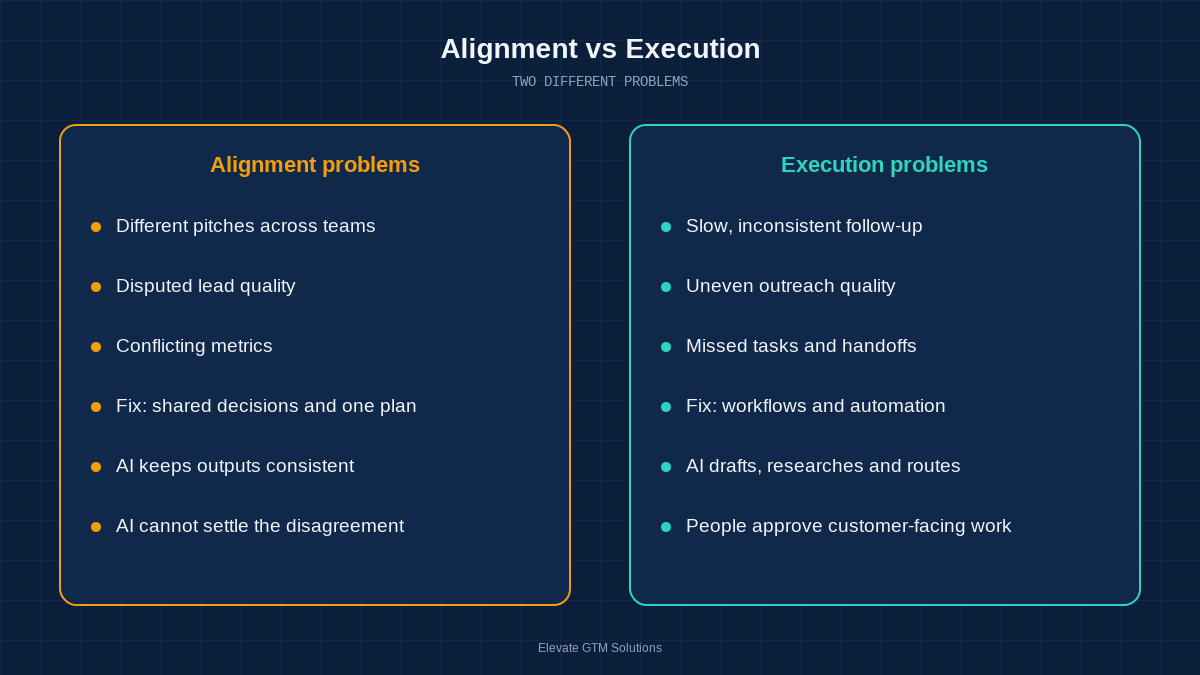
Two problems sit at the heart of most go-to-market struggles. Execution: the plan exists, but the work does not get done consistently. Alignment: marketing, sales, product and customer success each work from a slightly different idea of who the customer is and what to say. Dozens of AI tools now claim to fix one or both, and the claims blur together.
This guide separates the tools by what they actually do, shows how they combine, and explains what AI can and cannot do for alignment, which is mostly a decision problem and not a software problem. It names tools that describe themselves in each category and says where each stops. It is not a ranking. Elevate GTM Solutions makes one of the products discussed, so we are open about its place and its limits. Details come from vendors' public descriptions in November 2026 and change quickly, so confirm before buying.
What Are the Best AI Tools for GTM Execution and Alignment?
There is no single best tool, because execution and alignment need different layers. For alignment, use a shared GTM strategy and planning layer such as Elevate GTM Solutions, an AI-native GTM operating system, so every team works from one customer definition, positioning and plan. For execution, use outreach and engagement tools with AI agents such as Outreach, Salesloft or Apollo, data and workflow tools such as Clay or Zapier, enablement such as Seismic (which now includes Highspot), and intelligence such as Gong or Demandbase. AI speeds up drafting and routine tasks. People must still decide the strategy and approve customer-facing actions.
Which comes first, alignment or execution? Alignment. Automating execution against an unclear strategy scales the confusion.
Can AI align teams by itself? No. It can keep outputs consistent once decisions exist. Someone still has to make the decisions.
Execution and alignment are different problems
| Alignment | Execution | |
|---|---|---|
| The question | Do we agree who the customer is, what we say and how we measure? | Is the agreed work getting done well and on time? |
| The failure | Different pitches, disputed lead quality, conflicting metrics | Slow follow-up, inconsistent outreach, missed tasks |
| What fixes it | Shared decisions, one source of truth, a review rhythm | Workflows, automation, coaching, tools |
| Where AI helps | Keeping outputs consistent, drafting from one set of inputs, summarizing evidence | Drafting, research, routing, follow-up, reporting |
| Where AI does not help | Deciding the trade-offs | Replacing the relationship with a buyer |
Most teams discover that they have an alignment problem described as an execution problem. Reps send many emails because nobody agreed on the message. Marketing generates leads sales does not accept because nobody agreed on the customer. Fix alignment first and the execution tools do more.
The tool types
1. Alignment: GTM strategy and planning layer
These tools hold the shared decisions: the customer definition, positioning, messaging, pricing logic, channel plans and priorities. AI in this layer drafts and updates outputs from structured inputs and keeps them consistent.
- Elevate GTM Solutions describes itself as an AI-native GTM operating system with 15 connected modules and a unified strategy. It adds workflows, weekly execution plans, task ownership and a recurring review rhythm, and its use cases include aligning cross-functional teams.
- Ignition is a go-to-market operations platform that aligns product, product marketing and sales around launches.
- Documents and shared workspaces work for small teams, with more manual effort to keep versions aligned.
2. Execution: outreach and engagement
These run sequences, calls and follow-up.
- Outreach describes itself as an AI sales execution platform covering engagement, conversation intelligence, forecasting and AI agents for tasks such as prospecting and deal monitoring.
- Salesloft, which merged with Clari in December 2025, covers engagement, conversation intelligence and forecasting, with the forecasting product keeping the Clari name.
- Apollo combines a contact and company database with sequencing and an AI assistant.
3. Execution: data, enrichment and workflow automation
- Clay is known for combining data sources and AI steps into workflows for research and outreach preparation.
- Zapier, n8n and Make connect tools and automate routine steps between them.
- ZoomInfo supplies B2B contact and company data.
These move information and run steps. They do not decide what to do with it.
4. Execution: signals and account intelligence
- Demandbase describes itself as an AI-powered GTM intelligence platform with account intelligence, B2B advertising and agents that automate parts of intent analysis and campaign optimization.
- 6sense provides account intelligence and intent for revenue teams.
- Common Room, Unify, UserGems and similar tools surface buyer and account signals such as community activity, job changes and website visits, as each vendor describes.
5. Execution: content and personalization
- Jasper and Copy.ai generate marketing and sales content. Copy.ai positions itself around GTM AI.
- AI features inside your CRM, enablement platform and outreach tool also draft messages.
The risk in this category is generic output. Feed these tools your positioning and messaging, not an empty prompt.
6. Execution: enablement and conversation intelligence
- Seismic, which now includes Highspot, offers content, training, coaching and AI agents such as deal support.
- Gong records and analyzes conversations, surfaces deal risk and supports coaching.
How the types fit together
| Layer | Purpose | Typical tools |
|---|---|---|
| Decide and align | One shared strategy, messaging and plan | Strategy and planning platform |
| Data and signals | Who to reach and when | Account intelligence, data providers, signal tools |
| Orchestrate | Move information and run routine steps | Workflow automation, Clay |
| Engage | Contact buyers | Outreach, Salesloft, Apollo |
| Equip | Content, training, coaching | Enablement, conversation intelligence |
| Record | Customers and pipeline | CRM |
| Measure | What is working | Analytics, CRM reports |
Information should flow in both directions. Strategy informs targeting and messaging. Results feed back into strategy. A common failure is a one-way flow in which the strategy is written once and the field never feeds it.
What AI can do for alignment, and what it cannot
What it can do
- Draft a customer definition, positioning and messaging from one set of inputs, so every team starts from the same text.
- Regenerate outputs when a decision changes, so downstream material does not drift.
- Summarize win and loss notes, calls and feedback into themes.
- Produce role-specific variants of the same message.
- Flag inconsistencies between documents.
What it cannot do
- Decide which segment to prioritize when leaders disagree.
- Replace the conversation in which people commit to a plan.
- Know what customers think unless you give it that evidence.
- Take accountability for a recommendation.
A useful rule: AI is good at making agreed decisions consistent, and poor at making disputed decisions agreed.
A governance checklist for AI-driven execution
Automation at speed amplifies mistakes. Before you let any AI take action, decide:
| Question | Why it matters |
|---|---|
| Who owns the strategy the tool is working from? | Agents execute whatever instructions they receive |
| Which actions need human approval? | Anything customer-facing should start with review |
| What data may the tool use and where does it go? | Privacy, consent and company policy |
| How do we log and review what it did? | You need to trace errors |
| What is the limit on volume? | Poor targeting at scale damages reputation |
| How will we know if quality drops? | Sample outputs and track replies |
| Who can switch it off? | A clear owner for a quick stop |
Start with low-risk internal tasks such as research, summaries and reporting. Move to customer-facing actions only after quality is proven, and keep approval steps for anything sent under your name.
Example setups
These are patterns, not product endorsements.
| Team | Setup | Rationale |
|---|---|---|
| Small startup | Shared documents or a free first strategy build, a CRM, one outreach tool, manual customer calls | Keep it simple and learn fast |
| Mid-sized B2B with several segments | Strategy and planning platform, CRM, outreach, one data or workflow tool | Align first, then automate routine work |
| Enterprise with several regions | Strategy and planning platform, account intelligence, enablement, conversation intelligence, CRM, governed automation | Consistency and control at scale |
| Agency or advisor | Strategy platform for method and structure, client tools for execution | Repeatable approach across clients |
How to evaluate an AI tool for execution or alignment
- State the problem. Alignment or execution, and which part.
- Bring a real scenario. One product, one segment, one task.
- Compare against your current process. Time, quality and consistency.
- Ask what it assumes. Inputs, data and the strategy it follows.
- Test failure. What happens with thin or contradictory inputs?
- Check approvals and logs. Can you see and stop what it does?
- Pilot narrowly. One team, one workflow, a review date.
Mistakes to avoid
Automating before aligning. Faster execution of an unclear plan produces faster misses.
Buying many AI tools with overlapping jobs. Each adds cost, data flows and review work.
Letting agents run without approval steps. Start with oversight.
Ignoring data quality. AI acts on the data it is given.
Measuring activity, not results. More emails sent is not a result.
Forgetting the feedback loop. Results should update the strategy.
What the research says about AI and work
Two published studies are useful context. In a field study of 5,172 customer-support agents published in the Quarterly Journal of Economics, access to an AI assistant raised issues resolved per hour by about 15 percent on average, with larger gains for less experienced workers. In a Harvard Business School field experiment with 758 consultants, AI helped on tasks within its capability and reduced performance on a task outside it. The lesson for GTM teams is to use AI where tasks are structured and checkable, and to review where judgment is involved.
Alignment rituals that tools support
Tools help alignment only when a routine uses them. Four routines carry most of the benefit.
A shared definition sheet. One page that states the ideal customer, who is excluded, the main positioning statement, the three message pillars and the metric definitions. Everyone, including new hires, reads the same page. A strategy platform can hold and update this, and a shared document can do it for a small team.
A weekly GTM review. Thirty minutes. Agenda: what did buyers say this week, what changed in the market, which priorities moved, which tasks are blocked. Record decisions and owners.
A lead and opportunity agreement. Marketing and sales agree what a qualified lead is, how fast it is followed up and how rejections are recorded. Disputes about lead quality usually end here.
A quarterly reset. Revisit the customer definition and positioning with fresh win and loss evidence, then update outputs and downstream material.
Alignment checklist
| Item | Aligned when |
|---|---|
| Ideal customer | Any two people list the same fit and non-fit |
| Positioning | A seller and a marketer state it the same way |
| Messaging | Website, deck and emails say the same thing |
| Metrics | Terms such as qualified lead and opportunity mean one thing |
| Ownership | Every priority has a named owner |
| Feedback | Field insights reach the strategy owner within days |
| Update rhythm | There is a dated review in the calendar |
If three or more are not true, fix them before adding automation.
A sixty-day rollout
Days 1 to 15: align. Write the definition sheet and agree metric definitions. Name the strategy owner.
Days 16 to 30: prepare the data. Clean CRM ownership and duplicates. List repeated tasks that are low-risk.
Days 31 to 45: automate internal work. Summaries, research briefs, routing and reporting. Review quality weekly.
Days 46 to 60: add draft-and-approve workflows. AI drafts, a person approves. Set volume limits and a sampling review. Measure replies and quality against a baseline.
Hold customer-facing agent autonomy until the review shows steady quality.
How roles use these tools
| Role | Typical use | Watch for |
|---|---|---|
| Product marketing | Maintain positioning and messaging as the shared source | Drift between documents |
| Sales leadership | Coaching, forecasting, outreach standards | Standardized but generic messages |
| Marketing | Campaigns that follow the agreed definition | Lead volume over quality |
| RevOps | Routing, data quality, workflows | Automations nobody owns |
| Customer success | Onboarding workflows and health alerts | Promises made in sales that CS did not know |
| Executives | A single view of priorities and results | Dashboards that show activity, not outcomes |
AI agents in go-to-market: types, controls and failure modes
"Agent" is used for everything from a scheduled prompt to a system that plans and acts on its own. A useful way to think about them is by how much they are allowed to do.
| Type | What it does | Example tasks | Typical control |
|---|---|---|---|
| Assistant | Responds when a person asks | Summarize a call, draft an email | The person reviews every output |
| Copilot inside a tool | Suggests next steps within a workflow | Suggests a follow-up, fills fields | The person accepts or rejects |
| Task agent | Completes one defined task | Researches an account and writes a brief | Output is reviewed before use |
| Workflow agent | Runs several steps across tools | Finds accounts, drafts messages, queues them for approval | Approval gate before customer contact |
| Autonomous agent | Plans and acts toward a goal within limits | Sources leads, sends messages, handles replies, books meetings | Limits, logs, escalation rules and sampling |
Vendors such as Outreach, Salesloft, Demandbase, Seismic and Artisan describe agent capabilities at several of these levels. The more autonomous the agent, the more the controls matter.
Failure modes to plan for
| Failure | How it shows up | Control |
|---|---|---|
| Wrong target | Messages go to people who are not a fit | Define the ideal customer and exclusions in writing before the agent runs |
| Generic message | Replies are low, unsubscribes rise | Give the agent approved positioning and proof; sample outputs weekly |
| Unsupported claims | The agent states things you cannot prove | List forbidden and approved claims |
| Over-volume | Sending reputation suffers | Daily limits and ramp-up |
| Bad data | Messages reference wrong facts | Verify data sources and spot-check |
| Silent drift | Behavior changes over time and nobody notices | Logs, sampling and periodic review |
| Escalation failure | A sensitive conversation stays with the agent | Clear triggers that hand off to a person |
| Privacy and consent problems | Contacting people without a basis | Review regional rules with legal advisers |
A simple control set for any agent
- A named owner who can explain and stop it.
- A written brief: target, themes, allowed and forbidden claims, tone.
- A volume limit and a ramp.
- Approval for customer-facing actions until quality is proven.
- Logs that record what it did and why.
- A weekly sample review of real outputs.
- Escalation triggers to a human.
- A review date to extend or reduce autonomy.
Measuring alignment
Teams say they are aligned, and then the numbers disagree. Measure it.
| Signal | How to check | Healthy sign |
|---|---|---|
| Shared description of the customer | Ask five people to name the ideal customer and who is not a fit | Answers match |
| Shared message | Compare the website, sales deck and recent emails | Same pillars and language |
| Lead agreement | Rate of leads accepted by sales | Stable and explained |
| Metric definitions | Ask what a qualified lead is | One definition |
| Speed of updates | Time from a decision to updated material | Days, not weeks |
| Field feedback | Time from a seller's insight to the strategy owner | Days |
| Segment performance | Win rate by segment | Differences are understood, not surprising |
Run this check each quarter. If answers diverge, the problem is alignment, and more execution tooling will not fix it.
Three hypothetical organizations
These are illustrations, not real companies.
A founder-led startup of twelve people. Sales, marketing and product are the same few people, so alignment is easy and execution is the constraint. The team uses a CRM, one outreach tool and a shared document that states the customer, positioning and three pillars. It adds an AI assistant to draft emails from the shared document and summarize calls. It does not need a platform yet. The risk is that as the team grows, the document drifts. The founder sets a rule: any change to the message goes into the document first.
A mid-sized B2B company with three products and two regions. Each product marketer writes positioning in a different format, and the regional team asks which version is current. The company adopts a shared strategy and planning layer holding the customer definition, positioning and messaging for each product, with one owner each and a monthly review. The CRM stays as the system of record. The outreach tool receives messaging from the shared layer, with AI drafting subject to approval. Alignment improves first. Execution tooling follows.
A large enterprise with several business units. The challenge is consistency and control across units that do not report to the same leader. The company establishes decision rights: what is global, what units may adapt and who approves exceptions. A shared strategy layer records the decisions and their reasons. AI agents run internal tasks such as research briefs and reporting first. Customer-facing automation is introduced one unit at a time, with logging and approval. Our guide on global vs local GTM decisions covers the trade-offs.
How data should flow between tools
| Source | Destination | What flows | Notes |
|---|---|---|---|
| Strategy layer | Outreach and engagement | Target segments, messaging themes, forbidden claims | Usually manual or through supported connections |
| Strategy layer | Enablement | Customer profile, talk tracks, objections | Keep one source |
| CRM | Strategy layer | Wins, losses, reasons, pipeline by segment | Evidence for updates |
| Conversation intelligence | Strategy layer | Themes, objections, competitor mentions | Review before changing strategy |
| Signal tools | Outreach | Triggers for timing | Check false positives |
| Outreach | CRM | Activities, replies, meetings | Keep data clean |
| Analytics | Strategy layer | Results by segment and message | Feeds the monthly review |
Confirm with each vendor which of these connections are supported and which actions they cover. A supported connection is not the same as automatic synchronization of every object.
Getting teams to use a shared strategy
Tools do not create alignment. People using them do. Several habits help.
Start with a decision, not a tool. Hold a session that settles the customer definition and message. Then choose where to keep the result.
Show the people who sell. Walk sellers through the strategy and ask what is wrong. Include their words in the next version.
Make it the default source. New hires start from it, decks are built from it and campaigns reference it.
Name an owner and a rhythm. A monthly review of what changed. A quarterly reset.
Close the loop. When a seller's feedback changes the strategy, tell them. People contribute when they see an effect.
Retire competing versions. Archive old decks so that there is one current source.
Celebrate consistency, not volume. Praise a team for using the shared message when it is uncomfortable.
From symptom to tool type
Start from what you see, not from a product demo.
| What you observe | Likely cause | Look at |
|---|---|---|
| Sellers pitch different stories | No shared message | A shared strategy and planning layer, plus a definition sheet |
| Marketing leads are rejected by sales | No agreed definition of a qualified lead | Alignment between teams first, then routing rules |
| Reps spend hours researching accounts | Manual research | Research workflows or data tools with review |
| Follow-up is slow or inconsistent | No workflow | Engagement tools and reminders |
| Outreach has low replies | Wrong target or generic message | Strategy first, then personalization |
| Managers cannot coach at scale | No conversation visibility | Conversation intelligence |
| New hires take months to ramp | Scattered content and no shared message | Enablement, built from the strategy |
| Leadership cannot see what is working | Inconsistent data and definitions | Analytics and metric definitions |
| Launches miss dates | Poor coordination | Launch operations tools |
| The strategy is out of date | No update process | A system with owners and a review rhythm |
Most rows start with a decision problem. Tool choice comes second.
A one-page policy for AI in go-to-market
A short written policy prevents a surprising number of problems. Adapt this outline.
Purpose. Use AI to speed up structured work while keeping people accountable for decisions and customer relationships.
Approved tools. A named list. Anything else needs approval.
Data rules. What may and may not be entered. Customer personal data is excluded unless the tool is approved for it.
Human review. Customer-facing content is approved by a person until a review shows consistent quality. Claims need proof.
Ownership. Every workflow and agent has a named owner and a reviewer.
Limits. Volume caps, forbidden topics and forbidden claims.
Logging. Outputs and actions are recorded and retained for a stated period.
Incidents. How to report and pause a problem, and who decides.
Review. The policy is reviewed every quarter and after any incident.
Have legal and security advisers read it before you adopt it.
A quarterly review agenda
Sixty minutes, with the strategy owner, sales, marketing, RevOps and customer success.
- Evidence (15 minutes). New wins and losses, buyer language, competitor changes.
- Alignment check (10 minutes). Do we still describe the customer, message and metrics the same way?
- Execution review (15 minutes). What did automation and agents do, what was the quality and what went wrong?
- Decisions (15 minutes). What do we change in the strategy, targets, messaging or controls?
- Owners and dates (5 minutes). Who does what by when, and when do we review again?
Record the decisions and update the shared definition sheet the same day.
A buying checklist for AI GTM tools
| Question | Answer from the vendor |
|---|---|
| Which job does it do, and which does it only touch? | |
| What inputs does it need from us? | |
| How do outputs trace back to those inputs? | |
| Which actions can it take without approval? | |
| What logs and controls exist? | |
| Which exact actions work with our CRM and other tools? | |
| How is data stored, used and deleted? | |
| What does it not do? | |
| What does the contract say about product changes or acquisition? | |
| Can we export our data and outputs? | |
| Can we speak to a customer of similar size and motion? |
If a vendor cannot answer the first three clearly, the product may not do what the demo suggested.
Terms used in this guide
| Term | Meaning |
|---|---|
| Alignment | Teams agree on the customer, message and metrics |
| Execution | Carrying out the agreed work |
| Agent | AI that can carry out tasks or multi-step workflows |
| Human in the loop | A person approves before an action takes effect |
| Enrichment | Adding data to a record from other sources |
| Signal | An event that suggests buying interest, such as a hire or a visit |
| Orchestration | Moving data and triggering steps across tools |
| Guardrail | A rule that limits what a tool may do |
Three hypothetical stories of things going wrong
These are illustrations, not real companies.
The agent that wrote what nobody approved. A team enabled an AI feature in its outreach tool and let it send follow-ups. One message claimed an integration the product did not have. A prospect asked about it, and a seller had to correct the record. The company added a list of approved and forbidden claims, required approval for any message that mentioned product capabilities and began a weekly sample review.
The alignment document nobody used. A company wrote a thoughtful customer definition and messaging guide. It sat in a folder. Marketing used its own language, and sales used old decks. Three months later the leaders learned the team described the customer in four ways. The company moved the guide into the tool sellers used daily, made it the starting point for new campaigns and added a five-minute review to the weekly meeting.
The automation that nobody owned. A RevOps analyst built a set of routing and notification automations and later left the company. When a territory changed, leads were routed to a former employee for two weeks. The company created an inventory with an owner and a reviewer for each automation, plus a quarterly check.
Skills and training for teams using AI in GTM
Tools do not help people who do not know how to use them. Build a few skills deliberately.
| Skill | Why it matters | How to build it |
|---|---|---|
| Giving context | Specific inputs produce specific outputs | Practice rewriting weak prompts with evidence |
| Checking output | AI produces confident errors | Make sample review a routine and track corrected errors |
| Separating evidence from inference | Prevents false claims | Ask tools to mark inferences and review them together |
| Writing for approval | Clear briefs and rules | Write one-page briefs and review them |
| Reading results | Distinguishing activity from outcomes | Review a dashboard with a baseline each month |
| Data hygiene | Automation acts on data | Share simple standards and check them |
| Judgment | Choosing among options | Hold decision sessions and record reasoning |
A useful exercise is a monthly hour in which the team reviews ten AI outputs together, marks what was wrong and updates the rules. It builds shared standards and catches drift.
A sample definition sheet
A one-page definition sheet is the cheapest alignment tool there is. Here is a skeleton to adapt. All content is illustrative.
| Item | Example entry |
|---|---|
| Ideal customer | Field-service firms with ten to eighty technicians that schedule by spreadsheet |
| Not a fit | Firms below ten technicians, firms needing deep invoicing |
| The problem in their words | "We miss appointments and find out from the customer" |
| Positioning | Scheduling a team can start using in days, and technicians can use on a phone |
| Pillar 1 | Start in days. Proof: six customers, one internal measurement |
| Pillar 2 | Simple on a phone. Proof: five customer quotes |
| Pillar 3 | Fewer missed appointments. Proof: two customer-reported results, labeled as such |
| Forbidden claims | "Most accurate on the market", comparisons we cannot prove |
| Qualified lead | Fits the ideal customer and has named a scheduling problem |
| Opportunity | A qualified lead with a scheduled evaluation |
| Metric owner | Head of sales operations |
| Review date | First Monday of each month |
Print it, pin it where the team works and require every tool and AI brief to start from it.
Key takeaways
- Alignment and execution are different problems. Fix alignment first, because automating an unclear strategy scales confusion.
- AI keeps agreed decisions consistent. It cannot settle a disagreement about priorities.
- Tools fall into layers: strategy and planning, data, signals, outreach, enablement, records and measurement.
- Match an agent's autonomy to the risk of the task, and add controls as autonomy rises.
- Start with internal, easy-to-check tasks and require approval for customer-facing actions until quality is proven.
- Measure alignment directly: shared descriptions of the customer, one message and one set of definitions.
Where Elevate GTM Solutions fits
Elevate GTM Solutions is an AI-native GTM operating system, so it sits in the alignment layer. It holds the customer definition, positioning, messaging, pricing logic and plans, produces structured outputs, and supports workflows and weekly execution plans so teams act on the same strategy. It connects to HubSpot, Salesforce, LinkedIn, Notion and Claude for supported actions. It does not run outreach sequences, supply contact data or record calls, so most teams pair it with execution tools. Published plans start at USD 499 per month, billed annually, with a free first strategy build available.
For related reading, see Best GTM Strategy Software, What Is Elevate GTM Solutions?, Marketing Alignment and GTM Execution. See the pricing page, or request a demo.
Frequently Asked Questions
What are the best AI tools for GTM execution?
It depends on the task. Outreach, Salesloft and Apollo run outreach and engagement with AI features. Clay and workflow tools such as Zapier automate research and routine steps. Demandbase and 6sense provide account intelligence. Seismic, which now includes Highspot, and Gong support enablement and conversation intelligence.
What are the best AI tools for GTM alignment?
Alignment depends on shared decisions. A GTM strategy and planning platform such as Elevate GTM Solutions holds one customer definition, positioning and plan and keeps outputs consistent. Shared documents work for small teams.
What is the difference between GTM execution and GTM alignment?
Alignment means teams agree on the customer, message and metrics. Execution means the agreed work is done consistently. Alignment problems are often mistaken for execution problems.
Can AI align sales and marketing?
AI can keep outputs consistent once decisions exist, and summarize evidence. It cannot settle a disagreement about priorities. People must decide, and the tool can then keep everyone working from the decision.
Are AI agents safe to use in sales and marketing?
They can be, with limits. Start with internal tasks, require approval for customer-facing actions, log what they do and set volume limits.
Should I automate before I align?
No. Automating an unclear strategy scales mistakes. Settle the customer and message first.
Do I need more than one AI tool?
Usually yes, because the jobs differ: alignment, data, outreach, enablement and measurement. Avoid tools with overlapping jobs.
How do I evaluate an AI tool for GTM?
State the problem, test a real scenario against your current process, check inputs, failure behavior, approvals and logs, and pilot narrowly with a review date.
Does Elevate GTM Solutions run outreach?
No. It covers strategy, planning and workflow alignment and connects to other tools for supported actions. Teams use outreach tools for sequences.
What is the difference between an AI assistant, a copilot and an agent?
An assistant responds when asked, a copilot suggests next steps inside a tool, and an agent can carry out tasks or multi-step workflows. The more autonomous it is, the more controls you need.
How do I measure whether sales and marketing are aligned?
Ask several people to describe the ideal customer and the message, compare the website with sales material, track lead acceptance and metric definitions, and measure how fast decisions reach updated material.
What controls should I put on an AI agent?
A named owner, a written brief, volume limits, approval for customer-facing actions, logs, weekly sampling, escalation triggers and a review date.
Which tasks are safest to automate first with AI?
Internal tasks that are easy to check, such as call summaries, research briefs, reporting and routing. Customer-facing automation should follow, with approval.
How should data flow between GTM tools?
Strategy should inform targeting and messaging, the CRM should feed wins and losses back to strategy, and results should flow into a monthly review. Confirm which connections each vendor supports.