By the Elevate GTM Solutions Team · Updated November 10, 2026 · 11 min read
What Is GTM Automation? Definition, Examples, Levels, and Limits
"GTM automation" is a phrase vendors use for almost everything from a scheduled email to an autonomous AI sales agent. That breadth makes the term hard to pin down and easy to oversell. This guide gives a plain definition, shows what can and cannot sensibly be automated across go-to-market work, describes five levels of automation so you can see where you are, and explains the risks, so you automate the right things in the right order.
Elevate GTM Solutions makes software for the strategy layer of go-to-market, so we have a view on where automation helps most. We have tried to explain the subject fairly, including the cases where automation is the wrong first move.
What Is GTM Automation?
GTM automation is the use of software and AI to carry out repeatable go-to-market work with less manual effort: researching accounts, enriching data, routing leads, sending and following up on outreach, drafting content, building reports and keeping strategy outputs up to date. It covers work across marketing, sales and customer success. It works best on tasks that are repetitive and easy to check, and it should follow, not replace, decisions about who to target and what to say.
Is it the same as marketing automation or sales automation? No. Those cover one function. GTM automation spans the whole motion, including strategy and planning.
Should everything be automated? No. Customer relationships and strategic choices need people.
What GTM automation covers
| Area | Examples of work that can be automated |
|---|---|
| Strategy and planning | Drafting customer definitions, positioning and messaging from structured inputs; updating plans when assumptions change |
| Research and data | Account research, contact enrichment, signal tracking, competitor monitoring |
| Routing and operations | Lead scoring and routing, record updates, task creation |
| Outreach and engagement | Sequences, follow-up reminders, personalized drafts, meeting scheduling |
| Content | First drafts, variants, summaries, localization |
| Enablement | Surfacing the right content to sellers, call summaries, coaching prompts |
| Reporting | Dashboards, alerts, pipeline and attribution reports |
| Customer success | Onboarding steps, health alerts, renewal reminders |
Notice that the first row is strategy. Most discussions of GTM automation start with outreach, because that is where the tools are crowded. Automating the strategy layer matters because every other automated step depends on it.
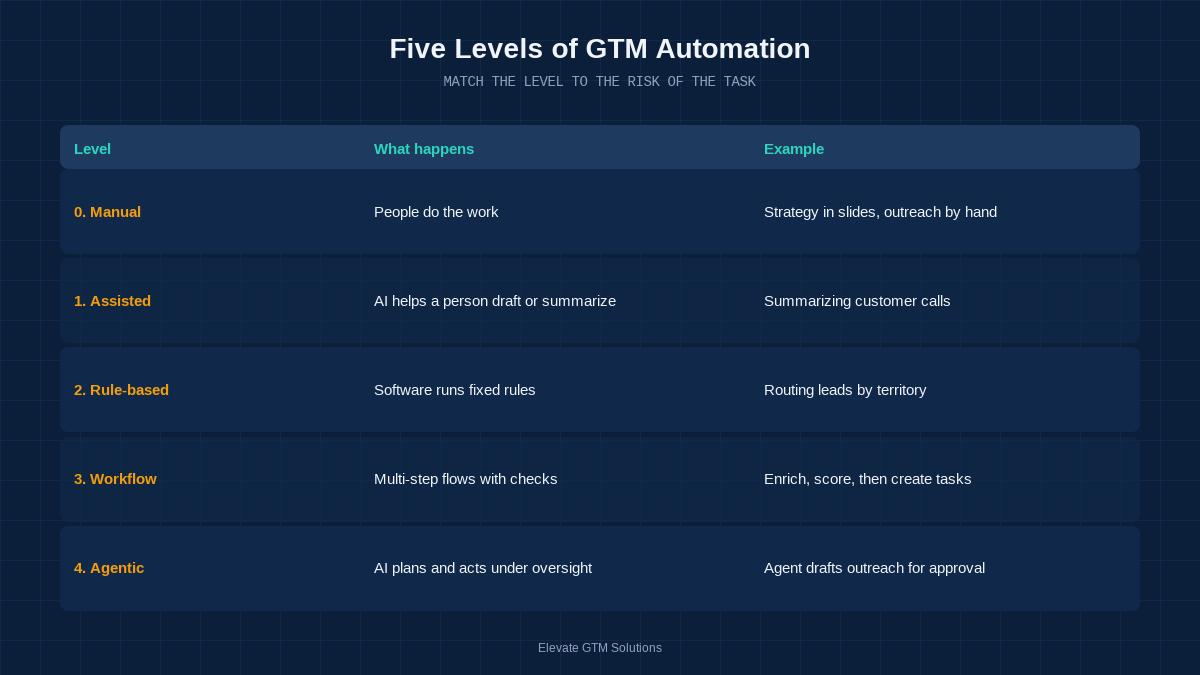
Five levels of GTM automation
A useful way to see where you are, and what to do next.
| Level | Description | Example |
|---|---|---|
| 0. Manual | People do the work in documents and spreadsheets | Strategy in slides, outreach by hand |
| 1. Assisted | AI helps a person draft or summarize | Using an assistant to summarize calls |
| 2. Rule-based | Software runs fixed rules | Routing a lead to an owner by territory |
| 3. Workflow-driven | Multi-step workflows run with checks | Enriching a list, scoring it and creating tasks |
| 4. Agentic | AI agents plan and carry out multi-step work with oversight | An agent that researches accounts and drafts outreach for approval |
Most teams run a mix. The aim is not to reach the highest level everywhere. It is to match the level to the risk of the task. Low-risk internal work can move up quickly. Customer-facing work should climb slowly, with approval steps.
Examples, from simple to advanced
- Lead routing: a form submission is scored and assigned to a seller within minutes.
- Account research: a workflow gathers public information on a target account and produces a short brief.
- Signal alerts: a seller is notified when a target company hires for a relevant role.
- Outreach sequences: a series of messages is sent, with follow-ups paused when someone replies.
- Call summaries: conversations are transcribed and summarized with action items.
- Strategy updates: inputs change, and related positioning and messaging drafts are regenerated for review.
- AI agents: a system sources leads, drafts personalized messages and books meetings under rules you set.
Benefits
- Speed: work that took days takes hours.
- Consistency: the same process runs every time.
- Coverage: a small team can reach more accounts and segments.
- Focus: people spend more time on conversations and decisions.
- Responsiveness: strategy and plans can be updated when conditions change.
Risks and limits
Automating the wrong thing faster. If the target segment or message is wrong, automation scales the mistake.
Poor data. Automation acts on the data it has. Duplicates and stale records produce confident errors.
Brand and compliance risk. Mass or poorly targeted outreach can harm reputation. Rules on contacting people and on personal data differ by region, so review them with your legal advisers.
Generic output. AI that drafts from thin context produces text that sounds like everyone else's.
Loss of control. Agents that act without approval can cause problems at speed.
Tool sprawl. Many automation tools with overlapping jobs add cost and maintenance.
Over-trust. Published studies show AI can raise productivity on some tasks and reduce it on others, so check outputs.
What to automate first
Order matters.
- Strategy structure. Settle the customer definition, positioning and messaging, ideally in a form that can be updated.
- Data hygiene. Fix duplicates, missing fields and ownership.
- Internal, low-risk tasks. Summaries, reporting, research briefs, routing.
- Draft-and-approve workflows. AI drafts, a person approves.
- Customer-facing automation with limits. Add volume caps, logs and review.
- Agentic workflows. Only after quality is proven.
Skipping the first step is the most common mistake: teams automate outreach and later discover that they never agreed who the customer was.
How to tell whether a task should be automated
| Question | Yes suggests automating | No suggests keeping human |
|---|---|---|
| Is it repetitive? | Done often in the same way | Different each time |
| Is it easy to check? | Errors are visible quickly | Errors are subtle |
| Is the cost of a mistake low? | Internal and reversible | Customer-facing or hard to undo |
| Are the rules clear? | You can state them | Depends on judgment |
| Is the data reliable? | Clean and current | Messy or contested |
| Is it the relationship itself? | No | Yes |
If most answers are on the left, automate. If most are on the right, keep a person in charge and use AI to assist.
Metrics for GTM automation
Measure outcomes, not activity.
| Type | Examples |
|---|---|
| Efficiency | Hours saved, time to first response, time to update the strategy |
| Quality | Reply rate and quality of conversations, error rate, review pass rate |
| Outcome | Pipeline created by segment, conversion, win rate |
| Risk | Complaints, unsubscribes, deliverability, compliance issues |
Compare with a baseline taken before automation. Without one, almost any result can be explained away.
A hypothetical example
This is an illustration, not a real company.
A B2B software company wanted to automate its go-to-market. The first proposal was an agent to run outbound. The head of marketing paused it and asked three questions: Do we agree who our customer is? Is our CRM data clean? Which tasks are low-risk?
The answers were no, no and several. The team spent two weeks settling a customer definition and messaging for its main segment in a structured form. It then cleaned the CRM, automated routing and call summaries, and built a research-brief workflow that drafted account briefs for sellers to review. After a quarter, quality was steady, so the team added a draft-and-approve outreach workflow with a daily volume cap and a weekly sample review. Reply quality improved because the messages followed the agreed definition. An autonomous agent came later, with narrower scope than the first proposal had imagined.
Automation by function
| Function | Good candidates | Keep human | Main risk |
|---|---|---|---|
| Product marketing | Drafting positioning and messaging options, competitor summaries | Choosing the positioning | Generic claims |
| Demand generation | List building, campaign variants, reporting | Offer and audience strategy | Volume over quality |
| Sales development | Research briefs, follow-up reminders, scheduling | Early conversations on strategic accounts | Brand damage from poor targeting |
| Sales | Call summaries, CRM updates, forecast prep | Negotiation and relationships | Over-reliance on automated notes |
| Customer success | Onboarding steps, health alerts, renewal reminders | Escalations and expansions | Impersonal contact at key moments |
| RevOps | Routing, data cleanup, reporting | Process design and governance | Automations nobody owns |
| Leadership | Dashboards and summaries | Priorities and trade-offs | Mistaking activity for results |
A simple automation policy
Writing the rules down prevents most problems.
- Every automation has an owner. A named person who can explain and stop it.
- Customer-facing actions need approval at first. Remove approval only after a review of quality.
- Set limits. Daily volume, target lists and allowed topics.
- Log what happens. Keep records that let you trace errors.
- Review a sample weekly. Read real outputs, not dashboards.
- Respect data and consent rules. Check regional requirements with your legal advisers.
- Retire what no longer works. Review quarterly.
A ninety-day roadmap
Days 1 to 30: foundations. Settle the customer definition and messaging in a structured form. Clean CRM ownership, duplicates and key fields. List repetitive tasks and rank them by effort and risk.
Days 31 to 60: low-risk automation. Call summaries, research briefs, reporting and routing. Measure hours saved and error rates.
Days 61 to 90: draft-and-approve. AI drafts outreach or content, a person approves, volume is capped and a sample is reviewed weekly. Compare reply quality with the baseline.
At day ninety, decide what to extend, what to stop and whether any workflow is ready for more autonomy.
Glossary
| Term | Meaning |
|---|---|
| Automation | Software carrying out a task without manual effort each time |
| Workflow | A sequence of steps, often across tools |
| Agent | AI that plans and performs multi-step tasks, ideally within limits |
| Enrichment | Adding data to a record from other sources |
| Routing | Sending a lead or task to the right owner |
| Sequence | A scheduled series of outreach messages |
| Human in the loop | A person approves before an action takes effect |
| Baseline | A measurement taken before a change, used for comparison |
Twelve automations in detail
Each of these is common, and each has a different risk profile. The entries describe what is automated, what you need first, how risky it is and how to tell whether it works.
1. Strategy structuring and updates
What. Drafting customer definitions, positioning and messaging from structured inputs, and regenerating them when inputs change. Needs first. Specific context and evidence about customers and alternatives. Risk. Low to medium. Output is internal until reviewed. Measure. Time to update the strategy after a change, and consistency of messaging across teams.
2. Win and loss summarization
What. Summarizing deal notes and call transcripts into reasons and themes. Needs first. Reasonably consistent notes and permission to process them. Risk. Low. Check a sample against the source. Measure. Hours saved and agreement between summaries and manual review.
3. Account research briefs
What. Gathering public information on a target account and producing a one-page brief. Needs first. A clear target list and a template for the brief. Risk. Low to medium. Facts can be wrong, so require sources. Measure. Seller time saved and the share of briefs corrected.
4. Data enrichment
What. Adding company and contact details to records from other sources. Needs first. Clean records and a view on accuracy by region. Risk. Medium. Wrong data spreads quickly. Measure. Accuracy on a sampled set and bounce rates.
5. Lead scoring and routing
What. Scoring inbound leads and sending them to the right owner. Needs first. Agreed qualification criteria and clear territory or ownership rules. Risk. Medium. Bad rules route good leads away. Measure. Speed to first response and lead acceptance rate.
6. Signal alerts
What. Notifying sellers when a target account shows a trigger, such as a relevant hire or product activity. Needs first. A defined list of signals that matter. Risk. Low to medium. Too many alerts are ignored. Measure. Share of alerts acted on and resulting conversations.
7. Outreach sequences
What. Scheduled messages with follow-ups that stop when someone replies. Needs first. A tested message and a defined audience. Risk. Medium to high. Volume magnifies mistakes. Measure. Reply quality, meetings, unsubscribes and deliverability.
8. AI-drafted personalization
What. An AI draft tailored to the recipient, reviewed before sending. Needs first. Approved positioning, proof and a style guide. Risk. Medium. Generic or inaccurate drafts damage trust. Measure. Edit rate by sellers and reply quality.
9. Call summaries and CRM updates
What. Transcribing calls, summarizing them and filling CRM fields. Needs first. Consent to record where required and a field map. Risk. Low to medium. Mistakes in summaries mislead later. Measure. Time saved and accuracy of sampled summaries.
10. Content variants
What. Producing role-specific or segment-specific versions of agreed content. Needs first. The master message and approval rules. Risk. Low to medium. Variants can drift from approved claims. Measure. Consistency checks and time saved.
11. Reporting and alerts
What. Weekly dashboards, anomaly alerts and pipeline summaries. Needs first. Agreed metric definitions. Risk. Low. Wrong definitions give wrong dashboards. Measure. Time saved and whether decisions use the reports.
12. Customer onboarding and renewal reminders
What. Triggering onboarding steps, health alerts and renewal tasks. Needs first. Defined milestones and health signals. Risk. Medium. Impersonal contact at key moments hurts relationships. Measure. Time to first value, renewal rates and customer feedback.
The data foundations automation depends on
Automation acts on your data. Before you automate, check these:
| Foundation | What good looks like | Why it matters |
|---|---|---|
| Ownership | Every account and lead has an owner | Routing and follow-up need a target |
| Duplicates | Few and managed | Duplicates cause double outreach |
| Key fields | Industry, size, segment and source are filled consistently | Scoring and targeting use them |
| Definitions | One definition for lead, opportunity and customer | Reports and workflows depend on it |
| Consent and source | You know how each contact was obtained | Legal and reputational risk |
| Freshness | Records are reviewed or enriched on a schedule | Stale data produces wrong actions |
| Access | Roles limit who can change rules and records | Prevents accidents |
A week of cleanup before automating often saves a month of cleanup afterward.
Who builds and maintains automation
| Role | Responsibility |
|---|---|
| Automation owner | Accountable for each workflow's purpose and results |
| RevOps or operations | Builds and maintains workflows and data quality |
| Strategy owner | Provides the customer definition, message and rules the workflows follow |
| Reviewer | Samples outputs and flags problems, often a seller or marketer |
| Legal and security advisers | Review data, consent and access |
Small companies combine these roles. What matters is that every automation has a named owner and a reviewer who is not its builder.
Building the business case
Avoid invented return figures. Use a simple structure.
- Pick one workflow. For example, account research briefs.
- Measure the current cost. Time per task, number of tasks, loaded cost of time, and errors.
- Estimate the change. Time saved after automation, plus the review time you add.
- Add the cost of the tool and of setup and maintenance.
- Include the risk. What a failure would cost, and the controls you will add.
- Run a pilot and compare to the baseline before scaling.
An automation that saves ten minutes a task but requires fifteen minutes of review is a loss. Count review time.
Diagnosing automation that is not working
| Symptom | Likely cause | What to check |
|---|---|---|
| Replies are low and unsubscribes are rising | Wrong audience or generic message | Target definition and message |
| Sellers ignore the alerts | Too many or irrelevant signals | Signal list and thresholds |
| Reports disagree | Different metric definitions | Definitions and data sources |
| Records contain errors | Poor enrichment or duplicates | Data quality and sources |
| Work still happens manually | The workflow does not fit how people work | Ask users what is missing |
| Nobody knows what runs | No owner or documentation | Inventory and owners |
| Costs creep up | Overlapping tools | Tool inventory and jobs |
| Quality drops over time | Drift without review | Sampling and review dates |
The five levels and the controls each needs
| Level | Typical controls |
|---|---|
| Manual | Templates and checklists |
| Assisted | Review of every output, approved tools, data rules |
| Rule-based | Documented rules, owner, change log, tests before changes |
| Workflow-driven | Error handling, alerts when a step fails, sampling |
| Agentic | Written brief, limits, approval for customer-facing actions, full logs, escalation triggers, periodic review |
As autonomy rises, controls must rise with it. A common error is moving to a higher level of autonomy because a vendor offers it, without adding the controls.
How GTM automation differs by company size
The right amount and type of automation depends on how many people and processes you have.
| Company stage | Typical situation | What to automate | What to avoid |
|---|---|---|---|
| Founder-led, under fifteen people | Few repeatable processes, high variability | Call summaries, research briefs, simple routing, reporting | Autonomous outreach before the target is proven |
| Growing, fifteen to a hundred | Several sellers, a first RevOps hire, inconsistent processes | Routing, enrichment, sequences with approval, strategy updates | Many overlapping tools |
| Mid-market, a hundred to a thousand | Multiple segments, products and regions | Governed workflows, signal alerts, reporting, shared strategy outputs | Local automations nobody owns |
| Enterprise | Many teams, strict governance and compliance | Standardized workflows with approvals, consistent strategy outputs, audit logs | Unreviewed agents and shadow tools |
Smaller teams gain most from automating internal, low-risk work. Larger teams gain most from consistency and governance.
What agentic automation can and cannot do today
Vendors describe agents that research accounts, write messages, monitor deals and book meetings. Some of this works well and some is still fragile. A realistic view:
Works reasonably well under supervision.
- Gathering public information into structured briefs.
- Drafting messages from approved positioning for a person to review.
- Summarizing conversations and updating records.
- Monitoring a defined set of signals and alerting a seller.
- Preparing reports from agreed metrics.
Needs close oversight.
- Sending messages to prospects without review.
- Handling objections and pricing questions.
- Deciding which accounts to prioritize.
- Making commitments on behalf of the company.
Not suited to autonomy.
- Choosing the target segment or positioning.
- Negotiating or making strategic exceptions.
- Handling sensitive or complex customer situations.
The practical advice is to expand autonomy slowly, one workflow at a time, with sampling and logs. The vendors' claims about productivity are worth testing against your own baseline, because results depend on your data, market and message.
Compliance, consent and ethics
Automation changes the scale of contact, so rules matter more.
| Topic | What to consider |
|---|---|
| Consent and lawful basis | Rules on contacting people and processing personal data differ by country and by channel, so review them with legal advisers |
| Opt-outs | Make unsubscribing easy and honor it across tools |
| Transparency | Decide how you disclose AI involvement where required or appropriate |
| Accuracy | Do not allow tools to make claims you cannot support |
| Data minimization | Use only the data you need and delete what you do not |
| Recording calls | Follow rules on consent to record |
| Bias | Review whether scoring or targeting rules treat groups unfairly |
| Security | Control access and review vendor security practices |
These are prompts for conversation with your legal and security advisers, not legal advice.
Three sample roadmaps
A founder-led startup
Month 1. Write the customer definition, positioning and three message pillars in one document. Use an assistant to summarize customer calls. Set up simple lead routing and a weekly report. Month 2. Add research briefs for target accounts, reviewed before use. Draft outreach with an assistant from the approved message. Month 3. Introduce a sequence tool with approval on every message. Review replies weekly. Beyond. Consider enrichment and signal tools once the target and message hold up.
A growing B2B company
Month 1. Settle the customer definition and message per product in a shared place. Clean CRM ownership and key fields. Month 2. Automate routing, call summaries and reporting. Add enrichment with sampling. Month 3. Add draft-and-approve outreach with volume caps. Create a monthly review of what automations did. Beyond. Add signals, then agent pilots on a narrow segment.
An enterprise with regions
Quarter 1. Agree decision rights and a shared strategy structure. Establish an AI policy and approved tools. Audit data quality by region. Quarter 2. Automate internal reporting, summaries and research briefs. Standardize routing rules with regional variants. Quarter 3. Pilot governed outreach workflows in one region with logging and approval. Quarter 4. Review results, extend to other regions where quality holds, and update the policy.
A readiness check
Answer yes or no. Three or more nos in the first six means you should fix foundations before automating.
- Can two people name the ideal customer and who is excluded?
- Do we have one approved message with proof?
- Is our CRM data owned and reasonably clean?
- Do we have one definition of a qualified lead?
- Do we know how our contacts were obtained and what consent applies?
- Do we have a named owner for each automation?
- Do we have a baseline for time, quality and results?
- Do we have a place to review samples of outputs weekly?
If you answer yes to most, you are ready to start with low-risk automation.
Automation anti-patterns
Certain patterns reliably cause trouble.
| Anti-pattern | What it looks like | Better approach |
|---|---|---|
| Volume as the goal | Counting emails sent | Measure reply quality, meetings and win rate |
| Set and forget | No review after launch | Weekly sampling and a quarterly review |
| One person's secret | Only the builder understands it | Documentation and a named backup |
| Automating a bad process | Faster poor lead handling | Fix the process, then automate |
| Tool for every task | Overlapping subscriptions | One tool per job and an inventory |
| Unchecked AI claims | Messages stating things you cannot prove | Allowed and forbidden claim lists |
| Ignoring opt-outs | Contacts continue after unsubscribing | Central suppression lists |
| Skipping the baseline | No way to tell if it worked | Measure before you change anything |
Examples of good and weak automated messages
These are illustrations of the difference that a defined target and proof make.
Weak. "Hi, I came across your company and I think our platform can help you grow faster and save time. Do you have fifteen minutes this week?" Why it fails. It could be sent by anyone to anyone. It makes no claim a reader can check.
Stronger. "Hi, many field-service firms of your size tell us missed appointments are what push them to change scheduling. We help teams start in days instead of months. Is that a problem you are dealing with this quarter?" Why it works. It names a specific situation drawn from customer evidence, makes a claim the company can support and asks a relevant question.
The difference comes from the strategy, not the tool. Automation should carry the second kind of message, and a person should check that the claim in it can be proven.
A dashboard for automation
Keep it simple. Review monthly.
| Section | Metrics |
|---|---|
| Efficiency | Hours saved per workflow, time to first response, time to update strategy |
| Quality | Error rate in sampled outputs, edit rate by reviewers, reply quality |
| Outcomes | Qualified conversations by segment, pipeline created, win rate |
| Risk | Unsubscribes, complaints, bounces, policy exceptions |
| Cost | Tool spend, review time, cost per qualified conversation |
Show trends against the baseline and annotate changes, such as a new rule or a new tool. A dashboard without annotations makes it hard to learn what caused a change.
Two questions people ask about automation
Will automation replace go-to-market jobs? Parts of jobs change. Tasks that are repetitive and easy to check, such as research briefs, summaries and routing, are being automated. Work that depends on relationships, judgment and persuasion remains with people. Teams that benefit most use automation to give people more time for conversations and decisions, and invest in the skills of reviewing and directing automated work. Plans that count on removing review tend to produce errors and lost trust.
Does automation hurt the brand? It can, when it is used to send more of the wrong message to the wrong people. It helps when it makes a good message more consistent, speeds up relevant follow-up and frees people to spend time with buyers. The difference lies in the strategy behind it and the controls around it. A message that a thoughtful person would be happy to send is a fair test. If you would not put your name on it, an automation should not send it under your company's name.
Keeping strategy automation honest
Automating strategy updates is different from automating outreach, because the output informs decisions instead of customers. A few habits keep it useful.
Set a monthly cadence. At a fixed date, update inputs with new wins and losses, competitor changes and customer language, then review what shifted in the outputs.
Review the changes, not only the result. Ask what changed, why, and whether the evidence supports it. A change that cannot be explained should not be accepted.
Keep a record. Save the inputs, outputs and decisions for each cycle, so you can see how your thinking evolved.
Separate drafting from deciding. Automation can regenerate drafts. A named person decides what becomes the working strategy.
Test the riskiest change. If an update proposes a new segment or message, test it with a few buyers before adopting it.
Watch for drift. If outputs begin to sound alike or lose specifics, the inputs may have thinned. Add fresh evidence.
Strategy automation pays off when the cycle is short and the review is honest. It fails when updates are accepted without reading them.
Key takeaways
- GTM automation uses software and AI to carry out repeatable go-to-market work across strategy, research, outreach, content, reporting and customer success.
- There are five levels: manual, assisted, rule-based, workflow-driven and agentic. Match the level to the risk of the task.
- Automate in order: strategy structure, data hygiene, internal low-risk tasks, draft-and-approve workflows, then customer-facing automation with limits.
- Every automation needs a named owner, a reviewer, limits and logs.
- Measure outcomes against a baseline, not activity.
- Review consent and data rules by region with legal advisers.
What to do this week
List the ten tasks your go-to-market team repeats most. Mark each as low, medium or high risk and as easy or hard to check. Choose one low-risk, easy-to-check task, measure how long it takes today and how many errors it has, and automate that one with a reviewer in place. After a month, compare with the baseline and decide whether to extend. Resist adding a second automation until the first has been reviewed.
Where Elevate GTM Solutions fits
Elevate GTM Solutions is an AI-native GTM operating system. It automates the strategy and planning layer: from the market, product and segment context you provide, it builds structured outputs across 15 modules and supports workflows, weekly execution plans and a recurring review rhythm, so strategy can be updated when conditions change. It does not send outreach, supply contact data or record calls, and it connects to HubSpot, Salesforce, LinkedIn, Notion and Claude for supported actions. Published plans are Enable at USD 499 per month and Growth at USD 1,499 per month, billed annually, with a free first strategy build.
For related reading, see Best GTM Automation Tools, AI Tools for GTM Execution and Alignment, What Is GTM Execution? and What Is Elevate GTM Solutions?. See the pricing page, or request a demo.
Frequently Asked Questions
What is GTM automation?
The use of software and AI to carry out repeatable go-to-market work with less manual effort, such as research, data enrichment, routing, outreach, content drafts, reporting and keeping strategy outputs up to date.
What can be automated in go-to-market?
Strategy drafts, account research, enrichment, lead routing, outreach sequences, call summaries, content first drafts, reports and routine customer success steps. Relationship work and strategic choices should stay with people.
What is the difference between GTM automation and sales automation?
Sales automation covers selling tasks such as sequences and follow-up. GTM automation spans the whole motion, including strategy, marketing, sales and customer success.
What are the levels of GTM automation?
Manual, assisted, rule-based, workflow-driven and agentic. Match the level to the risk of the task, and move customer-facing work up slowly with approval steps.
What should I automate first in GTM?
Settle the strategy structure first, then data hygiene, then internal low-risk tasks, then draft-and-approve workflows, then customer-facing automation with limits, and only later agentic workflows.
What are the risks of GTM automation?
Scaling a wrong target or message, poor data, brand and compliance risk, generic output, loss of control with agents and tool sprawl.
Can AI agents run go-to-market on their own?
They can carry out multi-step tasks, but they should work under rules, with approval for customer-facing actions, logging and limits. Strategy and accountability remain with people.
How do I measure GTM automation?
Track efficiency, quality, outcomes and risk against a baseline: hours saved, reply quality, pipeline and win rate by segment, and complaints or deliverability issues.
Does Elevate GTM Solutions automate outreach?
No. It automates the strategy and planning layer and workflow alignment, and it connects to other tools for supported actions. Teams use dedicated tools for outreach.
What is an example of GTM automation?
Routing a new inbound lead to the right seller within minutes, generating an account research brief for a target company, alerting a seller when a target hires for a relevant role, or regenerating positioning drafts when a customer definition changes.
What data do I need before automating go-to-market?
Clear ownership, few duplicates, consistently filled key fields, one definition of lead and opportunity, known consent and source for contacts, and a schedule for keeping records fresh.
Who should own GTM automation?
Every workflow needs a named owner and a reviewer who did not build it. RevOps or operations usually maintain workflows, while the strategy owner provides the target and message they follow.
How do I know if an automation is worth it?
Measure the current cost of the task, estimate time saved minus added review time, add tool and maintenance cost, include the cost of failure, and compare a pilot with the baseline.
Why is my GTM automation not producing better results?
The usual causes are a wrong or vague target, a generic message, poor data, too many irrelevant signals or no review. Check the strategy and data before changing tools.