By the Elevate GTM Solutions Team · Updated November 10, 2026 · 11 min read
Best GTM Automation Tools in 2026, by Job
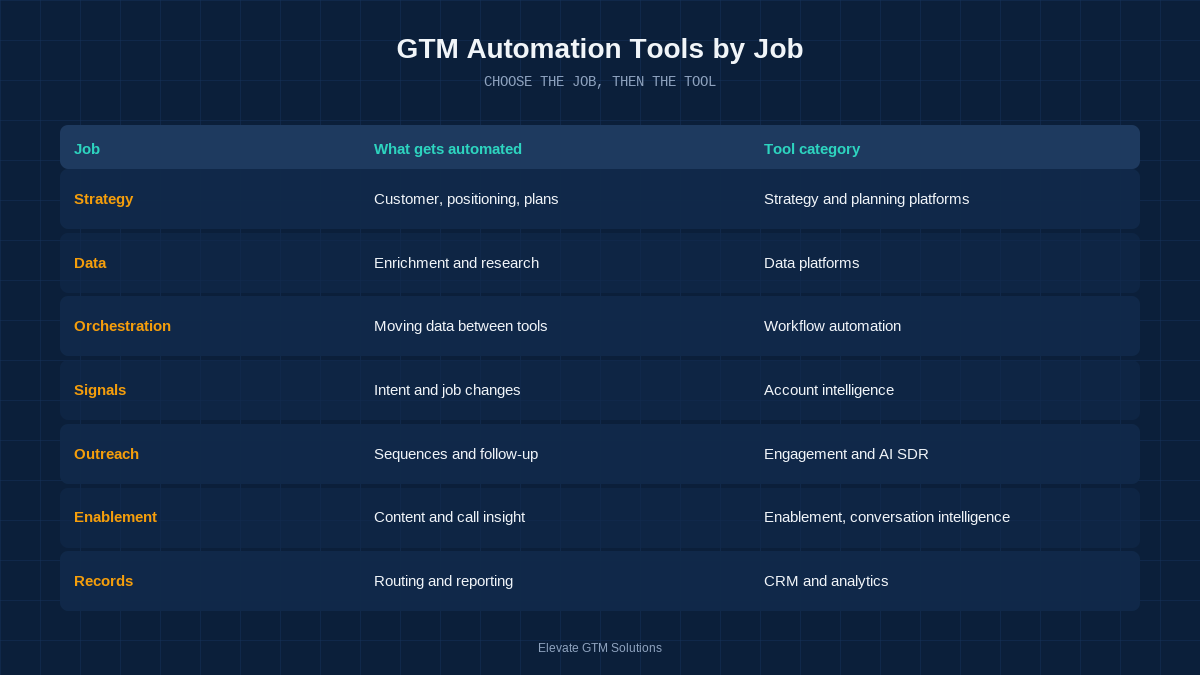
A search for the best GTM automation tools returns lists that mix workflow connectors, data providers, AI sales agents, CRMs and planning platforms as if they were interchangeable. They are not. Each automates a different part of go-to-market, and picking the wrong category is the usual way to waste a year and a budget.
This guide sorts the tools by the job they automate, names tools that describe themselves in each category, says what each is best for and where it stops, and gives you an order of operations. It is not a ranking. Elevate GTM Solutions makes one of the products discussed, so we are open about where it fits and where it does not. Vendor details come from public descriptions in November 2026 and change quickly, so confirm before you buy.
What Are the Best GTM Automation Tools?
It depends on what you want to automate. For strategy and planning, look at Elevate GTM Solutions or Ignition. For data and research workflows, Clay, Apollo or ZoomInfo. For connecting tools and running routine steps, workflow platforms such as Zapier, n8n or Make. For outreach and follow-up, Outreach, Salesloft, Apollo or Artisan's AI BDR, Ava. For account signals and advertising, Demandbase or 6sense. For records and basic automation, HubSpot or Salesforce. Most teams use a handful, chosen by bottleneck, and settle strategy before automating execution.
Is there one best tool? No. The tools do different jobs.
Where should I start? With the job that wastes the most time and carries the least risk if automated.
Eight jobs GTM tools automate
| Job | What gets automated | Tool category |
|---|---|---|
| 1. Strategy and planning | Drafting and updating customer definition, positioning, messaging, plans | GTM strategy and planning platforms |
| 2. Data and research | Enrichment, account research, list building | Data and enrichment platforms |
| 3. Orchestration | Moving data and triggering steps between tools | Workflow automation |
| 4. Signals and intelligence | Tracking intent, hiring, job changes, visits | Account intelligence and signal tools |
| 5. Outreach | Sequences, follow-up, scheduling, replies | Sales engagement and AI SDR platforms |
| 6. Enablement | Surfacing content, call summaries, coaching | Enablement and conversation intelligence |
| 7. Records and routing | Lead routing, task creation, updates | CRM and routing tools |
| 8. Reporting | Dashboards, alerts, attribution | Analytics and CRM reporting |
The tools by job
The tables are alphabetical within each job, not ranked.
Job 1: Strategy and planning
| Tool | What it describes itself as | Best for | Not designed for |
|---|---|---|---|
| Elevate GTM Solutions | An AI-native GTM operating system with 15 modules for strategy, activation and execution planning | A structured strategy kept consistent across products, segments and regions | Contact data or outreach |
| Ignition | A go-to-market operations platform for product launches | Coordinating launches between product and product marketing | Account targeting or outreach |
Documents and spreadsheets automate nothing, but they are the realistic alternative for a single product. They are cheap and flexible, and they drift as products and people multiply.
Job 2: Data and research
| Tool | What it describes itself as | Best for | Not designed for |
|---|---|---|---|
| Apollo | A B2B database with sales engagement and an AI assistant | Contacts and sequences in one tool | Strategy |
| Clay | A data enrichment and AI workflow platform | Custom research and enrichment workflows | Strategy |
| ZoomInfo | A B2B data and go-to-market intelligence provider | Contact and company data | Strategy |
Job 3: Orchestration
| Tool | What it does | Best for |
|---|---|---|
| Make | Visual workflow automation between apps | Moderate workflows without code |
| n8n | Workflow automation that can be self-hosted | Teams that want control and customization |
| Zapier | App-to-app automation with a large connector library | Simple, fast connections |
These tools move information and trigger steps. They do not know what is worth doing. Keep a person responsible for the rules.
Job 4: Signals and intelligence
| Tool | What it describes itself as | Best for |
|---|---|---|
| Common Room | Signals from community, product and web activity | Teams with community or product-led motions |
| Demandbase | An AI-powered GTM intelligence platform with account intelligence and B2B advertising | Enterprise account-based programs |
| 6sense | An account intelligence and intent platform | Identifying in-market accounts |
| Unify and UserGems | Signal-based outbound and champion or job-change tracking | Timing outreach around events |
Job 5: Outreach
| Tool | What it describes itself as | Best for |
|---|---|---|
| Apollo | Database plus engagement | Small and mid-sized outbound teams |
| Artisan | An AI-first outbound platform with Ava, an autonomous AI BDR | Teams that want AI to run prospecting and meeting booking under rules |
| Outreach | An AI sales execution platform with agents | Established sales organizations |
| Salesloft | A revenue platform merged with Clari | Execution and forecast visibility |
Autonomous outreach carries brand and compliance risk. Start with approval steps.
Job 6: Enablement and conversation intelligence
| Tool | What it describes itself as | Best for |
|---|---|---|
| Gong | Conversation and revenue intelligence | Call insight and coaching |
| Seismic (including Highspot) | An enablement platform, now merged | Content, training and coaching at scale |
Jobs 7 and 8: Records, routing and reporting
HubSpot and Salesforce are the systems of record, with automation for routing, tasks and reporting. Routing specialists and analytics tools such as HockeyStack add depth. A CRM tells you what happened. It was not built to decide what to do next.
Merger notes that affect your shortlist
Terminus merged into DemandScience in November 2024. Clari and Salesloft completed their merger on December 3, 2025. Highspot and Seismic completed theirs on August 18, 2026. If a comparison page treats these as separate rivals, it is out of date. Ask each vendor which products you are buying today and how they connect.
How to choose, in six steps
- Pick the job. Which of the eight wastes the most time?
- Check the risk. Internal and reversible tasks first.
- Check the inputs. Do you have a settled customer definition, message and clean data?
- Shortlist two or three tools in that category.
- Run one real scenario in each. Time saved, quality and effort.
- Pilot narrowly with a review date and a named owner.
A sensible order of automation
| Order | Automate | Why first |
|---|---|---|
| 1 | Strategy structure | Everything else depends on it |
| 2 | Data hygiene and routing | Automation acts on your data |
| 3 | Reporting and summaries | Low risk, immediate time savings |
| 4 | Research and enrichment | Saves effort, easy to check |
| 5 | Draft-and-approve outreach | Quality control before volume |
| 6 | Signals and timing | Improves relevance |
| 7 | Agentic workflows | Only when quality is proven |
Mistakes to avoid
Buying outreach automation before settling strategy. You will reach the wrong people faster.
Buying many overlapping tools. Each adds cost, integrations and review.
Skipping approval steps. Start with a person in the loop.
Trusting old lists. The market has merged repeatedly.
Measuring activity. Count outcomes such as pipeline, win rate and reply quality.
No owner. Automations drift when nobody maintains them.
Cost structures
Prices change and many are not published, so this describes shape, not amounts.
| Category | Typical shape |
|---|---|
| Strategy and planning | Subscription by scopes, products or seats |
| Data and enrichment | Credits or contracts scaling with usage |
| Workflow automation | Tiers by tasks or runs |
| Account intelligence | Annual, often quote-based |
| Outreach and AI SDR | Per seat or by usage, with add-ons |
| Enablement | Per seat or per team, quote-based |
| CRM | Per seat with tiers |
Add your team's time, and compare across three years.
Criteria for each category
Test every tool on criteria that fit its job.
| Category | What to test |
|---|---|
| Strategy and planning | Specificity of output from your inputs, traceability, how changes flow through, export |
| Data and enrichment | Accuracy for your regions and roles, freshness, cost per record, consent handling |
| Workflow automation | Reliability, error handling, connectors you need, who maintains the flows |
| Signals | Source quality, false positives, how signals reach sellers |
| Outreach and AI SDR | Deliverability protections, approval controls, personalization quality, reply handling |
| Enablement | Search quality, governance, adoption, coaching tools |
| CRM and reporting | Configuration effort, data model fit, reporting flexibility |
Integration patterns that work
Hub and spoke. The CRM is the hub for records. Specialist tools connect to it. A strategy layer sits above, feeding messaging and targeting rules to the spokes.
Pipeline of tools. Data and signals feed enrichment, which feeds outreach, which feeds the CRM, which feeds reporting. Each stage has an owner and a quality check.
Human checkpoints. Mark where a person approves: list approval, message approval, reply escalation.
Avoid a tangle of point-to-point connections that nobody can draw on a whiteboard. If you cannot sketch your automation map, it is too complex to maintain.
Workflow tools or a platform?
| Question | Workflow tools (Zapier, n8n, Make) | A specialist platform |
|---|---|---|
| Flexibility | High | Lower |
| Speed to a custom flow | Fast for simple flows | Depends on built-in features |
| Maintenance | You own it | The vendor owns it |
| Risk of fragile chains | Higher as flows multiply | Lower for supported actions |
| Best for | Glue between tools | Core, repeated workflows |
Many teams use both: a platform for the core job, and workflow tools for glue.
Security and compliance questions
- Where does the tool store our data and who can access it?
- Is customer data used to train models, and can we opt out?
- How is consent handled for contact data and outreach?
- What logs exist, and how long are they kept?
- Can we restrict what an agent may do?
- How do we delete data on request or on exit?
Review the answers with your security and legal advisers before connecting real customer data.
Sample stacks by team size
| Team | Example stack |
|---|---|
| Founder-led startup | Documents or a free strategy build, a CRM, one outreach tool, a workflow tool for routine steps |
| Growing B2B company | Strategy and planning platform, CRM, one data and enrichment tool, outreach, reporting |
| Mid-market with several segments | Adds account intelligence, enablement and governed workflows |
| Enterprise with regions | Adds conversation intelligence, formal governance and a shared strategy layer |
These are patterns for orientation, not endorsements of products.
Evaluation scripts by category
Generic demos rarely tell you what you need to know. These scripts give each category a test that reveals real fit.
Data and enrichment platforms
Test. Take a sample of fifty accounts you know well, including some small and some in the regions you target. Ask the platform to enrich them.
Check. Accuracy of company details, accuracy of contact roles and emails, coverage by region and size, cost per usable record, how often data refreshes and how consent and sourcing are documented.
Watch for. Impressive database size with weak accuracy in your niche. Credit systems that make real use expensive. Workflows that look clever but that nobody on your team can maintain.
Fit. Clay is described as a platform for combining data sources and AI steps in custom workflows. Apollo combines a contact database with outreach. ZoomInfo is a data and intelligence provider. They differ in how much you build yourself versus how much arrives ready to use.
Workflow automation tools
Test. Build one real workflow, such as "when a lead is created, enrich it, score it, assign it and notify the owner."
Check. Time to build, how errors are handled and surfaced, whether a failed step stops the chain or silently continues, how credentials are managed, how a colleague can read and modify the flow and what the pricing looks like at your expected volume.
Watch for. Fragile chains of many small automations that nobody understands. No logging. Personal accounts owning company-critical flows.
Fit. Zapier, Make and n8n differ in ease, visual design and hosting options. Choose by who will maintain the flows. A tool your team cannot maintain is a liability.
Outreach and AI SDR platforms
Test. Run a small, controlled pilot to a defined audience with every message approved by a person.
Check. Message quality, personalization accuracy, deliverability protections, how replies are handled and escalated, what controls exist for volume and content, what happens to a conversation you want to take over and how data and consent are handled.
Watch for. Volume as the goal. Claims such as "replaces your team." Platforms that make it hard to see what was sent.
Fit. Outreach and Salesloft suit established sales organizations that need workflow, coaching and forecasting. Apollo suits smaller teams that want data and outreach together. Artisan is built around an autonomous AI BDR for teams that want AI to run more of the process under rules. Whichever you choose, the target and message must come first.
Signal and intent tools
Test. Give the vendor a list of twenty accounts that bought from you and twenty that did not, and ask what signals would have appeared before the purchase.
Check. Which signals the tool uses, how often it is wrong, how alerts reach sellers, what the tool does to reduce noise and what it costs as you add accounts.
Watch for. Alerts without a plan for acting on them. Intent claims that cannot be explained.
Fit. Demandbase and 6sense focus on account intelligence. Common Room, Unify and UserGems focus on specific kinds of signals, as each describes. Pair any signal tool with a clear play for each signal.
Enablement and conversation intelligence
Test. Give sellers two real tasks: find the right content for a specific buyer, and review a call.
Check. Search quality, ease of use, governance, how insights reach managers and how adoption is measured.
Watch for. Large libraries that nobody uses. Coaching features that managers do not have time to apply.
Fit. Seismic, which now includes Highspot, covers content, training and coaching. Gong covers conversations and deal intelligence. They help most when positioning is settled.
Strategy and planning platforms
Test. Enter a real product and segment and ask for the customer definition, positioning and messaging, then change the segment.
Check. Specificity, traceability, how changes flow through outputs, version comparison, export and the effort your team spends on inputs and review.
Watch for. Output that would fit any company. Outputs that cannot be explained.
Fit. Elevate GTM Solutions and Ignition address this category from different starting points: strategy across segments, and launch operations.
Draw your automation map
Before you add a tool, draw what exists. A simple map has four columns.
| Trigger | Tool and step | Data touched | Owner and review |
|---|---|---|---|
| New inbound lead | Form to CRM, routing rule | Contact, company, source | RevOps, weekly check of unrouted leads |
| Target account hiring signal | Signal tool to seller alert | Account, signal | Sales manager, monthly review of alert value |
| Approved outreach list | Outreach tool sequence | Contact, message version | Marketing, weekly sample read |
| Closed lost | CRM field to win and loss summary | Reason, notes | Product marketing, monthly theme review |
If you cannot fill in the owner and review columns, you have found the risk. If two rows touch the same data with different rules, you have found a conflict.
A thirty-day plan for your first automation
Week 1: define. Pick one job. Write what success looks like and how you will measure it. Record the baseline: time, errors and volume.
Week 2: prepare. Check the data and the rules. Write the target and message the automation will follow. Choose the owner and reviewer.
Week 3: pilot. Run on a small scope with approval on every customer-facing output. Log what happens.
Week 4: review. Compare with the baseline, read a sample, list defects and decide: extend, adjust or stop. Write the rules you learned.
Repeat for the next job. Teams that automate one job at a time, with review, outperform teams that launch many at once.
A simple risk register
| Risk | Likelihood | Impact | Control |
|---|---|---|---|
| Wrong audience | Medium | High | Written target and exclusions, approval of lists |
| Generic messages | High | Medium | Approved positioning and proof, sample review |
| Bad data | Medium | Medium | Verification, sampling, source tracking |
| Reputation harm | Low to medium | High | Volume limits, approval, deliverability monitoring |
| Compliance issues | Low to medium | High | Review rules by region with legal advisers |
| Vendor change or merger | Medium | Medium | Contract protections, exportable data |
| Tool sprawl | High | Medium | Inventory and one tool per job |
| Unowned automations | High | Medium | Named owners and quarterly review |
Review the register each quarter. Risks change as your volume and tools change.
Pricing and contract questions for any tool
Whatever category you choose, ask these before you sign.
| Question | Why it matters |
|---|---|
| What exactly is included at this tier, and what costs extra? | Add-ons often change the total |
| How does price change as my volume, contacts or seats grow? | Plan for the cost at your next stage |
| What is the minimum term and what are renewal terms? | Avoid being locked in at higher prices |
| Is there a cap on price increases at renewal? | Protects the budget |
| What happens if the product is merged, renamed or retired? | Several vendors in this market have merged |
| Can I export my data and configuration? | Reduces switching cost |
| What support and onboarding are included? | Adoption depends on it |
| How is my data used, stored and deleted? | Security and confidentiality |
| What are the usage limits and what happens when I reach them? | Surprises appear at limits |
Put the answers in writing and keep them with the contract.
Sample stacks, with the trade-offs spelled out
These patterns are illustrations, not endorsements of particular products.
Stack A: lean outbound for a small team with a proven customer
Components. A CRM, one data and outreach tool, a simple workflow tool for routing and notifications, shared documents holding the customer definition and message. Strengths. Low cost, quick to start, easy to understand. Trade-offs. Strategy lives in documents, which can drift as the team grows. Data depth is limited to one provider. Upgrade trigger. More than one product or segment, or inconsistent messages across sellers.
Stack B: strategy-led stack for a company with several segments
Components. A strategy and planning platform, a CRM, a data or enrichment tool, an outreach tool with approvals, reporting. Strengths. One customer definition and message flow into execution tools. Updates are faster. Trade-offs. One more system to own, and integrations to confirm. Upgrade trigger. Account-based programs or enterprise scale.
Stack C: enterprise account-based stack
Components. A strategy layer, an account intelligence platform, enablement, conversation intelligence, a CRM, governed workflow automation and an AI policy. Strengths. Depth in each function and clear governance. Trade-offs. Cost, integration effort and change management. Upgrade trigger. Regional expansion or consolidation after acquisitions.
Stack D: agent-forward outbound stack
Components. An AI outbound platform with an autonomous agent, a CRM, a strategy source for the brief, approval rules and a weekly review. Strengths. Scale without proportional headcount. Trade-offs. Higher brand and compliance risk, and the need for monitoring. Upgrade trigger. Quality holds across several review cycles and you want to add segments.
Replacing a tool without breaking your workflows
Switching tools is where automation breaks. A careful method helps.
- Inventory what the old tool does. Triggers, rules, fields, integrations and reports. Include what only one person knows.
- Define the replacement's job. Which items move, which are retired and which need a new owner.
- Run in parallel. Keep the old tool working while you test the new one on a small scope.
- Compare outputs. Check records, routing, messages and reports against the old results.
- Migrate in stages. Move one workflow at a time and keep a rollback plan.
- Communicate. Tell sellers and marketers what changes and when.
- Retire deliberately. Export data, document the old configuration and cancel only after a quiet period.
Skipping the inventory is the usual cause of surprises.
Documenting automations so they survive staff changes
Automations often depend on one person. Documentation prevents a crisis when that person leaves.
| Item | What to record |
|---|---|
| Purpose | What the automation does and why |
| Trigger | What starts it |
| Steps | The sequence, in plain language |
| Data | Fields read and written |
| Owner and reviewer | Names and backup |
| Controls | Approvals, limits and logs |
| Failure handling | What happens when a step fails and who is alerted |
| Review date | When it is checked next |
Keep this in a shared location, and review it with the automation map each quarter.
A shortlist worksheet
| Criterion | Weight | Tool 1 | Tool 2 | Tool 3 |
|---|---|---|---|---|
| Fit with the job | ||||
| Quality of output on our scenario | ||||
| Control and approvals | ||||
| Data accuracy or coverage for our market | ||||
| Integration with our CRM and tools | ||||
| Effort to maintain | ||||
| Clarity of pricing and terms | ||||
| Security and data handling | ||||
| Honesty about limits | ||||
| Total score |
Set weights before scoring, use the same reviewers for each tool and record the evidence for each score.
Categories you probably do not need yet
Many teams buy tools for problems they do not have. If you are early, consider deferring these.
| Category | Defer until |
|---|---|
| Account intelligence and advertising platforms | You have a proven target list and budget to act on signals |
| Enterprise enablement platforms | You have enough sellers and content that a shared folder fails |
| Conversation intelligence | You have enough calls to coach from and managers with time to use it |
| Autonomous AI agents | Your target, message and approval rules are proven |
| Multiple data providers | One provider's coverage is clearly insufficient |
| Complex orchestration | Simple routing and notifications are already working |
Buying later is cheaper than buying early and not using the tool. It is also easier to choose well when you know your bottleneck.
Build with workflow tools, or buy a specialist?
| Consideration | Build with workflow tools | Buy a specialist platform |
|---|---|---|
| Speed to a simple flow | Fast | Depends on setup |
| Fit to unusual needs | High | Lower |
| Ongoing maintenance | Yours | The vendor's |
| Resilience | Depends on how well you build and document | Usually better for supported actions |
| Skill required | Some technical skill | Less |
| Cost at scale | Can grow quickly with volume | Often predictable per seat |
| Best for | Glue and unique processes | Core, repeated workflows |
Many teams use a specialist for the core job and workflow tools for the connections around it.
A quarterly review of your automation stack
An hour each quarter prevents slow decay.
- Inventory. List every tool, its job, its owner and its cost.
- Usage. Which tools are used weekly? Which are not?
- Overlap. Which tools do the same job?
- Quality. Read a sample of outputs from each automation.
- Risk. Review volume, complaints, unsubscribes and incidents.
- Results. Compare outcomes with the baseline and last quarter.
- Decisions. Keep, change, consolidate or retire.
- Updates. Update the automation map, the policy and the owners.
Record the decisions, and share a one-page summary with leadership.
Common pitfalls by category
| Category | Pitfall | Prevention |
|---|---|---|
| Data and enrichment | Buying credits before testing accuracy | Run a fifty-account test first |
| Data and enrichment | Treating the database size as quality | Verify by role and region |
| Workflow tools | Chains of fragile automations | Limit depth, add alerts and document each flow |
| Workflow tools | Personal accounts owning key flows | Use shared company accounts and owners |
| Outreach and AI SDR | Chasing volume | Track reply quality and meetings |
| Outreach and AI SDR | Insufficient approval rules | Start with approval on every message |
| Signals | Alert fatigue | Fewer signals with clear plays |
| Enablement | Content nobody finds | Test search with real tasks and prune content |
| Conversation intelligence | Insights nobody acts on | Tie reviews to coaching routines |
| Strategy platforms | Generic output from thin inputs | Provide specific evidence and review with sellers |
| CRM automation | Complex rules nobody understands | Document rules and test before changes |
| Reporting | Dashboards that show activity | Report outcomes against baselines |
Choose one pitfall for each tool you adopt and write down the prevention before you start. That single step avoids many predictable failures.
A decision record for tool selection
Write down why you chose a tool, so the next person can judge whether the reasons still hold.
| Field | Entry |
|---|---|
| Job the tool is for | |
| Problem it addresses and the baseline | |
| Alternatives considered | |
| Scenario used in the trial and who reviewed it | |
| Scores and the evidence for them | |
| Main risks and the controls chosen | |
| Cost over three years, including team time | |
| Owner and reviewer | |
| Contract terms that matter: renewal, exit, data export | |
| Success measures and review date | |
| What would make us stop |
Review the record when the contract nears renewal. If the problem it addressed has changed, reconsider the tool.
What good looks like after six months
A tool is working when you can say these things with evidence.
- The job it was bought for is done faster, more consistently or at lower cost than the baseline, after counting review time.
- The owner and reviewer can explain what it does and have read recent outputs.
- Quality has held steady or improved across at least two review cycles.
- Complaints, unsubscribes and errors are within the limits you set.
- Teams use it without being reminded.
- It connects to the other tools you need through supported actions.
- You know what it would cost to leave.
If three or more are missing, treat that as a reason to adjust, narrow or retire the tool, not to buy another one to compensate.
Key takeaways
- There is no single best tool. Tools automate different jobs: strategy, data, orchestration, signals, outreach, enablement, records and reporting.
- Settle strategy before automating outreach, and fix data before automating anything.
- Test each category with a script built for its job, using a real scenario.
- Keep one tool per job, an inventory with owners and a quarterly review.
- Check pricing, renewal, data export and product-change terms before signing.
- Several vendors in this market have merged, so confirm what you are buying today.
A short glossary
| Term | Meaning |
|---|---|
| Enrichment | Adding data to a record from other sources |
| Orchestration | Moving data and triggering steps across tools |
| Sequence | A scheduled series of outreach messages |
| Signal | An event suggesting buying interest |
| Guardrail | A rule limiting what a tool may do |
| Baseline | A measurement taken before a change |
What to do this week
Draw your current automation map with trigger, tool, owner and reviewer for each row. Circle anything without an owner. Pick the job that wastes the most time and carries the least risk, and write the baseline for it. Shortlist two tools for that job and run the category script from this guide on both. Record the decision with the template above, and set a review date for ninety days from now.
Final thoughts
The best automation stack is rarely the biggest one. It is the smallest set of tools that does the jobs that matter, fed by a settled target and message, run on clean data, owned by named people and reviewed on a schedule. Teams that follow that order tend to spend less, make fewer public mistakes and learn faster than teams that begin with the most impressive demo. Start with strategy, fix your data, automate one low-risk job, measure it against a baseline and only then widen the scope. Treat every claim about autonomy, accuracy or productivity as something to test on your own scenario before you rely on it.
Where Elevate GTM Solutions fits
Elevate GTM Solutions is an AI-native GTM operating system, so it automates the strategy and planning layer. From the market, industry, product and segment context you provide, it builds connected outputs across 15 modules, then supports workflows, weekly execution plans and a recurring review rhythm so strategy stays current. It connects to HubSpot, Salesforce, LinkedIn, Notion and Claude for supported actions. It does not provide contact data or send outreach, so teams pair it with tools from the execution jobs above. Published plans are Enable at USD 499 per month and Growth at USD 1,499 per month, billed annually, with a free first strategy build.
For related reading, see What Is GTM Automation?, Best GTM Strategy Software, AI Tools for GTM Execution and Alignment and What Is Elevate GTM Solutions?. See the pricing page, or request a demo.
Frequently Asked Questions
What are the best GTM automation tools?
It depends on the job. Strategy and planning: Elevate GTM Solutions or Ignition. Data and research: Clay, Apollo or ZoomInfo. Orchestration: Zapier, n8n or Make. Outreach: Outreach, Salesloft, Apollo or Artisan. Signals: Demandbase or 6sense. Records: HubSpot or Salesforce.
What does GTM automation software do?
It automates repeatable go-to-market work such as research, enrichment, routing, outreach, content drafts, reporting and strategy updates.
What should I automate first?
Settle the strategy structure first, then data hygiene and routing, then reporting and research, then draft-and-approve outreach, then signals, and only later agentic workflows.
What is the best GTM automation tool for startups?
Start from your bottleneck. A startup that knows its customer and needs pipeline may start with a data or outreach tool. One still defining its customer may start with a strategy build. Add tools as volume grows.
Are AI SDR tools worth it?
They can scale prospecting for teams with a proven target and message. They carry brand and compliance risk, so use approval steps, volume limits and review.
Can Zapier or n8n automate go-to-market?
They automate routine steps between tools. They do not decide who to target or what to say, so use them after strategy is settled.
Which GTM tools have merged recently?
Terminus merged into DemandScience in 2024, Clari and Salesloft in 2025, and Highspot and Seismic in 2026. Check the date of any comparison.
How do I measure GTM automation?
Track efficiency, quality, outcomes and risk against a baseline: hours saved, reply quality, pipeline and win rate by segment, complaints and deliverability.
Does Elevate GTM Solutions replace these tools?
No. It automates strategy and planning and connects to tools such as HubSpot and Salesforce for supported actions.
How do I test a data enrichment tool?
Enrich fifty accounts you know well, including small ones and ones in your regions, and check accuracy of company details, roles and emails, coverage, cost per usable record and refresh frequency.
How do I choose between Zapier, Make and n8n?
Choose by who will maintain the flows. Compare ease of building, error handling, hosting options, credential management and pricing at your expected volume.
How should I pilot an AI SDR platform?
Run a small controlled pilot to a defined audience with every message approved, then check message quality, deliverability protections, reply handling and what controls exist for volume and content.
How do I stop automations from becoming a tangle?
Draw an automation map listing each trigger, tool, data touched and owner, review it quarterly and keep one tool per job.
What should my first automation be?
A low-risk, repetitive, easy-to-check task such as call summaries, research briefs, reporting or routing, with a baseline measured first.