
GTM Stack Audit: How to Find the Layer That's Actually Broken (Before You Buy Another Tool)
A five-step GTM stack audit that starts with your plan, not your tools. Map every tool to a layer, find the one that's failing, and decide what to fix.
Published 2026-09-24
Most companies don't have a GTM platform problem. They have five or six of them, bought at different times, by different teams, for different reasons, and none of them talk to each other.
That's usually how it happens. Sales bought a CRM. Marketing bought an automation tool. Someone in demand gen added an intent platform after a good conference pitch. RevOps layered in a data provider to fix the CRM's bad records. Each purchase solved a real problem at the time. Two years later, the stack is expensive, nobody agrees on which number is right, and the actual go-to-market strategy (who to target, what to say, which channels to use, how to price) still lives in a slide deck nobody has opened since Q1.
That is why the usual response, auditing the tools and canceling the overlap, only gets you halfway. You end up with a shorter tool list and the same problem: nobody is sure which layer of the stack is actually failing, and nobody has checked whether the plan the tools are executing is still the right one.
This guide gives you a five-step audit that starts with the plan and then works through the tools. It covers the five layers of a GTM stack, what a broken layer looks like in practice, how to score each one, and a 30-day schedule to get it done. If you want a vendor-by-vendor comparison instead, see Top GTM Platforms. If you want the definition first, start with What Is a GTM Platform?.
One position up front, because it shapes everything below: audit the plan before you audit the tools. A stale strategy makes every tool underneath it look broken, and buying a better tool for a plan nobody has revisited just gets you to the wrong place faster.
Why most GTM stack audits stop too early
Most stack audits are inventory exercises. Someone lists every tool, adds up what each one costs, marks the overlaps, and cancels a few licenses. That work is worth doing, and it usually saves money. It rarely fixes go-to-market performance, because performance problems don't live in the license list.
There is real evidence that tools sit underused. One recent audit guide from NoGood cites Gartner's 2025 Marketing Technology Survey as finding that only about half of martech capability actually gets used. But an unused feature is a symptom. The cause is usually one of three things: nobody owns the layer, the data doesn't flow where it should, or the tool is executing a plan that has drifted from the market.
Some audit guides go further and argue that most GTM failures are infrastructure failures rather than strategy failures. Sometimes that's true. The trouble is that you can't know which it is until you've checked both, and most audits only check one. The audit in this guide checks the plan first because it takes an hour, costs nothing, and changes how you read everything else you find.
The five layers of a GTM stack
Before you can find the broken layer, you need a shared map of the layers. Every tool in your stack belongs to one of five, and each layer solves a different problem. Strategy sets direction from the top down. Data and signals flow back up from the bottom.

For each layer below: what it does, how you know it's the broken one, and what it can't fix even when it's working perfectly.
Layer 1: Strategy and planning
What it does. Decides who you target, what you say to them, how you price, and which channels you use, then keeps that plan current as the market moves. In most companies this layer is a slide deck and an annual planning cycle. A newer category of strategy platforms, Elevate among them, exists to make it a working system instead.
You'll know it's broken when the ICP hasn't been reviewed in six months, sales and marketing describe the customer differently, a new product or market means rebuilding the plan from scratch, or nobody can say who is responsible for updating it.
What it can't fix. Data accuracy or execution quality. A perfect plan still fails if the contact records are wrong or the campaigns never ship.
Layer 2: Account and intent orchestration
What it does. Identifies which accounts are in-market right now and coordinates outreach and advertising to them across channels. 6sense and Demandbase are the two names that dominate this layer.
You'll know it's broken when sales hears about deals late, marketing can't say which accounts to prioritize this quarter, or ad spend isn't tied to a defined account list.
What it can't fix. An unclear ICP or weak positioning. An orchestration platform makes you faster at reaching the accounts you've chosen. If those are the wrong accounts, you get to the wrong result sooner. These platforms also tend to need a dedicated operator to deliver value.
Layer 3: Data and sales intelligence
What it does. Keeps contact and company records accurate and layers buyer intent signals on top for the rest of the stack to use. ZoomInfo is the best-known name, and tools like Clay and Apollo play in adjacent parts of the space.
You'll know it's broken when emails bounce, the CRM is full of duplicate accounts, reps re-research contacts by hand, or job changes at key accounts go unnoticed for months.
What it can't fix. Whether an account fits your ICP or what to say to it. Data is the fuel, not the map.
Layer 4: Marketing automation and engagement
What it does. Runs the campaigns, sequences and workflows that reach prospects and customers, and logs the activity back to the CRM. HubSpot, Marketo and Salesforce Marketing Cloud are the common choices. HubSpot also appears in Layer 5, because it bundles a CRM.
You'll know it's broken when leads get stuck between marketing and sales, campaigns are rebuilt by hand each time, or reporting from marketing and reporting from sales never reconcile.
What it can't fix. Whether the campaign should go to that segment at all. These suites are excellent at sending the campaign you decided on and have limited opinions about whether it was the right one.
Layer 5: CRM, the system of record
What it does. Stores accounts, contacts, opportunities and activity history. Every other layer reads from it or writes to it. Salesforce is the default enterprise choice, and HubSpot's CRM is the common lighter-weight option.
You'll know it's broken when pipeline numbers differ depending on which report you open, reps keep their real notes somewhere else, or nobody trusts the forecast.
What it can't fix. Targeting or messaging. A CRM is a filing cabinet with reporting on top. It records what happened, and strategy has to live somewhere else or it doesn't live anywhere.
The five-step GTM stack audit
The steps below are in order on purpose. Step 1 takes the least effort and tells you the most.
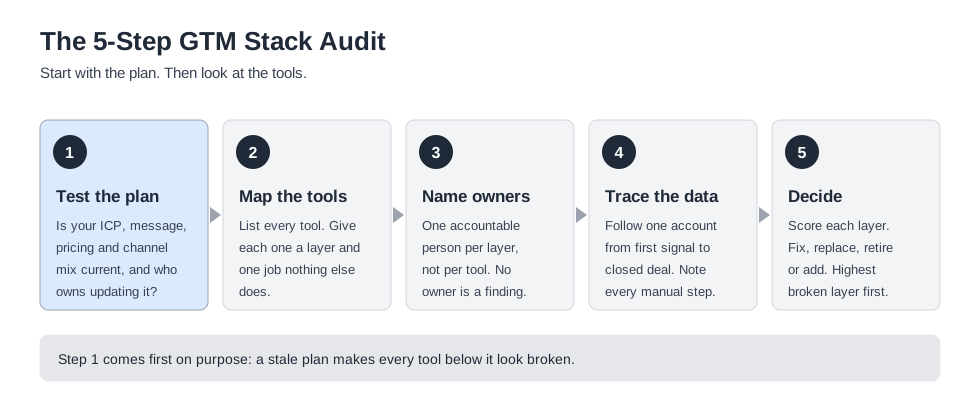
Step 1: Test the plan
Before you open a single contract, answer five questions with people from sales, marketing and product in the room:
- When was the ICP last reviewed, and who reviewed it?
- Can each team state the positioning in one sentence, and is it the same sentence?
- When did pricing last change, and what prompted it?
- Which channels were chosen on purpose, and which were inherited?
- Who is accountable for updating the plan, and how often does it happen?
If you can't answer three of the five with confidence, the strategy layer is your first finding. Write it down before you look at any tool.
What a good answer looks like
A passing answer is specific, recent and shared. A failing answer is vague, old or different depending on who you ask.
ICP review. Passing: "We revisited it in the last quarter, using closed-won and closed-lost data, and product signed off." Failing: "It's in the deck from last year's kickoff."
Positioning. Ask each team separately and compare the answers. Passing: the same core claim, in different words. Failing: three sentences that emphasize three different things, or a long pause.
Pricing. Passing: a dated change with a reason, or a dated decision to hold. Failing: prices that haven't moved since launch and nobody can say whether that was deliberate.
Channels. Passing: each channel has a stated purpose and a review date. Failing: channels that exist because someone joined the company and brought them along.
Accountability. Passing: one named person and a calendar entry. Failing: "leadership" or "the planning offsite."
Score one point for each passing answer. A score of two or below means the plan needs attention before the tools do. Three or four means the plan is probably sound but check the cadence. Five means move on to Step 2.
Step 2: Map every tool to a layer and one job
Build a list of every tool in the stack. Your finance team's card statement and your single sign-on app list will catch the ones nobody remembers buying. For each tool, record three things: the layer it belongs to, the one job it does that nothing else in the stack does, and how many people used it in the last 30 days.
Two tools with the same job are an overlap. A tool with no clear job is a candidate to retire. A tool that spans two layers, as HubSpot often does, gets listed under both.
A simple inventory needs only a handful of columns. Here is a starting template with two illustrative rows:
| Tool | Layer | The one job | Active users (30 days) | Annual cost | Verdict |
|---|---|---|---|---|---|
| Enrichment tool A | 3. Data | Contact and company enrichment | 14 | Fill in | Overlap with tool B |
| Intent platform | 2. Orchestration | Flag in-market accounts | 3 | Fill in | Watch: low usage |
Resist the urge to add more columns. The goal is a list the team will actually keep current, and the two columns that matter most are the "one job" and the active users. If a tool has no clear job, or nobody used it last month, that is your shortlist for retirement.
Step 3: Name one owner per layer
Assign a single accountable person to each of the five layers. Not each tool, each layer. The owner is responsible for whether the layer is doing its job, not for administering the software.
A layer with no owner is a finding in itself. It is also the most common reason a well-chosen tool underperforms, especially for platforms that need a full-time operator to pay back the investment.
In practice the owners tend to look like this. Treat it as a starting point, not a rule:
- Strategy and planning: a named GTM lead, often the head of product marketing, the CMO or the CRO, with product leadership as a required reviewer.
- Account and intent orchestration: the demand generation or ABM lead.
- Data and sales intelligence: revenue operations.
- Marketing automation: marketing operations.
- CRM: sales operations or revenue operations.
The one that most often has no owner is Layer 1. That is not a coincidence. Every other layer comes with software, an admin and a renewal date, so someone ends up responsible for it. The plan has none of those, so it belongs to everyone and therefore no one.
Step 4: Trace the data
Pick one real account and follow it from the first signal to a closed deal. Where did it enter the stack? Where was it copied? Where did someone paste it into a spreadsheet? Where did the record stop matching?
Every manual step you find is a place where a layer isn't doing its job. The CRM sits at the center of this trace, because every other layer either reads from it or writes to it.
Check six points along the way:
- First signal. Where did the account first show up, and in which system?
- Enrichment. Was the record completed automatically, or did someone look it up?
- Routing. How did it reach the right rep, and how long did that take?
- Outreach. Did the message reflect the current positioning, or an older version?
- Handoff. Did context survive the move between marketing and sales?
- Close. Did the outcome get written back so the next plan can learn from it?
The last one matters most for the plan. If closed-won and closed-lost reasons never make it back into the ICP and positioning, the strategy layer is running blind, however good the other layers are.
Step 5: Score each layer and decide
Score each layer on four checks: is there a named owner, is the layer actively used, does data flow in and out cleanly, and is it free of overlap with another tool. Then assign one verdict per layer: fix it, replace it, retire it, or add something to it.
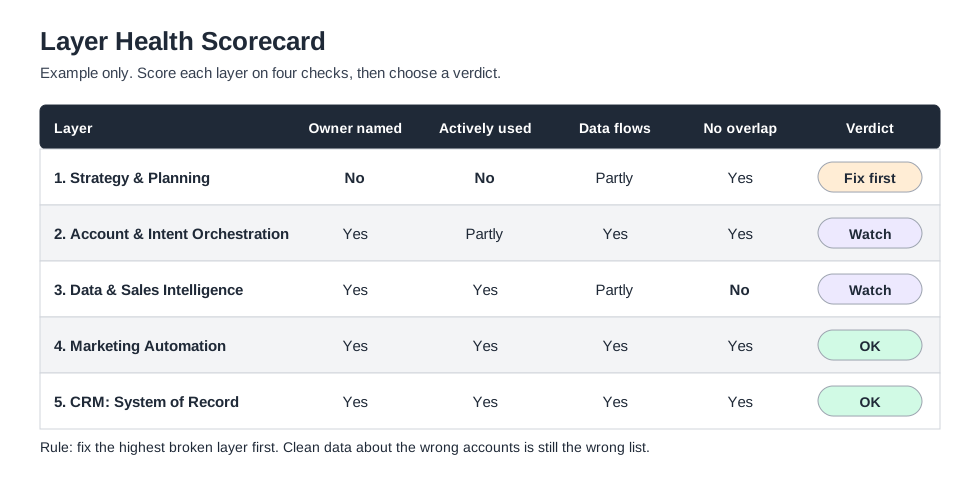
Fix the highest broken layer first. Problems travel downward: a stale plan makes every layer below it execute the wrong thing. If both the plan and the data are broken, start with the plan, because clean data about the wrong accounts is still the wrong list.
What each verdict means
Fix. Keep the tool, change how it's used. This is the right call when the software is capable but the layer has no owner, the configuration doesn't reflect the plan, or the data isn't flowing. It is cheaper than a replacement and it is the answer more often than teams expect.
Replace. Swap the tool for a different one in the same layer. Do this only when you can name a specific capability the current tool can't deliver, and when you have confirmed that the layer's owner and configuration aren't the real cause.
Retire. Remove a tool with no clear job, an overlap you have decided to consolidate, or usage so low that nobody would notice it was gone. Agree the retirement date and the data export before you cancel.
Add. Bring in a new tool only when a layer has a gap that no existing tool covers, and only after the plan is confirmed current. A new tool should replace a manual process or a worse tool. If it only adds a dashboard to check, it isn't ready to be added.
Match the symptom to the layer
Sometimes you already know something is wrong and just need to know where to look. The diagram below maps the symptoms teams report most often to the layer that usually causes them.

Once you've identified the layer, run whatever you're considering buying or changing through these five questions. Most bad GTM purchases fail one of them, not a feature checklist.
1. What layer is actually broken? Data accuracy, account targeting, campaign execution, or strategy itself. These are different problems with different fixes. Buying an orchestration platform to fix a strategy problem is a common and expensive mistake; so is buying a strategy tool when your real issue is that half your CRM's contact records are wrong.
2. Does it need a dedicated operator? Enterprise ABM platforms in particular tend to need someone running them full-time to get value out of the investment. If nobody on your team has the bandwidth to own the platform, the platform will underperform regardless of its feature set.
3. What's the real implementation timeline? Enterprise-tier ABM and intelligence platforms often take weeks to months to implement properly, depending on data readiness. If you need results this quarter, ask for a realistic timeline before you sign, not after.
4. Does pricing scale the way your company will? Some platforms have a clean self-serve entry point and a clear next tier. Others require a renegotiation, and often a new contract structure, the moment you cross a seat or usage threshold. Ask what year two looks like, not just what the first invoice looks like.
5. Does it replace something, or does it add a system to babysit? The most expensive stacks aren't the ones with the highest-priced tools. They're the ones with the most tools nobody fully uses. Every addition to the stack should replace a manual process or a worse tool, not just add a new dashboard to check.
Where Elevate fits in the audit
Elevate operates in Layer 1. It is explicitly not a CRM, not an intent data provider and not an advertising platform. It is built to work alongside the tools in the other four layers, pulling context from them and turning the strategy into a weekly cadence of specific actions for sales, marketing and product.
That makes it relevant when Step 1 turns up a stale plan. If the audit shows your gap is data accuracy, buy a data platform. If it shows your gap is coordinated account execution, look at orchestration. If it shows your strategy is a document nobody revisits, that is the layer Elevate is built to fix. It doesn't store deal history the way Salesforce does, doesn't replace 6sense's or Demandbase's account intelligence, and doesn't have ZoomInfo's contact database.
What the audit looks like at your size
The steps are the same at every size. What changes is which layer usually turns out to be the problem, and how much operating capacity you have to fix it.
If you're an SMB
In the audit, the honest starting point for most small B2B teams is a consolidated system (HubSpot or a comparably lightweight CRM) plus a habit of revisiting strategy on a real cadence rather than annually. Enterprise ABM and intelligence platforms are usually the wrong first purchase: the implementation overhead and price point outweigh the value until deal sizes and sales-cycle complexity grow into them. The most common failure mode at this stage isn't a missing tool, it's a strategy that was written once, at launch, and never revisited as the market and the product changed.
If you're mid-market
This is typically where the stack starts to fragment: a CRM, a marketing suite, and often the first serious evaluation of an intent or data platform as deal complexity grows and a single all-in-one tool starts to strain. The evaluation questions that matter most here: which layer is actually the bottleneck (is it data accuracy, account visibility, or a plan nobody's updated since it was written), and does the team have the operational capacity to run a new platform well, or will it become another underused line item.
If you're enterprise
At this scale, most companies already run some combination of Salesforce, a data provider, and one of the major ABM platforms. The gap that shows up repeatedly at this stage isn't a missing tool in the execution layer. It's that the strategy feeding all of those tools was set once, by a small group, and hasn't kept pace with a market, product line or competitive set that's moved since. Adding another execution tool to a stack that's already well-resourced rarely fixes that; revisiting how often the underlying plan gets updated, and who's accountable for updating it, usually does.
A worked example
The example below is illustrative. It shows how the steps play out and is not a description of a specific customer.
Take a 120-person B2B software company with a CRM, a marketing suite, two data enrichment tools and a recently purchased intent platform. Leadership feels that pipeline quality is slipping and is about to sign a renewal on a second orchestration tool.
Step 1. The plan test scores two out of five. The ICP was last reviewed fourteen months ago. Sales and marketing give different answers about the core positioning. The plan itself lives in a slide deck, and the person who built it has since changed roles.
Step 2. The inventory turns up two enrichment tools doing the same job, bought by different teams. The intent platform has three active users.
Step 3. Layers 2 to 5 each have a clear owner. Layer 1 has none.
Step 4. Tracing a recent deal shows leads being exported to a spreadsheet for manual prioritization before reaching sales. The cause is that the scoring rules were built around an ICP that no longer matches the accounts actually closing.
Step 5. The scorecard looks like the one above: strategy is marked fix first, orchestration and data are marked watch, and marketing automation and the CRM are fine.
The outcome. The company doesn't buy the second orchestration tool. It re-runs the ICP using recent closed-won and closed-lost deals, names a GTM lead as owner of Layer 1, retires one of the two enrichment tools, and schedules a quarterly plan check. The intent platform gets a 90-day usage target before anyone decides whether to keep it. The audit found no missing tool. It found a plan that had drifted, and an ownership gap that let it.
Common GTM stack audit mistakes
Auditing cost instead of decisions. A cost audit gives you a shorter invoice. A decision audit tells you who owns each layer and whether the plan behind it is current. Do both, but don't stop at the first.
Skipping the plan. If you go straight to the tools, every finding gets read through the assumption that the strategy is fine. Test it in Step 1.
Cutting the tool when the configuration is the problem. Plenty of underperforming CRM and automation setups are underperforming because nobody configured them to reflect an actual strategy, not because the software is weak. Check the configuration before you replace the product.
Running the audit and the migration at the same time. Once you start swapping tools mid-audit, you lose your baseline and every demo starts to look like an improvement. Decide in week 4, then change things.
Naming owners for tools instead of layers. Tool owners keep licenses alive. Layer owners are accountable for results. Without them the stack re-sprawls within a year.
Treating it as a one-time project. Run the five-question plan test every quarter, and the full audit at least once a year or whenever you enter a new market, launch a product or change pricing.
How to run the plan test in 60 minutes
Step 1 works best as a single working session, not a survey. Invite the head of sales, the head of marketing, someone from product and whoever runs revenue operations. Keep it to five people or fewer so the answers stay honest.
Minutes 0 to 10. Explain the rules. Each person writes down their answer to each of the five questions before anyone speaks. This stops the loudest voice from setting the answer for everyone else.
Minutes 10 to 40. Go through the five questions one at a time. Reveal the written answers together and compare them. The gaps between answers are the finding. Don't try to resolve them in the room yet, just record them.
Minutes 40 to 55. Score each question as passing or failing using the criteria above, and agree on the total. Disagreements about the score are worth noting, since they usually point to the same gap.
Minutes 55 to 60. Name the one person who will own Layer 1 from this point on, or record that nobody agreed to. Either result is useful.
Send the written answers and the score to the group the same day. The value of the exercise fades quickly if it stays in a meeting.
How to report the results
The output of the audit should fit on one page. Leadership needs the conclusion, not the inventory. A useful format has four parts:
- The plan score. The result of Step 1, with the two or three biggest gaps between team answers.
- The layer scorecard. The five layers, the four checks and the verdict for each, as in the diagram above.
- The decisions. What you will fix, replace, retire or add, with an owner and a date beside each.
- The cost and the trade-off. What each decision costs, what it saves, and what you are choosing not to do.
Keep the full inventory as a backup for anyone who asks. If your first draft runs past one page, you have probably reported findings instead of decisions. Cut until every line either changes something or explains why something stays the same.
A 30-day plan for the audit
Four weeks is enough for most teams. The point is to diagnose completely before you change anything.
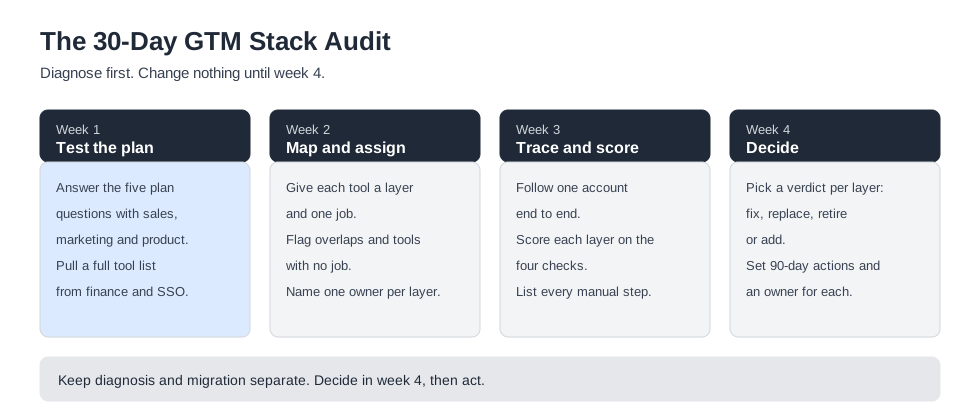
Week 1. Run the five plan questions with sales, marketing and product. Pull the full tool list and costs from finance and your single sign-on directory.
Week 2. Give each tool a layer and one job. Flag overlaps and tools with no job. Name one owner per layer.
Week 3. Trace one account end to end. Score each layer on the four checks and list every manual step you find.
Week 4. Choose a verdict for each layer, set 90-day actions with an owner for each, and schedule the next quarterly plan check.
Frequently asked questions
What is a GTM stack audit? A GTM stack audit is a structured review of the tools, data flows, owners and plan behind your go-to-market motion. It sorts every tool into a layer, checks whether each layer is working, and decides what to fix, replace, retire or add. The version in this guide also tests the strategy itself, which most tool audits skip.
How is it different from a martech audit? A martech audit looks at marketing tools. A GTM stack audit covers the whole motion across marketing, sales, data and strategy, and asks whether the layers work together. It is broader, and it puts the plan in scope alongside the software.
Who should run it? RevOps or marketing operations usually runs the mechanics, because they know the tools. The plan test in Step 1 needs sales, marketing and product leadership in the room, because it is a decision about strategy, not software.
How often should we do it? Run the five plan questions every quarter, since they take an hour. Run the full audit at least once a year, and again whenever you enter a new market, launch a product or change pricing.
Do I need both an intent platform and a data platform? Often, yes, and they're complementary rather than redundant. A data provider like ZoomInfo keeps your contact and company records accurate; an intent platform like 6sense or Demandbase tells you which of those accounts are actively in-market right now. One without the other means either accurate data with no sense of timing, or good timing signals attached to stale contact records.
Does a GTM strategy platform replace my CRM or ABM tool? No, and any platform that claims to replace all of them at once is worth a skeptical second look. A strategy layer like Elevate is built to sit alongside a CRM, a data provider and an orchestration platform, pulling context from them and pushing a current plan back into the actions those systems execute. It answers a different question than any of the five vendors compared in this guide.
The takeaway
Most stack audits ask which tools to keep. The better question is which layer is broken, and the first place to look is the plan. A well-configured stack still underperforms if the strategy it executes is a year out of date, and no amount of tool consolidation fixes that.
Run the five plan questions this week. If you can answer them, move on to mapping the tools with confidence. If you can't, you've already found your first layer to fix. For the vendor detail behind each layer, see Top GTM Platforms, and for the wider set of planning tools, browse the GTM Frameworks hub.
Contents
Related Frameworks
GTM Frameworks
Explore frameworks for assessing, structuring, aligning, and evolving go-to-market.
View Framework Library →