By the Elevate GTM Solutions Team · Updated November 13, 2026 · 23 min read
Accurate Deal Data Without Manual Entry: What Can Be Captured Automatically, What Cannot, and How to Trust the Result
Every sales leader has stood in a forecast meeting and watched a number fall apart. The close date was a guess, the stage was optimistic and the amount had not changed since the first call. Reps are not lying so much as busy, and the CRM is the last place on their list. So vendors promise deal data "without manual input": software that listens to calls, reads email, watches calendars and fills in the fields for you.
Some of that is real and useful. Some of it moves the error somewhere less visible. This guide explains what can be captured automatically, what still needs a person, how to check whether the automated version is more accurate than the manual one, and how to run a pilot that gives you an honest answer. It covers activity capture, call analysis, field suggestions, stage inference and the privacy and consent questions that come with them.
We make a GTM platform and do not sell deal capture software. Elevate GTM Solutions is not a revenue intelligence tool, and we say so in the last section. We name a few product categories as examples and do not rank products. Examples with numbers are invented. Laws on recording and monitoring communications vary a great deal, so this is not legal advice and your legal team should review any capture plan.
Which GTM solutions give accurate deal performance data without manual input?
Revenue and conversation intelligence tools capture activity automatically, such as emails, meetings and calls, and some infer stages, contacts and next steps. They can reduce manual entry and improve completeness, but accuracy depends on the data they can see, the rules they use and whether people still confirm key fields. Fully automatic capture is good at recording what happened (who spoke to whom and when) and weaker at judging what it means (is the buyer committed?). Judge any tool by testing its output against deals you already know, field by field, before you trust its forecast.
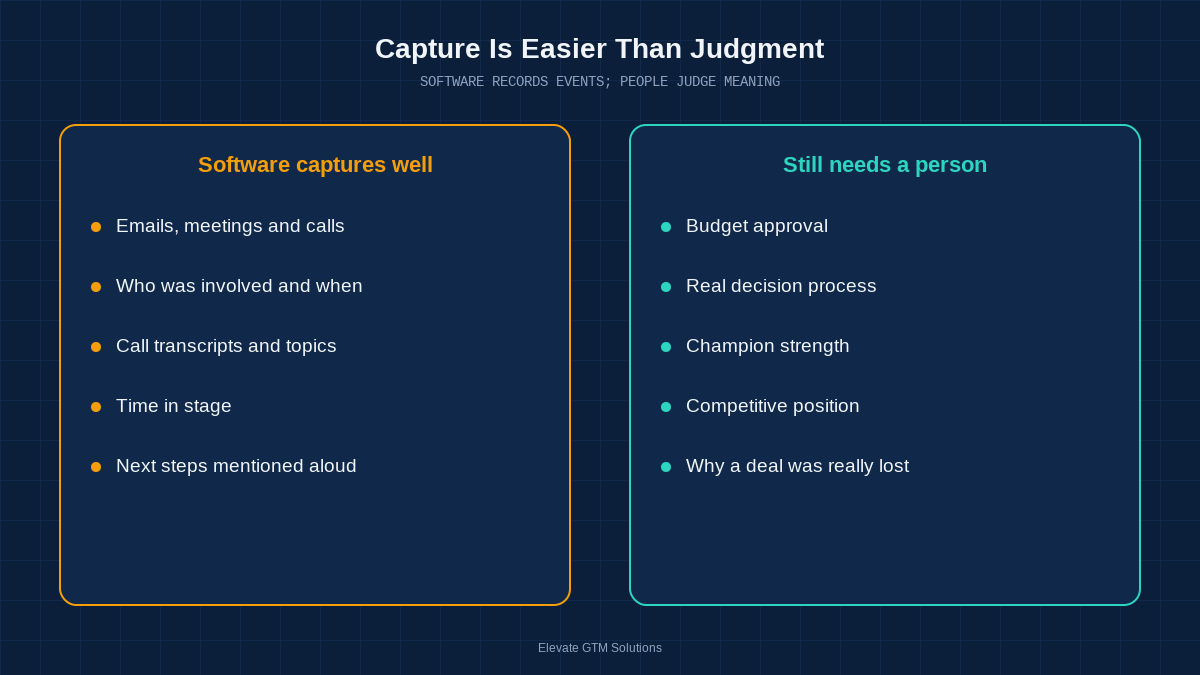
Can software remove manual entry completely? Not for fields that reflect judgment or information that never appears in email, calendar or calls.
How do I know it is accurate? Compare its fields with ground truth on a sample of closed and open deals, and track error by field.
Why manual entry fails
Understanding the cause helps you judge the cure.
| Cause | What happens |
|---|---|
| Effort | Entering data is work that does not feel like selling |
| Delay | Fields are updated in batches before a meeting, not as things change |
| Incentive | Reps may keep an optimistic stage to protect a deal from scrutiny, or a pessimistic one to protect a forecast |
| Ambiguity | Stage definitions mean different things to different people |
| Complexity | Too many required fields, so people fill in anything to save the record |
| Context | The information is in an email thread or a call and nobody copies it |
Automation addresses the first, second and sixth. It does not address the third or fourth. If the stage definitions are vague or the incentives reward optimism, automation will faithfully record the noise.
What can be captured automatically
| Data | How it is captured | Typical accuracy issue |
|---|---|---|
| Emails sent and received | Connection to the mail system | Personal or irrelevant messages, shared mailboxes, wrong matches to accounts |
| Meetings | Connection to the calendar | Internal meetings, tentative events, meetings with several deals involved |
| Calls | Telephony integration or call recording | Missed or unrecorded calls, consent restrictions |
| Contacts and roles | Names, titles and email signatures in messages | Outdated titles, wrong roles, duplicates |
| Buying group participation | Who appears on emails and calls | People who influence but never appear |
| Engagement over time | Frequency and recency of activity | Activity is not interest |
| Call content | Transcripts and summaries | Transcription errors, misread tone |
| Topics and competitors mentioned | Analysis of transcripts | Context errors, such as a competitor named in a joke |
| Next steps | Extracted from calls or emails | Vague next steps, or ones that were not agreed |
What is hard to capture
| Data | Why it is hard |
|---|---|
| Whether the budget is approved | It may be said once, on a call, or never |
| Real decision process and timeline | Buyers often do not share it, or it changes |
| Champion strength | A judgment about influence and commitment |
| Competitive position | Buyers may hide it |
| Deal amount | Often negotiated and reshaped late |
| Close date | Depends on the buyer's own calendar and politics |
| Reasons for loss | Buyers often give a polite reason, not the real one |
| Anything discussed off the record | Hallway chats, text messages, dinners |
| Intent that never shows in a message | Silence can mean anything |
The pattern is consistent. Software is good at recording observable activity and is limited when the truth lives in someone's head or in a conversation it cannot hear. Treat automated fields that depend on those as suggestions, not facts.
Three layers of "automatic"
The phrase covers very different things. Separate them.
Layer one: activity capture. The tool records that something happened: an email, a meeting, a call, a contact added. This is the most reliable layer because it records events, not interpretations.
Layer two: extraction. The tool reads the content and pulls out facts: a date mentioned, a competitor named, a person's role, a next step. It is useful and fallible, since it can misread a sentence.
Layer three: inference and scoring. The tool judges: this deal is at risk, this stage fits, this close date is likely. This layer produces the most attractive claims and carries the most risk, because the output is an opinion that looks like data.
A fair evaluation tests each layer separately. A vendor that is strong at layer one and honest about layers two and three is more useful than one that blends them.
How to measure accuracy
Do not rely on a vendor's accuracy figure. You can run your own test in a few weeks.
Build a ground-truth sample
- Choose thirty to fifty deals from the last two quarters, with a mix of wins, losses and open deals across segments and reps.
- For each, have a manager and the rep reconstruct the facts together: when each stage was actually reached, who was involved, what the amount and close date were at key points.
- Record the facts in a spreadsheet. This is your reference, imperfect but better than the CRM as it stands.
Compare field by field
| Field | Manual CRM vs reference | Tool vs reference |
|---|---|---|
| Stage date accuracy | Share within a few days | Share within a few days |
| Contacts involved | Share of real participants recorded | Share recorded |
| Amount at close | Difference | Difference |
| Close date at each forecast point | Difference | Difference |
| Next step present and correct | Share | Share |
| Competitors identified | Share | Share |
| Time to update after an event | Median | Median |
Measure error by field, not as a single score, because tools are often good at some fields and poor at others. Report completeness as well as correctness: a field that is always right when present and present half the time is a different problem from one that is always present and sometimes wrong.
Test the forecast, not only the fields
If the tool predicts outcomes, test them on past data you did not use to set it up. Take a date, look at the deals open then, apply the tool's rules and compare with what happened. Compare against a simple baseline such as the stage and age of the deal. If the tool does not beat the baseline, ask why you are paying for it.
An illustrative result, with invented numbers
This is a made-up example showing how to read a comparison.
| Field | Manual accuracy | Tool accuracy | Note |
|---|---|---|---|
| Contacts involved | Low: reps listed one or two people | High: the tool saw everyone on email | Clear win |
| Stage date | Moderate: batch updates caused delays | Moderate: the tool could not tell stage from activity | No clear gain |
| Close date | Low: optimistic | Low: the tool used the rep's date | No change |
| Competitor named | Low: rarely filled | Moderate: found in calls that were recorded | Gain, but calls without recording were missed |
| Next step | Low | Moderate | Gain, with some wrong ones |
The lesson is not that one column wins. It is that the tool improved the observable fields, did little for the judgment fields and still needed a person. That is a normal and useful result, and it tells you where to keep human review.
Designing a hybrid process
Most teams end up with automation for capture and people for judgment. A clear division of labor helps.
| Field | Source | Human role |
|---|---|---|
| Activity log | Automatic | None, unless something is wrong |
| Contacts and roles | Automatic suggestion | Confirm key roles, add missing influencers |
| Call summary | Automatic | Check for accuracy on important calls |
| Next step | Suggested from the conversation | Confirm or edit, with a date |
| Stage | Rule-based on evidence | Confirm with evidence, not a hunch |
| Amount | Rep | Confirm at defined points |
| Close date | Rep, with the buyer's stated date | Explain changes |
| Risk | Suggested signals | Manager judgment |
| Loss reason | Rep and buyer interview | Review sample |
The principle: let software record, let people decide and require evidence for the fields that drive the forecast. Stage definitions that are based on buyer actions, such as "the buyer has introduced us to the finance approver," are easier to verify than ones based on seller feelings.
Stage rules based on evidence
Automatic stage inference works better when stages are defined by observable events. Compare:
| Vague definition | Evidence-based definition |
|---|---|
| "Qualified" | A meeting with the named decision maker has occurred, and a problem and a budget range are recorded |
| "Proposal" | A written proposal was sent, and the buyer replied with at least one question or comment |
| "Negotiation" | Legal or procurement is involved, and a draft contract has been exchanged |
| "Commit" | A signature date is agreed in writing, and the approver has confirmed |
With definitions like these, a tool can check for the events and flag mismatches, and managers can inspect deals without arguing about adjectives. Our guide to win-loss analysis shows how to use the same events to learn from outcomes.
Privacy, consent and employee questions
Automatic capture touches communications, and several kinds of rules may apply. Your legal team should decide, and these are the questions to bring.
Recording calls. Laws on recording differ by country and, in some countries, by region. Some require every party's consent. Ask how the tool announces recording and handles participants who object.
Reading email and calendars. Employee consent, company policy and the privacy of personal messages all matter. Ask whether the tool can exclude personal or sensitive messages, and whether employees can see and correct what is captured.
Personal data of buyers. Contacts' names, titles and messages are personal data in many jurisdictions. Ask what is stored, for how long and on what legal basis.
Works councils and employment law. In some countries, monitoring tools need consultation with employee representatives.
Where the data is stored. Captured content may be stored outside your CRM. A secondary 2026 guide to Salesforce's own email and calendar capture notes that captured data can be stored on separate infrastructure and that captured-only email may not be fully usable in reports or automation. Whatever tool you use, ask where captured data lives and whether you can report on it.
Use of the data. Be clear with sellers about what the data will and will not be used for. If it is used in performance reviews, say so. A capture program introduced as "less admin" and later used as surveillance loses trust and then data quality.
See our governance checklist for the vendor side of these questions.
What to ask a vendor
| Question | What a good answer sounds like |
|---|---|
| What exactly do you capture automatically, and from where? | A specific list by source |
| Which fields do you fill, and which do you only suggest? | A clear split |
| How do you match activity to the right account and deal? | A described method, with a way to correct it |
| What accuracy have you measured, how and on what data? | A method, and honest limits |
| How do I see why the tool made a decision? | Evidence shown with each field |
| What happens when the tool is wrong? | A correction path that teaches the system |
| How do you handle calls we cannot record? | A fallback, and honest gaps |
| How do you handle personal email and sensitive contacts? | Exclusions and controls |
| Can we test on our own deals before we buy? | Yes, with a defined test |
| Does the forecast beat a simple baseline on our history? | A willingness to test it |
| What does it cost for all the roles that need it? | Written pricing, including managers and viewers |
| How do we leave and take our data? | A clear export |
The effect on reps and managers
Technology is half the story. How people react determines whether the data gets better.
Reps. They benefit if the tool removes tasks they dislike and gives something back, such as call summaries and follow-up drafts. They resist if it feels like monitoring. Involve a few trusted reps in the pilot, let them see the data first and listen to their complaints.
Managers. They need to change how they inspect deals. If they ask "what is the stage?" the stage will be a performance. If they ask "what happened in the last two weeks, and what is the next agreed step?" the activity data answers, and the conversation improves.
RevOps. They own definitions and rules. Automatic capture exposes sloppy definitions quickly, so expect a round of cleanup.
Finance. They want forecast reliability. Share the accuracy test, not the vendor's brochure.
A six-week pilot
| Week | Activity |
|---|---|
| 1 | Define the goal (for example, more accurate stage dates and contacts), choose the sample and write stage definitions based on evidence |
| 1 to 2 | Connect the tool for a small group, with consent and policy agreed |
| 2 | Build the ground-truth sample |
| 3 to 4 | Run in parallel with the manual process. Collect errors, gaps and complaints |
| 5 | Compare field by field and test the forecast against a baseline |
| 6 | Decide: adopt, adopt in part, change the process or stop |
Record time saved as well, but treat it carefully: time saved on entry may be offset by time spent correcting. Ask a few reps to track both for a week.
Where else deal data comes from
Not all useful deal data lives in the sales stack. Several other sources fill gaps.
| Source | What it adds | Caution |
|---|---|---|
| Product usage in trials | Real interest and use by account | Usage may not signal budget |
| Support tickets | Early risk and satisfaction | Different system, different identifiers |
| Marketing engagement | Which content buyers read | Anonymous or multiple visitors per account |
| Finance data | Payment history, terms | Access restrictions |
| Buyer interviews | The real reasons behind outcomes | Small samples |
| Third-party signals | Funding, hiring, news | Noise, delay |
A GTM platform that connects these to the CRM can enrich the deal record. The test is the same: check against ground truth before you trust it.
What accurate really means for forecasting
Accurate data and an accurate forecast are different things. A deal record with perfect history still depends on an unknowable thing, which is what the buyer will do. Better data narrows the range. It does not remove it. If a vendor promises forecast accuracy to a precise figure, ask for the method and the data behind it, and test it. Our B2B sales cycle length guide shows why even a basic figure like cycle length depends on definitions, and the principles apply here: write down what you are measuring, use cohorts and include the losses.
Validation rules that catch errors early
Whether data is typed or captured, a few simple rules keep the record trustworthy. They are cheap to set up and they catch the errors that damage forecasts most.
| Rule | What it catches |
|---|---|
| A close date cannot be in the past for an open deal | Forgotten deals that distort the pipeline |
| An opportunity needs at least one contact with a role | Deals with no known buyer |
| A stage change needs a next step with a date | Stage moves that are not backed by action |
| An amount change above a set size needs a reason | Silent shrinking or inflating |
| An opportunity with no activity for a set number of days is flagged | Stale deals |
| Duplicate opportunities on one account are flagged | Double counting |
| A closed-lost deal needs a reason from a list | Losses that teach nothing |
| A new contact outside a known domain is reviewed | Mis-matched activity |
Set the thresholds from your own history. A rule that fires on half of all deals will be ignored.
Edge cases that break capture
Tools tend to work well on the standard pattern and poorly on the exceptions. Before you roll out, list your exceptions and test each.
| Edge case | Why it breaks | What to do |
|---|---|---|
| Several open deals on one account | Activity cannot tell which deal an email belongs to | Decide a rule, such as matching by contact role, and allow manual correction |
| Shared mailboxes | Messages have no single owner | Exclude them or map them deliberately |
| Partner or channel deals | The buyer talks to a partner, not to you | Capture partner activity separately, and record the partner's role |
| Renewals and expansions | A long history with the account blurs the signals | Separate renewal and new business logic |
| Internal threads | Emails among colleagues about the deal | Exclude internal messages from engagement counts |
| Personal email or messaging apps | Some buyers write from other channels | Accept the gap, and ask reps to log key points |
| Forwarded emails | The real reader is not on the thread | Treat reach as unknown |
| Calls on a personal phone | No record | Set a policy and a way to log |
| Multiple time zones and languages | Transcription and date errors | Test in the languages and regions you sell in |
| Data from an acquired company | Different systems, different definitions | Map before you merge |
A good vendor will help you list these, and will tell you which ones the product handles and which it does not.
Evidence required by stage, for a hybrid process
A table of what must be true before a deal can move forward turns stage changes into checks, whether a person or a tool is verifying them.
| Moving to | Evidence required | Source |
|---|---|---|
| Qualified | The buyer described a problem in their own words, and a person with authority to act was on at least one call | Call summary, contact role |
| Evaluation | The buyer shared evaluation criteria and the alternatives under consideration | Call notes, email |
| Proposal | A proposal was sent, and a buyer reply exists | Email, document tracking |
| Negotiation | Legal or procurement is engaged and draft terms exist | Email, contract system |
| Commit | A written signature date from the approver | Email, signed order form workflow |
Automation can flag deals whose evidence is missing. A manager decides whether the exception is acceptable. This split keeps judgment where it belongs and removes the arguments about what a stage means.
Cost and benefit, honestly
A fair business case compares costs and benefits in plain terms.
Costs. Licenses for every role that needs access, including managers and viewers. Implementation and integration work. Time spent cleaning definitions and data. Training. The effort of correcting the tool's errors. Legal and HR review.
Benefits. Time saved on data entry and note-taking, which you can estimate by asking a sample of reps to track it for a week. More complete contact and activity records. Better deal reviews. Earlier warning on stalled deals. Possibly better forecast ranges.
What to be careful about. Time saved is only a benefit if the time goes somewhere useful. Forecast gains are hard to prove, and vendors' claims should be tested on your history. And benefits arrive through changed behavior, so they depend on managers using the data.
If the numbers do not clearly favor a purchase, consider the lighter alternative: better stage definitions, a few required fields and better review questions. See our guide to what deal intelligence is for a starter approach.
Keeping it accurate after launch
Capture programs decay. Plan upkeep from the start.
- Monthly sampling. Pick twenty deals, compare the record with the reality and track the error rate by field.
- Quarterly rule review. Adjust validation thresholds and stage evidence in light of what you learned.
- Change control. When the sales process changes, update definitions and tell the vendor.
- Feedback loop. Make it easy for reps to flag a wrong capture, and fix the pattern, not only the instance.
- Offboarding and onboarding. Remove access and reassign records when people leave, and set up new hires correctly.
- Vendor changes. Ask for notice of changes to models and matching logic, and re-run a small test after major updates.
A short note on definitions of "accurate"
People use the word accurate for three different things, and it helps to separate them before you test anything.
Complete. Is the information there? A record with the right contacts but a blank next step is accurate where filled and incomplete overall.
Correct. Is what is there true? A close date that is present and wrong is worse than a blank, because people rely on it.
Timely. Is it up to date when someone needs it? A correct stage that was updated a week late still misleads a Monday forecast call.
Report all three for each field. Automatic capture usually improves completeness and timeliness first, and correctness last. Manual entry tends to be correct when done and incomplete and late. Seeing the profile of each tells you where a hybrid will pay off, and where neither approach is enough without better definitions.
Questions managers should stop asking, and what to ask instead
Data quality depends on how the data is used in meetings. Some familiar questions teach people to perform, and some teach them to report.
| Question that produces theater | A better question | Why it works |
|---|---|---|
| "Is this deal still on track?" | "What happened in the last two weeks, and what is the agreed next step?" | It asks for events, which the record can confirm |
| "What stage is it in?" | "Which evidence tells us it is in that stage?" | It ties the stage to buyer actions |
| "Are you confident?" | "Who have we not met, and what could stop this?" | It surfaces gaps instead of feelings |
| "Why is the forecast down?" | "Which deals changed, and what did we learn?" | It treats changes as information |
| "Why isn't this updated?" | "What got in the way of updating it?" | It finds friction the tools could remove |
If managers keep asking the first column, reps will keep giving the answers that keep them out of trouble, and no amount of automation will make the record candid. Changing the questions is free, and it is often the largest single improvement.
Small teams and large teams
The right amount of automation depends on size. A team of five sellers with a few dozen deals can manage with a good stage definition, a weekly review and a shared sheet. A team of five hundred, with thousands of open deals across regions, cannot inspect by hand and gains more from capture and flags. In between, the tipping point is usually when managers can no longer read every deal, or when new hires spend a long time learning what a "good" record looks like. If you are near that point, run the pilot described above. If you are far below it, spend the effort on definitions and habits first.
If you decide not to buy anything
Plenty of teams get most of the benefit without new software. The alternative is modest: write evidence-based stage definitions, require a dated next step and a named approver before a deal can enter the forecast, turn on the activity capture already included with your CRM or mail system and review a sample of deals each month for accuracy. It will not give you call analysis or automatic risk flags. It will give you a record that people trust a little more each quarter, and a clear view of what a tool would need to add before you spend money on one.
Glossary
Activity capture. Automatic recording of emails, meetings and calls against records in the CRM.
Conversation intelligence. Software that records and analyzes sales calls.
Extraction. Pulling facts from the text of calls and messages.
Ground truth. A reference set of facts established with care, used to check a tool.
Inference. A judgment made by software from signals, such as a risk score.
Revenue intelligence. Software that combines activity, conversation and pipeline data to analyze deals and forecasts.
Stage definition. The rule for when a deal is in a given stage.
Common mistakes
- Believing "no manual input" means no human judgment.
- Blending capture, extraction and inference.
- Trusting a vendor's accuracy figure.
- Starting without clear stage definitions.
- Not involving the reps.
- Forgetting consent and local rules.
- Measuring time saved and not errors introduced.
- Using the data for something other than what you told sellers.
- Skipping the baseline in forecast tests.
- Assuming one tool covers all fields equally well.
Where Elevate GTM Solutions fits
Elevate GTM Solutions is an AI-native platform for GTM strategy and planning. It is not a revenue intelligence tool, a conversation recorder or a deal capture product, and it does not automatically fill your CRM's deal fields. It works on the layer before and around that: who to target, how to position, what to say and how to plan and review execution, with a measurement area that feeds results back into the next cycle. If accurate deal data is your main problem, look first at the categories above, test them on your own deals and treat the tool's outputs as suggestions until you have checked them. For how a GTM platform and revenue intelligence fit together, see GTM platform vs revenue intelligence platform and our page on GTM analytics.
What to do this week
- List the five deal fields you trust least and say why.
- Rewrite your stage definitions as observable events.
- Pull thirty to fifty past deals and build a ground-truth sheet.
- Ask your legal team what rules apply to recording and capturing communications.
- Tell sellers what the data will be used for.
- Shortlist two tools and agree a test on your own deals.
- Decide which fields stay human.
Key takeaways
- Software captures activity well and judgment poorly. Keep people on the fields that reflect judgment.
- "Automatic" covers capture, extraction and inference, and each has a different risk.
- Test accuracy field by field against a ground-truth sample, and test forecasts against a simple baseline.
- Evidence-based stage definitions make both automation and inspection easier.
- Settle consent, privacy and use of the data before you capture anything.
- A pilot with written measures beats a demo.
Sources
- Einstein Activity Capture: The Guide to Salesforce Email and Calendar Sync, a Salesforce consulting site, March 2026. A secondary source used for the point that captured activity may be stored on separate infrastructure and may be limited in reporting and automation. Confirm details with Salesforce.
- The categories, field-by-field tests and process suggestions reflect common practice and the writers' judgment. The tables with numbers are invented illustrations and are not benchmarks.
- Laws on recording and monitoring communications vary. This page is not legal advice.
Frequently Asked Questions
Which GTM solutions give accurate deal performance data without manual input?
Revenue intelligence and conversation intelligence tools capture activity automatically and may suggest fields. Accuracy depends on what they can see and how they match data. Test any tool against deals you already know, field by field, before you trust its forecast.
Can deal data be captured with no manual entry at all?
Activity such as emails, meetings and calls can be captured automatically. Fields that reflect judgment or information not shared in messages and calls, such as budget approval, champion strength and real timeline, still need people.
How do I measure whether automatic capture is accurate?
Build a ground-truth sample of thirty to fifty past deals, compare stage dates, contacts, amounts, close dates, next steps and competitors against what the tool and the manual CRM recorded, and report error by field. Test any forecast against a simple baseline.
What is the difference between capture, extraction and inference?
Capture records that an event happened. Extraction pulls facts from the content, such as a date or a competitor. Inference makes a judgment, such as risk or likely close. Risk rises at each step, so test each separately.
Do I need consent to record sales calls?
Rules vary by country and sometimes by region, and some require consent from every party. Ask the vendor how it announces recording and handles objections, and have your legal team confirm what applies.
Will automatic capture make my forecast accurate?
It can improve the inputs, but the forecast still depends on what buyers decide. Treat promises of precise accuracy with caution, and test the tool's predictions on your own history.
How should I define stages for automation?
Define them by observable events, such as a meeting with the named decision maker or a draft contract exchanged, not by seller opinion. Evidence-based definitions are easier for tools to check and for managers to inspect.
How do reps react to automatic capture?
It depends on whether they see a benefit and trust the purpose. Involve reps in the pilot, remove tasks they dislike and be clear about how the data will be used.
What should I ask a revenue intelligence vendor?
What it captures and from where, which fields it fills or only suggests, how it matches activity to deals, what accuracy it has measured, how you can see its evidence, how errors are corrected, how it handles unrecorded calls and personal email and how you export your data.
Does Elevate GTM Solutions capture deal data?
No. It is a GTM strategy and planning platform, not a deal capture or revenue intelligence tool. It has a measurement area for results, and it works alongside the tools that capture deal data.
How long should a pilot take?
About six weeks is a reasonable length: a week to set up, a few weeks running in parallel with the manual process, a week to compare and a week to decide.