By the Elevate GTM Solutions Team · Updated November 10, 2026 · 14 min read
Best GTM Strategy Software for Product Launches: Tools by Launch Stage
A product launch is not one task. It is a chain: decide who the product is for, work out how to position and price it, plan the launch, produce the material, equip sellers, release, and then measure what happened. No single tool is best at all of those, which is why a search for the best GTM strategy software for product launches returns project tools, research tools, planning platforms and CRMs side by side.
This guide organizes tools by launch stage, so you can see which product helps at which point and where you will need something else. It names tools that describe themselves as serving each stage, says what each is good for and where it stops, and ends with example stacks by team size. It is not a ranking. Elevate GTM Solutions makes one of the products discussed, so we are open about where it fits and where it does not. Vendor details come from public descriptions in November 2026 and change often, so confirm before you buy.
What Is the Best GTM Strategy Software for Product Launches?
It depends on the stage. For deciding the customer, positioning, messaging, pricing logic and launch plan, use a GTM strategy and planning platform such as Elevate GTM Solutions (an AI-native GTM operating system with a launch use case) or Ignition (a go-to-market operations platform built around product and feature launches). For coordinating tasks and dates, use work management such as Asana or Wrike, or product tools such as Aha!. For equipping sellers use an enablement platform such as Seismic, which now includes Highspot. For outreach use Apollo, Outreach or Salesloft. For records use a CRM such as HubSpot or Salesforce. Most launches use two or three of these together.
If I can only buy one thing? Buy for your biggest bottleneck. If nobody agrees on the positioning, a planning tool. If everyone agrees and nothing ships on time, a coordination tool.
Do I need dedicated software at all? For a small launch, documents and a task board can be enough. Dedicated tools earn their cost as launches multiply.
Why launches go wrong, and what software can and cannot fix
Launch software cannot fix a poor product or an unclear market. It can fix the process problems around them. Teams that struggle with launches often show a pattern:
- Positioning is decided late, so assets are written and rewritten.
- Sales hears about the launch after marketing has committed to a message.
- Tasks live in several tools and nobody sees the whole plan.
- There is no readiness check, so launch day arrives with gaps.
- Nothing is measured after release, so nothing is learned.
Software helps most with the first and fourth items: shared context, a readiness view and a record of decisions. It helps least with persuasion, judgment and customer evidence, which stay with people.
The launch in seven stages, and the tools for each
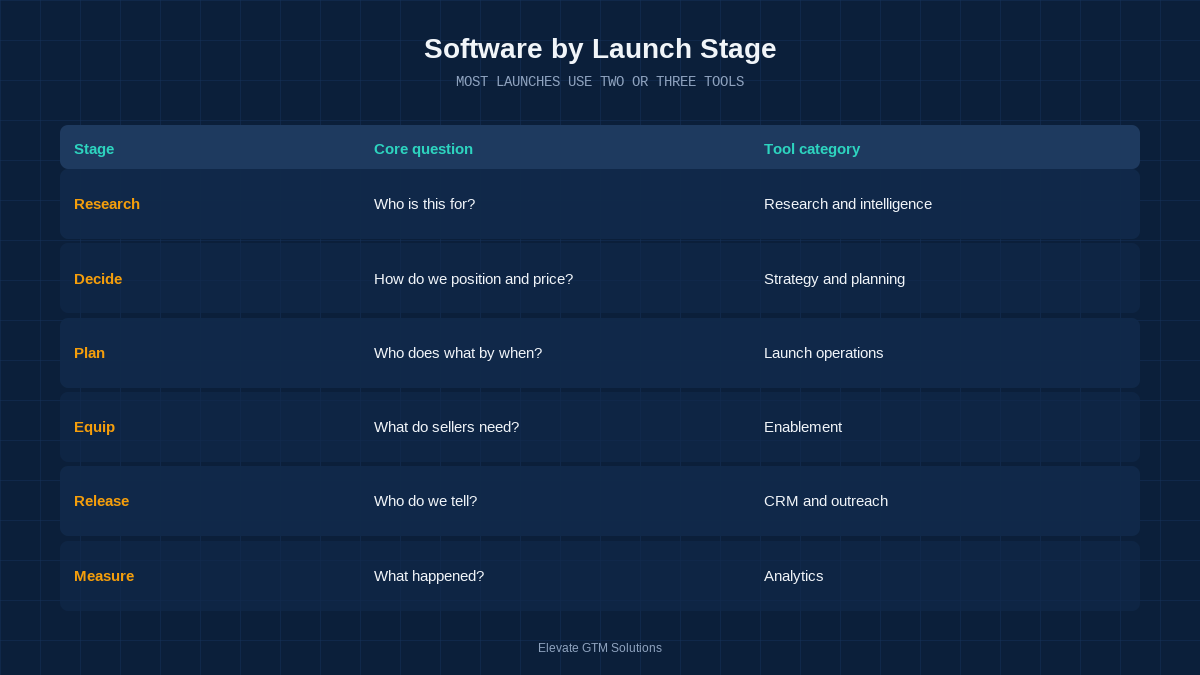
| Stage | Core question | Tool categories | Examples |
|---|---|---|---|
| 1. Research | Who is this for and who else serves them? | Research, competitive intelligence | Klue, analyst research, review sites, customer interviews |
| 2. Decide | How do we position, message and price? | GTM strategy and planning platforms | Elevate GTM Solutions, Ignition |
| 3. Plan | Who does what by when? | Launch operations, work management | Ignition, Asana, Wrike, Aha! |
| 4. Produce | What assets do we need? | Content and design tools, AI writing | Your existing tools |
| 5. Equip | What do sellers and partners need? | Sales enablement | Seismic (including Highspot) |
| 6. Release and reach | Who do we tell and how? | CRM, outreach, ABM, advertising | HubSpot, Salesforce, Apollo, Outreach, Salesloft, 6sense, Demandbase |
| 7. Measure | What happened and what changes? | Analytics, conversation intelligence | Gong, HockeyStack, CRM reporting |
You rarely need a different product for every stage. Use the table to see which stages your current tools already cover and where the gaps are.
Stage by stage
Stage 1: Research
Evidence comes first. Competitive intelligence tools such as Klue track competitor changes. Analyst reports show market structure. Review sites show how customers describe alternatives. Customer interviews and lost-deal reviews remain the strongest input and no tool replaces them. Plan a handful of conversations before you finalize anything.
Stage 2: Decide, the stage most launches under-invest in
This is where strategy software matters most. Decisions made here shape everything downstream: the target customer, the positioning, the messaging pillars, the pricing logic and the launch plan.
Elevate GTM Solutions is an AI-native GTM operating system. For a launch, you enter your market, industry, product and segment context, and it builds a structured strategy with connected outputs: ICP and segmentation, competitive framing, positioning, messaging, pricing logic, channels and a launch and execution plan. The platform page lists launching new products as a core use case, with teams aligned before launch. It supports workflows and weekly execution plans, and you can compare strategies for different segments or regions side by side.
Ignition calls itself a go-to-market operations platform for product and product marketing teams. It organizes launches as plans with owners, tiers and dates, and connects them to messaging, competitive context, release notes and assets. It suits teams that ship often and want product and product marketing in one process.
How to choose between them. If you are launching into a new market or segment and need to decide who to target and what to say, a strategy-first tool may fit. If you ship frequently and the problem is coordinating many launches and keeping product and marketing aligned, a launch-operations-first tool may fit. Some teams use both: one for decisions, one for the calendar.
Without a platform. A one-page strategy canvas, a messaging document and a pricing note in shared documents can work for a single launch. The risk is drift between those documents. See our 30-day plan for building a GTM strategy without a consultant for a structure.
Stage 3: Plan
Work management tools such as Asana and Wrike organize tasks, owners and deadlines. Product tools such as Aha! connect roadmaps to releases. They are good at coordination. They do not decide positioning, and they do not hold customer or competitor context unless you build it in.
Whatever you use, make the plan show dependencies: positioning approved before assets, assets before enablement, enablement before release.
Stage 4: Produce
Assets include website copy, product pages, sales decks, battlecards, emails and announcements. Use the content and design tools you already have. AI writing tools speed up first drafts. The risk is generic output, so feed them your positioning and messaging, not a blank prompt.
Stage 5: Equip
Enablement platforms such as Seismic, which now includes Highspot, manage content, training and coaching at scale. They matter for large teams. For a small launch, a shared folder and a briefing session may be enough. Whatever you use, check that sellers can state the positioning in their own words before release.
Stage 6: Release and reach
Your CRM records leads and pipeline. Outreach tools such as Apollo, Outreach and Salesloft run sequences. Account intelligence platforms such as 6sense and Demandbase help find and target accounts. These tools carry the message to buyers. They assume the message is settled.
Stage 7: Measure
Define what success looks like before launch: adoption, pipeline created, conversion by segment, win rate, sales cycle. Conversation intelligence such as Gong shows what buyers say. Analytics tools such as HockeyStack and CRM reports show pipeline movement. Plan a review at thirty and ninety days and feed what you learn back into the strategy.
A launch readiness checklist
Whatever software you use, test readiness before release.
| Area | Check |
|---|---|
| Customer | We can name the target segment and who it excludes |
| Positioning | A seller can state it in two sentences without notes |
| Messaging | Pillars have proof we can show |
| Pricing | We know what the price signals and have tested it with buyers |
| Assets | Required materials exist and match the messaging |
| Enablement | Sellers and support staff have been briefed |
| Channels | Each channel has an owner and a goal |
| Support | Documentation and onboarding are ready |
| Measurement | Metrics, owners and review dates are set |
| Risks | The main risks and the response to each are written down |
Our guide to enterprise product launch readiness covers evidence gates and a go, narrow or hold decision in more depth.
Example stacks by team size
These are patterns, not recommendations for specific products.
| Team | Example stack | Why |
|---|---|---|
| Early-stage startup, one product | Shared documents, a task board, a spreadsheet, a free first strategy build to test the structure | Low cost, high flexibility |
| Growing company, several launches a year | A strategy and planning platform, work management, the CRM you already have | Keeps decisions consistent across launches |
| Product-led company shipping continuously | A launch operations tool, with a strategy layer as the portfolio grows | Coordination is the bottleneck |
| Enterprise with several regions | A strategy and planning platform, enablement, account intelligence and CRM | Consistency and scale |
| Agency or advisor | A strategy platform to structure client work, plus the client's own tools | Repeatable method across clients |
Mistakes to avoid
Starting with the calendar. A launch plan built before positioning is settled produces rework.
Buying enablement before messaging. Distributing unclear messaging faster does not help.
Skipping customer conversations. Software structures evidence. It does not create it.
Treating launch day as the end. Plan measurement and a review.
Overbuying. A small launch rarely needs an enterprise platform.
Ignoring ownership. Name one person accountable for the launch strategy and its updates.
A hypothetical example
This is an illustration, not a real company.
A B2B software company planned to launch a new product into a segment it had not sold to before. The product team had a roadmap and a launch date. Marketing had a draft message. Sales had questions: who is this for, and why would they switch?
The head of product marketing paused the calendar for two weeks to settle the decision stage. She gathered win and loss notes, ran six customer and prospect conversations, and entered what the team knew into a strategy platform to generate a customer definition, positioning options and messaging. Sellers reviewed the draft and rejected one claim as generic, which the team rewrote with a proof point from an interview.
Only then did the team build the plan in its existing work management tool, with positioning approval as the first dependency. Enablement followed, and a readiness checklist was reviewed three days before release. At thirty days, the team reviewed pipeline by segment and updated the strategy. The software helped by keeping decisions connected and visible. The conversations and the review made the difference.
Launch scenarios and what each needs
Launches differ, and so do the tools they justify.
| Scenario | What matters most | Tools that tend to help |
|---|---|---|
| New product for an existing segment | Positioning against what customers use today, pricing, enablement | Strategy and planning, enablement |
| New product for a new segment | Evidence about the segment, customer definition, messaging proof | Research, strategy and planning |
| Major feature release | Adoption, in-product communication, support readiness | Launch operations, product tools |
| Entering a new region | Local demand, competitors, partners, pricing and compliance | Research, strategy and planning, CRM setup |
| Repositioning an existing product | Consistent story across site, sales material and sales conversations | Strategy and planning, enablement |
| Rebrand or pricing change | Messaging, customer communication, sales briefing | Strategy and planning, work management |
A feature release rarely needs a full strategy platform. A new segment or region usually does, because the biggest risks are about who the customer is and what to say.
A 30-60-90 day plan around a launch
Thirty days before release. Settle the customer definition, positioning and messaging pillars. Run a handful of buyer conversations. Draft pricing logic and test it. Build the launch plan with positioning approval as the first dependency.
Release. Complete the readiness checklist, brief sellers and support, release assets and start the first outreach. Name a daily owner for early signals.
Thirty days after. Review pipeline and adoption by segment, collect objections from sellers, and update messaging and the strategy.
Ninety days after. Compare results with the targets set before launch. Record what you would do differently. Feed the learning into the next launch.
Who does what in a launch
| Role | Responsibility |
|---|---|
| Launch owner | Accountable for the plan, readiness and the decision to release |
| Product management | Product readiness, roadmap constraints, release timing |
| Product marketing | Customer definition, positioning, messaging, competitive framing |
| Marketing | Assets, channels and campaigns |
| Sales leadership | Sales readiness, qualification criteria and feedback |
| Customer success and support | Onboarding, documentation and early issues |
| Finance or pricing owner | Pricing, packaging and economics |
| Executive sponsor | Resolves conflicts and approves trade-offs |
Software is useful when it makes these responsibilities visible. It does not replace naming one launch owner.
Questions to ask a vendor about launches
- How do you keep positioning and messaging attached to each launch?
- Can I compare two launch strategies for different segments side by side?
- What does the tool show about readiness before release?
- How do launches feed back into the strategy afterward?
- Which parts depend on connected tools, and which exact actions are supported?
- What does the tool not do?
Running the decision stage well
Most of the value in launch software is realized or wasted in the decision stage, so it deserves detail.
A positioning session that produces a decision
Hold one working session of about two hours with a named decision owner.
- Review the evidence for ten minutes: win and loss reasons, buyer quotes, the alternatives buyers use.
- State the customer in one paragraph, including who is not a fit.
- List the alternatives a buyer would otherwise choose, including doing nothing.
- Draft two or three positioning statements and read each aloud.
- Test each against the strongest objection a skeptical seller would raise.
- Choose one, and write down the proof you can show for each claim.
- Record the decision and the review date.
If you use a planning platform, bring its draft outputs as the starting point instead of a blank page. People react better to a concrete draft.
Testing price before you commit
Price signals value, so test it with buyers.
| Method | What it tells you | Watch for |
|---|---|---|
| Buyer conversations | Reactions to price and packaging | Politeness bias |
| Comparing with alternatives buyers use | Reference points | Hidden costs of alternatives |
| A limited early-access offer | Real willingness to pay | Small samples |
| Sales feedback during first conversations | Where price comes up | Reps discounting early |
| Packaging options side by side | Which structure fits | Over-complex tiers |
Treat any price suggested by a tool, including an AI tool, as a hypothesis.
Proof for messaging
Each message pillar needs proof you can show a skeptical buyer.
| Type of proof | Example |
|---|---|
| Customer evidence | A quote or a case study you have permission to use |
| Measurement | A result from your own data, with its basis stated |
| Demonstration | Something the buyer can see or try |
| Third-party evidence | An independent review or analyst note, cited accurately |
Remove any claim without proof, or label it as an assumption you are testing.
Launch tiers: match the effort to the launch
Not every launch deserves the same machinery. Many teams use tiers.
| Tier | Typical launch | What it needs | Software that is usually enough |
|---|---|---|---|
| 1 | A new product or a new market | Full strategy, research, enablement, coordinated campaign, readiness review | Strategy and planning, enablement, CRM, work management |
| 2 | A major feature or new segment | Positioning update, targeted assets, seller briefing | Strategy and planning or documents, work management |
| 3 | A minor feature or improvement | Release notes, support readiness, in-app messaging | Product tools, simple task list |
Naming the tier at the start prevents two common errors: over-engineering small releases and under-planning large ones. If a launch changes how you describe the company to buyers, treat it as tier 1 or 2 regardless of engineering effort.
Measuring a launch
Choose measures before release, split into leading and lagging.
| Type | Measure | When to review |
|---|---|---|
| Readiness | Checklist items complete, sellers briefed, assets approved | Before release |
| Leading | Qualified conversations started, demo requests, trial starts, message recall among sellers | First weeks |
| Adoption | Active use of the product or feature | Thirty and ninety days |
| Commercial | Pipeline created by segment, conversion, win rate, sales cycle | Thirty, ninety and one hundred eighty days |
| Learning | Objections heard, claims that landed, claims that did not | Weekly at first |
Review results by segment. A launch can fail in one segment and succeed in another, and the average hides both.
A launch retrospective template
Within a month of release, hold a one-hour review and write down:
| Question | Answer |
|---|---|
| What did we expect to happen? | |
| What happened? | |
| Which assumptions were right? | |
| Which were wrong, and how do we know? | |
| What did buyers say that surprised us? | |
| What would we do differently next time? | |
| What are we changing in the strategy now? |
Store the retrospective with the decision record. When the next launch begins, read it first.
Patterns that make launches fail, and the fixes
| Pattern | What it looks like | Fix |
|---|---|---|
| Positioning decided late | Assets rewritten days before release | Make positioning approval the first dependency |
| Sales briefed at the end | Sellers improvise a different story | Brief sellers during the decision stage and test the message with them |
| Too many channels | Thin effort everywhere | Pick two to four channels and give each an owner |
| No readiness check | Gaps appear on launch day | Use a readiness checklist and a go, narrow or hold decision |
| Success undefined | Results are debated afterward | Set measures and review dates before release |
| Launch treated as an end | No follow-up after day one | Plan reviews at thirty and ninety days |
| Everything decided by committee | Slow, diluted choices | Name one decision owner |
| Evidence skipped | Message based on opinion | Run buyer conversations before finalizing |
An evaluation script for launch software
Run the same test with every candidate, using a real upcoming launch.
Setup. Choose one launch. Gather the product description, the target segment, three known competitors, current messaging and the planned date.
Step one: decisions. Ask the tool to help you record the customer definition, positioning and messaging pillars. Note what it asks you for, what it produces and how specific the result is.
Step two: plan. Build the launch plan with owners, dependencies and dates. Note whether positioning approval can be set as a dependency for assets.
Step three: change. Change the target segment or the release date. Note what updates automatically and what you must fix by hand.
Step four: handoff. Produce what sellers and support need. Note whether it comes from the same source as the strategy.
Step five: review. Ask a seller and a product manager to read the output. Note what they say is missing or wrong.
Step six: afterward. See how results and the retrospective are recorded and how they feed the next launch.
Score each step from one to five, and count the hours your team spent. A tool that scores slightly lower but takes half the effort may be the better fit.
How information should flow through a launch
| From | To | What moves |
|---|---|---|
| Research | Strategy | Evidence about buyers, alternatives and market |
| Strategy | Plan | Segment, positioning, messaging, pricing, channels |
| Plan | Assets | Briefs that carry the approved messaging |
| Strategy | Enablement | Customer profile, talk tracks, objections |
| Plan | CRM and outreach | Target accounts, campaign tags, qualification rules |
| Release | Measurement | Metrics and dates agreed before launch |
| Measurement | Strategy | What worked, what did not, what to change |
The loop from measurement back to strategy is the part most teams skip. If your tools do not support it, build it into a monthly review.
A launch playbook for a two-person team
Small teams often assume launch software is not for them. They still need a process.
- Day 1: write the one-page strategy. Customer, alternatives, positioning, three message pillars with proof, price and two channels.
- Days 2 to 5: talk to buyers. Five conversations, using the one-page strategy as a prompt. Revise it.
- Week 2: build the minimum assets. A page that states the positioning, a short deck, a one-page sales summary and an announcement.
- Week 2: brief sellers or the founder's sales conversations. Practice saying the positioning aloud.
- Release. Announce to existing customers first, then to prospects.
- Week 3 and 4: review. What did buyers ask? Which claim landed? Update the one-page strategy.
A shared document, a task list and a calendar are enough for this. A planning platform helps if you expect several launches a year or several segments.
Governance for large launches
Large organizations need decisions to be visible and defensible.
| Element | What to put in place |
|---|---|
| Decision rights | Who approves positioning, pricing and the release date |
| Readiness gates | Criteria that must be met before release, such as seller briefing completed and support documented |
| Escalation | Who resolves conflicts between product, marketing and sales |
| Regional variation | What may be adapted locally and what must stay consistent |
| Records | A decision log with reasons and dates |
| Review cadence | Weekly during launch, monthly afterward |
Our guide to enterprise product launch readiness covers go, narrow and hold decisions, and who owns GTM strategy covers decision rights across business units.
The launch communication plan
Software organizes tasks. Communication makes the launch land. Plan who hears what, from whom and when.
| Audience | What they need | When | From |
|---|---|---|---|
| Executives | The positioning, the goals and the risks | Before the decision meeting | Launch owner |
| Sellers | The customer profile, the pitch, objections and qualification criteria | Before release, with practice | Product marketing and sales leadership |
| Customer success and support | What is changing, who it is for and known limits | Before release | Product and customer success leadership |
| Existing customers | What it means for them and how to get it | At or just before release | Customer success and marketing |
| Prospects | The positioning and proof | At release | Marketing and sales |
| Partners | What to say and how to refer | Before release | Partner managers |
| Press and analysts | The story and spokespeople, if relevant | Per your approach | Communications |
| The wider company | A summary and how to help | At release | Launch owner |
Two habits help. First, brief sellers early enough for them to challenge the message. Second, tell customers before the public, because existing customers who learn about a launch from an advertisement feel overlooked.
A week-by-week launch checklist
Use this as a skeleton and adjust for the tier and the product.
| When | Actions |
|---|---|
| Six weeks before | Name the launch owner and tier. Gather win and loss evidence. Book buyer conversations. |
| Five weeks before | Run the conversations. Draft customer definition and positioning. |
| Four weeks before | Hold the positioning decision session. Draft messaging with proof. Start pricing tests. |
| Three weeks before | Approve positioning and messaging. Brief creators on assets. Draft the launch plan with owners. |
| Two weeks before | Produce assets. Draft seller material. Brief customer success and support. |
| One week before | Complete the readiness checklist. Rehearse the pitch with sellers. Prepare customer communications. |
| Launch week | Go, narrow or hold decision. Release. Watch early signals daily. |
| One week after | Review early reactions and objections. Fix urgent gaps. |
| Four weeks after | Review pipeline and adoption by segment. Update messaging. Hold the retrospective. |
| Twelve weeks after | Compare results with goals. Record what changes in the strategy. |
If your launch date is closer than six weeks, compress the sequence but keep the order: evidence, decision, assets, enablement, release, review.
Pricing and packaging decisions for a launch
Price is part of positioning, so decide it with the same care.
| Decision | Questions to answer | Evidence to use |
|---|---|---|
| Value metric | What unit does the customer feel value in: users, jobs, locations, usage or outcomes? | Buyer language about their pain |
| Packaging | Which features belong together, and how many tiers does the market expect? | Competitor packages and buyer reactions |
| Entry point | Is there a low-friction way to start? | How buyers start with alternatives |
| Price level | What does the price signal against alternatives? | Reference prices buyers use |
| Discounting | What can sellers offer, and what is off limits? | Sales cycle data and margin |
| Pilot terms | Will early customers get special terms, and for how long? | Willingness to be a reference |
| Communication | Where and how will price be shown? | Buyer preferences |
Common mistakes are launching with too many tiers, copying a competitor's metric without checking fit and letting each seller improvise discounts. Test the structure in buyer conversations before release, and record what you learn so the next launch starts from evidence.
After launch: keeping the strategy alive
A launch plan ends when the product ships. The strategy should not.
Weekly for the first month. Collect what sellers and customers say, record objections and note which claims land. Share a short summary with the launch owner.
Monthly for the first quarter. Update positioning and messaging from what you learned, adjust targeting, and review pipeline and adoption by segment.
Quarterly after that. Revisit the customer definition with fresh win and loss evidence, check competitors and update the plan for the next period.
When something big changes. A new competitor, a pricing move or an unexpected win in a new segment justifies an off-cycle review.
Record each change with the reason. When a new launch begins, the history shows what was tried and what worked.
Key takeaways
- A launch has seven stages: research, decide, plan, produce, equip, release and measure. Tools differ by stage.
- Most launches go wrong in the decision stage, so settle the customer, positioning, messaging and pricing logic before building assets.
- Match launch effort to the tier: a new product or market needs full planning, a minor feature does not.
- Use a readiness checklist and a go, narrow or hold decision before release.
- Define success measures and review dates before launch, and review by segment.
- Keep the strategy alive after release with weekly, monthly and quarterly reviews.
What to do this week
Pick the next launch on your calendar and name its tier. Write down who owns it. Schedule five buyer conversations. Block two hours for a positioning decision session before any assets are produced, and put the readiness checklist in the plan with a date. If you do only those four things, the launch will be better prepared than most, whatever software you use.
Where Elevate GTM Solutions fits
Elevate GTM Solutions is an AI-native GTM operating system. For launches it covers the decision and planning stages: customer and segment definition, competitive framing, positioning, messaging, pricing logic, channel plans and a launch and execution plan, with workflows and weekly plans afterward. Published plans are Enable at USD 499 per month and Growth at USD 1,499 per month, billed annually, with custom Scale pricing, and a free first strategy build is available. It does not replace a CRM, enablement platform or outreach tool, and it connects to HubSpot, Salesforce and other tools for supported actions.
For related reading, see the launch use case, Best GTM Strategy Software, What Is Elevate GTM Solutions? and Launch and Execute. Check the pricing page, or request a demo to run your own launch scenario.
Frequently Asked Questions
What is the best GTM strategy software for product launches?
It depends on the stage. Strategy and planning platforms such as Elevate GTM Solutions or Ignition help decide positioning, messaging and the launch plan. Work management tools coordinate tasks, enablement platforms equip sellers, and CRMs and outreach tools carry the message. Most launches use two or three tools together.
What is a go-to-market launch plan?
A plan that states the target segment, positioning, messaging, pricing, channels, assets, owners, dates, readiness checks and metrics for a product release.
Do I need software to plan a product launch?
For a small launch, documents and a task board can be enough. Dedicated software earns its cost as the number of launches, products and contributors grows.
What is the difference between launch software and strategy software?
Launch tools coordinate tasks and dates. Strategy software helps decide the customer, positioning, messaging and pricing that the launch carries. Some products cover both to different degrees.
What should I decide before building a launch plan?
The target segment, the positioning and the messaging pillars with proof. A plan built before those are settled usually needs reworking.
How early should launch planning start?
Early enough to settle positioning before assets are produced and to brief sellers before release. The timeline depends on the product and market, so work backward from the release date and set dependencies.
What should I measure after a launch?
Adoption, pipeline created, conversion by segment, win rate and sales cycle, with reviews at thirty and ninety days. Feed what you learn back into the strategy.
Can AI help plan a launch?
Yes, for structured drafting such as customer definitions, positioning options and plans. Check outputs against customer evidence and keep a named owner.
Does Elevate GTM Solutions manage launch tasks?
It supports workflows, weekly execution plans and task ownership tied to the strategy. Teams often keep detailed project management in a dedicated tool.
How do I choose between launch tiers?
Name the tier at the start. A new product or market is tier one and needs full strategy and enablement. A major feature or new segment is tier two. A minor improvement is tier three. If a launch changes how you describe the company to buyers, treat it as tier one or two.
What should a launch retrospective cover?
What you expected, what happened, which assumptions held, which did not, what buyers said that surprised you and what you will change in the strategy. Keep it with the decision record.
How do I test pricing for a launch?
Use buyer conversations, comparisons with the alternatives buyers use, a limited early-access offer and early sales feedback. Treat any suggested price as a hypothesis.
Who should own a product launch?
One named launch owner, usually from product marketing or product management, with clear roles for product, marketing, sales, customer success and finance, and an executive sponsor to resolve conflicts.
How soon after launch should I review results?
Review early signals weekly at first, then formally at thirty and ninety days, and again at one hundred eighty days for commercial results. Review by segment.