
By the Elevate GTM Solutions Team · Updated November 10, 2026 · 21 min read
Best GTM Tools for Startups in 2026: What to Use at Each Stage, and What to Skip
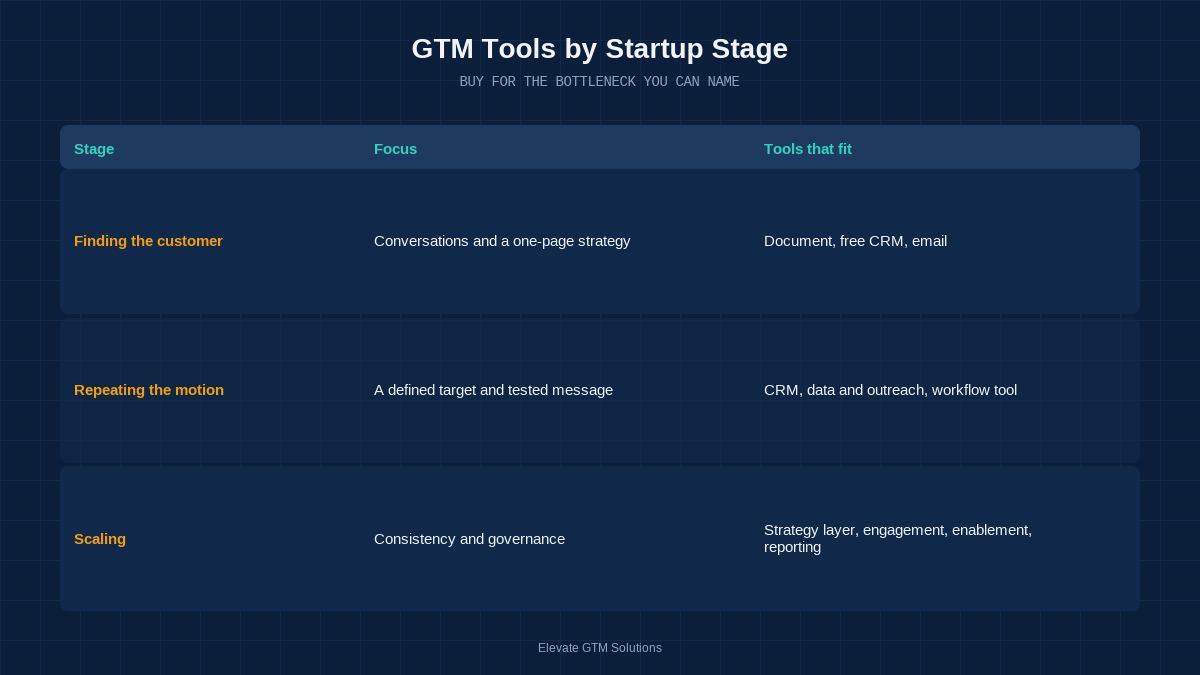
Startups are told to buy a lot of software. A founder with six customers and a half-built product will be pitched a CRM, a data platform, a sequencing tool, an enablement system, a conversation intelligence product and an AI agent, all as essential. Most of it is not essential yet. Early go-to-market is mostly about learning who your customer is and what they will pay for, and the tools that matter at that point are modest.
This guide sorts GTM tools by startup stage and by job, says what to buy and what to defer, names tools that describe themselves in each category and gives you ways to keep the stack small. It does not rank products, because the right tools depend on your stage, motion and budget. Elevate GTM Solutions makes a GTM strategy platform and offers a free first strategy build, so we have an interest. We say where documents and conversations beat any platform for a young company. Details reflect vendors' public descriptions as of November 2026 and change often, so confirm before you buy.
What Are the Best GTM Tools for Startups?
It depends on stage. Before product-market fit, you need few tools: a simple CRM (HubSpot offers a free CRM at its core), shared documents for a one-page strategy and a way to run customer interviews. With early traction, add data and outreach (Apollo has a free plan), a workflow tool such as Zapier, n8n or Make, and a structured strategy process; a platform such as Elevate GTM Solutions offers a free first strategy build to test whether structure helps. When you scale, add enablement, conversation intelligence and account intelligence. At every stage, buy for the biggest bottleneck, not for the category.
How many tools does an early startup need? Often three to five: a CRM, a place for strategy and notes, a way to reach buyers and a calendar and email tool you already have.
Is free software enough? For many early teams, yes. Upgrade when limits block real work.
Three stages, three stacks
| Stage | The question you are answering | What you need | What to skip |
|---|---|---|---|
| 1. Finding the customer (before product-market fit) | Who has this problem and will pay to solve it? | Conversations, a simple record of them and a one-page strategy | Enterprise platforms, autonomous agents, complex attribution |
| 2. Repeating the motion (early traction) | Can we reach the right people repeatedly and win? | A CRM, data and outreach, simple automation and a structured strategy | Large enablement suites, multi-vendor data stacks |
| 3. Scaling (several segments, a team) | How do we stay consistent and efficient as we grow? | Strategy layer, enablement, intelligence, governed automation, reporting | Tools you cannot staff or measure |
The most common mistake is buying stage-three tools at stage one. They are not harmful. They are expensive in cash and attention while you still do not know your customer.
Stage 1: finding the customer
At this stage your most valuable asset is learning. Tools should make learning cheaper.
| Job | Sensible choice | Notes |
|---|---|---|
| Record conversations | A shared document or a free CRM | HubSpot offers a free CRM at its core; any simple tool works |
| Customer interviews | A calendar link, a call tool you already use and a note template | Interviews beat any dashboard |
| Strategy | A one-page strategy in a shared document | Customer, problem, alternatives, positioning, three messages, price hypothesis |
| Outreach | Your own email and LinkedIn, by hand | Manual outreach teaches you the language |
| Research | Review sites, community discussions and competitor pages | Free and informative |
| Analytics | Basic site and CRM reports | Do not over-instrument |
What a founder should do in the first ninety days.
- Talk to twenty people who might have the problem.
- Write what you learn in a template: situation, trigger, alternatives, what they would pay for and who else is involved.
- Draft the one-page strategy and revise it after every five conversations.
- Reach out by hand to a defined list, and record replies.
- Review wins, losses and non-responses weekly.
A platform at this stage is optional. Our guide to GTM strategy for startups goes deeper.
Stage 2: repeating the motion
Once you have a handful of customers and a sense of who buys, the aim is repeatability.
| Job | Tool types | Examples that describe themselves in the category |
|---|---|---|
| Customer records and pipeline | CRM | HubSpot, Salesforce, and other CRMs |
| Contacts and outreach | Data plus sequencing | Apollo (database, sequences, dialer and a free plan), Clay (data and AI workflows), Artisan (AI-run outbound) |
| Routine automation | Workflow tools | Zapier, n8n, Make |
| Strategy and positioning | A structured process or platform | A shared document, Elevate GTM Solutions, Ignition |
| Call notes and coaching | Conversation tools | Often built into outreach tools at this stage |
| Reporting | CRM dashboards | Keep it simple |
Choose by bottleneck.
- If you have no system of record, start with a CRM.
- If you lack contacts, test a data and outreach tool on a small, reviewed batch.
- If you repeat manual steps, automate one.
- If messages vary across the team, write down the message and use a structured process.
Questions to ask before any purchase:
- Which problem does this solve this quarter?
- What is the cheapest way to test it?
- Who will own it?
- What would make us stop?
- Can we export our data?
Stage 3: scaling
When you have several segments, a growing team and real pipeline, consistency and efficiency matter more.
| Job | Tool types | Notes |
|---|---|---|
| Shared strategy | Strategy and planning layer | Keeps customer definition, positioning and messaging consistent across people |
| Account intelligence | ABM and intent platforms | For account-based motions, such as Demandbase or 6sense |
| Enablement | Content, training and coaching | Seismic, which now includes Highspot |
| Conversation intelligence | Call analysis | Gong, or features inside engagement tools |
| Execution at scale | Engagement platforms | Outreach, Salesloft, Apollo |
| Governed automation | Workflow tools with policies | Zapier, n8n, Make with review |
| Reporting | Analytics tools | Attribution tools such as HockeyStack for some teams |
At this stage, an operating rhythm matters as much as the tools: monthly reviews, owners and a record of decisions.
What each job needs, by stage
| Job | Stage 1 | Stage 2 | Stage 3 |
|---|---|---|---|
| Strategy | One-page document | Document or free platform build, updated monthly | Structured layer with owners and a review rhythm |
| CRM | Free CRM or sheet | A CRM with defined stages | CRM with governance and reporting |
| Outreach | By hand | Data and outreach tool, reviewed | Engagement platform, possibly agents with controls |
| Data | Manual research | One data source | Multiple sources if coverage demands |
| Automation | None | A few simple flows | Governed workflows |
| Enablement | A shared doc | Playbook and templates | Enablement platform if scale demands |
| Analytics | Basic | CRM reports | Segment and message analysis |
| AI | Assistant for drafts | Assistant plus tool features, reviewed | Agents with controls and logs |
Keeping the stack small
A small stack is cheaper, easier to learn and easier to leave.
One tool per job. If two tools overlap, retire one.
Free tiers first. Test with free plans where available, and upgrade when limits block real work.
Monthly subscription review. List every tool, its owner and its use. Cancel unused tools.
Annual commitments only after proof. Avoid long contracts until a tool has earned its place.
Exportable data. Prefer tools that let you take your data with you.
Document the stack. One page listing tools, jobs, owners and costs.
Free and low-cost starting points
Prices change, so check each vendor. Examples of free or low-cost entry points described in public sources:
| Tool | Free or low-cost entry point described publicly |
|---|---|
| HubSpot | A free CRM at the core of the platform |
| Apollo | A free-forever plan with limits, and a 14-day trial of paid features |
| Elevate GTM Solutions | A free first strategy build; published plans start at USD 499 per month, billed annually |
| Workflow tools | Free or entry tiers from several vendors |
| General AI assistants | Free or low-cost tiers, useful for drafting and summarizing notes |
Treat free plans as ways to learn. Do not build critical processes on limits you cannot rely on.
Using AI sensibly as a startup
AI assistants can save a small team a great deal of time. A few habits help.
- Give the assistant your own evidence: interview notes, wins and losses, competitor pages.
- Ask it to separate what the notes say from what it infers.
- Never publish a statistic from an AI answer without a source.
- Keep customer data out of tools your company has not approved.
- Treat drafts as drafts. A founder's voice and judgment are the product at this stage.
Our guide to building a GTM strategy with AI covers the process.
Ninety-day plans by stage
Stage 1 plan: find the customer
| Weeks | Focus | Output |
|---|---|---|
| 1 to 2 | List fifty people who might have the problem. Book the first ten conversations | A list and a note template |
| 3 to 4 | Run the conversations. Record trigger, alternatives, willingness to pay | Notes for ten conversations |
| 5 to 6 | Draft the one-page strategy. Reach out by hand to a narrower list | A first strategy and replies to review |
| 7 to 8 | Run ten more conversations, especially with people who did not reply or declined | Evidence about objections |
| 9 to 10 | Revise the strategy. Test one message and one price hypothesis | A second version with changes explained |
| 11 to 12 | Review wins, losses and non-responses. Decide the next segment to test | A decision and next review date |
Tools: a free CRM or spreadsheet, a shared document, your own email and calendar.
Stage 2 plan: repeat the motion
| Weeks | Focus | Output |
|---|---|---|
| 1 | Write the ideal customer, exclusions, buying roles and message pillars with proof | A one-page customer and message sheet |
| 2 to 3 | Set up the CRM stages and loss reasons. Test a data tool on a fifty-account truth set | A working pipeline and a data verdict |
| 4 to 6 | Run a small, reviewed outreach batch. Read every reply | Reply themes and objections |
| 7 to 8 | Automate one routine step. Tag outreach by segment and theme | A simple flow and tagged results |
| 9 to 10 | Review results with the whole team. Update the strategy | A revised sheet |
| 11 to 12 | Decide what to extend, change or stop. Review subscriptions | A leaner or better stack |
Tools: a CRM with defined stages, a data and outreach tool on a free or low plan, a workflow tool, a structured strategy process.
Stage 3 plan: scale with control
| Weeks | Focus | Output |
|---|---|---|
| 1 to 2 | Define owners for strategy, data, outreach and reporting | A roles table |
| 3 to 4 | Settle one shared set of definitions for each product or segment | Shared definitions |
| 5 to 8 | Configure outreach, enablement and reporting from the shared definitions | Aligned configuration |
| 9 to 10 | Introduce a monthly strategy review and a quarterly reset | A review calendar |
| 11 to 12 | Audit automation and agents for controls and logs | An automation map and policy |
Tools: a strategy layer, a CRM with governance, outreach and enablement as needed, governed workflow automation, reporting.
How to think about budget
Prices vary and many are quote-based, so think in terms of decisions, not figures.
| Question | Why it matters |
|---|---|
| What is the cost of the problem this tool addresses? | A tool is worth buying when the problem costs more than the tool |
| What is the cheapest test? | Free plans and short trials limit risk |
| What do we lose by waiting a month? | Many purchases can wait until a bottleneck is real |
| What does the tool really cost over a year, including time? | Setup and review time are costs |
| Can we leave? | Export and notice terms limit lock-in |
| What would we cut to afford it? | Forces trade-offs |
A common rule among founders is to buy only what removes a bottleneck you can name. That is a good rule, not a law.
A scorecard for startup tool choices
Score each candidate from one to five on each line, with the same people scoring.
| Criterion | Question | Score |
|---|---|---|
| Fit with the bottleneck | Does it solve the problem we named? | |
| Simplicity | Can one person set it up and run it? | |
| Free or trial path | Can we test before paying? | |
| Data and export | Can we take our data with us? | |
| Integration | Does it work with our CRM and email? | |
| AI controls | Can we review and limit what AI does? | |
| Total cost | Cost including our time, over a year | |
| Honesty | Does the vendor say what it does not do? |
Choose the highest total, and write down why. Revisit in a quarter.
Founder roles and the tools that support them
| Founder role | What they need | Tool support |
|---|---|---|
| Customer discovery | Conversations, notes, patterns | Calendar, notes, a CRM or sheet |
| Positioning and messaging | A clear one-page strategy | Documents, a structured process |
| Outreach | A list, a message, a way to track | Email, a CRM, later a data and outreach tool |
| Selling | Pipeline, follow-up, proposals | CRM, templates |
| Pricing | Hypotheses and tests | Buyer conversations, a pricing sheet |
| Fundraising or reporting | Metrics that tell a story | CRM reports, a simple dashboard |
| Hiring first sellers | A playbook | The one-page strategy and a short onboarding guide |
If one founder holds all of these roles, favor tools that do not need maintenance.
Four lean stacks, with trade-offs
These are patterns, not recommendations of specific products.
Stack A: conversations and documents
Components: shared document, free CRM or spreadsheet, email and calendar. Strengths: free and focused on learning. Trade-offs: manual work, little reporting. Upgrade trigger: more than a handful of active opportunities or a second seller.
Stack B: lean outbound
Components: CRM, a data and outreach tool on a free or low plan, a one-page strategy. Strengths: can reach many people with modest cost. Trade-offs: risk of volume without relevance. Upgrade trigger: a proven message and a need for more consistency.
Stack C: strategy-led
Components: a structured strategy process or platform, CRM, one outreach tool. Strengths: consistent message as the team grows. Trade-offs: an extra system to maintain. Upgrade trigger: several segments or products.
Stack D: agent-forward
Components: AI outbound platform, CRM, a written brief and approval rules. Strengths: scales prospecting without hiring. Trade-offs: brand and compliance risk, need for monitoring. Upgrade trigger: quality holds across several review cycles.
Signals it is time to upgrade
| Signal | Possible upgrade |
|---|---|
| Deals are tracked in several places | A CRM with defined stages |
| You cannot find contacts fast enough | A data tool, after the target is clear |
| The team repeats the same manual steps | A workflow tool |
| Sellers describe the product differently | A strategy layer and written pillars |
| Managers cannot see what reps do | Engagement or conversation tools |
| Content is scattered | A shared playbook, later enablement software |
| Reports take hours | Better CRM reporting |
| Several sellers need coaching | Conversation intelligence |
Upgrade one signal at a time and review after a month.
A cheat sheet by tool category
| Category | What it does | When to start | What to measure |
|---|---|---|---|
| CRM | Records contacts, deals and history | When you have more than a handful of active conversations | Pipeline by stage, loss reasons |
| Data and enrichment | Finds and verifies contacts | When your target is defined | Accuracy on a sample, cost per usable record |
| Outreach and sequencing | Runs messages and follow-up | When a message has worked by hand | Reply quality, meetings |
| Workflow automation | Connects tools and runs routine steps | When you repeat the same manual steps weekly | Hours saved, errors |
| Strategy and planning | Holds customer, positioning, messaging and plans | When several people need the same answer | Consistency of message, time to update |
| Analytics | Shows results | When you have enough volume to see patterns | A few outcome measures |
| Enablement | Content, training and coaching | When you have several sellers and many assets | Ramp time, content use |
| Conversation intelligence | Records and analyzes calls | When managers can coach from it | Coaching actions taken |
| Account intelligence | Finds in-market accounts | When you run an account-based motion with a proven target | Pipeline influenced, signal quality |
AI assistants for startups: practical workflows
Used well, a general assistant is the most cost-effective GTM tool a small team has.
| Workflow | How to do it | Check |
|---|---|---|
| Interview synthesis | Paste anonymized notes. Ask for triggers, alternatives, objections and exact phrases, with counts and marked inferences | Compare five themes with the notes |
| Competitor summaries | Paste each competitor's own pages. Ask how they position and what they claim | Verify claims against the pages |
| Message drafts | Provide your positioning, proof and forbidden claims. Ask for three variants for one persona | Remove unsupported claims |
| Objection preparation | Provide transcripts. Ask for the five strongest objections and honest responses | Test with a colleague |
| Call preparation | Provide the account's public information. Ask for questions to ask | Verify facts |
| Weekly review | Provide the week's notes. Ask what changed and what to test | Decide yourself |
Keep a prompt library for these, and note which model and version produced which output.
Security and data basics for small teams
A startup handles customer information from day one. A few habits cost little.
| Habit | Why |
|---|---|
| Use company accounts, not personal ones, for tools that hold customer data | Continuity and control |
| Use strong authentication | Basic protection |
| Limit who can export contact lists | Reduces exposure |
| Check where data is stored and whether it is used to train models | Confidentiality |
| Honor opt-outs everywhere | Legal and reputational |
| Keep a list of tools and who owns them | Offboarding and audits |
| Review regional rules on contacting people with your legal advisers | Compliance |
Contract and pricing red flags
| Red flag | Why it matters |
|---|---|
| Annual commitment before you have tested | Lock-in while your needs are changing |
| Pricing hidden until a long sales process | Hard to compare |
| Charges that scale unpredictably | Surprises at volume |
| No data export | Switching cost |
| Auto-renewal with price increases | Budget risk |
| Minimum seats beyond your team | Paying for unused capacity |
| Vague claims about AI limits | Possible overuse charges |
Ask for a monthly or short trial term, and keep notes of what the vendor promised.
Common startup mistakes
| Mistake | What happens | Fix |
|---|---|---|
| Buying tools before talking to customers | A stack with no strategy | Do twenty conversations first |
| Automating outreach too early | Volume without learning | Do it by hand until you know the message |
| Many overlapping subscriptions | Cost and confusion | One tool per job |
| Over-instrumenting analytics | Dashboards nobody reads | Track a few outcomes |
| Letting AI write the strategy | Generic positioning | Use AI to structure evidence |
| No owner for the stack | Tools decay | Name one person |
| Long contracts early | Lock-in | Monthly plans until proven |
A one-page strategy template
Any startup can write this in a day and revise it weekly.
| Field | What to write |
|---|---|
| Customer | Who, in specific terms, including who is not a fit |
| Problem | The situation that makes them need this, in their words |
| Alternatives | What they use today, including doing nothing |
| Positioning | How we are different and why that matters |
| Messages | Three claims with the proof for each |
| Price hypothesis | What we think they will pay and why |
| Channels | Two ways we will reach them |
| Assumptions to test | What we believe but have not proven |
| Next review | Date |
A hypothetical example
This is an illustration, not a real startup.
Two founders building scheduling software for field-service firms bought a data platform, a sequencing tool and an AI outbound agent in their second month. They sent several thousand messages and booked a handful of meetings. After eight weeks they stopped and reviewed. Of the twelve people they had actually spoken with, nine were owner-operators of firms with ten to forty technicians who scheduled in spreadsheets. Their outreach had targeted firms of every size.
They cancelled two tools, kept a free CRM, wrote a one-page strategy around the owner-operator segment, and did fifteen more interviews. They then restarted outreach by hand to a list of two hundred firms, using the words customers had used. After a month, they added a data and outreach tool on a free plan to scale what had worked. Their stack had been cut from five paid tools to two, and their conversations were better.
Questions founders ask about tools
"Should I buy the tool everyone recommends?" Recommendations come from companies in different situations. Ask what problem it solved for them and whether you have that problem now.
"Is it worth paying for a database?" Test a free plan on fifty accounts you know. If accuracy is good for your segment and you need the contacts, a paid plan may be worth it. If your target is small and well known, you may not need a database at all.
"When do I replace spreadsheets with a CRM?" When you cannot see the state of your pipeline in one glance, or when more than one person updates it.
"How do I keep subscriptions under control?" Keep a one-page list with the job, owner, renewal date and monthly cost of each tool, and review it on the first of each month.
"Can I trust AI outputs in my pitch deck?" Only for drafts. Any number or claim needs a source you have read.
"What should I never automate early?" Conversations with your first customers. They are your best source of learning.
A monthly stack review checklist
- List every tool with its job, owner and cost.
- Mark tools not used in the last thirty days.
- Cancel or downgrade the unused.
- Check for overlaps and retire one of each pair.
- Review renewal dates for the next ninety days.
- Confirm data can be exported from every tool.
- Ask each owner whether the tool still solves the original problem.
- Note any new bottleneck that might justify a new tool.
Terms used in this guide
| Term | Meaning |
|---|---|
| Product-market fit | A state in which a product meets a real market need strongly enough to grow |
| CRM | A system that records customers, deals and interactions |
| Enrichment | Adding data to a record from other sources |
| Sequence | A scheduled series of outreach messages |
| Workflow automation | Software that connects tools and runs routine steps |
| One-page strategy | A short document covering customer, problem, alternatives, positioning, messages, price, channels and assumptions |
A sample first-year tool journey
This is an illustration of how a stack might grow, not a prescription.
Months 1 to 3. A shared document holds the one-page strategy and interview notes. A free CRM or spreadsheet tracks conversations. Outreach is by hand. Tool spend is close to zero.
Months 4 to 6. A handful of customers and a clear segment emerge. The team adopts a CRM with defined stages and loss reasons, and tests a data and outreach tool on a free plan with a fifty-account truth set.
Months 7 to 9. A message has worked by hand, so outreach is scaled with a reviewed sequence. A simple workflow tool handles routing and notifications. The strategy page is reviewed weekly and becomes a monthly review.
Months 10 to 12. A second segment and a first seller arrive. The team writes a short playbook, introduces call recording where permitted and considers a structured strategy process. Subscriptions are reviewed and two overlapping tools are retired.
At each step, a specific bottleneck justified the purchase, and the team could say what it would stop paying for if the tool did not help.
When free is not enough
Free plans are for learning. Move to a paid plan when limits block real work: a cap on sequences stops a tested message from scaling, a contact limit stops you from reaching a defined segment, or a missing integration forces hours of manual work each week. Before upgrading, estimate the hours saved and compare them with the monthly cost and the time to set it up. If the saving is not clear, wait another month.
A summary you can pin to the wall
| Stage | Spend attention on | Likely tools | Skip for now |
|---|---|---|---|
| Finding the customer | Conversations and a one-page strategy | Document, free CRM, email | Platforms, agents, attribution |
| Repeating the motion | A defined target and a tested message | CRM, data and outreach on a free plan, a workflow tool | Enterprise enablement |
| Scaling | Consistency and governance | Strategy layer, engagement, enablement, reporting | Tools nobody owns |
Check each purchase against one question: which bottleneck does this remove, and how will we know?
What to do this week
List every tool you pay for and the job it does. Cancel any you have not used in a month. Write the one-page strategy. Book five customer conversations. Choose one bottleneck and one tool to test for it, with a free plan if possible.
In plain language
A startup does not need a big stack. It needs to learn who its customer is, say something specific to them and find out whether they will pay. Software helps once you know what you want to speed up, and it distracts before that. Start with conversations, a one-page strategy and a simple record of what you hear. Add a CRM when pipeline becomes hard to see, a data and outreach tool when you have a message that works, and structure when several people need the same answer. Keep one tool per job, use free plans to test, review subscriptions monthly and cancel what you do not use. The best stack is the smallest one that removes your current bottleneck.
Key takeaways
- The right tools depend on stage. Before product-market fit, conversations and a one-page strategy matter more than software.
- Buy for your biggest bottleneck, test with free plans and keep one tool per job.
- Add outreach and data tools once your target and message are proven.
- Add enablement, intelligence and governed automation when you scale.
- Use AI for structuring and drafting, with your own evidence and review.
- Review the stack monthly and avoid long contracts until a tool has earned its place.
Where Elevate GTM Solutions fits
Elevate GTM Solutions is an AI-native GTM operating system for B2B companies. It builds structured strategy across 15 modules from the market, product and segment context you provide, and supports workflows and a review rhythm. A free first strategy build is available, which makes it a low-cost way to test whether structure helps your team. Published plans, billed annually, are Enable at USD 499 per month and Growth at USD 1,499 per month, with custom Scale pricing. It is not a CRM, a data provider or an outreach tool, and it connects to HubSpot, Salesforce, LinkedIn, Notion and Claude for supported actions.
For related reading, see What Is Elevate GTM Solutions?, Best GTM Automation Tools, Best GTM Strategy Software and GTM Strategy for Startups. See the pricing page, or request a demo.
Frequently Asked Questions
What are the best GTM tools for startups?
It depends on stage. Early on: a simple or free CRM, shared documents for a one-page strategy and a way to run customer interviews. With traction: data and outreach, light automation and a structured strategy process. At scale: enablement, intelligence and governed automation.
How many GTM tools does a startup need?
Often three to five at first: a CRM, a place for strategy and notes, a way to reach buyers and the email and calendar tools you already use. Add tools as bottlenecks appear.
Is a free CRM enough for an early startup?
Often yes. HubSpot offers a free CRM at the core of its platform, and other CRMs have free tiers. Upgrade when limits block real work.
Should a startup use an AI SDR?
Only once the target and message are proven, with approval rules and monitoring. Before that, outreach by hand teaches you the language that works.
Do startups need a GTM platform?
Not always. A one-page strategy in a shared document can be enough. A platform helps when you have several products, segments or contributors, and a free first strategy build can be a low-cost test.
What should a startup buy first?
Whatever solves your biggest current bottleneck, tested on a free plan if possible. If you have no system of record, a CRM. If you lack contacts, a data and outreach tool, after your target is clear.
How do I avoid wasting money on GTM tools?
Buy for one bottleneck at a time, test on free plans, keep one tool per job, review subscriptions monthly and avoid annual contracts until a tool has proven itself.
How should startups use AI in go-to-market?
For structuring interview notes, drafting and research, using your own evidence, separating what the notes say from inference and reviewing every output. Do not publish unsourced statistics.
When should I add enablement or conversation intelligence?
When you have enough sellers and calls that a shared folder and manual reviews no longer work, and managers have time to coach from the output.
What is a good first GTM process for a startup?
Twenty customer conversations, a one-page strategy revised weekly, hand-written outreach to a defined list and a weekly review of wins, losses and non-responses.
What is a good GTM stack for a startup under ten people?
A free or simple CRM, a shared document holding a one-page strategy, your existing email and calendar and a data and outreach tool on a free plan once your target is clear. Add tools as bottlenecks appear.
When should a startup start using a data and outreach tool?
After you have a defined target and a message that has worked with real buyers. Until then, outreach by hand teaches you the language.
How do I decide what to cut from my stack?
List every tool with its job, owner and last use. Cancel what you have not used in a month and retire one of any two tools that overlap.
Is it worth paying annually to save money?
Only after a tool has proven itself on a monthly plan. Early startups change direction often, and long commitments reduce flexibility.
What is a one-page GTM strategy?
A short document covering customer, problem, alternatives, positioning, three messages with proof, a price hypothesis, two channels, assumptions to test and a review date.