By the Elevate GTM Solutions Team · Updated November 13, 2026 · 23 min read
GTM Platforms That Integrate With Salesforce: What "Native" Means, How Field Mapping Fails, and What to Test Before You Buy
Every GTM vendor says it integrates with Salesforce. The sentence is nearly meaningless on its own. It can describe a certified package installed inside your org, a connector that runs once a day, a webhook that pushes a record when something happens, or a button that exports a spreadsheet. All four get called "integrations" on a feature page, and they behave very differently on the day your admin changes a picklist.
This guide explains the kinds of Salesforce integration you will meet, what "native" does and does not guarantee, why field mapping is where most integrations quietly break, and a test plan you can run in a sandbox before you commit. It is written for the person who has to answer the question at the heart of many buying conversations: which GTM tools work with our existing Salesforce setup, and how reliable is the mapping?
Elevate GTM Solutions is a GTM strategy platform that connects to Salesforce for supported actions, so we are a vendor with a stake. We do not rank other vendors' Salesforce integrations here, and we have not tested them. We describe the technical patterns, because the patterns are the same whichever product you evaluate. Details of Salesforce itself can change with each release, so confirm limits and behavior in Salesforce's current documentation and with your own administrator.
Which GTM platforms integrate with Salesforce, and how reliable is field mapping?
Many GTM platforms connect to Salesforce, but the connections differ: some are installed packages from the AppExchange, some use the Salesforce APIs through an authorized connection, and some only export files. "Native" usually means built for Salesforce and often installed inside it, which can help with security review and use of Salesforce objects, but it does not guarantee reliable mapping. Reliability depends on how fields are mapped, which direction data flows, how conflicts, duplicates and required fields are handled, and what happens when your admin changes the schema. Test with your real fields in a sandbox, then watch the error log for two weeks.
What does native mean? Built for or inside Salesforce, usually through the AppExchange. It is a starting point for questions, not an answer.
Why does mapping break? Because the schema changes, and integrations do not always notice.
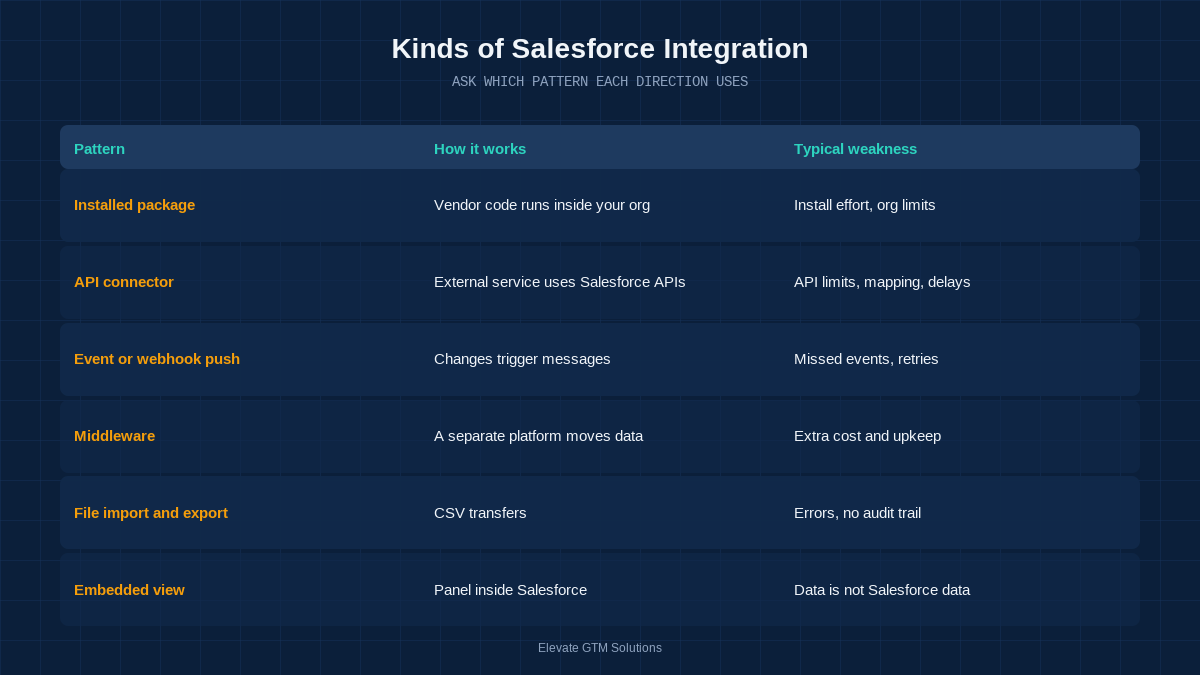
The kinds of Salesforce integration
| Pattern | How it works | Typical behavior | Best when | Typical weakness |
|---|---|---|---|---|
| Installed package (AppExchange) | The vendor's code runs inside your org as a managed package | Uses Salesforce objects, fields and permissions directly | You want data and actions to live in Salesforce | Install effort, org limits, package upgrades |
| API connector | An external service connects through an authorized app using Salesforce APIs | Reads and writes records on a schedule or on events | The product lives outside Salesforce and needs CRM data | API limits, field mapping, sync delays |
| Event or webhook push | Changes trigger a message to or from Salesforce | Near real time for specific events | Time-sensitive actions such as routing or alerts | Missed events, retry handling |
| Middleware or iPaaS | A separate integration platform moves data between tools | Flexible mapping and transformation | Many tools, complex rules | Extra cost, another system to maintain |
| File import and export | CSV or spreadsheet transfers, manual or scheduled | Batch, one way or two | Pilots, small volumes, one-off loads | Errors, no audit trail, manual effort |
| Embedded view | A panel inside Salesforce that shows data from another tool | Display, sometimes with actions | Showing context to sellers | Data does not become Salesforce data |
A single product may use more than one of these. A vendor might sell an AppExchange package for display inside Salesforce and an API connection for the heavier data movement. When you ask a vendor how it integrates, ask which pattern it uses for each direction and each object.
What "native" really means
The word is used loosely, and it helps to separate three things people mean by it.
Built for Salesforce. The product was designed around Salesforce data, and it is a good fit for how Salesforce organizes accounts, contacts, leads, opportunities and activities.
Installed in your org. The vendor's code runs inside your Salesforce environment, typically through a package on the AppExchange. Products listed on the AppExchange go through a Salesforce security review as part of the listing process, which gives you some assurance about how the package behaves. It does not tell you how well the product maps to your own fields.
Certified or partner status. The vendor belongs to a partner program. This tells you the vendor has a relationship with Salesforce. It does not tell you how the integration performs.
What native does not guarantee: that your custom fields are supported, that two-way sync works the way you expect, that duplicates are handled, that data quality is protected or that the integration continues to work after a schema change. Those are properties of the specific implementation.
Why field mapping is the real issue
A field map is a table that says "this field in the GTM tool corresponds to that field in Salesforce." Field mapping looks simple and is where most integrations fail in practice, because the two sides keep changing.
| Failure | What happens | Why it happens |
|---|---|---|
| Renamed or deleted field | Sync errors or silent drops | The map points at something that no longer exists |
| New required field | Writes fail | Salesforce rejects records missing the new field |
| Picklist mismatch | Values rejected or mapped wrongly | The tool sends a value that is not in the picklist |
| Data type mismatch | Truncation or errors | Text sent to a number field, or too long for the field |
| Field-level security | The integration user cannot see or write the field | Permissions for the integration user were not set |
| Validation rules | Records fail to save | A rule your admin wrote does not expect the integration |
| Duplicate rules | Records blocked or duplicated | Matching logic differs between the tool and Salesforce |
| Record types | Wrong layouts or values apply | The integration does not choose a record type |
| Owner assignment | Records land with the wrong owner | The tool and Salesforce disagree on routing |
| Time zones and formats | Dates shift by a day | Different assumptions about time zones |
Most of these are silent. The integration appears to work, the sync log shows green and the data is subtly wrong. This is why the test plan later in this guide spends so much time on the error log.
Direction of sync, and who wins
Data can flow from the tool to Salesforce, from Salesforce to the tool, or both. Each choice creates a rule about who is right.
| Direction | Meaning | Risk |
|---|---|---|
| Salesforce to tool | Salesforce is the source of truth | The tool's own edits are overwritten |
| Tool to Salesforce | The tool is the source for chosen fields | It can overwrite what sellers entered |
| Two way | Both can change a field | Conflicts, and a rule is needed to resolve them |
The cleanest design assigns each field one owner. Account name and owner come from Salesforce. A score calculated by the GTM tool goes to Salesforce. Fields that could be edited by both sides are the ones that cause trouble. A consulting site's 2026 guide to Salesforce's own email and calendar sync makes the same point in its own context: it recommends treating Salesforce as the source of truth for contacts and syncing outward, so individual users' edits do not overwrite shared CRM data. The principle applies to any integration.
Ask every vendor: for each field we plan to sync, which system owns it, and what happens when both change it between syncs?
Limits you may run into
Salesforce enforces limits on how heavily an integration can use its APIs, and the details depend on your edition, licenses and options. Salesforce publishes the current numbers in its developer documentation, which describes limits on API requests over a rolling period and on concurrent requests. Because the numbers depend on your contract and change over time, check the documentation for your edition and ask your administrator how much headroom you have.
Why this matters for a GTM integration:
- Two-way sync of large databases can consume a large share of the daily allowance. Ask the vendor how many calls a typical sync uses per thousand records.
- Several tools sharing one org compete for the same allowance. Add them up.
- Bulk operations behave differently from single-record operations. Ask whether the vendor uses bulk methods for large loads.
- Limits are enforced by Salesforce, so a rejected call is not the vendor's fault, but it is your problem. Ask what the product does when a limit is reached: retry, queue, alert or drop.
Objects and data that matter
Integrations support different parts of Salesforce. Before you buy, list what you need and ask about each.
| Salesforce area | What GTM tools typically want | Questions |
|---|---|---|
| Accounts | Firmographics, hierarchy, owner | Are parent and child accounts handled? Which fields? |
| Contacts and leads | Roles, status, source | How are leads and contacts matched, and what about conversion? |
| Opportunities | Stage, amount, close date, history | Is stage history available? Can the tool create or update opportunities? |
| Activities | Calls, emails, meetings | Are they read, written or both? |
| Campaigns | Membership and response | Which campaign fields are supported? |
| Custom objects | Your own structures | Are they supported, and how are they mapped? |
| Users and roles | Ownership and territories | Can the tool respect your hierarchy and permissions? |
| Reports and dashboards | Existing reports | Can the tool read report data or only objects? |
| Files and notes | Attachments, call notes | Is this supported or excluded? |
If your org relies heavily on custom objects, record types or complex hierarchies, put those first in your test, because they are where simple integrations stop.
Activity data and email capture
Many GTM tools depend on activity data: who spoke to whom, when, about what. Salesforce has its own features for capturing email and calendar activity, and third-party tools capture it in their own ways. The details matter because captured activity is not always the same as standard activity records.
A 2026 guide to Salesforce's Einstein Activity Capture, written by a Salesforce consulting site, describes some of the differences. It reports that captured emails and events can be stored outside the core Salesforce instance, that captured-only email may appear on timelines without being reliably usable in reports, automation or APIs, and that Salesforce recommends syncing email as standard Salesforce activity instead. It also describes retention and user limits that differ by license. These details are secondary and change between releases, so treat them as a prompt to ask your administrator, and not as a specification.
Questions to ask any GTM vendor that depends on activity data:
- Do you read activity from Salesforce, from the mail server directly, or both?
- If you read from Salesforce, which activity types and which storage?
- If captured activity is stored outside the main org, can your tool use it?
- How far back can you read, and what happens to history if a setting changes?
- How do you handle privacy, consent and excluded contacts?
Security and permissions
An integration acts in Salesforce as a user, and what it can see and change depends on that user's permissions. Good practice:
- Use a dedicated integration user, not a person's login.
- Give the least access needed. Read only where possible. Write only to named fields.
- Review field-level security. The integration can only read and write the fields its user is allowed to.
- Use the authorized connection method the vendor recommends, and review which scopes it requests.
- Know where the data goes. Ask where the vendor stores Salesforce data, for how long and who can access it.
- Plan the exit. Know how to revoke access and what data the vendor deletes.
Our GTM platform governance checklist goes through these questions for AI tools in more detail.
Sandbox first
Salesforce sandboxes are copies of your org for testing. Run the integration in a sandbox first, with a realistic data set and your real configuration: custom fields, validation rules, duplicate rules, record types and automation. A test in a clean developer org will pass things that fail in production.
Check that the sandbox contains enough data to expose problems. A sandbox with a hundred records will not show you what a hundred thousand does.
A test plan you can run in two weeks
| Day | Test | What to record |
|---|---|---|
| 1 | Connect the tool to a sandbox with a dedicated integration user | Which permissions and scopes were requested |
| 1 | Map ten fields: five standard, five custom | Time to map, any fields the tool could not see |
| 2 | Run a first sync of a limited set | Records read, records written, errors |
| 2 | Check ten records by hand against Salesforce | Exact differences, including formats and time zones |
| 3 | Change a picklist value in Salesforce | Does the tool notice, error or send the old value? |
| 4 | Add a required field | Do writes fail, and does the tool alert you? |
| 5 | Rename a custom field | Does the map break, and how visibly? |
| 5 | Create a duplicate and a near-duplicate | How does matching behave? |
| 6 | Edit the same field on both sides between syncs | Who wins, and is the result logged? |
| 7 | Remove the integration user's access to one field | Does the tool report the permission error? |
| 8 | Load a high volume | Time taken, API calls used, behavior at limits |
| 9 | Delete a record on each side | Is the deletion mirrored, ignored or flagged? |
| 10 | Revoke access and reconnect | Is the process clean? What data remains in the tool? |
| 11 to 14 | Run on live-like data and review the error log daily | Error types, how often, how they were reported |
Keep a table of results. A tool that fails visibly and tells you what went wrong is better than one that appears to succeed.
Monitoring after launch
Integrations decay. Plan a lightweight routine.
- A weekly look at the sync error report, by a named person.
- A review of schema changes before they happen. Add the integration owner to the change process for fields and picklists.
- A monthly sample check. Pull twenty records and compare them across systems.
- Alerts for failures, sent to a person, not to a mailbox nobody reads.
- A quarterly review of API consumption across all tools.
If your org has a change advisory process, make the integration part of it. The most common cause of a broken sync is an administrator making a reasonable change without knowing a tool depended on the field.
Questions to ask any vendor about Salesforce
- Which pattern do you use: AppExchange package, API connection, events, middleware or file import?
- For each object we need, what do you read and what do you write?
- Which fields are supported, including custom fields, and how do I map them?
- Which system owns each field, and how are conflicts resolved?
- How do you handle picklists, required fields, validation and duplicate rules?
- What happens when we change the schema?
- How many API calls does a typical sync use?
- What do you do when a limit is reached?
- How do you report errors, and who gets the alert?
- What permissions does the integration user need?
- Where do you store our Salesforce data, and for how long?
- Can we test in a sandbox, and can we speak to a customer with a setup like ours?
Choosing between patterns
| If this is true | Consider |
|---|---|
| You want sellers to work inside Salesforce and see context there | An installed package or embedded view |
| The product has its own workspace and needs CRM data in it | An API connection with clear field ownership |
| You need an action to happen quickly after an event | Event-driven push, with retry |
| You run many tools and need shared mapping | Middleware, and a person to maintain it |
| You are piloting and the volume is small | File import, with a plan to replace it |
| Your org has heavy customization | Test each pattern in a sandbox before choosing |
There is no best pattern for everyone. The reliability of an integration depends on the care taken with mapping, monitoring and ownership, and on how disciplined the Salesforce admin team is about change.
Roles and ownership
Three roles tend to be involved, and problems follow when one is missing.
The business owner decides what the integration is for and what data matters. Without one, nobody can say whether it works.
The Salesforce administrator knows the schema, the automation and the permissions, and approves access. Without one in the room, mapping is guesswork.
The integration owner monitors the sync and follows up on errors. This is often the person who runs the GTM tool. Without one, errors pile up.
Name all three before launch, and put a recurring thirty-minute review on their calendars for the first quarter.
An illustration
This is a fictional example.
A company asks a GTM platform to write a "fit score" from its own model into a custom field on the Account object, and to read account owner and industry from Salesforce. In the sandbox, the first sync works. On day three, the admin adds a validation rule that requires a reason whenever a score is changed by anyone other than a sales operations user. The next sync fails for every account, and the vendor's dashboard shows a generic error that the team does not notice for four days. The fix is simple: an exception for the integration user. The lesson is about monitoring. Because the failure was visible only if someone looked, the company adds an alert and puts the integration owner on the admin change list.
What to ask about AI features in the integration
Many GTM tools now use AI on CRM data. Questions to add:
- Does the tool send Salesforce data to an AI model, and which provider?
- Is our data used to train models?
- Can we exclude fields or objects from AI processing?
- What does the AI write back to Salesforce, and is there approval before it does?
- Is there a log of AI-written changes?
These questions overlap with governance, and the answers should be in writing. See our guide to questions to ask AI GTM vendors.
Glossary
API. A way for software to talk to Salesforce. API limits cap how much it can do in a period.
AppExchange. Salesforce's marketplace for apps and packages.
Field-level security. Permissions that decide who can read or edit each field.
Integration user. A Salesforce user account used by a connected tool.
Managed package. Code installed in an org from a vendor, which the vendor can upgrade.
Picklist. A field with a fixed list of allowed values.
Record type. A way to give different layouts and picklist values to different kinds of record.
Sandbox. A copy of an org used for testing.
Schema. The structure of objects and fields in an org.
Validation rule. A rule that blocks a record from saving unless a condition is met.
Common mistakes
- Accepting "native" as an answer.
- Testing in a clean org.
- Mapping ten fields and calling it done.
- Allowing both sides to edit the same field without a rule.
- Using a person's login for the integration.
- Not telling the admin team about the integration.
- Ignoring API consumption until it runs out.
- Trusting a green sync dashboard.
- Having no owner for errors.
- Forgetting what happens to data when you leave.
Clean the data before you connect anything
An integration copies whatever is in Salesforce, including the mess. A week of cleanup before the test saves a month of confusion after it. Start with these checks.
| Check | What to look for | Why it matters to an integration |
|---|---|---|
| Duplicate accounts | Several records for one company, often with variations in the name | The tool may attach data to the wrong one, or create another |
| Orphan contacts | Contacts with no account | Account-level logic cannot reach them |
| Owner hygiene | Records owned by people who have left, or by queue users | Routing and alerts go nowhere |
| Picklist sprawl | Many near-identical values, or values nobody uses | Mapping tables become long and fragile |
| Unused custom fields | Fields nobody fills in | They add noise to every mapping conversation |
| Stage definitions | Opportunity stages that mean different things to different teams | Any tool that reads stage inherits the confusion |
| Missing industry or size | Blank firmographics | Scoring and segmentation produce poor output |
| Inconsistent formats | Phone, country and state written many ways | Matching fails and reports split |
You do not need to fix everything. You do need to know which problems the integration will meet, and to decide in advance which ones the vendor's tool must handle.
Matching and duplicates
Matching is the process of deciding whether an incoming record is the same as one already in Salesforce. It is a source of more integration trouble than any technical limit, because the right answer depends on business rules.
Ask each vendor to describe, in plain words, what happens in these cases:
- A contact arrives with an email address that matches a contact on a different account.
- A company arrives whose name is close to, but not the same as, an existing account.
- A lead arrives for a person who is already a contact.
- Two records in the tool both match one record in Salesforce.
- A merged record in Salesforce disappears, and the tool still holds the old identifier.
Good answers name the keys the product uses, such as an external identifier, an email address or a domain, and say what happens when keys conflict. Weak answers say "we use AI to match." If the tool uses fuzzy matching, ask to see the confidence setting and the review queue for uncertain matches.
Salesforce has its own duplicate and matching rules that your admin may have tuned over years. A good integration respects them. Ask whether the tool's matching runs before or after Salesforce's rules, and whether a record blocked by a Salesforce rule is reported or lost.
Territories, ownership and routing
If your sellers' work depends on territories, account ownership and routing, the integration must respect them. This is more than a technical matter, since it decides who sees a signal first.
- Who owns a record the tool creates? Some products assign a default owner, which can break territory logic.
- Can the tool read your territory model? If it ignores it, alerts reach the wrong people.
- What happens when ownership changes? Reassignment should flow to the tool, and alerts should follow the new owner.
- Do sellers see data they should not? Check that the sharing model in Salesforce is respected in any embedded view.
A short test: create an account in a territory with a known owner, run the sync and see where the first alert goes.
Reporting after integration
Leaders will want to see results. Plan the reporting before the data starts to flow.
Where will the numbers live? If a tool writes a score to Salesforce, the score can appear in Salesforce reports. If it keeps the score inside its own workspace, the report has to come from the tool. Decide which is the source for each measure.
How will you tell the integration is working? Track two things: a technical measure such as the share of records synced without error, and a business measure such as the share of sellers who use the output. Neither alone is enough.
What will you do when the numbers disagree? They will. Agree on which system wins, and write it down.
Replacing or retiring an existing integration
If you already have a connection and are moving to a new one, run them side by side for a short period and compare. Points to settle:
- Which fields are written by the old integration and must now be written by the new one?
- What history is held in the old tool and will you keep an export?
- When will you revoke the old connection's access?
- Who tells the sellers, and what will they notice?
Turning off an old integration and turning on a new one in the same afternoon is how data goes missing.
A comparison worksheet
Use one column per vendor and score what you see in the test, not what the sales page says.
| Question | Vendor 1 | Vendor 2 | Vendor 3 |
|---|---|---|---|
| Integration pattern for each direction | |||
| Objects read | |||
| Objects written | |||
| Custom fields supported | |||
| Time to map ten fields | |||
| Behavior when a picklist changes | |||
| Behavior when a required field is added | |||
| Conflict rule | |||
| Duplicate handling | |||
| API calls per thousand records | |||
| Error reporting and who is alerted | |||
| Sandbox testing allowed | |||
| Reference with a similar setup | |||
| Data stored by the vendor, and for how long |
If a vendor cannot fill in a row, ask for the answer in writing, and note how long it takes them to reply. A vendor's responsiveness during the evaluation is often a preview of its support afterwards.
Where Elevate GTM Solutions fits
Elevate GTM Solutions is an AI-native GTM strategy platform, and it is not a CRM. Its integrations page describes Salesforce as a connection for supported destination actions with available inputs. That wording is deliberate and worth reading closely. It means the connection supports particular actions and data, not automatic two-way synchronization of every Salesforce object. Before you rely on it, ask which exact actions and data it supports for your account, which fields are involved and how errors are reported. We would suggest the same questions for any vendor, including us. For a comparison of what the platform does and what Salesforce does, see Elevate vs Salesforce and GTM platform vs CRM.
What to do this week
- Ask your Salesforce administrator for the list of custom fields, validation rules and automation that any tool must respect.
- List the objects and fields each GTM tool you are considering needs.
- Send every vendor the twelve questions above.
- Book a sandbox and a named integration user.
- Run the two-week test plan on the most likely candidate.
- Name the business owner, the admin and the integration owner.
- Set up a weekly error review before you go live.
Key takeaways
- "Integrates with Salesforce" covers installed packages, API connections, event pushes, middleware and file imports, and they behave differently.
- Native is a starting point for questions, not proof of reliability.
- Mapping fails when the schema changes, so test changes, not only the first sync.
- Give every field one owner and decide what happens in conflict.
- Test in a sandbox with your real configuration and watch the error log.
- Name owners and monitor the integration after launch.
Sources
- Salesforce developer documentation describes API limits, which vary by edition and license. Check the current figures for your org on Salesforce's developer site.
- Einstein Activity Capture: The Guide to Salesforce Email and Calendar Sync, a Salesforce consulting site, March 2026. A secondary source used for the description of captured activity, source-of-truth advice and limitations. Confirm details with Salesforce.
- Elevate GTM Solutions integrations page: description of the Salesforce connection as supported destination actions with available inputs.
Frequently Asked Questions
Which GTM platforms integrate with Salesforce?
Many do, through different methods: installed AppExchange packages, API connections, event pushes, middleware or file imports. The method matters more than the logo on a feature page. Ask each vendor which method it uses for each object and direction.
What does a native Salesforce integration mean?
It usually means the product was built for Salesforce or runs inside it, often through an AppExchange package. It does not guarantee that your custom fields are supported or that mapping stays reliable after a schema change.
How reliable is Salesforce field mapping?
It depends on the implementation and on how your org changes. Mapping fails when fields are renamed, required fields are added, picklists change, permissions differ or validation and duplicate rules block writes. Test these changes in a sandbox.
What happens if my admin changes a field?
It depends on the tool. Some break visibly, some skip the field silently and some continue to send old values. Test it before you buy, and add the integration owner to your change process.
Should data sync one way or both ways?
Give each field one owner. A common design reads account and owner data from Salesforce and writes calculated results from the tool back to named fields. Two-way sync on the same field needs a clear conflict rule.
Do I need a sandbox to test a GTM integration?
Yes, if you can. Test with a realistic data volume and your real validation rules, record types and automation. A clean test org hides most of the problems you will meet in production.
Can Salesforce API limits affect a GTM tool?
Yes. Salesforce limits API usage by edition and license, and several tools share the same allowance. Ask each vendor how many calls a typical sync uses and what the tool does when a limit is reached.
What permissions should the integration user have?
Use a dedicated user with the least access needed: read access where reading is enough and write access only to named fields. Review field-level security and the scopes the connection requests.
How do I monitor an integration after launch?
Assign an owner to review the sync error report weekly, sample records monthly, set alerts for failures and review API consumption each quarter. Include the integration in your schema change process.
Is Elevate GTM Solutions a Salesforce integration or a CRM?
It is not a CRM. It lists Salesforce among its supported connections for destination actions with available inputs. Ask which exact actions and data are supported for your account.
Does an AI tool change what I should ask about Salesforce?
Yes. Ask whether CRM data goes to an AI model, whether it is used for training, whether you can exclude fields, what the AI writes back and whether changes are logged and approved.
How long should an integration test take?
Two weeks is a reasonable minimum: a few days for mapping and schema-change tests, a few for volume and permission tests and a week of running on live-like data with a daily look at errors.