By the Elevate GTM Solutions Team · Updated November 13, 2026 · 25 min read
How to Tell Whether a GTM Platform Is Really AI-Native or Just Has AI Features Added On: Ten Tests You Can Run in a Demo
Nearly every GTM product now says it is AI-powered. A chat box appears in the corner of the screen. A button writes an email. A summary appears above a call recording. The press release says "AI-native." For a buyer, the words have stopped carrying information, because they apply to products built very differently. Some were designed around AI from the first line of code. Some added a model on top of an older product last year. Some did little more than rename an existing feature.
Does it matter? It can. How a product is built affects what it can do, how well it keeps up as models improve, how much it costs to run, how it handles your data and whether the results are consistent enough to trust. But the label alone proves nothing, and "AI-native" is not automatically better than "AI-added." A mature product with careful AI features may beat a new product that is mostly a demo.
This guide gives you a way to find out for yourself. It explains what the terms are supposed to mean, why the difference matters and when it does not, and ten tests you can run during a demo or trial. We make a GTM platform that we describe as AI-native, so we have an obvious interest, and we apply every test in this guide to our own product's claims as well. We use no benchmark figures. Descriptions of other vendors reflect general positioning and should be checked on their sites. Examples are invented.
How can you tell if a GTM platform is really AI-native?
Look at what happens when the AI is removed or constrained. In an AI-native product, the core job, such as building and updating a strategy, cannot be done well without the AI, because the product was designed around it: its data model, workflows and interface assume that a model does much of the work. In an AI-added product, the AI is an extra layer that drafts text or summarizes data on top of a workflow that exists without it. Test this in a demo: ask for the core outcome using your own data, ask what is generated and what is retrieved, ask how outputs are checked and corrected, ask what happens when the underlying model changes and ask to see the limits. Judge by results on your own cases, not by the label. Neither design is automatically better, and what matters is whether the product does your job reliably.
Is AI-native always better? No. It is a design approach, not a quality guarantee. Mature products with well-built AI features can serve you better than a young one.
What is the fastest test? Give it your own messy real-world input and see whether the output is specific, correct and editable.
The short version
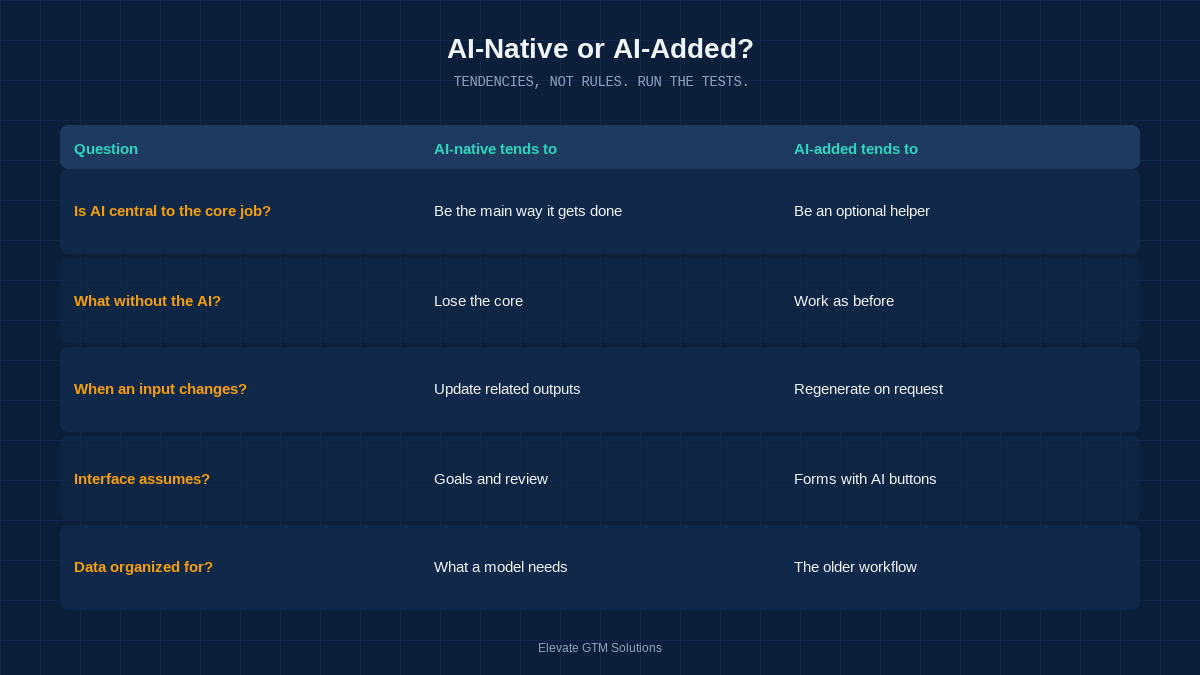
| Question | An AI-native product tends to... | An AI-added product tends to... |
|---|---|---|
| Is the AI central to the core job? | Make it the main way the job gets done | Add it as an optional helper |
| What does the interface assume? | Describing goals and reviewing output | Filling forms and configuring rules, with AI buttons |
| How is data organized? | Around what a model needs: context, relationships, history | Around the older workflow, with AI reading it |
| How does it handle change? | Update outputs as inputs change | Rerun reports or regenerate text on request |
| What happens without AI? | The product loses its core | The product still works as before |
These are tendencies. Real products mix both, and the label tells you little. The tests below are more reliable.
What the terms are supposed to mean
There is no standard definition. Vendors use the terms for marketing, and analysts use them in different ways. A fair working description:
AI-native. The product was designed from the start around AI as the main engine of the work. The data model, the workflow and the interface assume that a model is doing substantial work, such as reading, reasoning, drafting and updating, with humans guiding and reviewing.
AI-added, or AI-enhanced. An existing product, designed around forms, rules and reports, gains AI features such as drafting, summarizing, scoring or search. The core workflow predates the AI and works without it.
AI-washed. A product that uses the label with little real AI behind it, or with AI that does not change what the product does. This is the thing buyers most want to detect.
Our own guides cover the concept in more depth: see what is an AI-native GTM operating system, AI-native vs traditional GTM platforms and best AI-native GTM platforms for B2B companies. This page is different: it is a set of tests, not a definition.
Why it can matter, and when it does not
When the difference can matter
The core job. If the job is judgment-heavy, such as building a strategy, writing messages or analyzing many sources, a product designed around a model may handle it more coherently than one that bolts a model to a form.
Pace of change. AI models improve quickly. A product designed to swap and improve models may benefit. A product tied to one older design may struggle to keep up.
Consistency across outputs. If positioning, messaging and pricing come from the same underlying context, they are more likely to agree. If each AI feature works from its own narrow view, outputs can contradict each other.
Context handling. AI results depend on what the model knows about your company. A product built to gather and maintain that context may produce better results than one that sends a prompt with a few fields.
Cost and speed. Heavy AI use costs money to run. How a vendor handles that affects your price and reliability.
When it matters less
Narrow, well-defined jobs. For a task like transcribing calls, a specialist tool with a mature AI feature may be better than a general AI-native one.
Mature products with strong foundations. A product with deep data, integrations and reliability may add AI features that are excellent.
When your team needs stability. A new product built around a new design may change quickly, which is a risk as well as a benefit.
When the label is the only difference. If you cannot find a difference in results, there is no difference that matters to you.
Judge by the job you need done. Our guide to how to choose a GTM platform covers the wider decision.
Ten tests to run
Use your own data and your own real scenario wherever possible. Vendors will show a clean example. You want a messy one.
Test 1: Remove the AI
Ask: "If I turned the AI off completely, what could I still do in this product?"
What to look for. In an AI-native product, the honest answer is "not much of the core work," because the AI is the engine. In an AI-added product, most things still work. Neither answer is bad. A vendor who cannot answer clearly may be hiding how thin the AI is, or how thin everything else is.
Test 2: Bring your own messy input
Do: Give the product a real, imperfect input: a vague product description, a transcript, a spreadsheet with gaps, a page of rough notes. Ask for the core output.
Look for: Does the output reflect your specifics, or does it read like generic text that fits any company? Are there errors? Is it editable? A product that handles only polished inputs is a demo.
Test 3: Ask what is generated and what is retrieved
Ask: "For each item in this output, is it generated by a model, retrieved from data or calculated by rules? Can I see the source?"
Look for: Clear separation and visible sources. Outputs that mix invented text and real data without telling you which is which are a risk, especially for facts, figures and claims about competitors.
Test 4: Check the claims it makes
Do: Review the output for statements of fact: market sizes, competitor details, customer claims, statistics. Check three against reliable sources.
Look for: Whether the product cites sources, whether the claims are right and whether it flags uncertainty. Any unsourced number is a red flag. Our guide on questions to ask AI GTM vendors goes deeper on accuracy and sourcing.
Test 5: Change an input and watch what updates
Do: Change something upstream, such as your target segment or your price. See what else changes.
Look for: In a well-integrated product, related outputs update or flag that they need review, such as messaging, positioning and enablement material. In a loosely connected one, each output is separate, and you must regenerate each by hand. This is one of the clearest tests of whether the pieces share context.
Test 6: Ask about the model and what happens when it changes
Ask: "Which models do you use? Can you switch? What happens to my outputs and my settings when a model is updated or retired?"
Look for: A clear answer. Vendors should be able to explain how they handle model changes, how they test for regressions and whether your outputs could change without warning. "We use the best available model" is not an answer.
Test 7: Probe the guardrails and the limits
Do: Ask the product to do something outside its scope, or to produce something it should not, such as a claim you cannot prove or an invented customer quote.
Look for: Does it refuse, flag or comply? Can an administrator set rules? See the GTM platform governance checklist.
Test 8: Ask where your data goes
Ask: "Is my data sent to outside model providers? Is it used to train models? How long is it kept? Can I delete it? Where is it processed?"
Look for: Specific, written answers. Data handling is a legal and security matter, and you should review the terms with your own advisors. This guide is not legal advice.
Test 9: See the human in the loop
Do: Ask how a person reviews, edits and approves outputs, and how the product learns from corrections.
Look for: Easy editing, visible history and the ability to lock parts you have approved. A product that regenerates everything and overwrites your edits will frustrate users.
Test 10: Test repeatability and cost
Do: Run the same task twice. Ask about usage limits and how AI costs are charged.
Look for: Reasonable consistency across runs, and a pricing model that does not surprise you. Heavy AI use can raise costs, and some vendors charge by usage or credits. See the AI GTM platform pricing guide.
Scoring the tests
Use a simple sheet. For each test, record what you did, what you saw and a rating from "weak" to "strong." Do not add the numbers mechanically. Look for patterns.
| Test | Weak sign | Strong sign |
|---|---|---|
| 1. Remove the AI | Evasive answer | Clear explanation of what depends on AI |
| 2. Messy input | Generic output, errors | Specific, editable, accurate on your case |
| 3. Generated vs retrieved | Mixed with no labels | Clear labels and sources |
| 4. Claims | Unsourced, wrong figures | Sourced, flagged uncertainty |
| 5. Change propagation | Nothing updates | Related outputs update or flag review |
| 6. Model changes | Vague | Clear policy and testing |
| 7. Guardrails | Complies with anything | Flags, refuses and allows admin rules |
| 8. Data | Unclear terms | Specific written answers |
| 9. Human review | Overwrites edits | Easy editing, history, locking |
| 10. Repeatability and cost | Wildly inconsistent, surprise bills | Consistent, clear costs |
A product that is weak on tests 3, 4 and 8 is a risk whatever it calls itself. A product that is strong on tests 2, 5 and 9 is likely to be useful.
Questions for the vendor
Beyond the tests, ask in writing.
- When was the product first built, and what did the first version do?
- Which parts of the product use AI, and which use rules or retrieval?
- How do you measure the quality of AI outputs, and can you share results on tasks like mine?
- How do you handle errors, and what is the process when a customer reports a wrong output?
- Which customers use the AI features weekly, and for what?
- What is on the roadmap, and what is explicitly not?
- What are the contract terms if the AI features change materially?
Be wary of vendors who answer with adjectives instead of specifics. Be wary too of any claim of accuracy percentages with no explanation of what was measured.
Red flags and green flags
Red flags
- The AI is a chat box and nothing else changes.
- The demo uses only prepared data and refuses your input.
- "AI-powered" appears on every feature, with no explanation of what the AI does.
- Outputs contain confident facts with no sources.
- Nobody can explain what happens when the model changes.
- Data use terms are vague or buried.
- Outputs differ widely between identical runs.
- The sales team cannot explain how the product was built.
Green flags
- The vendor shows the limits of the product without being asked.
- Outputs cite sources and mark uncertainty.
- Changes in one place flow to related outputs.
- Editing and approval are easy.
- Data terms are specific and in writing.
- The vendor invites a trial on your data with agreed success criteria.
- References from customers with similar needs are available.
Running a fair trial
A good trial answers the tests with evidence.
- Choose a real scenario. For example, build the go-to-market strategy for a product you know well, or update messaging after a change.
- Write success criteria first. "The output names our real competitors correctly, uses our terms and needs under an hour of edits."
- Use your team. The people who will use it should judge it.
- Compare against your current method. Time, quality and effort.
- Check the facts in outputs against sources.
- Record problems and ask the vendor how they would handle them.
- Decide with evidence. Score the tests, review the pattern and weigh price, support and fit.
See our how to evaluate GTM platform customer support guide for what to test beyond the product itself.
A worked example, invented for illustration
Imagine a marketing director comparing two platforms that both claim to be AI-native. She runs the same scenario in each: a product description pulled from an internal document, a rough list of competitors and a list of target industries.
Product A produces a polished strategy document in a minute. It is fluent, and on reading it she notices it names two competitors that are not on her list, states a market size with no source and describes a customer segment she has never targeted. When she changes the target industry, nothing else updates. She asks the vendor which parts are generated and which are retrieved, and the answer is that everything is generated.
Product B takes longer and asks her to confirm assumptions. Its output uses her competitor list, labels two figures as "from your input" and flags one claim as "not verified." When she changes the target industry, it marks the positioning and messaging sections as "needs review" and shows what changed. The vendor explains which parts use a model and which use retrieval, how models are updated and where data goes, in writing.
Neither product is perfect. B passed the tests that matter for her situation: specific outputs, honest sourcing and change propagation. The "AI-native" label appeared on both. The tests told her which to trust.
Applying this to our own product
Because we describe Elevate GTM Solutions as AI-native, we should say how we would expect it to be tested. Our homepage says the platform builds a structured strategy "in minutes," with unified logic across positioning, messaging, pricing and channels, and that strategies can be adapted as context changes. Those are the company's claims. Apply the tests: bring your own messy input, check any facts in the output against sources, change an input and see what updates, ask where your data goes and whether you can edit and lock the results. If the product does not pass on your case, that is the answer that matters.
Common mistakes
Buying the label. "AI-native" is a claim, not evidence.
Believing the demo. Demos use clean data.
Skipping the data questions. Data handling can be a legal and security issue.
Ignoring editability. Outputs you cannot easily correct are a burden.
Assuming AI-native means better. It is a design approach.
Testing only the first output. Test change, repeat and correction too.
Letting one person decide. Include the people who will use it and your security and legal reviewers.
Forgetting cost. AI usage can change the bill.
Not writing success criteria. Without them, a good-looking demo wins.
Not checking facts. Fluent text can be wrong.
What to read in the contract
The tests tell you how the product behaves today. The contract tells you what you are entitled to when it changes.
Model changes. Does the vendor commit to notify you of material changes in the models it uses, and to test for regressions? Can outputs change materially without notice?
Output ownership. Who owns what the product generates for you? Can you use it freely, including after you leave?
Data use. Is your data used to train models, for the vendor or for others? Is there an opt-out? What happens to it on termination?
Subprocessors. Which outside providers handle your data, in which countries, and how are you told of changes?
Service levels. What uptime and support does the vendor commit to? What remedies apply if it falls short?
Accuracy and liability. Contracts for AI features often limit liability for outputs. Understand what you are accepting and who is responsible for reviewing outputs before use.
Pricing for AI usage. Are usage limits, credits or fair-use rules defined? Can prices change mid-term?
Exit. Can you export your data and outputs in a usable form?
Have your own legal and security advisors review these terms. This guide is not legal advice, and the rules on AI, data protection and contracts vary by country.
Questions for your own team
The product is only half of the question. Ask your own side:
- Who will review outputs before anything reaches a customer, and how much time will that take?
- What rules do we need on what may be sent to an AI system, such as confidential or personal data?
- Who will own the platform, keep inputs current and check results?
- How will we know if the quality drops after a model change?
- What would we do if the vendor changed direction, was acquired or shut down?
Teams that have answered these get more from any platform, whatever the label. Teams that have not often blame the tool for what is really a process gap.
Why the label will keep changing
Today "AI-native" is a selling point. In a few years most products will contain AI, and the label may fade, the way "cloud-based" faded once everything was. The questions that last are about results: is it accurate, is it specific to my situation, can I trust and correct it, does it keep up and is my data safe? Use the tests in this guide as a method you can reapply, not a verdict on any product at one moment in time.
Reading vendor claims
Marketing language follows patterns. Learning to read it saves time.
| Phrase | What it may mean | Question to ask |
|---|---|---|
| "AI-powered" | Some feature uses a model | Which features, doing what, and what happens without it? |
| "AI-native" | The vendor claims AI is central to the design | What would not work without the AI? |
| "Built from the ground up with AI" | The product is recent | Does it have the depth, integrations and reliability you need? |
| "Proprietary AI" | The vendor trained or tuned its own model, or wraps others | Which models, and who processes your data? |
| "Autonomous" or "agentic" | The system takes multi-step actions | What are the limits, approvals and logs? |
| "Accuracy of 95 percent" or similar | Someone measured something | What was measured, on what data, by whom, and could I repeat it on mine? |
| "Learns from your data" | Outputs adapt to you | Is it training, retrieval or stored context, and where does it go? |
| "Enterprise-grade" | Aimed at larger buyers | Which controls, attestations and terms, specifically? |
A claim is not false for being vague, and it is not true for being confident. Replace each adjective with a test.
What good vendors do
A few vendor behaviors tend to signal a partner worth trusting. They let you try the product on your own data. They tell you what it does not do. They put data terms in writing without being asked. They give a straight answer about models and about what changes. They can name customers with similar needs who have used it for a while. They accept a trial with success criteria you set. None of this guarantees a good product, and its absence is a reason for caution.
If you cannot run a full trial
Sometimes a long trial is not possible. A shorter route still tells you a lot.
- Ask for a live session in which you provide the input, with a camera on the screen and no pre-built environment.
- Ask for a sandbox account for a week with your own sample data, stripped of anything confidential.
- Ask two reference customers about what the AI does well and badly in daily use, and how often they correct it.
- Read the vendor's public documentation, release notes and security pages and compare them with what the sales team says.
- Ask for the data processing terms and the list of subprocessors before the demo.
- Check public reviews for recurring themes, remembering that reviews skew toward strong opinions.
If a vendor refuses all of these, the refusal is information. If a vendor welcomes them, that is also information, and worth weighing alongside the product itself.
Glossary
AI-native. Designed from the start around AI as the main engine of the work. There is no standard definition.
AI-added. An existing product with AI features added to a pre-existing workflow.
AI-washing. Using AI language in marketing with little real AI behind it.
Large language model. A model trained on large amounts of text that can generate and analyze language.
Retrieval. Looking up information from a data source instead of generating it.
Generation. Producing new text or content with a model.
Hallucination. A confident but false output from a model.
Guardrail. A rule or control that limits what a system will do.
Human in the loop. A design in which people review and approve AI outputs.
Context. The information about your company, customers and market that a model uses to produce relevant output.
Regression. A drop in quality after a change, such as a model update.
Data processing terms. The contract terms that govern how a vendor handles your data.
What to do this week
- Write the one core job you need the platform to do, in one sentence.
- Pick a real, messy input from your own work to use in every demo.
- Write success criteria: what would make the output good enough?
- List the ten tests and decide which three matter most to you.
- Send the vendor questions in writing, and note the quality of the answers.
- Ask security and legal to review the data terms.
- Run the same scenario in each finalist, and score the results with your team.
Key takeaways
- "AI-native" has no standard definition. It describes a design approach, not a quality guarantee.
- The useful question is whether the product does your job reliably, using your data.
- Run the tests: remove the AI, use messy input, separate generated from retrieved, check claims, change an input and watch what updates, ask about models, guardrails, data, review and cost.
- Weak sourcing, vague data terms and no change propagation are risks whatever the label says.
- Write success criteria first, and include the people who will use it.
- Apply the same tests to every vendor, including us.
Sources
- Elevate GTM Solutions: descriptions of the platform and its claims, as stated on the company's homepage. These are the company's own claims.
- Related Elevate guides linked in the text, including what is an AI-native GTM operating system, AI-native vs traditional GTM platforms and questions to ask AI GTM vendors.
- The definitions, the ten tests and the red and green flags reflect common practice and our judgment. There is no single standard, and vendors, analysts and buyers use the terms differently.
- This guide is not legal advice. Data protection and contract terms vary by country and by deal.
- The worked example is invented for illustration. We cite no benchmark figures.
Frequently Asked Questions
How can you tell if a GTM platform is really AI-native?
Test it. Ask what happens if the AI is removed, give it messy input from your own work, ask what is generated versus retrieved, check the facts in its output, change an input and see what updates, and ask about models, data handling and review. Judge by results on your cases, not the label.
What does AI-native mean?
There is no standard definition. It generally means a product designed from the start around AI as the main engine of the work, with the data model, workflow and interface built for it. AI-added products attach AI features to an older workflow.
Is an AI-native platform better than one with AI features added?
Not automatically. AI-native is a design approach, not a quality guarantee. A mature product with well-built AI features can serve you better than a young AI-native one. What matters is how well it does your job.
What is AI-washing?
Using AI language in marketing with little real AI behind it, or with AI that does not change what the product does. The best defense is testing on your own data and asking specific questions about how the product works.
What questions should I ask a vendor about their AI?
Which parts use AI, which use rules or retrieval, which models and what happens when they change, how quality is measured, how errors are handled, where data goes and whether it is used for training, and what the limits are.
How do I check whether the outputs are accurate?
Review statements of fact, such as market sizes, competitor details and statistics, and verify several against reliable sources. Look for sourcing, flags for uncertainty and clear labels for what is generated and what is retrieved.
What should I test in a demo?
Bring your own messy input, ask for the core output, change an upstream input to see what updates, run the same task twice, try an out-of-scope request, and check how easily you can edit and approve outputs.
How do I handle data privacy with an AI platform?
Ask in writing whether data goes to outside model providers, whether it is used for training, how long it is kept, whether it can be deleted and where it is processed. Have your security and legal teams review the terms.
Why does it matter whether outputs update when I change an input?
It shows whether the pieces share context. If changing a segment updates positioning and messaging, or flags them for review, the product treats strategy as connected. If each output is separate, you must regenerate and reconcile them by hand.
What are red flags in an AI GTM platform?
A chat box with nothing else changed, demos that refuse your input, confident facts with no sources, vague answers about model changes and data use, inconsistent outputs between identical runs and a sales team that cannot explain how the product works.
Does your own product pass these tests?
We encourage buyers to apply them to Elevate GTM Solutions as to any vendor: bring your own messy input, check facts against sources, change an input and see what updates and ask where your data goes. The company's claims on its site are its own, and your trial results are what matter.
Should I choose a specialist tool or an AI-native platform?
It depends on the job. For a narrow task like call transcription, a specialist with a mature AI feature may be better. For a connected, judgment-heavy job like building a strategy, test whether a platform with shared context does it more coherently.