
By the Elevate GTM Solutions Team · Updated November 13, 2026 · 22 min read
How to Evaluate GTM Platform Customer Support Before You Buy: What to Test, How to Read Complaints, and Which Questions to Ask
A software demo shows the product at its best. It almost never shows the support team at work, and yet support is what you will deal with in month four, when an integration fails the night before a launch. Buyers who ask about it usually get a reassuring paragraph and a plan name. Buyers who test it learn something.
This guide is about testing it. It explains what GTM platform support covers, how to measure it before you sign, how to read the complaints you will find in reviews without being fooled by them, which questions to put to references, which contract terms matter and how to set up your own side so that you get good support. It speaks directly to the question buyers type when they are worried: what complaints do people commonly raise about GTM platform support, and how do I avoid them?
On that question we want to be careful. We have no dataset of complaints and have not audited any vendor's support. Review sites contain real experiences and also contain selection effects, and we do not claim to know which complaints are most common across the market. What we can offer are the failure modes that are structurally likely in this kind of software, and ways to test for each one before you buy. We make a GTM platform ourselves, so apply the same tests to us.
What complaints do buyers commonly raise about GTM platform customer support?
We cannot give you reliable market-wide frequencies, because we have no verified dataset and review sites over-represent extremes. The failure modes worth testing for are predictable: slow or inconsistent responses, answers that do not resolve the issue, handoffs between teams that lose context, support limited to the paid tier you did not buy, onboarding that ends too early, integration problems that fall between the vendor and your CRM, and no one who owns the account relationship. Test each before you sign by asking a real question during the trial, measuring the response, and speaking to references, including a customer who left.
How do I test support before buying? Submit a real question during the trial and measure the time, the quality and the follow-through.
Are reviews reliable? They are useful as a source of questions. They are not a measurement.
What "support" actually covers
Buyers use the word for several different services. Separate them, because vendors are often strong at some and thin at others.
| Service | What it is | Who usually provides it |
|---|---|---|
| Technical support | Fixing problems and answering how-to questions | Support team |
| Onboarding | Setting up the product and getting the first results | Implementation or customer success |
| Customer success | Ongoing guidance on getting value, reviews and renewal | Customer success manager |
| Professional services | Paid, scoped work such as integrations, configuration and training | Services team or partners |
| Documentation | Help articles, guides and release notes | Product and support |
| Community | Forums, user groups and events | Community or marketing |
| Account management | Commercial relationship, renewals and escalation | Account manager |
| Incident communication | Status updates during outages | Engineering and support |
Before you evaluate, decide which of these you need. A small team using a straightforward tool might need only good documentation and fast technical support. A large deployment with integrations needs onboarding, a named contact and escalation.
Failure modes, and how to test for each
These are the ways support goes wrong in software of this kind. Each has a test you can run in advance.
| Failure mode | What it looks like | How to test before buying |
|---|---|---|
| Slow first response | Hours or days pass before anyone replies | Submit a real question in the trial and time the reply |
| Fast but empty response | A quick acknowledgment with no answer | Check whether the reply addressed the question |
| Wrong answer | Confident advice that does not work | Try the advice and see |
| Lost context | You repeat yourself at each handoff | Reply to an earlier ticket and see whether the new person has read it |
| Tier gating | Real help is reserved for a higher plan | Read what each plan includes in writing |
| Early drop-off | Onboarding ends before you are productive | Ask what happens in month two and three |
| Integration orphaning | The vendor says the CRM is the problem and the CRM vendor says the reverse | Ask who owns an integration failure, and get it in writing |
| No owner | Nobody is accountable for your success | Ask for a named contact and what they do |
| Poor incident handling | Outages with little communication | Read the status page history |
| Documentation gaps | Help articles are out of date or missing | Find the answer to three real questions in the docs |
| Feature requests vanish | Feedback never gets a response | Ask for examples of customer requests that shipped |
| Billing and renewal friction | Hard to change plans or get a straight answer | Read the terms, then ask a billing question |
Run as many of these as you can during the evaluation. The most informative are the live ones, because they use the real people and processes.
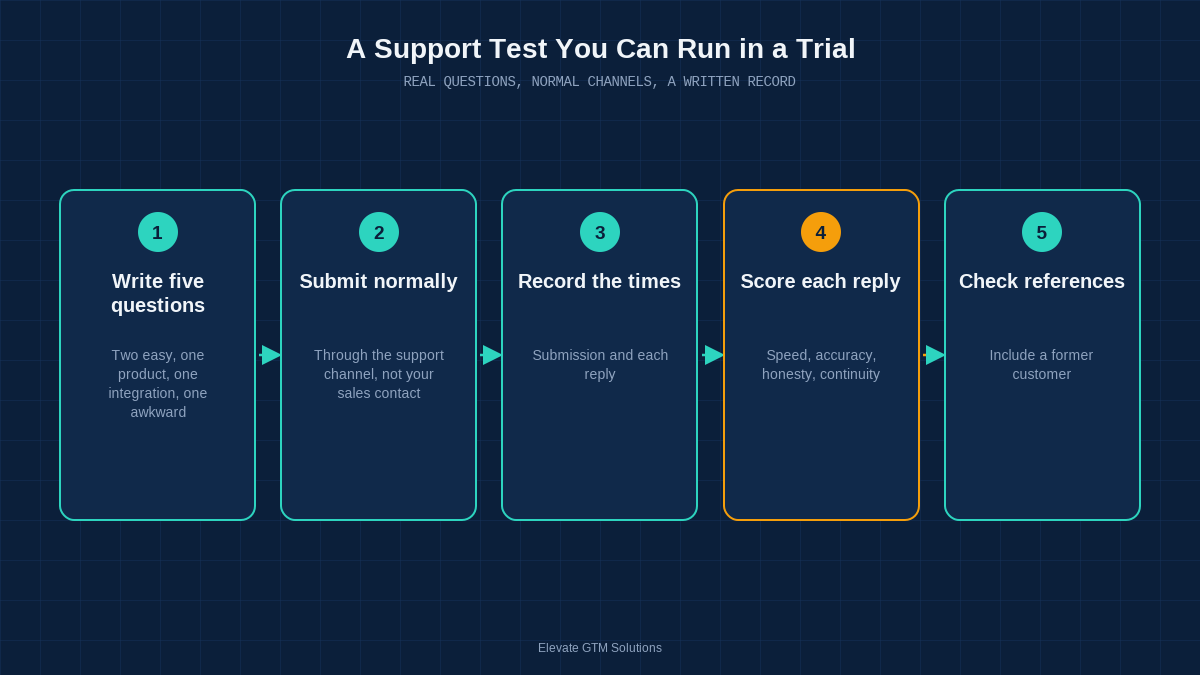
A support test you can run during a trial
Treat it as an experiment with a record.
- Write five questions in advance. Two simple how-to questions, one that needs product knowledge, one that touches an integration with your own system and one that is slightly awkward, such as "can it do this?" when you suspect the answer is no.
- Submit them through the normal channels. Not through your sales contact. Use the support form, chat or email that a customer would use.
- Record the time of each submission and each reply. Note whether the reply came from a person or an automated system.
- Score each reply. Did it answer the question? Was it correct? Did it say when it did not know? Was the tone respectful?
- Follow up once. Reply with a clarification and see whether the context was kept.
- Check the channels. Is there chat, email, phone and a ticket portal? Which hours?
- Write a one-page summary to share with your team.
Keep in mind that vendors often give trial users the same or better attention than customers. If support is poor during the trial, treat it as a serious signal. If it is good, treat it as a promising signal and still check references.
Scoring support replies
| Criterion | Question | Score one to five |
|---|---|---|
| Speed | How long until the first useful reply? | |
| Accuracy | Was the answer correct when tried? | |
| Completeness | Did it address every part of the question? | |
| Clarity | Could a new user follow it? | |
| Honesty | Did it admit limits or unknowns? | |
| Continuity | Did the next reply remember the thread? | |
| Ownership | Did someone say they would follow up, and did they? | |
| Tone | Respectful and helpful? |
An average across five test questions is more informative than any single reply.
Reading reviews and complaints
Review sites can be valuable and misleading at once. Use them as a source of hypotheses to test.
What reviews can tell you
- Themes. If many reviewers mention the same issue, such as slow onboarding or confusing billing, it is worth asking about.
- The kind of customer who is happy. Reviews often show whether the product suits companies like yours.
- How the vendor responds. Some vendors reply to reviews, and the manner of the reply shows how they handle criticism.
- Recency. Support teams change. Weight recent reviews more.
What reviews cannot tell you
- How common a problem is. Reviewers are a self-selected, small share of customers. People with strong feelings write.
- Whether reviews are balanced. Some vendors invite reviews from happy customers, which pushes the average up.
- Whether a problem has been fixed. A two-year-old complaint may be out of date.
- The context. A complaint about support may be a complaint about a missing feature, or a mismatch between plan and expectations.
- Whether a review is genuine. Fake and incentivized reviews exist. Look for specifics, dates, role details and balanced content.
Our research page on review sites and B2B software buying looks at what G2's buyer surveys report about how review sites are used and what they cannot show.
A method for reading reviews
- Read the three-star reviews first. They tend to be the most specific.
- Sort by most recent.
- Search for the word "support." Read twenty mentions and write each as a short note: what happened, when, which plan.
- Group the notes by theme. Speed, quality, onboarding, billing, integration.
- Turn each theme into a question for the vendor and your references.
- Check for patterns by company size. A complaint from small teams may not apply to you, and the reverse.
Questions for the vendor
| Topic | Question | A good answer |
|---|---|---|
| Channels | Which channels do you offer, and in which hours and languages? | A clear list with hours |
| Plans | What does support include on the plan we are buying? | A written table |
| Response | What are your response and resolution targets by severity, and how do you measure them? | Written targets and a measurement method |
| Ownership | Who is our named contact, if any, and what do they do? | A role, a scope and a cadence |
| Onboarding | What does onboarding include, for how long and who runs it? | A defined plan with milestones |
| Escalation | What is the path when something is urgent or unresolved? | Named levels and times |
| Integrations | Who owns a problem that involves our CRM? | A clear policy |
| Incidents | How do you communicate during outages? | A status page and a commitment |
| Documentation | Where are your docs, and how are they kept current? | A visible, dated knowledge base |
| Services | What is free, and what is paid? | A price list |
| Staffing | How big is the support team, and how are tickets triaged? | An honest answer |
| Feedback | How do we give feedback, and what has changed because of customers? | Examples |
Questions for references
Ask for two or three references and make sure at least one is a customer of your size and one used the product through a hard moment. Then ask:
- How long did onboarding take, and was it what you expected?
- Tell me about the last time you needed help. What happened?
- How long did the vendor take to respond, and to resolve?
- Did you ever have to escalate? What happened?
- Who do you contact, and do they know your account?
- Did anything you were promised in the sales process not happen?
- How did the vendor handle an outage or a bug?
- What would you change about the support?
- Would you buy again, and what would you do differently?
- If you left, why? (For a former customer.)
Ask the vendor for a former customer. If it refuses, find one yourself through your network. The answer to that request is information.
Contract terms that protect you
| Term | Why it matters | A reasonable ask |
|---|---|---|
| Support scope by plan | Prevents surprises on what is included | A table in the order form |
| Response targets | Gives you something to hold the vendor to | Written targets by severity |
| Service credits or remedies | Gives the targets consequences | Credits for repeated misses |
| Named contact | Creates ownership | Written in the order form for your tier |
| Onboarding scope | Prevents early drop-off | Milestones and acceptance |
| Escalation path | Speeds urgent cases | Named levels and contact methods |
| Integration responsibility | Avoids the gap between vendors | A statement of what the vendor will investigate |
| Exit | Protects you if support fails | A right to terminate for repeated missed targets, and data export |
Not every vendor will agree, and smaller ones often cannot. But asking shows you what they will commit to.
Plan tiers and what you actually get
Many vendors tier support. A typical structure, in general terms, runs from self-service documentation and community on the lowest tier, to email or chat support during business hours on a middle tier, to priority response and a named contact on a higher tier. The details vary, and so do the names. Three things to check:
- What is in the tier you are buying, in writing. Not what the website says about "support" in general.
- What the next tier up adds and costs. If the answer is "most of what you will need," build that into the budget.
- What happens if you need help outside the tier. Some vendors offer paid incident support.
Our pricing guide lists premium support among the costs that often sit outside the headline quote.
Onboarding as a test
Onboarding is where support begins, and the vendor's habits show up here.
| Sign | Healthy | Worrying |
|---|---|---|
| Plan | A written plan with milestones | "We'll get you started" |
| Roles | Named people on both sides | Unclear ownership |
| First result | A real result in the first weeks | Setup that takes months before anything is used |
| Training | Role-based sessions and recordings | One generic webinar |
| Handoff | A clear end and a transition to support | Onboarding stops and nobody picks up |
| Honesty | The vendor flags risks early | Everything is "on track" |
Ask what typically goes wrong in onboarding with customers like you, and what the vendor does about it.
Your side of the relationship
Good support is partly your doing. Four habits get better results.
Name an owner on your side. One person who submits requests, knows the product and tracks open issues. Support teams respond better to someone who gives clear, complete reports.
Write good tickets. Say what you did, what you expected, what happened, which account or record, and a screenshot or log. Rate the severity honestly. If everything is urgent, nothing is.
Keep a record. Track tickets, times and outcomes in a simple sheet. At renewal, you will have evidence.
Use the whole system. Read release notes, join the community, attend the review calls. Many support issues are answered by documentation you did not know existed.
Handling integration problems
Integration failures cause some of the hardest support conversations because two vendors are involved. Before you buy, ask each vendor what it will do when a problem sits between systems.
- Will they investigate their side and share logs?
- Will they join a call with the CRM vendor or your administrator?
- Do they have a sandbox or test account to reproduce the issue?
- What do they consider outside their scope?
On your side, assign someone who understands both systems, keep a record of changes in the CRM and add the integration to your change process. For the technical checks, see our guide to GTM platforms that integrate with Salesforce.
Support for AI features
AI features add support questions that older software did not have.
- Who investigates a wrong or strange output? Ask whether the vendor can trace an output to its inputs and explain it.
- How are model changes communicated? An output that changes after a provider update needs an explanation.
- What is the process to report harmful or inaccurate output? A clear route and a response time.
- Can support see our data, and under what controls? Support access to customer data should be limited and logged.
See our governance checklist for the wider set of AI controls.
Red flags
- Support is available only after you sign.
- The sales contact answers every question and support never does.
- No public status page or incident history.
- A refusal to describe what each plan includes.
- No references, or only references chosen by the vendor, with no former customer.
- A trial with no access to support.
- Response targets that exist only in the sales deck.
- Onboarding described only in general terms.
- A pattern in recent reviews that the vendor dismisses.
- Pressure to buy a premium tier before you have seen the standard one.
A one-page support scorecard
| Item | Vendor 1 | Vendor 2 | Vendor 3 |
|---|---|---|---|
| Trial test: average reply score | |||
| First response time, median | |||
| Channels and hours match our needs | |||
| What our plan includes, in writing | |||
| Written response targets | |||
| Named contact | |||
| Onboarding plan with milestones | |||
| Integration responsibility stated | |||
| Status page and incident history | |||
| Documentation test: three questions found | |||
| References: former customer spoken to | |||
| Review themes and our questions | |||
| Exit terms for missed targets |
An illustration
This is a fictional example.
A company is choosing between two planning platforms. Both demo well. The buyer runs the five-question test. Vendor A replies to all five within a few hours, the third reply is wrong and the support person corrects it the next morning without being asked. Vendor B replies within minutes with an automated message, then takes three days for the first real answer, which addresses only half of the question. The buyer finds no former customer for Vendor A, because none will respond, and finds two for Vendor B, who both praise the product and complain about onboarding that stopped after two weeks.
The buyer does not conclude that A is good and B is bad. She concludes that A's support is attentive and its reference record is unproven, and that B's product is liked and its onboarding is thin. She asks A for a reference by name and asks B to put a longer onboarding in the contract. Her decision is based on tested behavior and not on slides.
What good onboarding looks like in the first ninety days
Since onboarding is where most customers form their view of support, it helps to know what a reasonable plan contains. The details differ by product and plan, and this is a sketch for comparison, not a promise any vendor makes.
Days one to ten. Kickoff with named people on both sides. A written plan with milestones. Access and permissions set up, including the integration user for your CRM. A clear statement of what success looks like at thirty, sixty and ninety days.
Days eleven to thirty. First real use with real data. A working session with the people who will use it most. A first review of what is confusing or missing. Answers to questions that came up in the first week, in writing.
Days thirty-one to sixty. Expansion to more users or more scopes. Role-based training. A check on integrations and error logs. A conversation about what is not working, and what will be done about it.
Days sixty-one to ninety. A review against the success measures. A handoff to ongoing support with a named contact or a clear process. A date for the next review.
Ask each vendor to describe their version of this, and compare. A vendor with no plan after the kickoff is signaling something. So is one that promises a perfect ninety days with no risks.
Support during a crisis
Most support is routine. The cases that define a vendor are the bad days: a failed sync before a launch, a wrong output sent to a customer, an outage during a quarter-end. You cannot test these in advance, but you can ask how the vendor behaves in them.
- Ask for a story. "Tell me about the worst incident in the last year and what you did." A good vendor can tell one, including what went wrong on their side.
- Read the status history. Look for how fast incidents were acknowledged, how often updates came and whether a follow-up explanation was posted.
- Check for a post-incident review practice. Do they publish or share what they learned and what they changed?
- Ask about out-of-hours cover. If your launch is on a Sunday in another time zone, who answers?
- Know the pause button. For any feature that acts automatically, know how to stop it quickly, and who can.
On your side, write a one-page incident plan: who decides to pause automation, who contacts the vendor, who tells customers if needed and who reviews afterwards. A vendor's support is only as useful as your ability to use it quickly.
Measuring support after you buy
Do not wait until renewal to judge. A light routine gives you evidence and gives the vendor a chance to fix things.
| Measure | How | Review |
|---|---|---|
| First response time | Median from your ticket log | Monthly |
| Time to resolution | Median, by severity | Monthly |
| Repeat contacts | Tickets reopened or repeated for one problem | Quarterly |
| Satisfaction | A one-line rating from your own team after each ticket | Quarterly |
| Onboarding milestones | Planned dates against actual | During onboarding |
| Open issues older than thirty days | Count and reasons | Monthly |
| Product requests and outcomes | List of requests and what happened | Twice a year |
Share a short summary with your vendor contact each quarter. Vendors that care will use it. Those that do not will show you at renewal what you will be dealing with next year.
Support for different kinds of buyer
What good support means depends on who you are, and it helps to name your own profile before you compare.
| Buyer | What matters most | What to test |
|---|---|---|
| Founder or small team | Fast, human answers; good documentation; no ceremony | Reply speed and quality on a handful of how-to questions |
| Mid-size team with one admin | Clear onboarding; help with integrations; a contact who knows the account | The onboarding plan and the integration question |
| Large organization | Named contact, escalation, security and legal responsiveness, service levels | Written targets, references at your scale and the incident story |
| Regulated industry | Documentation, audit support, data handling answers on request | How quickly and completely the vendor answers your questionnaire |
| Global team | Hours and languages that match your regions | Out-of-hours behavior and local-language support |
If you are a small buyer, do not copy a large buyer's checklist and then reject every vendor. If you are a large buyer, do not accept a small buyer's level of service because the product is good. Match the test to your needs.
Self-service support
Many questions can be answered without a person, and good self-service is a sign of a mature vendor. Judge it by trying it.
- Search the documentation for five real tasks. How long does it take to find each answer? Is the answer current?
- Look at the release notes. Are they dated, specific and written for users?
- Check the community or forum. Do vendor staff answer? Are old questions resolved?
- Look for tutorials and recorded training. Are they current with the product you saw in the demo?
- Test the in-product help. Is there guidance at the point of use?
If an AI assistant answers support questions, test it with a hard question and see whether it admits when it does not know and offers a route to a person.
A message you can send to a reference
Reference calls go better when you send a short, specific note beforehand. Edit to suit.
Thanks for agreeing to talk. We are choosing between a few GTM platforms, and your experience with support would help us a great deal. We will keep it to twenty minutes. The main things we want to understand are how onboarding went, what happened the last time you needed help, how the vendor handled any problems with integrations and whether anything you were told in the sales process turned out differently. We will not quote you without asking.
Then listen more than you talk. Ask for an example every time someone gives a general view, because "support is great" is easier to say than to illustrate. If a reference says something negative, ask what the vendor did about it. How a vendor repairs a mistake is often more informative than whether it made one.
Glossary
Escalation. Moving an unresolved or urgent issue to more senior people.
First response time. The time from submitting a request to the first reply from a person.
Named contact. A specific person assigned to your account.
Onboarding. The initial period of setting up the product and getting first results.
Resolution time. The time from submitting a request to its solution.
Service credit. A refund or discount when the vendor misses a service level.
Severity. A classification of how serious an issue is.
Status page. A public page showing current service status and incident history.
Common mistakes
- Evaluating the product and not the support.
- Trusting a reassuring paragraph.
- Using the sales contact as a stand-in for support.
- Reading reviews as statistics.
- Skipping the former-customer reference.
- Not reading what your plan includes.
- Leaving integration ownership unclear.
- Having no internal owner.
- Writing vague tickets.
- Not keeping a record for renewal.
Where Elevate GTM Solutions fits
Elevate GTM Solutions is an AI-native platform for GTM strategy and planning, and it also offers guided programs, advisory and a partner network, sold separately from the subscription. The pricing page and platform overview describe the plans, and you should ask what support each plan includes, what is part of the free first strategy build and what falls under paid guidance, and have it in writing. We suggest that you run the five-question test on us during your free first build and ask for a reference. For an overview, see what Elevate GTM Solutions is and questions to ask AI GTM vendors.
What to do this week
- Decide which support services you need: technical, onboarding, success, services.
- Write five test questions, including one about an integration and one awkward one.
- Submit them during the trial through the normal channels, and record the times.
- Read recent three-star reviews, and turn the themes into questions.
- Ask each vendor for a former customer as a reference.
- Get the support scope for your plan in writing.
- Name your own internal owner for the relationship.
Key takeaways
- Support is several services: technical help, onboarding, customer success, services and incident communication.
- We have no verified market-wide data on complaint frequency, so test for the predictable failure modes yourself.
- Submit real questions in the trial through normal channels, and score speed, accuracy, completeness, honesty and continuity.
- Treat reviews as a source of questions, not statistics.
- Ask for a former customer, and get plan scope, targets and integration responsibility in writing.
- Name an owner on your side and keep a record of tickets.
Sources
- Review Sites and B2B Software Buying: Elevate's review of what G2's buyer surveys report and what they cannot show.
- Elevate GTM Solutions platform overview: description of plans, guided programs and advisory.
- The failure modes, tests and scorecards reflect common buying practice and the writers' judgment. They are not drawn from a dataset of complaints, and this page makes no claim about any named vendor's support.
Frequently Asked Questions
What complaints do buyers commonly raise about GTM platform customer support?
We have no verified market-wide data. The failure modes worth testing are slow or empty responses, wrong answers, lost context at handoffs, tier gating, early drop-off of onboarding, unclear ownership of integration problems and no named contact. Test each before you buy.
How do I test a vendor's customer support before buying?
Write five real questions, including one about an integration and one awkward one. Submit them through the normal support channels during the trial, record the time of each reply and score accuracy, completeness, honesty and continuity.
Are online reviews a reliable guide to support quality?
They are a useful source of questions and themes. They do not show how common a problem is, because reviewers are self-selected, and some reviews are solicited or fake. Read recent, specific reviews and check each theme with the vendor and references.
What should I ask a reference about support?
How long onboarding took, what happened the last time they needed help, how fast the vendor responded and resolved, whether they escalated, who their contact is, whether promises were kept and what they would change. Ask for a former customer too.
What support is included in a typical plan?
It varies. Lower tiers often include documentation and community, middle tiers add email or chat in business hours and higher tiers add priority response or a named contact. Get what your plan includes in writing.
Who is responsible when a problem sits between the GTM platform and our CRM?
Ask each vendor before you buy. Find out whether they will investigate their side, share logs and join a call, and what they consider outside scope. Put the answer in writing and keep an internal owner for the integration.
What contract terms protect me on support?
Support scope by plan, written response targets, remedies for repeated misses, a named contact, onboarding milestones, an escalation path, integration responsibility and a right to exit and export your data if targets are missed repeatedly.
How can I get better support after I buy?
Name an internal owner, write complete tickets with honest severity, keep a record of tickets and times, read release notes and use the community and review calls.
Does AI change what I should ask about support?
Yes. Ask who investigates wrong or strange outputs, how model changes are communicated, how to report harmful output and how support access to your data is limited and logged.
What are red flags in a vendor's support?
No access to support before you sign, a sales contact standing in for support, no status page, a refusal to describe what each plan includes, no former-customer reference and response targets that exist only in the sales deck.
How should I evaluate Elevate GTM Solutions' support?
Ask what each plan includes, what the free first build covers and what falls under paid guidance, and have it in writing. Run the five-question test during the free first build and ask for a reference.
How long does a support test take?
A few days of the trial is usually enough to submit five questions, receive replies and follow up once. Add time to speak to references and read recent reviews.