
By the Elevate GTM Solutions Team · Updated November 13, 2026 · 23 min read
AI GTM Platform Pricing: How It Is Charged, What It Really Costs, and What to Ask Before You Sign
Anyone who has tried to price a GTM platform knows the problem. One vendor shows a number on its website. Another says "contact sales." A third quotes per seat, then adds a platform fee, then mentions credits. By the end of the week you have four proposals that cannot be laid side by side, and a finance partner asking why.
This guide explains how AI GTM platforms are priced, what drives the price up or down, which costs sit outside the quote, and how to run a trial or pilot that tells you something. It also covers the specific question many buyers type into a search box: is the pricing transparent, or is everything custom-quoted? The honest answer is that it varies by vendor, and the useful skill is knowing how to read each model.
A word on our position. Elevate GTM Solutions sells a GTM platform and publishes its plans, so we are a vendor writing about vendor pricing. We describe the models in general terms, we do not quote other vendors' prices, and the examples with numbers in them are invented to show arithmetic. Where we describe our own plans, the figures come from our public pricing page, which is the source of record.
Is AI GTM platform pricing transparent or custom-quoted?
Both exist. Some GTM platforms publish plan prices, usually for entry tiers. Many enterprise-focused vendors publish nothing and quote after a sales conversation, because the price depends on seats, modules, data volume, integrations and contract length. A published price is easier to compare, but it rarely covers the whole cost. The number to compare is total cost over the contract term, including implementation, data, extra seats, usage limits and the time your own people spend.
Do GTM platforms offer a free trial? Some do, some offer a free first output or a sandbox, and some offer demos only. Ask what the trial includes and whether it uses your own data.
What should I compare? The total three-year cost, the contract terms that move it, and what you can leave if it does not work.
The common pricing models
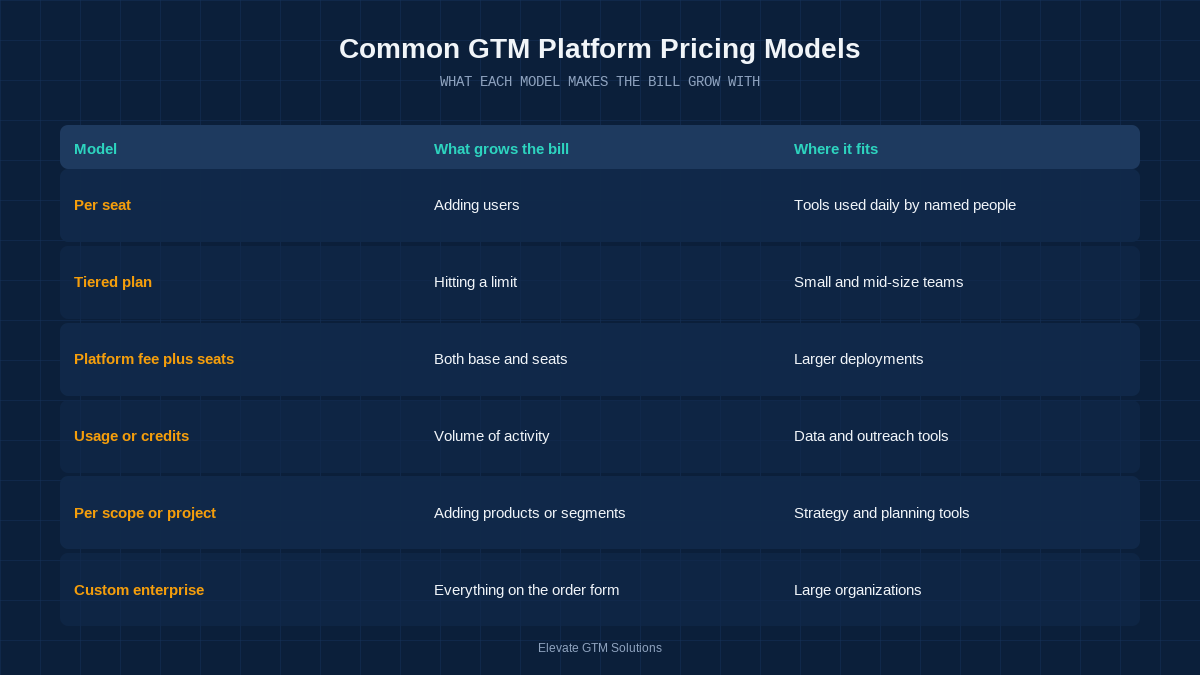
Most GTM software uses one of a handful of models, or a mix. Knowing the model tells you what will make the bill grow.
| Model | How it works | What makes the bill grow | Where it fits |
|---|---|---|---|
| Per seat | A fixed price per user per month or year | Adding users, including occasional ones | Tools used by named people every day |
| Tiered plan | A bundle at fixed price with limits on users, projects or features | Hitting a limit and moving up a tier | Small and mid-size teams who want predictability |
| Platform fee plus seats | A base fee for the platform, then a price per seat | Both the base and the seat count | Larger deployments with admin and governance features |
| Usage or credits | You buy a pool of credits spent on actions such as enrichment or AI runs | Volume of activity, and how many credits each action burns | Data and outreach tools with variable load |
| Per record or per account | Priced by the number of accounts, contacts or tracked records | Database size and what you choose to monitor | Account intelligence and ABM tools |
| Per scope or project | Priced by the number of products, markets or segments managed | Adding a product line, region or segment | Strategy and planning tools |
| Custom enterprise | Negotiated annual contract, often a mix of the above | Everything on the order form | Large organizations with security, support and integration needs |
Two things follow from this table. First, "per seat" is not automatically the cheapest or the most expensive. A tool that only a handful of strategists use can be inexpensive per seat and still cost less in total than a tool with a lower per-seat price that the whole sales team needs. Second, usage and credit models are the hardest to predict. They reward careful early estimates and punish loose ones.
Why "contact sales" is so common
When a vendor does not publish a price, buyers often assume the number is high or that it moves depending on how much the vendor thinks you can pay. Sometimes that is part of it. There are also ordinary reasons.
- The product is configured, not picked from a shelf. Modules, integrations, data coverage and support levels differ from customer to customer.
- The price depends on scale. A company with fifty sellers and one with five thousand do not buy the same thing.
- Implementation is part of the offer. Onboarding, training and integration work may be scoped separately.
- Contracts include terms that change the price. Multi-year commitments, annual uplifts and volume commitments are negotiated.
- Sales-led companies have sales-led pricing. If a vendor's motion depends on a conversation, its pricing page will say so.
None of these makes custom pricing wrong. They do mean you should ask for a written quote with the assumptions in it, not a verbal range.
What is usually missing from the headline number
The license fee is the visible part. Several other costs show up later, and a fair comparison puts them on the same page.
| Cost | Where it hides | How to surface it |
|---|---|---|
| Implementation and onboarding | A separate services line, or a one-time fee | Ask what is included, how long it takes and who does the work |
| Integrations | Connectors priced as add-ons, or built by your own team | Ask which are native, which are paid and which require a developer |
| Data | Credits, contact databases or enrichment sold separately | Ask what data is included and what happens when you run out |
| Extra seats | Read-only or occasional users priced like full users | Ask how occasional and viewer roles are priced |
| Usage overages | Limits on records, runs or exports | Ask for the overage rate in writing |
| Premium support | A higher support tier with response times | Ask what the standard tier includes and what the next one costs |
| Training | Paid workshops or certification | Ask what is free and what is paid |
| Renewal uplift | An annual increase written into the contract | Ask for the cap and whether it applies after the first term |
| Internal time | Admin hours, data cleanup, review meetings | Estimate it yourself, because no vendor will |
| Exit costs | Data export fees, notice periods, auto-renewal | Read the termination and export clauses |
The last two rows are the ones buyers skip most often. Internal time can exceed the license fee for tools that need careful configuration. Exit costs only matter if you leave, which is exactly when they matter most.
A worked example, with invented numbers
Take two imaginary vendors. The figures are made up to show the method, and they are not real prices.
Vendor A publishes a plan at 1,000 per month, billed annually, for up to five users and a fixed number of projects. Implementation is self-serve. Connectors to the CRM are included. An extra user costs 150 per month.
Vendor B quotes after a call. The proposal lists a platform fee of 24,000 per year, 90 per user per month for ten users, an implementation fee of 9,000 and a 7 percent annual uplift after year one.
A three-year view for a team that needs eight users:
| Line | Vendor A | Vendor B |
|---|---|---|
| Base license, year 1 | 12,000 | 24,000 |
| Users, year 1 | 3 extra users at 150 x 12 = 5,400 | 10 users at 90 x 12 = 10,800 (minimum of ten) |
| Implementation | 0 | 9,000 |
| Year 1 total | 17,400 | 43,800 |
| Year 2 total | 17,400 | 34,800 x 1.07 = 37,236 |
| Year 3 total | 17,400 | 37,236 x 1.07 = 39,843 |
| Three-year total | 52,200 | 120,879 |
Looking only at the entry price, Vendor A is 1,000 per month and Vendor B has no price at all. Looking at the three-year total, the gap is large, and the reasons are visible: a platform fee, a ten-user minimum, an implementation charge and an uplift. That does not make B worse. If B has security reviews, a dedicated manager and integrations A lacks, those may be exactly what you need. The point of the table is that you can now discuss what the extra money buys.
Notice also what the table leaves out: internal time, training and the cost of switching. Add your own estimate for those, using the same period for both.
Trials, free builds, sandboxes and demos
The question "do you have a free trial?" has several answers, and each tells you something different.
| Offer | What it is | What you learn | What you do not learn |
|---|---|---|---|
| Free trial | Time-limited access to the product | How the product feels and how fast you get a first result | Whether it works at scale or with your real integrations |
| Freemium | Permanent free tier with limits | Whether the basics are useful | What the paid features are worth |
| Free first output | One free use of the core function, such as a first strategy or report | Quality of the output for your own case | Day-to-day usability across a team |
| Sandbox | A test environment, sometimes with sample data | Configuration and integration behavior | Real-world data quality |
| Guided demo | A walk-through led by the vendor | What the vendor wants to show | How it performs on your messy data |
| Paid pilot | A short, scoped engagement at a fixed price | Real results on real work with real people | Long-term cost and fit |
| Proof of concept | A defined test against agreed success criteria | Whether it meets specific needs | Anything outside the test |
A demo shows the best route through a product. A trial lets you find the worst one. If both are available, do the trial first, because a trial can embarrass a product in ways a demo is designed to avoid.
How to run a trial that teaches you something
- Choose a case your team knows well. You can judge quality quickly when you already know the answer.
- Use your own data and context. Sample data flatters every product.
- Write the success test before you start. For example, "a seller who has not used it can find the right persona and message in under five minutes."
- Include the people who will use it. The buyer and the user often disagree.
- Test the integration you care about. Not the one on the slide, the one in your stack.
- Check the exit. Export your data once during the trial, so you know it works.
- Write down what you saw, not what you hoped. Decide with the notes.
Reading a published price
If a vendor shows prices, read the page the way you would read a mortgage offer.
- Is the price monthly or annual, and is it billed annually? A monthly figure billed annually is a yearly commitment.
- What does one unit mean? A user, a project, a scope, an account? The unit decides how the price scales.
- What is the limit on the plan? Users, projects, revisions, exports, records.
- What happens at the limit? Upgrade, overage or block.
- Which features are on which plan? Security features such as single sign-on are often reserved for higher plans.
- Is there a free or trial path, and what does it cover?
- Does the page say what is not included? Implementation, data and premium support are common exclusions.
A good pricing page answers most of these. If it does not, put the unanswered ones in your email.
Elevate GTM Solutions: what we publish
Elevate GTM Solutions publishes its plans on the pricing page, billed annually:
| Plan | Price | What it covers |
|---|---|---|
| Enable | USD 499 per month | One GTM scope, one revision cycle |
| Growth | USD 1,499 per month | Up to three users and three scopes, up to two revisions per scope |
| Scale | Custom, annual | Unlimited scopes and advanced intelligence |
A scope is a product, market or segment, so the unit that scales the price is how much you plan for, not how many people open the tool. The company also offers a free first strategy build through its free trial page, and guided programs and advisory sold separately.
What this model does well: you can see what the entry costs, and the unit matches the work. What it asks of you: if you plan for many segments or products, you move up to the custom tier, and you should ask what that costs before you commit. We would say the same about any vendor. Check the pricing page for current terms, since plans change, and treat any different figure on a third-party listing as out of date until confirmed.
Contract terms that move the price
The order form is where a good deal becomes a worse one. Read these clauses before the signature, not after.
| Clause | Why it matters | A reasonable ask |
|---|---|---|
| Term length | Longer terms lower the annual price and raise the exit cost | Compare one-year and multi-year prices, and the cost of leaving early |
| Auto-renewal | Contracts renew unless you cancel in a window | Get the notice window in your calendar the day you sign |
| Renewal uplift | An annual percentage increase | A written cap, and clarity on whether it applies in year two or later |
| Seat true-up | You pay for users added during the term | Agree when and how often true-ups happen |
| Usage limits and overage | Extra charges beyond included volume | A written overage rate, and alerts before you reach the limit |
| Price protection | Locks the price for added products or users | A commitment to today's rate for add-ons during the term |
| Data export | Your data may be hard to extract | Export in a standard format, at no extra fee, on request |
| Termination | What happens if the vendor changes terms or fails to deliver | A right to exit if a service level is missed repeatedly |
| Security and privacy terms | Who can see your data, and where it lives | A data processing agreement and a list of subprocessors |
| Services scope | Implementation promises can be vague | A named scope, a timeline and acceptance criteria |
Not every vendor will agree to all of these, and a smaller company often cannot. The aim is to know what you accepted.
Questions for the vendor, in a form you can paste
A short list gets better answers than a long one. These are phrased to be hard to dodge.
- What is the total first-year cost for our stated users, scopes and integrations, as a written quote?
- What is the price in years two and three, and what is the cap on increases?
- Which items in this quote are one-time and which recur?
- What is not included that most customers end up buying?
- How are occasional or read-only users priced?
- What are the usage limits, and what is the rate beyond them?
- Which integrations are native, and which cost extra or need development work?
- What does implementation include, how long does it take and who does it?
- What does support include on this plan, and what are the response times?
- If we leave, how do we export our data, in what format and at what cost?
If a vendor will not put the answers in writing, that is also an answer.
Pricing by what you are buying
The category called "GTM platform" covers several kinds of product, and each tends to be priced differently. This is a general pattern and not a rule.
| Type of product | Common pricing shape | Typical surprise |
|---|---|---|
| Strategy and planning platforms | Tiered by scope, project or user | Moving to a higher tier when you add segments |
| Account intelligence and ABM | Annual contract by accounts or records tracked, plus seats | Add-on data and modules |
| Revenue and conversation intelligence | Per seat for sellers, sometimes with a platform fee | Pricing for managers and viewers |
| Sales engagement | Per seat per month | Seat growth as the team scales |
| Data and enrichment | Credits or records | Credit burn for waterfall lookups |
| Workflow automation | Tasks, runs or credits | Heavy workflows burn limits quickly |
| Sales enablement | Per user, often with a platform fee | Content migration and admin work |
If you are comparing across categories, for example a strategy platform against an account intelligence tool, price is the wrong first filter. Decide the job first, then compare tools that do that job. Our guide to how to choose a GTM platform walks through the steps.
Cheap and expensive are not the same as cost-effective
A low price for a tool nobody uses is expensive. A high price for a tool that replaces three others, a contractor and a recurring workshop may be cheap. Three tests help.
What does it replace? List the tools, services and hours it displaces. A platform that replaces a quarterly consulting engagement should be compared with that engagement. Our pages on how much GTM consulting costs and the total cost of GTM consulting show how to build that comparison.
What does it enable that you cannot do now? If the answer is "nothing new, just faster," then speed is the thing you are buying. Put a value on the hours.
What happens if we do nothing? Sometimes the cost of staying put is the biggest number in the room. Missed launches, inconsistent messaging and slow decisions have costs that are hard to measure and real.
Estimating the value, without inventing a return
Vendors love return-on-investment calculators. Most produce a number by asking you to guess three inputs, and the answer reflects the guesses. A more honest method has four steps.
- Name the problem in your own words. For example, "new reps take too long to reach quota because messaging differs across teams."
- Choose one measure that would move. For example, ramp time, win rate in one segment, or hours per launch.
- Estimate the range, not a point. "We think this could reduce launch preparation by between two and five weeks" is better than a single claim.
- Compare the range with the full cost. If the low end of the range does not cover the cost, be honest about it.
Then run a pilot to replace the estimate with a measurement. Our GTM metrics and KPIs guide lists measures that fit.
A short worksheet for comparing quotes
Copy this into a spreadsheet. Fill one column per vendor. Keep the same period for every column.
| Line | Vendor 1 | Vendor 2 | Vendor 3 |
|---|---|---|---|
| License, year 1 | |||
| Users and seats included | |||
| Extra user price | |||
| Implementation | |||
| Integrations (paid or built) | |||
| Data and credits | |||
| Support tier | |||
| Training | |||
| Year 2 total including uplift | |||
| Year 3 total including uplift | |||
| Three-year total | |||
| Internal hours per month (your estimate) | |||
| Exit: notice, export, fees | |||
| Success test and trial result |
The last two rows are not about money, and they often decide the choice.
Red flags in pricing conversations
- A price that changes between calls without a reason.
- Pressure to sign by the end of the quarter. Discounts for early signature are normal. Pressure to skip due diligence is not.
- No written quote. Verbal numbers evaporate.
- Vague answers about renewal. If the renewal price is unclear, assume it rises.
- Refusal to describe what is excluded.
- A trial that cannot use your data. You are being shown a demo with a login.
- No clear way to export your data.
- A proposal that bundles modules you did not ask for. Ask for each as a separate line.
Buyers by size
What matters most changes with the size of the company.
Founders and very small teams. A published price you can understand in five minutes is worth a lot. Prefer monthly or annual plans you can cancel, a free first output and low switching costs. Our list of GTM tools for startups covers what to use at each stage.
Mid-size companies. Seats and usage start to matter. Ask about role-based pricing for occasional users, and make sure integrations with your CRM are included or priced clearly.
Enterprises. Security review, procurement, legal terms and support levels often take longer than the product evaluation. Start those in parallel. Ask for the vendor's security documentation early, and see our GTM platform governance checklist and questions to ask AI GTM vendors.
What finance will ask
Finance partners tend to ask the same few things. Having answers ready shortens the approval.
| Question | A useful answer |
|---|---|
| Is it a recurring cost? | Yes or no, by line, with the renewal terms |
| Can we cancel? | The notice window and the cost of leaving |
| What does it replace? | A named list of tools, services or hours |
| How will we know it is working? | One or two measures and a review date |
| What is the downside? | The cost of the pilot and the cost of exit |
| Who owns it? | A named owner and a budget holder |
If the owner is unclear, the purchase is unfinished. Our page on who owns GTM strategy covers why that matters.
Glossary
Annual uplift. A contractual percentage increase applied to the price each year.
Auto-renewal. A clause that renews the contract unless you cancel within a window.
Credits. A prepaid pool spent on actions such as data lookups or AI runs.
Overage. The charge for usage beyond the included amount.
Platform fee. A fixed charge for access, separate from per-user charges.
Proof of concept. A test against agreed criteria before a full purchase.
Scope. In some tools, a unit of planning such as one product, market or segment.
Seat. A named user license.
True-up. A payment for seats or usage added during the term.
Viewer or read-only role. A user who can look but not edit, sometimes priced lower.
Common mistakes
- Comparing entry prices instead of total cost.
- Skipping the renewal clause.
- Believing the demo. A demo is a rehearsal.
- Counting only the sellers as users. Managers, enablement, marketing and RevOps often need access.
- Ignoring internal time. The hours your team spends are real costs.
- Forgetting the exit. Export and notice terms are part of the price.
- Buying a bundle for one feature. Ask for the single module.
- Paying for annual billing when you are not sure. Sometimes the discount is not worth the lock-in.
- Letting the vendor define success. Write your own test.
- Treating a third-party listing as a price list. Listings are sometimes out of date.
How this plays out for different teams, as illustrations
These are fictional composites, shown to make the thinking concrete.
A five-person software company. The founder needs a first go-to-market strategy and cannot afford a consulting retainer. She tries a free first build with her own product, shows the draft to the two people who talk to customers, and keeps it only if they say it reads as specific to the business. The price she compares is the plan she would actually use, plus the hours she would spend. Her exit test is simple: can she export what she built?
A mid-size company with three products. The head of product marketing needs consistent positioning across the products. The comparison turns on how the tool prices additional products or scopes, because each one multiplies the bill. She asks each vendor for a quote with three scopes and gets numbers she can compare. The cheapest entry plan turns out to be the most expensive once all three products are in.
A large company with a security team. The procurement process begins with a questionnaire and lasts weeks. The product evaluation runs in parallel with a sandbox and the questionnaire. The final decision depends less on price than on whether the vendor can meet the data handling and support terms. The cost line that surprises everyone is implementation support, which was not in the original quote.
A pricing conversation, step by step
If you are about to join a call with a vendor, this order of events works.
- Share the facts they need to quote. Users, products or segments, integrations, security requirements and timeline.
- Ask for the quote in writing, with assumptions.
- Ask what customers like you usually add after the first quarter.
- Compare with your worksheet.
- Ask for a pilot, a trial or a smaller first phase.
- Negotiate the terms that move the price, not only the discount. A cap on renewal increases can be worth more than a lower first-year price.
- Read the contract against your list of clauses.
- Set a review date for the first quarter.
Using AI to help you compare quotes
An AI assistant can help you build the worksheet, normalize quotes into the same columns and spot missing items. Two cautions. First, give it the actual quotes and let it work from them; do not ask it to recall a vendor's price, because it may produce a figure that is out of date or invented. Second, check any arithmetic that matters yourself or in a spreadsheet. The method in this guide works without AI, and AI can save time on the typing.
What to do this week
- Write down the job you want the platform to do, in one sentence.
- List the users, scopes and integrations you need, so every vendor quotes the same thing.
- Request written quotes with year two and three prices.
- Fill in the worksheet.
- Run one trial with your own data and a written success test.
- Read the renewal, export and termination clauses.
- Share the three-year totals with finance, and name the owner.
Key takeaways
- Pricing is transparent for some vendors and custom-quoted for others. Neither is a quality signal on its own.
- The model tells you what makes the bill grow: seats, scope, usage, records or contract size.
- Compare three-year total cost, not the entry price.
- Trials teach you more than demos. Use your own data and a written test.
- Contract terms, especially renewal, usage limits and export, move the real price.
- Internal time is a cost, and exit terms are part of the price.
Where Elevate GTM Solutions fits
Elevate GTM Solutions is an AI-native platform for GTM strategy and planning, sold as software with published plans and a free first strategy build. It is priced by scope and users, with a custom tier for larger needs, and it is a product rather than a consulting engagement. We cannot tell you whether it is the right fit for your team. A free first build with your own product is the cheapest way to find out, and the guidance in this article is meant to work whichever vendor you choose. For a view of the whole category, see Top GTM Platforms and What Is Elevate GTM Solutions?.
Sources
- Elevate GTM Solutions pricing page: current published plans and terms.
- Elevate GTM Solutions free trial page: the free first strategy build.
- General contract and pricing practice described here reflects common commercial terms. It is not legal advice, and a lawyer should review any contract before you sign.
Frequently Asked Questions
Is pricing for GTM platforms transparent or custom-quoted?
Both exist. Some vendors publish plan prices, especially for entry tiers. Many enterprise-focused vendors quote after a sales conversation because the price depends on users, modules, data and contract length. Compare total cost over the term, not the headline number.
How much does an AI GTM platform cost?
It depends on the type of product and the pricing model. Strategy platforms, account intelligence tools, revenue intelligence tools and sales engagement tools are priced differently. Ask each vendor for a written quote based on the same users, scopes and integrations. This page does not quote other vendors' prices.
Do GTM intelligence platforms offer a free trial or only a demo?
It varies. Some offer a free trial, a freemium tier, a free first output or a sandbox. Others offer only a guided demo or a paid pilot. Ask what the trial includes, how long it lasts and whether you can use your own data.
What is the difference between a trial and a demo?
A demo is led by the vendor and shows the best route through the product. A trial lets you use it yourself. A trial is more likely to reveal limits, so do it first when both are available.
What costs are not in the quote?
Implementation, integrations, data and credits, extra or occasional users, usage overages, premium support, training, renewal uplifts and your own internal time. Ask the vendor to list what customers usually add.
What should I check in a GTM platform contract?
Term length, auto-renewal and the notice window, renewal increases, seat true-ups, usage limits and overage rates, data export, termination rights, security terms and the scope of implementation. Have a lawyer review the contract.
How do I compare quotes from different vendors?
Ask every vendor to quote the same users, scopes and integrations. Put the quotes in one spreadsheet for three years, include uplifts, implementation and your own hours, then add exit terms and trial results.
What are Elevate GTM Solutions' prices?
The published plans are Enable at USD 499 per month, Growth at USD 1,499 per month, billed annually, and a custom Scale plan. A free first strategy build is available. Check the pricing page for current terms.
Is a published price always better than "contact sales"?
Not necessarily. A published price is easier to compare, but it may omit implementation, data or support. A custom quote can fit a complex need. What matters is whether you can get the full cost in writing.
How can I tell whether a GTM platform is worth the price?
Name the problem, choose one measure that would move, estimate a range rather than a point, and compare the range with the full cost. Then run a pilot to replace the estimate with a measurement.
Can I negotiate GTM software pricing?
Often, yes. A cap on renewal increases, clear overage rates, a right to export data and a smaller first phase can matter more than a headline discount. Smaller vendors may have less room on some terms.
What is a seat true-up?
A payment for users added during the contract term. Agree in advance how often true-ups happen and at what price, so growth does not surprise you at renewal.