
By the Elevate GTM Solutions Team · Updated November 24, 2026 · 27 min read
Go-to-Market Strategy Software With Implementation Support: What "Implementation" Really Covers and How to Compare Vendors
Many go-to-market software vendors say they offer "implementation support." The phrase covers almost anything. At one vendor it means a help article and a chat widget. At another it means a named person who sets up your workspace, loads your data and trains your team over six weeks. At a third it means a separate services team with its own statement of work and its own bill. Buyers who treat these as equal are often surprised three months later.
This guide explains what implementation support can include, which parts matter for a go-to-market strategy platform in particular, how to compare vendors on support rather than on slogans, what to ask for in writing and what a realistic first ninety days looks like. It also describes, from published information, what Elevate GTM Solutions offers alongside its software, and what it does not state.
Which go-to-market strategy software vendors offer implementation support?
Many do, in different forms: self-serve documentation, onboarding sessions, a customer success contact, paid implementation services, partner implementers and guided programs. Enterprise revenue-planning and sales-enablement platforms usually offer paid implementation. Smaller platforms often combine software with a guided program or advisory. The names vary, so judge each vendor on what is written in the quote: who does the work, for how long, what is included and what it costs. Ask for a named plan for your first ninety days.
What should I ask first? "Who will set this up for us, how long will it take and what is excluded?"
What is the usual mistake? Assuming that "support" includes setup, training and strategy help when it only includes answers to questions.
The short version
- "Implementation support" is not one thing. It ranges from documentation to a dedicated project team. Ask what exactly is included.
- Separate three kinds of help: technical setup, adoption and training, and strategy help. Many vendors cover the first, some cover the second and few cover the third.
- Go-to-market strategy tools need more than technical setup. The hard part is deciding the content: segments, positioning, priorities. Ask whether the vendor helps with that.
- Compare vendors on a written plan for the first ninety days: who, what, when and what it costs.
- Ask what is excluded. Data migration, integrations, security reviews, custom reports and training are common exclusions.
- Ask who you can call afterwards. Support after launch matters more than support before it.
- Ask for a customer like you. A reference is the best evidence of how implementation goes.
- Budget your own team's time. Even great vendor support needs your people to make decisions.
What "implementation" means in a go-to-market platform
Implementation is everything between signing and getting value. For a strategy and planning platform, it usually includes the following.
Account and access setup
Creating the workspace, users, roles and permissions, and connecting single sign-on if required. This is quick if your requirements are clear and slow if security reviews are involved.
Defining the scope
Deciding what the platform will plan: which products, markets and segments, and in what order. This is a decision, not a technical task, and it determines everything after.
Data and context
Loading or entering the context the platform works from: company and product information, customer definitions, competitors, pricing, goals. Some platforms import data from connected systems. Others rely on what you enter.
Integrations
Connecting to your CRM, marketing tools, data sources or project tools. Ask which are supported, in which direction data moves and who builds the connection.
Content and strategy
Producing the first plans: segments, positioning, messaging, priorities. This is where implementation turns into strategy work, and where vendors differ most. A platform may generate a first draft, a consultant may facilitate decisions, or you may do it all yourself.
Training and adoption
Teaching people how to use the tool and, more importantly, getting them to use it. This includes training for editors and viewers, a champion in each team and changes to meetings and templates.
Workflows and review rhythm
Setting up how plans turn into work and how they are reviewed: owners, dates, check-ins and dashboards.
Ongoing support and success
Help after launch: answering questions, fixing issues, suggesting improvements and reviewing results.
A vendor that quotes only the first and last items is selling technical support. A vendor that includes the middle five is selling a more complete service, usually at a higher price. Neither is wrong. Know which one you are buying.
Types of support you will see
| Type | What it usually means | Good for | Watch for |
|---|---|---|---|
| Self-serve documentation | Help centre, guides, videos | Small teams comfortable learning alone | No human to ask |
| Chat or email support | Responses to questions | Fixing issues | Response time, hours of coverage |
| Onboarding session | A scheduled setup or training call | Quick starts | One call is not an implementation |
| Customer success manager | A named contact who checks in | Ongoing adoption | May be shared across many accounts |
| Paid implementation services | A project with scope and fee | Complex setups | Separate statement of work and cost |
| Partner implementers | A third-party firm sets it up | Large or specialised deployments | Two contracts, two parties |
| Guided program | Advisors work alongside the software | Teams that need strategy help | Hours and scope limits |
| Advisory | Short focused expert sessions | Specific problems | Not a full implementation |
Why strategy platforms need more than technical setup
For a CRM or an outreach tool, implementation is mostly technical: import data, connect systems, train users. For a go-to-market strategy platform, the technical part is often small. The harder part is that the platform needs good inputs and good decisions.
If your team has not decided who the customer is, no setup will fix that. If sales and marketing disagree on positioning, the platform will show the disagreement, not settle it. If nobody owns the plan, adoption will fade.
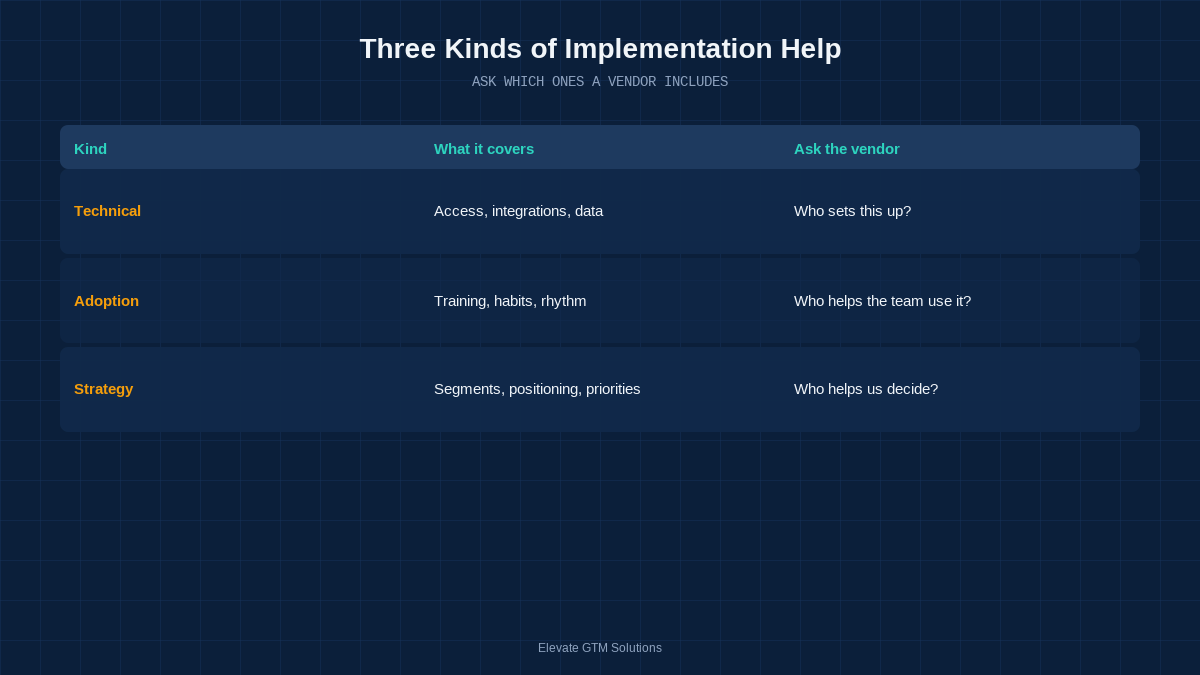
So when you ask about implementation support for this category, ask three separate questions.
- Technical: who sets up the workspace, users and integrations?
- Adoption: who helps the team use it and change their habits?
- Strategy: who helps us make the decisions the platform needs?
A vendor may be strong on one and silent on another. Decide which you need. A team with strong strategy skills and a small technical need can do well with light support. A team that wants help deciding what its plan should say needs strategy help, whether from the vendor, a consultant or a program.
How to compare vendors on support
Step 1: Write your needs
List what you need under the three headings: technical, adoption and strategy. Rate each as essential, helpful or not needed. This takes fifteen minutes and clarifies the search.
Step 2: Ask the same questions of each vendor
- Who does the implementation work, and are they employees or partners?
- How long does a typical implementation take for a company like ours?
- What does the standard plan include, and what is extra?
- What is the cost of paid implementation, and how is it scoped?
- Is there a named contact after launch?
- What are the support hours and response times?
- What training is included and for how many people?
- What do you need from us, in people and hours?
- What do customers usually underestimate?
- Can we speak to a customer who implemented with you recently?
Step 3: Ask for a ninety-day plan in writing
A credible vendor can describe the first ninety days: what happens in weeks one to two, three to six and seven to twelve, who is involved and what you will have at the end of each period. If a vendor cannot or will not describe it, treat that as information.
Step 4: Compare on a table
| Item | Vendor A | Vendor B | Vendor C |
|---|---|---|---|
| Technical setup included | |||
| Integrations included | |||
| Training included | |||
| Strategy help included | |||
| Named contact | |||
| Support hours and response | |||
| Paid services available and cost | |||
| Our team time needed | |||
| Reference customer |
Step 5: Weigh the total cost
Add the software price to the implementation price and to the cost of your team's time. A cheaper platform with expensive services can cost more than a pricier platform with good included onboarding.
What to get in writing
Verbal promises about support do not survive staff turnover. Ask for these in the quote or the order form.
- The implementation scope: tasks, deliverables and exclusions.
- The timeline and milestones.
- The people and roles: vendor and yours.
- Training: sessions, audiences and format.
- Support: hours, channels, response targets, escalation.
- Success measures: what counts as a successful launch.
- Change handling: what happens if scope changes.
- Costs: fixed or estimated, what is billed when.
- Exit: what happens to your data and work if you leave.
A realistic first ninety days
Here is a plausible shape, based on common practice and our judgment, not on any vendor's published plan. Your own timeline will differ.
Days 1 to 14: Set up and scope
Confirm owners and access. Decide the first scope: one product, one market, a few segments. Gather inputs: product description, customer notes, competitor information, pricing, goals. Complete any security review. Agree on how success will be judged.
Days 15 to 45: First plans and review
Produce the first strategy for the chosen scope. Review it with sales, marketing and product. Mark what is right, wrong and missing. Make decisions on the disputed points and record them. Connect the first integration if one is needed.
Days 46 to 75: Workflows and adoption
Turn the plan into workflows: owners, dates, check-ins. Train editors and viewers. Retire the old documents for this scope. Set the review rhythm and put it on calendars.
Days 76 to 90: Review and expand
Hold the first review. What worked, what did not, what do people use. Decide whether to expand to the next scope. Adjust the plan for support and ownership.
At the end, you should be able to say: one scope is live, the team uses it, decisions are recorded, and we know what the next scope needs. If you cannot, the implementation support was not enough, or your team's time was not available.
What you must provide, whatever the vendor does
Vendor support does not replace your own effort. Plan for these.
- A project owner with time and authority. One day a week at the start is a realistic expectation for many teams.
- Decision-makers who attend the review sessions.
- Inputs gathered before the work starts.
- A champion in each team who helps others adopt.
- Security and legal review time, if required.
- A habit of using it. The plan should become part of meetings.
Teams that underestimate their own part often blame the vendor for slow results.
Questions about integrations and data
Integrations are where implementation most often slips.
- Which systems do you connect to out of the box?
- What does each connection do: read data, write data, or both?
- Who builds and maintains each connection?
- Is there a charge?
- How often does data sync?
- What happens when a connection breaks?
- Are there limits on volume?
For any integration you need, ask the vendor to describe the specific actions it supports, not just that it "integrates with" a tool. See can go-to-market software integrate with a CRM and what enterprise buyers check for data governance, security and CRM integration in AI GTM platforms for more.
Security and compliance during implementation
Security reviews can add weeks. Start early.
- Ask what security documentation the vendor provides and in what form.
- Ask where data is stored and who can access it.
- Ask how permissions work and whether single sign-on is supported.
- Ask about retention and deletion.
- Involve your security team in the first call, not the last.
Do not assume any particular certification or standard. Ask whether the vendor holds the ones you require and ask to see the evidence.
Red flags in vendor support promises
- "Our platform is so easy you won't need support." Ease is good, but a team of forty will still need help.
- "We'll get you live in a week" with no scope.
- No named person for implementation.
- Services priced as "an estimate" with no cap.
- No references from companies like yours.
- Support described as "available" with no hours or response times.
- A tour in place of a plan.
- Pressure to sign before you see the implementation scope.
- No mention of your team's required time.
Choosing between software with included support and a consultant
Some buyers wonder whether to buy a platform with light support and hire a consultant separately. A few thoughts.
Platform plus consultant gives flexibility and independent advice, but two parties must coordinate and you pay for both.
Platform with a guided program keeps the work in one place, with advisors who know the tool, but the program has set hours and scope.
Platform alone is cheapest and suits teams with strong internal strategy skills.
See GTM platform vs GTM consultant, GTM consultant vs agency vs platform for a launch and can a GTM platform replace GTM consulting for the trade-offs.
A worked example, invented for illustration
A fifty-person company wants a platform to plan two products across three regions. The head of revenue operations writes her needs. Technical: single sign-on and a CRM connection. Adoption: a champion in each team. Strategy: help deciding segments for the second product, because sales and product disagree.
She asks three vendors the same ten questions. Vendor A is a software-only product with documentation and chat support. Strong on technical setup, silent on strategy. Vendor B offers paid implementation by a services team, priced by scope, with a named project manager, but no strategy help. Vendor C combines software with a guided program of advisor hours, describes a ninety-day plan and offers a reference.
She builds the table. Vendor A is cheapest but would leave the segment decision to her team, which is where the disagreement is. Vendor B is strongest on technical work, though the services bill is large. Vendor C costs more than A and less than B all in, but its program has a fixed number of hours, so she asks what happens if they need more.
She speaks to Vendor C's reference, a company with two products. The reference says the first month took more of their time than expected. She plans for that, names an owner with a day a week and picks Vendor C with a written ninety-day plan and a clause on additional hours.
This is an illustration, not a real company or product.
Where Elevate GTM Solutions fits
Elevate GTM Solutions is an AI-native GTM operating system and platform for B2B teams, based in Toronto. It is software first. It also offers programs and advisory alongside. Here is what its published pages say, and where we do not make claims.
Software that produces a first draft. You describe your market, industry, product and segment, and the platform builds a structured strategy across fifteen connected modules, with a unified view. The company says a strategy takes about five minutes to build. That shortens the "first plans" stage described above, because you start from a draft instead of a blank page. It does not replace the review and decisions.
Guided programs. For teams that want advisors alongside the software, programs start at USD 4,000, one time, and the pricing page lists the hours, scope and timeline for each program. The two smaller programs, priced at USD 4,000 and USD 12,000, are described there with hours and weeks.
GTM Advisory. The company describes advisory as short, focused engagements on specific problems such as positioning, pricing and expansion, and as fast and focused, not long-term consulting. Advisory pricing is not published, so ask for a scope and a quote.
Platform plans. Enable is USD 499 a month, billed annually. Growth is USD 1,499 a month, billed annually, for up to three users and three scopes. Scale is custom and annual, priced on request. Individual modules are USD 79 and a Unified GTM Strategy is USD 199, one time. Check the pricing page for current terms.
What we do not state. We do not state a standard implementation timeline, a named customer success manager, a particular support response time, specific certifications or a list of supported integrations on this page. Ask Elevate for these in writing and use the questions in this guide. The case studies the company publishes are anonymised and describe how the platform was used, not measured results.
How to use it. If your gap is strategy help, look at the guided programs or advisory. If your gap is technical, ask what setup and integrations are available for your tools and in what form. See what Elevate GTM Solutions is, the enterprise GTM operating system implementation roadmap and the pricing guide.
Implementation by company size
The right amount of support depends on how big and how complicated you are.
A small team with one product
You can often start with documentation, a short onboarding session and email or chat support. The main work is yours: gather inputs, decide the first plan, use it. A guided program or advisory may be worth it if you want help with decisions. Avoid paying for a large services project you do not need.
A mid-sized company with several teams
Plan for a named owner, a champion in each team, structured onboarding and a ninety-day plan. Integrations and permissions start to matter. Ask whether the vendor supplies onboarding as part of the plan or as a paid service.
A large company with several products and regions
Expect a longer implementation, a formal project plan, security and legal review, single sign-on and integrations. Paid implementation services or a partner may be appropriate. Insist on a written plan, a named project manager, milestones and a clear change process. Start with one region or product and add others in phases.
Who does what: a simple responsibility table
Unclear roles slow implementation more than software does. Agree on a table like this before you start.
| Task | Vendor | Your owner | Your teams |
|---|---|---|---|
| Workspace and access setup | Does | Approves | Informed |
| Scope decisions | Advises | Decides | Consulted |
| Inputs and context | Guides | Gathers | Contribute |
| First strategy or plan | Supports | Reviews | Review |
| Integrations | Builds or guides | Prioritises | Test |
| Training | Provides | Schedules | Attend |
| Adoption and habits | Advises | Leads | Practise |
| Review rhythm | Suggests | Owns | Attend |
| Support after launch | Provides | Escalates | Use |
Adapt the table. The aim is that nobody has to guess who does what.
A training plan that works
Training fails when it covers every feature and nobody practises. A shorter plan works better.
- Start with the three questions each role asks most. For a seller: who is the target customer, what do I say and what do I avoid. For a marketer: what is the priority segment, what is the message and what is launching. For a leader: what are we doing and why.
- Train by role, not by feature. Thirty minutes per role beats a two-hour tour for everyone.
- Use real material. Train on your own plan, not a demo workspace.
- Give people a task. "Find the answer to this question" is better than a presentation.
- Record it. A short recording helps new hires.
- Follow up after two weeks. Ask what people could not find or do.
Measuring adoption
You cannot manage adoption without measuring something. Pick a few simple signals.
- Use: how many people open the plan each week, and which teams.
- Currency: how recently the plan was updated, and by whom.
- Decisions recorded: how many decisions are logged with reasons.
- Reviews held: whether the monthly and quarterly reviews happened.
- Questions answered: whether people can find answers without asking the owner.
- Old documents: whether people still use the retired ones.
Review these in the first ninety days. A drop in use after the first month is common. It is a sign to reinforce the habit, not to blame the tool.
What good support after launch looks like
After launch, you will need help from time to time. Ask what the vendor commits to.
- Channels: email, chat, phone, a shared channel.
- Hours: business hours in which time zone, and whether there is out-of-hours cover for urgent issues.
- Response targets: how quickly the vendor replies, by severity.
- Escalation: who to contact if the first answer does not help.
- Named contact: whether a person knows your account.
- Reviews: whether the vendor holds periodic reviews of usage and results.
- Changes: how product updates are communicated.
Write the commitments you rely on into the order form. If a vendor will not write them, plan as if they do not exist.
Handling the risks that slow implementation down
Most implementations that run late fail for a small number of reasons. Knowing them lets you plan for them.
Decisions that nobody owns
If the segment, the positioning or the priorities are disputed, the platform will wait. Name who decides, and by when. Escalate early.
Inputs that arrive late
The platform needs product information, customer context, competitor views and goals. Gather them before the first working session. A short checklist helps.
Security review that starts too late
Security and legal review can take weeks. Begin in the first week, in parallel with setup, not after it.
Integrations that grow
An integration list that starts with one connection can grow to six. Prioritise. Make the first scope work with the minimum connections and add the rest later.
A champion who has no time
A champion with no time is a title, not a role. Agree the hours with their manager.
Scope that expands
Every team wants its own scope added in the first month. Hold the line: one scope live, reviewed and used before the next begins.
Leadership attention that fades
Executives support the project at the start and forget it by week six. A short monthly update, with one measure of use and one decision, keeps it in view.
What to ask in a reference call
A reference call is the best evidence you will get. Make the most of it.
- What did the implementation actually involve, week by week?
- How much of your team's time did it take, and from whom?
- What was harder than you expected?
- What did the vendor do well, and where did you wait?
- How quickly do they answer when something breaks?
- What would you do differently?
- Is the plan still used six months later? By whom?
- Would you buy it again?
Ask for a reference who resembles you in size, industry and complexity. A reference from a very different company tells you little.
When to choose light support, and when to pay for more
Paying for heavy support you do not need wastes money, and skipping support you do need wastes time. A few tests help.
Choose light support when your team has done this kind of work before, one person can own the project, your inputs are mostly gathered, the platform builds a first draft for you and you have no complex integrations or security reviews.
Pay for more support when the segment or positioning is disputed, nobody has time to own the project, you need several integrations, your security review is formal, you are planning several products or regions at once or the last software rollout stalled.
A middle path is to start light, set a review at day thirty and add support if the project is behind. Ask the vendor whether support can be added mid-term and at what price. That way the first decision is not final.
Questions to ask yourself before you talk to vendors
Vendors answer the questions you ask. Make sure you have asked yourself the important ones first.
- Do we agree on the problem, or does each team describe it differently?
- Who will own this after the vendor leaves?
- How many hours a week can that person give in the first two months?
- Which decisions are still open, and who will make them?
- What would make us call this a success in ninety days?
- What have we tried before, and why did it fade?
- Which of our tools must connect on day one, and which can wait?
- What would we cut first if the budget shrank?
Teams that answer these before the first call get better quotes, better support and fewer surprises. Teams that skip them often discover the answers in week six, when the implementation is already late.
A note on expectations
Good implementation support shortens the path to value, but it cannot make the decisions or do the daily work of using the plan. Vendors can set up the workspace, produce a draft, train your people and answer questions. Your team still has to review the draft, decide what is true for your company, change meetings to use the plan and keep it current. When a vendor describes support as "we handle everything," ask what that means in hours and deliverables. When a vendor says "you will need to do the following," treat that as a sign of honesty, not a weakness. The best outcomes usually come from a clear split of work, agreed early and written down.
Common mistakes
- Treating "support" as "implementation."
- Buying technical setup when the gap is strategy.
- Not asking for a ninety-day plan.
- Forgetting exclusions: migration, integrations, training.
- Underestimating your own team's time.
- No named project owner on your side.
- Starting the security review late.
- Relying on a tour instead of a reference.
- Choosing on software price alone.
- Not recording decisions during implementation.
- Launching to everyone at once instead of one scope.
- No review rhythm after launch.
Glossary
- Implementation: everything between signing and getting value.
- Onboarding: the initial setup and training period.
- Customer success manager: a named contact responsible for your adoption.
- Statement of work: a document defining the scope and fee of a services project.
- Guided program: advisors working alongside software for a set scope.
- Advisory: short focused expert sessions.
- Scope: a product, market or segment planned in a platform.
- Champion: a team member who helps others adopt.
- Integration: a connection between two systems.
- Exclusion: something not covered by the quote.
What to do this week
- Write your needs under technical, adoption and strategy.
- List three vendors and send each the same ten questions.
- Ask each for a written ninety-day plan.
- Build the comparison table, including your team's time.
- Ask for a reference customer like you.
- Start the security conversation now.
- Name your own project owner.
Key takeaways
- "Implementation support" covers technical setup, adoption and strategy help. Ask which parts are included.
- Strategy platforms often need more help with decisions than with technology.
- Compare vendors on a written ninety-day plan, not on slogans.
- Get scope, timeline, roles, training, support and exclusions in writing.
- Budget your own team's time.
- A reference customer is the best evidence of how implementation goes.
- Ask any vendor, including Elevate, for what is not published.
Sources
- Elevate GTM Solutions pricing page: plans, programs and prices as published. Confirm current terms there.
- Related Elevate guides linked in the text, including what Elevate GTM Solutions is and the enterprise GTM operating system implementation roadmap.
- The ninety-day shape, timelines and checklists reflect common practice and our judgment, not any vendor's published plan or a measured benchmark.
- The worked example is invented for illustration.
Frequently Asked Questions
Which go-to-market strategy software vendors offer implementation support?
Many do, in different forms: documentation, onboarding sessions, customer success contacts, paid implementation services, partner implementers and guided programs. Judge each by what the written quote says about who does the work, how long it takes and what it costs.
What does implementation support usually include?
Account and access setup, scoping, data and context, integrations, content and strategy, training and adoption, workflows and a review rhythm, and ongoing support. Vendors often cover only some of these, so ask which.
How long does implementation take?
It depends on scope, integrations and security review. A first scope can be live in weeks, and larger portfolios take longer. Ask the vendor for a written plan for the first ninety days for a company like yours.
Is implementation support included in the price?
Sometimes partly. Onboarding sessions and support are often included, while data migration, integrations, custom setup and strategy help are often extra. Ask for exclusions in writing.
Does Elevate GTM Solutions offer implementation support?
It offers guided programs from USD 4,000, one time, and GTM Advisory for specific problems, alongside its software. We do not state a standard implementation timeline, support response time or integration list here, so ask Elevate for these in writing.
What is the difference between a guided program and advisory?
A guided program has advisors working alongside the software for a set number of hours over a set period. Advisory is short and focused on one problem, such as positioning or pricing.
What should I ask a vendor about integrations?
Which systems are supported, what each connection does, who builds and maintains it, whether it costs extra, how often data syncs and what happens when it breaks. Ask for specific actions, not only that it integrates with a tool.
How much of my team's time will implementation need?
More than most teams expect. Plan for a project owner with regular time, decision-makers at reviews, inputs gathered in advance and a champion in each team.
Should I hire a consultant as well as buy a platform?
If you need strategy help and the vendor does not provide it, a consultant or a guided program can fill the gap. Coordination between parties adds cost, so compare it with a program from the vendor.
What are red flags in support promises?
No named implementer, a go-live promise with no scope, uncapped service estimates, no references from similar companies, vague support hours and a tour offered in place of a plan.
Does a strategy platform need technical implementation at all?
Usually some, such as access and optional integrations, but the harder part is content and decisions. Make sure you know who helps with those.
How do I know implementation went well?
One scope is live, the team uses it, decisions are recorded, the old documents are retired and you know what the next scope needs.