
By the Elevate GTM Solutions Team · Updated November 24, 2026 · 26 min read
How to Move Your Go-to-Market Plans From Decks and Spreadsheets Into New Software, Step by Step
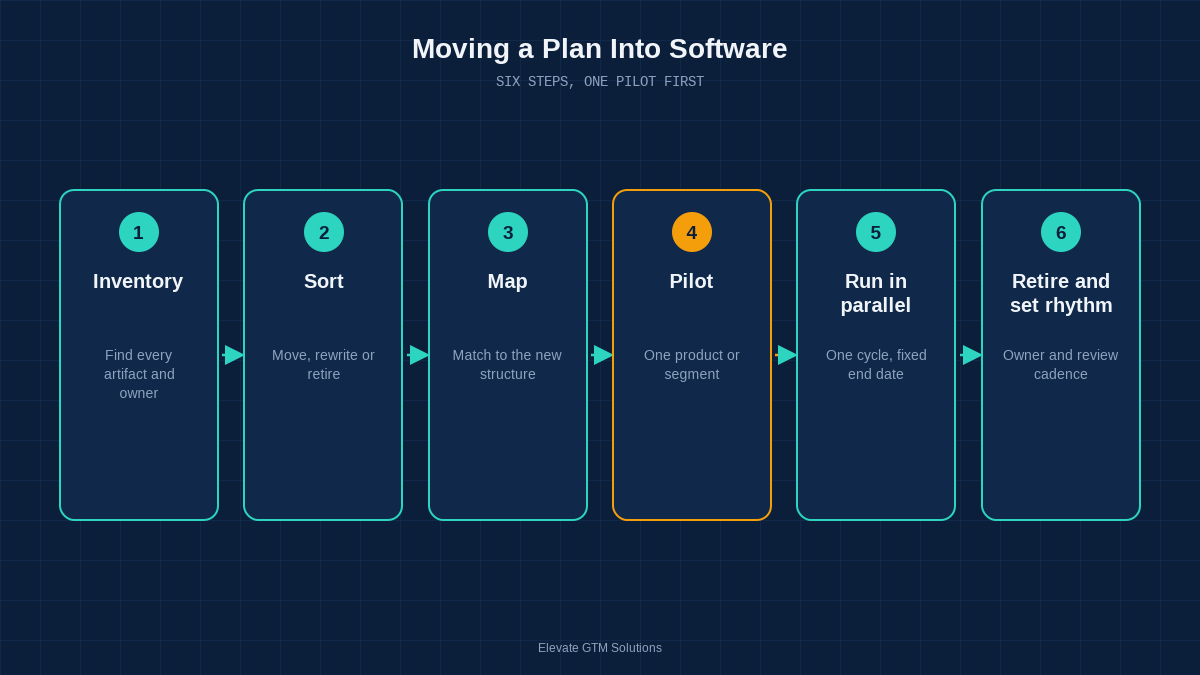
Most go-to-market plans do not live in software. They live in a slide deck from the last planning offsite, a spreadsheet of target accounts, a document called "Launch plan v7 FINAL," a few pages in a wiki and a lot of memory. When a team decides to move that into a platform, the hard part is not the software. It is deciding what to move, what to rewrite and what to leave behind.
This guide gives you a practical way to do the move. It covers how to take stock of what you have, which parts of a plan move cleanly and which do not, how to map old material into a new structure, how to run the old and new side by side for a while, how to get people to use the new thing and how to avoid the mistakes that make a migration stall at "we'll finish it next quarter." It is written for teams of any size, and it applies whether you are moving into Elevate GTM Solutions, another platform or a work-management tool.
How do I move my GTM plans into new software?
Do it in six steps. First, inventory every place the plan lives and who owns each piece. Second, decide what to move as is, what to rewrite and what to retire. Third, define the structure the new software expects, such as product, market and segment. Fourth, move one product or segment as a pilot, not everything. Fifth, run the old and new in parallel for one planning cycle. Sixth, retire the old documents on a set date and tell people where to look. Most migrations fail from trying to move everything at once and from having no owner after launch.
How long does it take? For one product and a handful of segments, a few weeks of part-time work is a reasonable expectation. Bigger portfolios take longer, mostly because of the decisions, not the typing.
What is the biggest risk? People keep using the old deck. Set a retirement date and make the new place the only place decisions are recorded.
The short version
- Moving a plan is mostly an editing and decision job. The software only holds what you decide.
- Start with an inventory. You cannot move what you have not found.
- Sort each item into three piles: move as is, rewrite, retire. Most teams find the retire pile is bigger than expected.
- Match your material to the structure the new tool uses. If the tool is organised by product and segment, your deck, written by theme, will not map one to one.
- Pilot with one product or segment. Learn what breaks before you do the rest.
- Run old and new in parallel for one cycle, with a set end date.
- Name an owner and a review rhythm. A migrated plan with no owner decays within a quarter.
- Do not move the spreadsheets that are working. Move the decisions around them.
- Be honest with the team about what the software will not do.
Why teams move at all
Teams usually move because of a specific pain.
- The plan is stale. The deck was right in January and wrong by April, and nobody updated it.
- Nobody can find the current version. There are four copies and none is marked as current.
- The plan is disconnected from execution. Marketing works from one document, sales from another and product from a third.
- Onboarding is slow. A new hire needs a week to piece together what the plan is.
- Reviews are painful. Each quarterly review starts with reconstructing what was decided last time.
- Leadership wants a single view. Executives want to see priorities, owners and status without asking five people.
Knowing which pain is yours matters, because it tells you what to move first. If the plan is stale, move the parts that change often. If nobody can find it, move the parts people ask for most. If it is disconnected, move the parts that cross teams.
For more on why plans drift, see why B2B go-to-market strategies fail in execution and how to tell if your GTM strategy is broken.
What lives in a typical plan, and where
Before you move anything, list what a complete plan contains. Most teams hold these pieces in different places.
| Plan element | Typical home today | Moves how |
|---|---|---|
| Market and segment definitions | Strategy deck, wiki | Rewrite into the new structure |
| Ideal customer profile and personas | Marketing doc, sales deck | Move after review |
| Competitor and alternatives view | Battlecards, spreadsheet | Move the current version, retire the rest |
| Positioning and messaging | Messaging doc, brand guide | Move as is if current; rewrite if not |
| Pricing and packaging | Spreadsheet, pricing doc | Link or summarise; keep the model where it works |
| Channel and campaign plans | Marketing calendar, project tool | Often stay in the project tool, linked |
| Sales plays and enablement | Enablement platform, shared drive | Reference, do not duplicate |
| Targets, quotas and capacity | Finance spreadsheet, planning tool | Usually stays where finance owns it |
| Launch plans | Project plan, checklists | Move the plan, keep task tracking where it is |
| Metrics and review notes | Dashboards, meeting notes | Define what to track; link to the source |
| Decisions and rationale | Often nowhere | Start recording now |
The last row is the one most teams skip. If you move only one thing well, move the decisions and the reasons for them. That is what disappears when people leave.
Step 1: Take inventory
Spend a couple of days finding everything. Be thorough and slightly paranoid.
List every artifact. Decks, documents, spreadsheets, wiki pages, shared-drive folders, project boards, dashboards, battlecards, email threads that contain decisions and personal files that people rely on.
Record for each one: the owner, the last updated date, the audience, whether it is current and where people actually go when they want the answer.
Ask the team. Run a short survey or ask in a meeting: "Where do you look when you want to know our target customer, our top three priorities, our pricing?" The answers show the real map, which is often different from the official one.
Note duplicates. Where two documents disagree, mark it. The disagreement is a finding, and you will have to resolve it before you can move anything.
Mark sensitive material. Pricing models, customer names, contract terms and financial targets may need access controls in the new tool. Decide this now, not after you import.
Output of this step: a single sheet with one row per artifact. It does not need to be pretty.
Step 2: Sort into three piles
Go through the inventory and sort each item.
Move as is
Content that is current, correct and used. A well-kept ideal-customer profile, a recent competitor comparison, an approved messaging framework. Move it with light formatting.
Rewrite
Content that is useful but out of date, or written for a different structure. A strategy deck from last year, a segment list with no priorities, a launch plan for a product that has changed. Treat these as drafts, not as finished material. Rewriting is when you catch things that were wrong.
Retire
Content that is stale, duplicated or no longer used. Old decks, abandoned experiments, outdated battlecards. Do not move them. If someone might want them, archive them in a clearly named folder, outside the new system.
Teams that skip this step end up importing a large amount of clutter into a new tool, which then looks cluttered too. The new place should feel cleaner than the old one, or nobody will move.
A useful test for each item: "If this were missing tomorrow, who would notice, and what would they do?" If the answer is "nobody," retire it.
Step 3: Learn the structure the new software expects
Different tools organise plans differently. Some are organised by product, market and segment. Some by campaign. Some by project and task. Some by goal and key result. Before you move anything, learn the structure and decide how your plan maps onto it.
Draw the mapping. On one page, draw your plan's current shape (for example, by theme: market, positioning, pricing, channels) and the tool's shape (for example, by product and segment). Mark where the two do not line up.
Decide the unit of work. Is a plan one product in one market? One segment? One launch? The unit decides how many plans you create and how they relate.
Decide what is shared and what is specific. Some things are shared across plans, such as company positioning and pricing principles. Others are specific, such as the pain points of one segment. Put shared material in one place and link to it.
Set naming rules. A naming rule, such as "Product - Market - Segment," avoids a mess of "Plan 2," "New plan" and "Copy of plan."
If the software builds a structured strategy from inputs rather than importing your documents, the work looks different: your documents become inputs, and the output is a fresh draft that you compare against your existing plan. That is how a platform like Elevate works, described in the section below.
Step 4: Pilot with one product or segment
Do not migrate everything at once. Choose one product and one segment.
Pick a pilot that matters but is not on fire. A launch happening next week is a bad pilot. A quiet product no one cares about is also bad, because nobody will review the result. Choose something with a real owner and a review coming in the next month or two.
Set a pilot goal. For example: "By the end of the pilot, the sales lead and the marketing lead can both find the target customer, the three priorities and the messaging in the new place, and agree that it is current."
Move the material. Follow your three piles. Rewrite where needed.
Keep a log of friction. Each time something is awkward, a field does not fit, a step is slow or someone cannot find something, write it down. These notes are the most valuable output of the pilot.
Review with the people who will use it. Not just the owner. Ask a seller and a marketer to find specific answers in the new place without help. Watch where they get stuck.
Decide go, adjust or stop. If the pilot shows the tool does not fit, you have saved yourself a full migration. If it fits, you now know how long the rest will take.
Step 5: Run old and new in parallel, for a fixed time
For one planning cycle, usually a quarter or a month, keep both. But set rules.
- The new place is the source of truth for the pilot scope. Changes get made there first.
- The old documents are marked "read only" or "being retired" with a date.
- One person owns synchronisation. If an old document is edited, that person tells the team.
- A check-in at the midpoint to find what is still being done the old way, and why.
Parallel running is a bridge, not a destination. Without an end date, it becomes permanent, and you end up with two systems and twice the maintenance.
Step 6: Retire the old and set the rhythm
On the retirement date:
- Announce it in the usual channels, with the link to the new place.
- Mark old documents as archived, with a pointer.
- Remove old links from onboarding and team pages.
- Update templates and meeting agendas so reviews start in the new place.
- Name the owner and write down the review rhythm: who looks at what, how often, and what triggers an update.
A review rhythm is the difference between a plan and a snapshot. A simple one: a short monthly check on priorities and status, and a deeper quarterly review of segments, positioning and results. Put it on calendars.
What does and does not belong in a planning platform
Not everything should move. Here is a way to decide.
Good candidates to move:
- Decisions and the reasons behind them.
- Segment and customer definitions.
- Positioning and messaging.
- Priorities, owners and review dates.
- Plans that cross teams.
Often better left where they are, but linked:
- Detailed campaign calendars in a marketing tool.
- Task-level launch checklists in a project tool.
- Quota and capacity models owned by finance.
- Sales call recordings and enablement content.
- CRM records.
Do not move:
- Old versions with no ongoing value.
- Raw data dumps nobody reads.
- Duplicates of living documents.
The rule of thumb is: move what needs to be shared and decided, and link to what needs to be worked on in a specialist tool. A plan platform is not a replacement for the CRM, the project tool or the finance model. It is the place where they are tied together by a plan.
The spreadsheet question
Spreadsheets are the hardest thing to move, because they work. A target-account list, a pricing model and a capacity plan can each be better in a spreadsheet than in anything else.
Ask three questions of each spreadsheet.
- Does it hold a decision or a calculation? Calculations often stay. Decisions belong where people can see the reasoning.
- Who edits it? One expert editor suggests it can stay. Ten editors with conflicting versions suggests it needs a home.
- Who reads it? If only its owner reads it, leave it. If five teams read it, link it from the plan.
A pattern that works: keep the spreadsheet, and put the conclusions, owners and review dates in the plan, with a link to the sheet. Then when the sheet changes, the plan points to the source instead of copying it.
Data: what to bring over and what to clean first
Even in a planning platform, you will move some data: account lists, segment definitions, product details. Clean it before you move it.
- Remove duplicates. Two entries for the same company cause confusion later.
- Standardise names. "Acme Inc", "Acme, Inc." and "ACME" are one company.
- Agree on definitions. What counts as "enterprise"? What is an "active" customer? Write the definition down.
- Check ownership. Every account or segment has one owner.
- Check permissions. Who can see pricing and customer names?
- Keep a backup. Export the old data before you change anything.
If you are unsure about data handling, security or privacy, ask the vendor in writing. See what enterprise buyers check for data governance, security and CRM integration in AI GTM platforms for a checklist.
People: how to get a team to use it
The software is the easy part. People are the hard part.
Explain the why. "We are doing this so nobody has to ask which version is current." Tie it to a pain they feel.
Make it easier than the old way. If it takes ten clicks to find the priorities, they will go back to the deck.
Involve the doubters early. The seller who says "I never read the plan" is the best tester. If the new place works for them, it works.
Name a champion in each team. One person in sales, one in marketing, one in product who knows the new place and helps others.
Train briefly and specifically. Thirty minutes on "how to find the answer to your three most common questions" beats a two-hour tour.
Make the new place the place for decisions. If decisions are still made in a meeting and written in a deck, the new place will always be behind.
Celebrate small wins. A quarterly review that took an hour instead of a day is worth saying aloud.
Be honest about limits. If the tool does not do something, say so and say where that work happens.
Governance: who can change what
A shared plan needs rules.
- Owner: one person accountable for each plan.
- Editors: a short list of people who can change content.
- Viewers: everyone else.
- Change log: a record of what changed, when and why.
- Approval: who signs off on changes to positioning, pricing and priorities.
- Archive: where retired material goes.
Without rules, a shared plan turns into a free-for-all. With too many rules, nobody edits it. Aim for the simplest set that stops silent changes to the things that matter.
A worked example, invented for illustration
A thirty-person software company sells two products. Its plan lives in a strategy deck from January, a spreadsheet of target accounts, a messaging document, a pricing spreadsheet and a wiki page of sales plays. The head of marketing, who owns the plan, decides to move into a planning platform because the sales team has stopped reading the deck.
She starts with an inventory and finds eleven artifacts. Two disagree about who the main customer is for product B. Three have not been updated in over a year.
She sorts them. The messaging document and the target-account spreadsheet are current: move as is, with the spreadsheet linked rather than copied. The January deck needs rewriting, because product B's market has changed. Four items are retired. The pricing spreadsheet stays where it is, with its conclusions summarised in the plan and a link to the sheet.
She pilots with product A, which has a quarterly review coming. She learns that the tool expects a plan per segment, but the deck was organised by theme, so she redraws the structure first. She keeps a friction log and notes that two fields are confusing and one report is not what sales wanted.
Sales and product review the pilot. The seller finds the target customer in under a minute, which he could not do with the deck. The product manager spots an out-of-date competitor claim, and the team fixes it in the platform and notes why.
For one month the old deck is marked "retiring on 15 March" and edits happen in the new place first. On the 15th she announces the switch, archives the old documents and updates the sales onboarding page. She puts a monthly priorities check and a quarterly review on the calendar. Product B is migrated next, using what the pilot taught her.
This is an illustration, not a real company. The pattern is what matters: inventory, sort, map, pilot, parallel, retire, rhythm.
Where Elevate GTM Solutions fits
Elevate GTM Solutions is an AI-native GTM operating system and platform for B2B teams, based in Toronto. It is software, not a consulting firm. If you are considering it for the move, here is how the process differs from a document import, described from the published product flow.
Your documents become inputs, not imports. You describe your market, industry, product and segment, and the platform builds a structured strategy across fifteen connected modules, with a unified strategy view. The company says a strategy takes about five minutes to build. Your existing deck, spreadsheet and messaging document become the reference you compare the new draft against. That comparison is valuable on its own, because it shows where your current plan is out of date, thin or contradictory.
The structure is product, market and segment. A strategy is built for a scope. Map your plan to scopes before you start, as in step 3 above.
Strategy and execution connect. The platform describes a path from strategy into workflows, a review rhythm and dashboards, so the plan feeds execution instead of sitting in a deck. See what Elevate GTM Solutions is and what an AI-native GTM operating system is for how the pieces fit.
What it does not do. It is not a CRM, a project tool or a finance model, and it does not replace them. Link to the systems where specialist work happens. We do not claim a one-click import of existing decks and spreadsheets, and we recommend you ask the team during a demo exactly which import and integration options are available for your tools, so you can plan the move on facts.
Pricing for the move. A single module costs USD 79 and a unified strategy USD 199, one time, which makes a pilot cheap. Platform subscriptions start at USD 499 a month, billed annually. Guided programs from USD 4,000 add advisors alongside you. Check the pricing page for current terms and the pricing guide for how the plans differ.
A sensible pilot. Pick one product and segment. Request a free first strategy, or buy a unified strategy for that scope. Compare it to your current plan, line by line. Note what is new, what is wrong and what is missing. Then decide whether to move the rest. See how to compare multiple GTM strategies before committing budget for a method.
Elevate's published case studies are anonymised and describe how the platform was used, not measured results, so judge it on your own pilot.
What each team needs from the move
A migration succeeds when each team can see itself in the new place. Ask each function what it needs, then check the structure serves it.
Marketing
Marketing usually wants the target customer, positioning, messaging and the priority segments, plus a view of what is launching and when. If the new place cannot show that on one screen, marketing will keep a separate calendar and a separate messaging document.
Sales
Sellers want to know who to call, what to say and what to avoid. They will not read a long strategy. Make sure the new place has a short, scannable version of the segment, the pain points, the competitors and the messaging. Test it with a seller who has never seen it.
Product
Product wants to know which segments the roadmap serves and which feedback matters. Link the plan to the roadmap, and record which decisions about the product came from the go-to-market plan.
Revenue operations
Revenue operations cares about definitions, data and handoffs. Make sure the definitions in the plan (what counts as a target account, an enterprise customer, a qualified lead) match the ones in the CRM. A mismatch here causes months of confusion.
Customer success
Customer success wants to know what customers were promised and who the best-fit customers are. Include the expansion and retention view, not only acquisition.
Leadership
Leaders want priorities, owners, status and the reasons behind the biggest bets. A single view that answers "what are we doing this quarter and why" is the strongest reason for them to back the migration.
A thirty, sixty and ninety day plan
If you want a schedule, here is a plain one. Treat it as a starting point, because your timeline depends on how many scopes you have and how much time the owner can give.
Days 1 to 30. Complete the inventory and the three piles. Draw the mapping. Choose the pilot. Gather inputs. Agree the success test: what must be true for the pilot to count.
Days 31 to 60. Build the pilot scope in the new tool. Rewrite what needs rewriting. Hold the review with sales, marketing and product. Keep the friction log. Decide whether to proceed.
Days 61 to 90. Run the old and new in parallel with a retirement date. Train the team on the three questions they ask most. Set the review rhythm. Plan the next scope using what you learned.
These figures are our judgment, not a benchmark. A small company with one product may finish faster. A company with many products and regions will take longer, mostly because of decisions.
Questions stakeholders ask, and honest answers
"Why can't we just keep the deck?" You can, if the deck is current and everyone uses it. If it is not, the cost shows up as meetings spent reconstructing the plan.
"Will this take a lot of time?" The inventory and the sorting take real hours. The typing is small. The decisions are the long part, and you would have to make them anyway.
"What if people do not use it?" Then you have a new place that is also stale. That is why the owner, the rhythm and the retirement date matter more than the tool.
"What if we choose the wrong tool?" The pilot is your protection. A small first move limits the cost of a bad fit.
"Can we move everything automatically?" Sometimes part of it. Even then, the sorting and rewriting have to be done by people who know the plan.
Common mistakes
- Trying to move everything at once.
- Skipping the inventory and the retire pile.
- Importing clutter and then wondering why the new tool looks messy.
- Forcing a theme-based deck into a segment-based tool without redesigning it.
- Moving spreadsheets that were working, then losing the calculation.
- Running old and new in parallel forever.
- No owner and no review rhythm.
- Training for features instead of for the questions people actually ask.
- Forgetting permissions for pricing and customer names.
- Not recording decisions, only content.
- Expecting the software to settle disagreements between teams.
- Assuming the vendor's import works on your files without testing.
Glossary
- Inventory: a list of every place the plan lives.
- Pilot: a small first migration used to learn.
- Parallel run: keeping old and new for a fixed time.
- Source of truth: the one place a decision is recorded.
- Scope: a product, market or segment planned in the tool.
- Retire: stop using and archive.
- Friction log: notes on what is awkward during the pilot.
- Review rhythm: the regular schedule for checking and updating the plan.
- Champion: a team member who helps others adopt the tool.
What to do this week
- Make the inventory sheet and list every artifact and owner.
- Ask five people where they look for the target customer, priorities and pricing.
- Sort the items into move, rewrite and retire.
- Choose one product and segment for a pilot.
- Draw the mapping between your plan and the tool's structure.
- Set a retirement date for the old documents.
- Put the review rhythm on calendars.
Key takeaways
- Moving a plan is an editing and decision job, not a typing job.
- Inventory first. Sort into move, rewrite and retire.
- Map your material to the structure of the new tool before you move it.
- Pilot with one product or segment, and keep a friction log.
- Run old and new in parallel for one cycle, with an end date.
- Name an owner and a review rhythm.
- Keep the spreadsheets that work, and move the decisions around them.
- Ask any vendor exactly which import and integration options exist, and plan on facts.
Sources
- Elevate GTM Solutions pricing page: module, strategy and plan prices as published. Confirm current terms there.
- Elevate GTM Solutions free trial page: how to request a first strategy.
- Related Elevate guides linked in the text, including what Elevate GTM Solutions is and why B2B go-to-market strategies fail in execution.
- The migration steps reflect common practice and our own judgment, not a measured benchmark.
- The worked example is invented for illustration.
Frequently Asked Questions
How do I move my GTM plans into new software?
Take inventory of every artifact, sort each into move, rewrite or retire, map your material to the new structure, pilot with one product or segment, run old and new in parallel for one cycle and then retire the old on a set date. Name an owner and a review rhythm.
How long does a GTM plan migration take?
For one product and a few segments, a few weeks of part-time work is a reasonable expectation. Larger portfolios take longer, mostly because of decisions, not data entry. A pilot will give you a better estimate than any rule of thumb.
Should I move my spreadsheets into the new software?
Not always. Keep calculations that work in a spreadsheet, and put the conclusions, owners and review dates in the plan with a link to the sheet. Move spreadsheets that many people edit with conflicting versions.
What should I do with old decks?
Sort them. If they are current, move or link them. If they are out of date but useful, rewrite them as drafts. If they are stale or duplicated, archive them outside the new system and do not import them.
Can Elevate GTM Solutions import my existing plans?
We do not claim a one-click import of existing decks and spreadsheets. The platform builds a structured strategy from the context you enter, and your current plan becomes the reference to compare against. Ask during a demo which import and integration options exist for your tools.
How do I get my team to use the new tool?
Explain the pain it solves, make it easier than the old way, involve doubters early, name a champion in each team, train on the questions people actually ask and make the new place the only place for decisions.
What is a pilot and why run one?
A pilot moves one product or segment first. It shows what breaks, how long the rest will take and whether the tool fits, before you commit the whole portfolio.
Do I need to run the old and new systems in parallel?
For one planning cycle, yes, with a fixed end date. Without an end date, parallel running becomes permanent and doubles the maintenance.
Who should own the migrated plan?
One accountable owner for each plan, a short list of editors and a clear approval step for changes to positioning, pricing and priorities. Without an owner, the plan decays.
What should not go into a GTM planning platform?
Old versions, raw data dumps, duplicates of living documents and specialist work such as task-level checklists, CRM records and finance models. Link to them instead.
How much does it cost to pilot Elevate GTM Solutions?
A first strategy request is free, an individual module is USD 79 one time and a unified strategy is USD 199 one time. Subscriptions start at USD 499 a month, billed annually. Check the pricing page for current terms.
How do I keep decisions from getting lost?
Record the decision, the reason, the owner and the date in the plan, not just the final content. Decisions and their reasons are what disappear when people leave.