By the Elevate GTM Solutions Team · Updated November 10, 2026 · 20 min read
HubSpot Alternatives for GTM Strategy: What to Use When the CRM Is Not Enough
Searches for "HubSpot alternatives" usually come from one of two moods. Some buyers are unhappy with HubSpot as a CRM and want to replace it. Others are happy with HubSpot as a system of record and have discovered that it does not produce their go-to-market strategy for them. The two groups need different answers, and most "best HubSpot alternatives" lists serve only the first.
This guide takes both seriously. It explains what HubSpot is and does well, separates three things people mean by an alternative, maps alternatives to the specific problem you are trying to solve, and shows how to use HubSpot together with a strategy layer if you decide to keep it. Elevate GTM Solutions makes a platform that sits at the strategy layer and is not a HubSpot replacement, so we say plainly when HubSpot or another tool is the better answer. Vendor details come from public descriptions and your own site's comparison pages as of November 2026 and change often, so confirm them before you buy.
What Are the Best HubSpot Alternatives for GTM Strategy?
It depends on the problem. If you need a different CRM, look at systems such as Salesforce. If you need to decide your go-to-market strategy (customer definition, positioning, messaging, pricing logic and plans), HubSpot does not do that, and a GTM strategy platform such as Elevate GTM Solutions or Ignition addresses it, usually alongside HubSpot, not instead of it. If you need account intelligence, consider Demandbase or 6sense. If you need outbound data and sequences, consider Apollo, Clay or Artisan. Most teams keep their CRM and add tools for the jobs it does not cover.
Can I replace HubSpot with a GTM platform? No. A GTM platform does not hold customer records or run marketing automation. It decides what the CRM should execute.
Should I leave HubSpot? Only if the problem is HubSpot itself. If the problem is unclear strategy, a new CRM will not fix it.
Three things people mean by "alternative"
| Meaning | The real question | What to look at |
|---|---|---|
| A replacement CRM | We want to move off HubSpot's CRM and marketing automation | Other CRMs and marketing platforms |
| A complement for strategy | HubSpot runs our operations but does not tell us who to target or what to say | GTM strategy and planning platforms |
| A complement for a missing function | We need account intelligence, outbound data, enablement or analytics that HubSpot does not cover well | Specialist tools |
Naming which meaning applies saves weeks. A team that wants a better CRM and buys a strategy platform will be disappointed, and so will a team that wants strategy and buys a different CRM.
What HubSpot is, and what it does well
HubSpot was founded in 2006 around inbound marketing and has grown into one of the most widely adopted customer platforms. It is built around a CRM with paid product lines called Hubs for specific functions.
| Hub | What it covers |
|---|---|
| Marketing Hub | Landing pages, email, automation workflows, forms, SEO tools and campaign reporting |
| Sales Hub | Deal pipelines, email sequences, meetings, a dialer, forecasting and conversation intelligence |
| Service Hub | Ticketing, a knowledge base, customer feedback and support automation |
| CMS Hub | A website content management system on the same contact database |
| Operations Hub | Data syncing, workflow automation and data quality management |
| Revenue Hub | Quoting, invoicing, subscriptions and payments |
HubSpot has also introduced an AI layer called Breeze, with an assistant for everyday tasks, agents for tasks such as customer support and prospecting, and an intelligence component for enrichment and buyer signals. Pricing details change, including how some agent features are charged, so check HubSpot's current pages.
Its architectural pitch is that every Hub writes to the same contact and company record. For teams tired of reconciling data between separate tools, that has real value. Our Elevate vs HubSpot comparison covers this in depth.
What HubSpot does not do
The same breadth has a boundary. HubSpot records and runs the motion. It does not decide it.
| Question | Does a CRM answer it? |
|---|---|
| Which segment should we prioritize? | Not on its own. It can show data about past deals |
| How should we position against the alternatives buyers use? | No |
| What should the message be, and what proof supports it? | No |
| What should the price signal, and how should we package? | No |
| How do regions or products stay consistent with one strategy? | Only if the team builds and maintains that discipline outside it |
| What changes when the market moves? | The team must decide, then configure |
This is why many companies keep strategy in slide decks while running operations in a CRM. It is also why our article Why CRM Isn't Your GTM System exists.
Why teams look beyond HubSpot
These are reasons buyers commonly give. They are not criticisms specific to any vendor, and your experience may differ.
- The cost grows with contacts, seats and features. Teams reassess when usage scales, and when they discover they are paying for capabilities they do not use.
- Complexity increases as modules are added. Configuration and administration can become a job in itself.
- A function is thinner than a specialist's. For example, advanced account-based advertising or enterprise-scale enablement.
- They need strategy and alignment help. The CRM shows what happened, and leaders want to decide what should happen.
- They want AI-run outbound. Some teams look at tools built around autonomous agents.
- A merger or reorganization forces a rethink of tools.
- Procurement standardizes on another platform.
Write down which of these is yours. If none of them is about the CRM itself, you may want a complement, not an alternative.
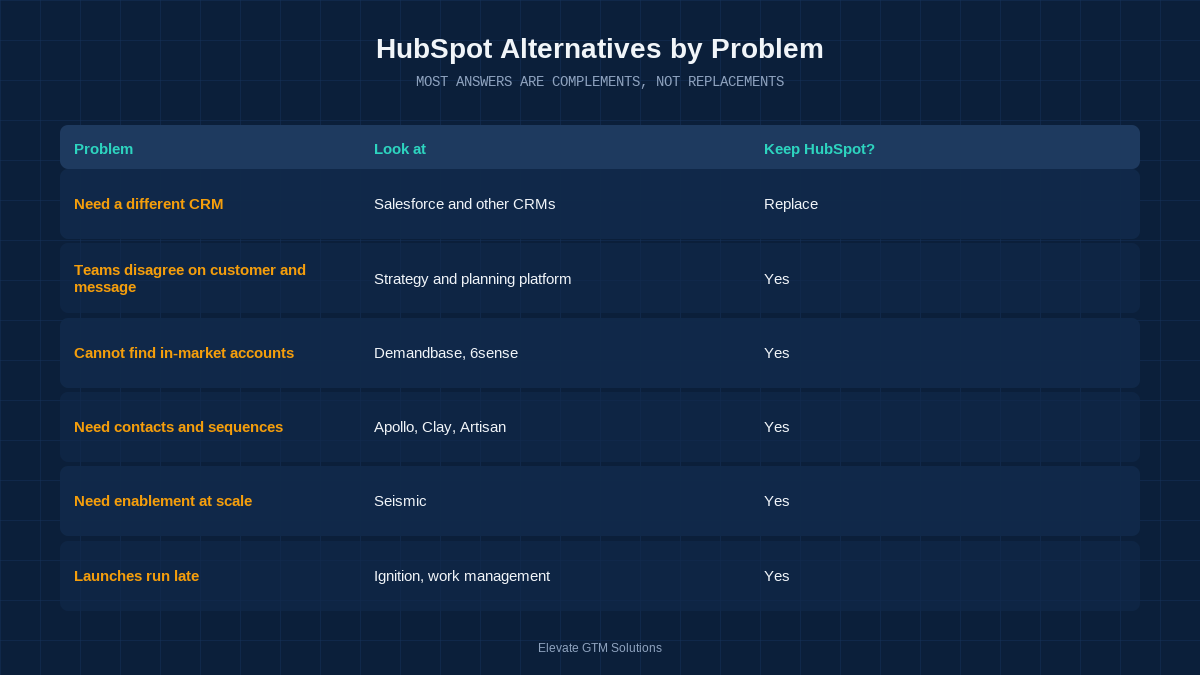
Alternatives by problem
| Problem | Look at | Why | Keep HubSpot? |
|---|---|---|---|
| We need a different CRM | Salesforce and other CRMs | Fit with your data model, scale or integrations | Replace |
| Teams disagree on customer, message and plan | A GTM strategy and planning platform (Elevate GTM Solutions, Ignition) | A shared strategy layer | Yes |
| We cannot find in-market accounts | Demandbase, 6sense | Account intelligence and advertising | Yes |
| We need contacts and sequences | Apollo, Clay, Artisan | Data, enrichment and outbound | Yes |
| We need enablement at scale | Seismic (including Highspot) | Content, training and coaching | Yes |
| We need call insight and coaching | Gong | Conversation intelligence | Yes |
| Launches run late | Ignition, work management tools | Launch operations | Yes |
| We want to automate routine steps between tools | Zapier, n8n, Make | Orchestration | Yes |
The right-hand column is the useful part. Most of the time the answer is "yes, keep it" because the problem is elsewhere.
If you need a different CRM
Replacing a CRM is a major project. Treat it as such.
Salesforce is the most common alternative for larger organizations, with a broad platform and a large ecosystem. It typically requires more configuration and administration than a lighter system. Our Elevate vs Salesforce page covers where a strategy layer fits with it.
Other CRMs serve different sizes and needs. Evaluate them on the same criteria: data model fit, integrations you need, administration effort, reporting, security and total cost over three years.
Before you migrate, ask: Is the problem the CRM, or how it is configured and used? Many frustrations come from unclear process, not from the platform. A migration that carries the same unclear process into a new system disappoints in a new color.
If you need to decide your strategy
This is the problem a CRM cannot solve. A strategy and planning layer holds the decisions: customer definition, segments, positioning, messaging, pricing logic and channel plans, and keeps them consistent.
Elevate GTM Solutions is an AI-native GTM operating system with 15 modules and a unified strategy. You provide market, industry, product and segment context and it builds connected outputs, then supports workflows, weekly plans and a recurring review rhythm. It integrates with HubSpot CRM for supported actions. It does not hold customer records or run marketing automation.
Ignition is a go-to-market operations platform built around product launches and aligning product, product marketing and sales.
Documents and spreadsheets work for one product and one owner and cost little. They drift as products and people multiply.
If the symptom is that teams describe the customer differently, start here, not with a new CRM.
If you need account intelligence or ABM
Demandbase describes itself as an AI-powered GTM intelligence platform with account identification, intent data, a native B2B advertising engine, sales intelligence and AI agents, and has grown through acquisition. 6sense is an account intelligence and intent platform. Both assume you already know which accounts and messages matter. See Elevate vs Demandbase and Elevate vs 6sense.
If you need data and outbound
Apollo describes itself as an AI sales platform that combines a B2B contact database with sequencing, a dialer, conversation intelligence and deal management, and has a free plan. Clay is a platform for combining data sources and AI steps into custom research and outbound workflows. Artisan is built around an autonomous AI BDR called Ava. They need a settled target and message. See Elevate vs Apollo, Elevate vs Clay and Elevate vs Artisan.
If you need enablement, conversation intelligence or launch operations
Seismic, which now includes Highspot, handles content, training and coaching. Gong handles conversation and revenue intelligence. Ignition and work management tools handle launch coordination. These assume the strategy is settled. See Gong vs Seismic after the Highspot merger.
Using HubSpot with a strategy layer
If you keep HubSpot, the combination is simple.
| Flow | From | To | What moves |
|---|---|---|---|
| Strategy to configuration | Strategy layer | HubSpot | Qualification rules, segments, lifecycle definitions, messaging themes, usually applied by a person or a supported connection |
| Evidence back | HubSpot | Strategy layer | Wins, losses, reasons, pipeline by segment, campaign results |
| Messaging to marketing | Strategy layer | Marketing Hub content | Positioning and pillars that campaigns use |
| Messaging to sales | Strategy layer | Sales Hub sequences and templates | Talk tracks and approved claims |
Confirm with each vendor which actions are supported. A supported connection is not the same as automatic synchronization of every field.
What HubSpot gains. Segment and lead definitions that match the strategy, and sequences that carry the agreed message.
What the strategy layer gains. A steady flow of evidence from real pipeline.
A decision tree
- Is the problem a missing or poor CRM? If yes, evaluate CRMs and plan a migration carefully.
- Do teams disagree about the customer, message or plan? If yes, add a strategy layer, keep the CRM.
- Is the problem finding accounts? Add account intelligence.
- Is the problem reaching buyers consistently? Add data and outbound tools, after strategy is settled.
- Is the problem equipping sellers? Add enablement, after positioning is settled.
- Is the problem visibility into results? Add analytics or conversation intelligence.
- Is the problem cost? Review usage, contacts and seats before changing platforms, and compare over three years.
Fix it or replace it? Signals to look for
Before replacing any CRM, test whether the frustration comes from the platform or from how it is configured and used.
| Signal | Points to a platform problem | Points to a configuration or process problem |
|---|---|---|
| Needed capability does not exist | Yes, if it is a documented gap | No |
| Reports disagree | Sometimes | Often, because definitions differ |
| Sellers do not update records | Rarely | Usually, because of workflow or incentives |
| Data is messy | Rarely | Usually, because of missing ownership and rules |
| Automation is slow or unreliable | Sometimes | Often, because rules were never documented |
| Cost has risen | Sometimes | Often, because of unused seats, contacts or features |
| Leads are weak | Rarely | Often, because targeting and qualification are unclear |
| Teams cannot agree on the customer | No | Yes, this is strategy |
| The system is hard to administer | Sometimes | Often, because it was configured ad hoc |
If most of your signals are in the right-hand column, a migration will carry the problem across. Fix the configuration, definitions and strategy first, and reconsider the platform afterward.
A configuration review before any decision
An afternoon spent on these questions can save a migration.
Ownership. Does every contact, company and deal have an owner? Are there rules for reassigning when someone leaves?
Definitions. Is there one written definition of lead, marketing qualified lead, sales qualified lead, opportunity and customer? Do lifecycle stages in the system match those definitions?
Properties. How many custom properties exist, and how many are used? Retire the unused.
Duplicates. What is the duplicate rate, and what prevents new ones?
Deal stages. Do stages reflect how buyers actually buy, and are exit criteria clear?
Loss reasons. Are loss reasons captured consistently, with a short list of choices?
Forms and sources. Are sources recorded accurately, or do most contacts show as direct or unknown?
Workflows. Are automations documented and owned? When did someone last review them?
Permissions. Are roles sensible and are admin rights limited?
Integrations. Which are active, who owns them and do they work?
Seats and contacts. Are you paying for what you use?
Score each from one to five. If the average is low, a better configuration may deliver more than a different product.
What your strategy should set in the CRM
If you keep HubSpot or any CRM, the strategy should show up in how it is configured. Here is a map of strategic decisions to configuration choices. The names of objects and settings vary by product, so treat these as categories.
| Strategic decision | Where it appears in the CRM |
|---|---|
| Ideal customer definition | Account properties and scoring criteria, such as industry, size and use case, and a field that marks fit |
| Segment priorities | A segment property and views, reports and ownership rules by segment |
| Exclusions | Rules and lists that prevent outreach to poor-fit accounts |
| Lifecycle definitions | Lifecycle stages and the criteria for moving between them |
| Qualification criteria | Required fields and questions before an opportunity is created |
| Messaging themes | Email templates, sequence content and campaign tags |
| Buying group roles | Contact roles on deals and fields for champion and budget owner |
| Pricing logic and packaging | Product and line item structures, discount rules and approval workflows |
| Channels | Source properties and campaign structures |
| Loss reasons | A structured reason field with a short list |
When strategy changes, the corresponding configuration should be reviewed. A monthly check linked to the strategy review keeps them aligned.
Capturing win and loss reasons so they are useful
The feedback path from the CRM to strategy depends on reasons that are consistent and honest. A common problem is a free-text field that nobody reads, or a drop-down that reps fill with the first option.
Keep the list short. Six to ten reasons with plain names, such as price, missing capability, chose a competitor, no decision, bad timing, poor fit and lost champion.
Add a competitor field when the reason is a competitor, and include non-obvious alternatives such as a spreadsheet or building in-house.
Add a one-sentence note in the buyer's words.
Make it required at the point of closing a deal, and check completion monthly.
Review a sample. Read twenty closed-lost notes each quarter and compare with the reasons selected.
Interview. For important deals, hold a short call with the buyer, ideally by someone outside the selling team.
Feed it back. Summarize themes monthly and bring them to the strategy review.
These practices are valuable whichever CRM you use.
A script for evaluating any alternative
Whether you are evaluating a CRM, a strategy platform or a specialist tool, use the same approach.
- State the problem and the baseline. For example, time to produce a pipeline report, number of live versions of the customer definition, hours rebuilding regional decks.
- Prepare one real scenario. Real data, a real question, a real deadline.
- Run it in every candidate. Same inputs, same questions, same reviewers.
- Change something. Alter an assumption, a segment or a process, and watch what updates.
- Test the edges. Try a case that is awkward for your business.
- Ask for the logs. What changed, who approved it and when?
- Count effort. Hours spent by your team to set up and review.
- Check the exit. How do you export data and configuration?
- Score and decide. Use weights set beforehand.
Questions about AI in CRMs and in strategy tools
AI features are now part of nearly every platform's pitch. Ask each vendor:
- What exactly does the AI do, and what does it not do?
- Which actions can it take without approval?
- What data does it use, and is our data used to train models?
- How are its outputs traced to sources?
- How do we review and correct it?
- How is it priced, including any usage-based or outcome-based charges?
- Can we turn it off?
Treat any answer that amounts to "it is all handled" as a prompt for more questions.
If you decide to replace HubSpot
A careful migration limits damage.
| Step | What to do |
|---|---|
| Define the reason | Write what you expect the new system to do better, with measures |
| Inventory | List objects, properties, workflows, integrations, reports and forms |
| Clean first | Remove duplicates, fix ownership and retire unused properties |
| Map | Match each property and workflow to the new system |
| Pilot | Migrate a small segment or team first |
| Run in parallel | Keep both working for a defined period |
| Train | Teach users with real tasks |
| Cut over | Move in stages, with a rollback plan |
| Review | Compare measures with the baseline after one quarter |
Plan for more time than the vendor's estimate, and expect a temporary dip in productivity.
Comparing cost honestly
| Element | What to include |
|---|---|
| Licenses | Seats, contacts, hubs or modules, over three years |
| Add-ons | AI features, additional contacts, advanced reporting |
| Implementation | Partners, consultants and internal time |
| Migration | Data cleaning, mapping, testing, parallel running |
| Training | Time for every user |
| Administration | People who maintain the system |
| Integrations | Connectors and their upkeep |
| Switching cost later | Export and exit terms |
A cheaper license can cost more once you add migration and administration. A complement such as a strategy layer costs money, and it may avoid a migration that would not have solved the problem.
Five scenarios
| Scenario | Likely direction |
|---|---|
| A startup outgrowing spreadsheets | HubSpot or another CRM is a reasonable first system. Add strategy tooling later |
| A growth company happy with HubSpot but disagreeing on segments | Keep HubSpot, add a strategy layer |
| An enterprise on Salesforce considering HubSpot for a business unit | Check integration and governance costs before adding a second CRM |
| A HubSpot customer whose pipeline is healthy but win rates differ by team | Review messaging and qualification, probably a strategy and alignment issue |
| A team whose HubSpot costs have climbed | Review usage and tiers first, then consider alternatives |
A hypothetical example
This is an illustration, not a real company.
A company of about a hundred people ran its marketing, sales and service on HubSpot. A new head of marketing proposed replacing it, because pipeline was flat and sellers said leads were weak. Before a migration was scoped, the head of revenue operations asked for a review of lost deals. It showed that marketing targeted mid-sized firms across five industries, sellers closed mostly in two, and the message emphasized features that buyers in those two industries did not mention.
The company kept HubSpot. It used a strategy process to define the two industries as the priority segments, rewrite the message with buyer language and set qualification rules. It then updated lifecycle definitions and sequences in HubSpot to match. Six months later, lead acceptance by sales was steadier and win rates were higher in the priority segments. The problem had been strategy, not software.
Reading your own situation honestly
A few direct questions help separate a platform problem from a strategy problem.
| Question | If the honest answer is yes |
|---|---|
| Can three leaders describe the ideal customer in the same words? | Your problem is probably not the CRM |
| Do we capture win and loss reasons and read them monthly? | You have the feedback path a strategy layer needs |
| Did our last CRM complaint come from a missing feature, or from a missing process? | Missing process points to configuration and strategy |
| If we switched platforms tomorrow, would our targeting change? | If not, a migration will not change results |
| Do we pay for modules nobody uses? | A review of tiers may save more than a migration |
If you answer these candidly and the CRM still looks like the constraint, plan the replacement carefully. If not, put the effort where it matters.
What to do this week
Write the problem in one sentence. Decide which of the three meanings of alternative applies. Pull the last ten lost deals and note the reasons. If the reasons are about the target or the message, spend the week on that before looking at any new tool.
A closing checklist before you act
- I can say in one sentence whether I need a replacement, a complement or a missing function.
- I have read the last ten lost deals and the reasons are not mainly about the CRM.
- I have reviewed configuration, ownership, definitions and unused modules.
- I know who owns the strategy and how the CRM will reflect it.
- I have compared costs over three years including migration and administration.
- I have named an owner and a review date for whatever I choose.
Key takeaways
- "HubSpot alternative" means three different things. Decide which one you need.
- HubSpot records and runs the motion. It does not decide the strategy.
- If teams disagree on customer, message or plan, add a strategy layer and keep the CRM.
- Replace HubSpot only if the problem is HubSpot itself, and migrate carefully.
- Compare cost over three years, including migration and administration.
- Use evidence from lost deals to find the real problem.
A maturity ladder for using a CRM well
Many "we need an alternative" conversations are really "we have not used what we have" conversations. A simple ladder helps you see where you are.
| Level | What it looks like | Typical next step |
|---|---|---|
| 1. Records | Contacts and deals are stored, with inconsistent ownership | Define ownership, lifecycle stages and required fields |
| 2. Process | Stages, qualification and handoffs are defined and followed | Capture win and loss reasons consistently |
| 3. Automation | Routine steps such as routing, reminders and nurture run automatically | Review automations for ownership and results |
| 4. Insight | Reporting shows conversion and cycle length by segment | Feed insight into a monthly strategy review |
| 5. Alignment | Configuration reflects an agreed strategy, and changes follow decisions | Keep strategy and configuration reviewed together |
Most teams stalled at level two or three do not need a new platform. They need level four and five practices, which also happen to be where a strategy layer plugs in.
What to pull from the CRM into a monthly strategy review
The feedback path is only useful if it is routine. A simple monthly pack from any CRM could include:
| Item | Why it matters |
|---|---|
| Closed-won and closed-lost counts by segment | Shows where you win and lose |
| Loss reasons, with the notes read, not only the counts | Reveals buyer language and misperceptions |
| Sales cycle length by segment | Signals fit and friction |
| Conversion rates between stages by segment | Shows where deals stall |
| Source and campaign performance by segment | Tests channel assumptions |
| Competitors named in deals | Updates competitive framing |
| Deals stuck beyond a threshold | Prompts qualification review |
| Lead acceptance rate by source | Tests marketing and sales alignment |
Add a short note from sellers on what buyers said that was surprising. Bring the pack to the strategy review and decide what to change.
Who wants what from this decision
| Role | What they are likely to want |
|---|---|
| Founder or CEO | Predictable cost and a clear plan for growth |
| Head of marketing | Strong automation and reporting, and a clearer message |
| Head of sales | A system sellers use, with less admin |
| RevOps | Clean data, manageable administration and reliable integrations |
| Product marketing | One place for positioning and messaging |
| Finance | Control of cost growth and a defined exit |
| IT and security | Access control, data handling and compliance |
Gather these views before you decide whether the problem is the CRM, the process or the strategy. A single person's frustration can look like a platform problem when it is a process problem.
Terms used in this guide
| Term | Meaning |
|---|---|
| CRM | A system that records customers, deals and interactions |
| Hub | HubSpot's name for a product line built on its CRM |
| Lifecycle stage | A label showing where a contact is in the customer journey |
| Qualification criteria | Rules that decide whether a lead becomes an opportunity |
| Strategy layer | A system that holds decisions such as customer definition and messaging |
| Win and loss reasons | Recorded reasons a deal was won or lost |
| Orchestration | Moving data and triggering steps across tools |
A configuration example, step by step
This is a hypothetical illustration of how a strategy decision becomes CRM configuration. Field names and menus vary by product.
The decision. After a strategy review, a company decides to prioritize two segments, mid-sized logistics firms and mid-sized field-service firms, and to stop pursuing small retailers.
What changes in the CRM.
- Segment property. A company-level field with three values: logistics, field service and other. Sellers and marketers fill or enrich it for target accounts.
- Fit scoring. Scoring criteria update to weigh industry, employee range and a spreadsheet-scheduling signal, and to give no points for small retail.
- Lifecycle definitions. A lead becomes marketing qualified only when the segment is logistics or field service and a named scheduling problem is recorded.
- Qualification questions. Required fields on the first-call form include the number of technicians or drivers, current scheduling method and who owns the problem.
- Sequences. Two sets of templates, each carrying the message pillars and proof points for its segment, with forbidden claims listed in the style sheet.
- Views and reports. Pipeline and win-rate views by segment, shared with sellers and reviewed monthly.
- Loss reasons. The list adds "outside target segment" so that off-target losses are visible.
- Suppression. Small retail accounts are excluded from outbound lists.
What the strategy review receives each month. Wins and losses by segment, loss reasons with notes, cycle length and conversion by stage, and competitors named.
What this shows. The CRM did not decide anything. It was configured to carry a decision, and it reports whether the decision is working. That is the relationship a CRM and a strategy layer should have, whichever products you use.
Where Elevate GTM Solutions fits
Elevate GTM Solutions is an AI-native GTM operating system for B2B companies. It builds structured strategy across 15 connected modules, supports workflows and weekly plans, and connects to HubSpot CRM and Salesforce for supported actions. It is not a CRM, a marketing automation platform or a contact database, so it is a complement to HubSpot, not a replacement. Published plans, billed annually, are Enable at USD 499 per month and Growth at USD 1,499 per month, with custom Scale pricing and a free first strategy build.
If you are weighing it against HubSpot, our detailed Elevate vs HubSpot page covers features, philosophy and when to choose each. For related reading, see What Is Elevate GTM Solutions?, GTM Platform vs CRM and Best GTM Strategy Software. See the pricing page, or request a demo.
Frequently Asked Questions
What is the best HubSpot alternative for GTM strategy?
HubSpot does not produce a GTM strategy, so the alternative depends on the job. A strategy and planning platform such as Elevate GTM Solutions or Ignition addresses strategy, usually alongside HubSpot. A different CRM such as Salesforce addresses records and pipeline.
Can Elevate GTM Solutions replace HubSpot?
No. Elevate GTM Solutions does not hold customer records or run marketing automation. It decides the strategy and connects to HubSpot CRM for supported actions.
Why do teams look for HubSpot alternatives?
Common reasons are cost growth with contacts and seats, complexity as modules are added, thinner depth in some functions than specialists offer, a need for strategy and alignment help, and procurement or merger decisions.
Is HubSpot a GTM platform?
HubSpot is a customer platform with a CRM and Hubs for marketing, sales, service, content and operations. It runs much of the go-to-market motion, but the strategy decisions behind it are made elsewhere.
Should I switch from HubSpot to Salesforce?
Only if the problem is the CRM: data model fit, scale, integrations or governance. Check whether the real problem is process or strategy, which a migration would carry over.
What tools complement HubSpot?
A strategy layer for decisions, account intelligence for in-market accounts, data and outbound tools for prospecting, enablement for content and coaching, conversation intelligence for call insight and workflow tools for routine steps.
How do I use HubSpot with a strategy platform?
Let the strategy set qualification rules, segments, lifecycle definitions and messaging themes, and let HubSpot feed wins, losses, reasons and pipeline by segment back into the monthly strategy review. Confirm which actions are supported.
How do I compare the cost of alternatives?
Compare over three years including licenses, add-ons, implementation, migration, training, administration, integrations and switching cost.
How do I migrate off HubSpot safely?
Define the reason and measures, inventory objects and workflows, clean data first, map properties, pilot with a small team, run in parallel, train users, cut over in stages with a rollback plan and review after a quarter.
Does HubSpot have AI?
HubSpot has an AI layer called Breeze, with an assistant, agents and intelligence features. Check HubSpot's current pages for capabilities and pricing, which change.
What if our problem is that sellers say leads are weak?
Review lost deals and lead definitions before changing tools. The cause is often targeting, message or qualification rules.
Where can I read a detailed comparison with Elevate?
Our Elevate vs HubSpot page compares features, philosophy, pricing and when to choose each.