By the Elevate GTM Solutions Team · Updated November 24, 2026 · 28 min read
How to Compare and Buy Enterprise Go-to-Market Software Plans: Where to Look, What to Compare and How Companies Usually Buy
Buying enterprise go-to-market software is not like buying a laptop. There is no single shelf where you can compare plans side by side. Prices are often "contact us." The same label, "GTM platform," covers revenue-planning tools, sales-enablement systems, account-based marketing suites and AI strategy platforms, and they do very different jobs. And the person who uses the software is rarely the person who signs the contract.
This guide explains where enterprise buyers actually look, how to build a fair comparison, which plan features matter at enterprise scale, how procurement usually unfolds, what drives enterprise prices, and how to avoid the mistakes that cost the most. It names categories rather than ranking vendors, because rankings go stale and the right answer depends on your problem. At the end, we describe how Elevate GTM Solutions' published plans fit, including what is and is not stated.
Where can I compare enterprise go-to-market software plans, and how do companies usually buy?
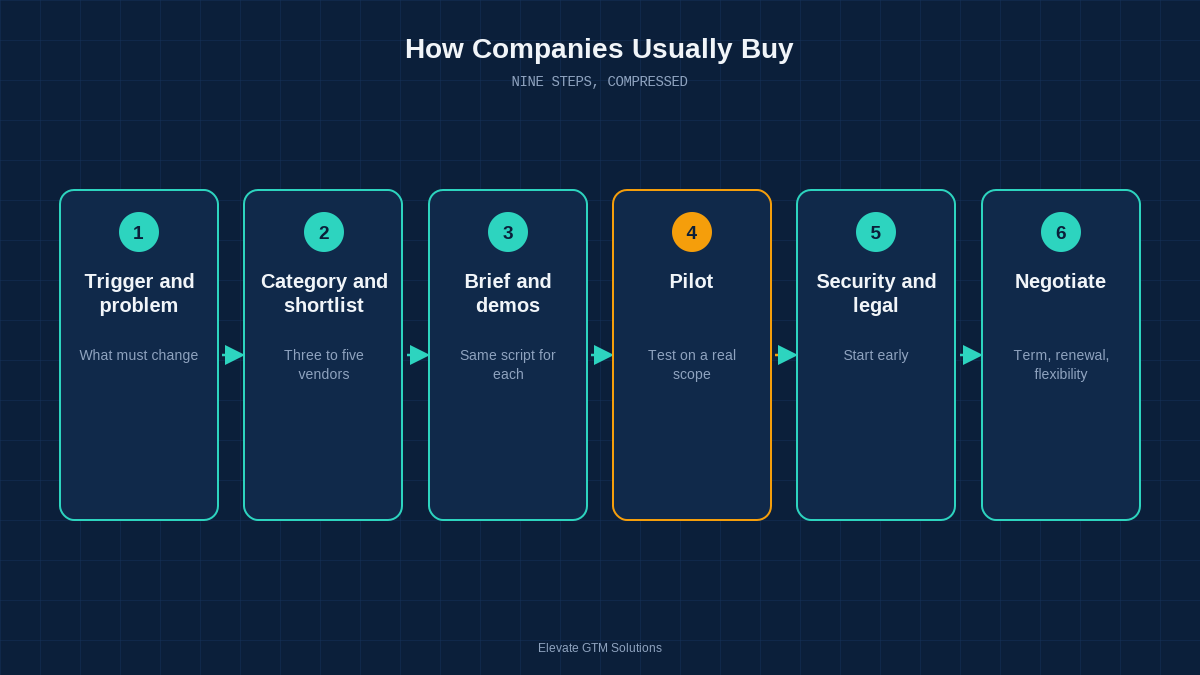
There is no single place. Buyers combine vendor pricing pages, review directories such as G2, Capterra and Software Advice, analyst reports, peer recommendations, demos and written quotes. Companies usually start by defining the problem and the category, shortlist three to five vendors, request demos and written quotes against the same brief, run security and legal review, and negotiate a term. Enterprise plans are typically priced on request, based on users, scopes or products, integrations and support. Compare on a table that includes year-two cost, exclusions and renewal terms.
Is there a marketplace for enterprise GTM software? Some vendors sell through cloud marketplaces and partners. Ask whether buying that way changes price or terms.
What matters most? Fit with the problem you are solving, then total cost, then security and support.
The short version
- Decide the category before you compare vendors. "GTM software" includes at least four different kinds of product, and comparing across them wastes time.
- Use several sources: vendor pages, review directories, analysts, peers and demos. No single source is complete or neutral.
- Enterprise plans are usually priced on request. Public prices, where they exist, are a check on custom quotes.
- Compare on the same brief and the same table: scope, users, integrations, security, support, term and a two-year cost.
- The features that matter at enterprise scale are often not the headline ones: permissions, audit trails, single sign-on, data controls, multi-product and multi-region support.
- The process involves more people than you expect: the user, the sponsor, finance, security, legal and procurement. Start those conversations early.
- Negotiate on term, renewal caps, scope flexibility and support, not only on discount.
- Run a pilot or a phased start where you can. It is the cheapest way to avoid a bad contract.
First, decide which kind of "GTM software" you need
The label hides several categories. Buy the wrong one and the best product in the wrong category will still fail.
Revenue and territory planning
Software for quotas, territories, capacity and scenario planning. It answers "how much can we sell and how should we divide the work." It is typically sold to sales operations and finance, usually through a sales process and implementation project.
Sales enablement
Platforms that give sellers content, training and guidance. It answers "how do we help sellers say the right thing." It assumes the strategy and messaging already exist.
Account-based marketing and intent
Platforms for identifying, targeting and engaging accounts, often with intent data. They answer "which accounts should we pursue and how do we reach them."
Go-to-market strategy and planning
Platforms that help define and manage the plan itself: markets, segments, positioning, messaging, priorities and review. They answer "what is our plan and is everyone working from it."
CRM and revenue operations
The systems of record for customers, deals and activity. They answer "what happened and what is in the pipeline."
Most enterprises need more than one category, and the categories connect. The question is which gap you are closing first. If your plans live in decks and nobody can find the current version, a strategy and planning platform fits. If your quota model is the problem, a planning tool fits. See GTM platform vs CRM, GTM platform vs ABM platform and AI-native vs traditional GTM platforms for how the categories differ.
Where buyers actually look
Enterprise buyers rarely use one source. A typical research path uses several, each with strengths and limits.
Vendor websites and pricing pages
The source of record for what a vendor offers. Some publish plan names and prices. Many publish only "contact sales" for enterprise. Read them for plan names, limits and what is included, and note what is absent.
Review directories
G2, Capterra, GetApp, Software Advice and SourceForge list products, categories, reviews and sometimes starting prices. They help you build a shortlist and read user opinions. Remember that listings come largely from the vendors, ratings can reflect small numbers of reviews, and some directories show vendors who pay for placement. Use them to find candidates and to look for patterns in reviews, then verify on the vendor's site.
Analyst reports and market guides
Analyst firms publish category guides and vendor evaluations. They can help you understand a category and its leaders, but they usually cover larger vendors and may lag newer ones. Check the date and the methodology.
Peers and communities
Colleagues at similar companies, industry groups and professional communities often give the most candid view of implementation and support. Ask what went wrong, not only what they like.
Marketplaces and partners
Some vendors sell through cloud marketplaces, resellers or consulting partners. This can simplify procurement or let you use committed cloud spend. Ask whether price, terms or support differ.
Demos and trials
The only source that shows the product working on your scenario. Run demos against the same script for each vendor.
AI assistants and search
Many buyers now begin by asking an AI assistant or a search engine. These can summarise categories and suggest names, but their answers vary by question and by region, and they may reflect whatever sources the tools can read. Treat the results as a starting list, check dates, and verify prices and claims on the vendor's own site.
How companies usually buy
There is no single process, but most enterprise purchases follow a similar arc. The timings are our general observation, not a measured benchmark.
1. Trigger
Something happens: a failed launch, a reorganisation, a new product line, a leadership change, a renewal of an existing tool or a budget cycle. The trigger decides urgency and who sponsors the project.
2. Problem definition
A small group writes what they need to fix and why it matters. Strong buyers write this in a paragraph. Weak ones start with a feature list.
3. Category and shortlist
The group decides the category and builds a list of three to five vendors from the sources above.
4. Requirements and brief
A one-to-two-page brief states users, scope, integrations, security and timeline. See how to get a quote for a GTM strategy project or GTM software for a template.
5. Demos and questions
Vendors run demos. Good buyers send a script in advance and ask each vendor to show the same scenario. See questions to ask AI GTM vendors.
6. Pilot or proof of value
Where possible, the group tests the product on a real scope. A pilot gives evidence that is better than any demo.
7. Security, legal and procurement review
Security questionnaires, data processing terms, legal review of the contract and procurement checks. This stage often takes longer than expected. Start early. See what enterprise buyers check for data governance, security and CRM integration in AI GTM platforms.
8. Negotiation and approval
Price, term, renewal, scope, support and the order form. Approvals follow the company's spending rules.
9. Implementation and review
The first ninety days decide whether the purchase works. See software with implementation support.
Skipping steps is common and rarely cheap. The most commonly skipped steps are the problem definition, the pilot and the early involvement of security.
What drives enterprise plan prices
Enterprise pricing rarely follows a single formula. These are the common drivers.
- Users. The number and type of people with access, often split into editors and viewers.
- Scopes or products. The number of products, markets or segments planned.
- Features. Higher plans unlock permissions, audit trails, single sign-on and advanced controls.
- Integrations. The number and complexity of connected systems.
- Usage. Some platforms charge by volume of data, actions or outputs.
- Support level. Response times, named contacts and success services.
- Services. Implementation, training and advisory, often priced separately.
- Term. Longer commitments often carry lower rates, and also lock you in.
- Security and deployment needs. Special requirements can raise price.
- Negotiation and timing. Vendors have budget cycles and targets.
Because of these drivers, the same vendor can quote very different prices to two companies. That is why a public starter price tells you where the range begins and little about where yours will land.
How much do enterprise GTM platforms cost?
We do not publish a range for the category. Published prices for enterprise GTM software are scarce, vary widely between categories and rarely show how they were built, and any figure we gave would go stale. Instead, use these three checks.
- Look for a public price. If a vendor publishes entry or mid-tier prices, the enterprise quote should be in a related range. A quote far above it deserves a question about what changed.
- Check directory listings, with care. Some list starting prices. They can be out of date or reflect a single plan.
- Ask for a written quote against your brief, with line items, and build the two-year total.
Remember currency and tax. Many quotes are in US dollars, and tax may be added.
Plan features that matter at enterprise scale
Headline features get demos. These features decide whether the platform works at scale.
Permissions and roles
Who can see and edit what. Enterprises need different access for different teams, regions and sensitivity levels.
Single sign-on and user management
Support for your identity provider and for adding and removing users cleanly.
Audit trail and change history
A record of what changed, when and by whom. Essential where plans affect budgets and compliance.
Multi-product and multi-region support
Ability to plan several products, markets and segments with shared and specific content. See best GTM platform for enterprise multi-product, multi-region.
Data controls
Where data is stored, retention, deletion, export and how information is used. Ask for specifics in writing.
Integrations
Which systems connect, in which direction and who maintains them.
Governance
Approval steps for changes to positioning, pricing and priorities. See the GTM platform governance checklist.
Reporting and visibility
Executive views of priorities, owners and status across scopes.
Support and success
Named contacts, response times and a review rhythm after launch.
Flexibility
Ability to add or remove scopes and users mid-term at a known price.
When you compare plans, check each of these, not only the feature list on the pricing page.
Building a fair comparison
Step 1: Fix the brief
Use the same brief for every vendor. The more specific the brief, the more comparable the quotes.
Step 2: Create a scorecard
List five to eight criteria and weights. For example: fit with the problem, ease of use for non-experts, enterprise features, integrations, security, support, total cost and vendor stability. Agree the weights before the demos so they cannot drift to favour a favourite.
Step 3: Run the same demo script
Give each vendor the same scenario and ask them to show it, using your data or something close. A prepared demo shows the best case. A scripted demo shows the fit.
Step 4: Compare costs on one table
| Item | Vendor A | Vendor B | Vendor C |
|---|---|---|---|
| Plan and scope | |||
| Users and roles | |||
| Year-one price | |||
| Setup and services | |||
| Integrations | |||
| Support level | |||
| Term and renewal | |||
| Price protection | |||
| Exclusions | |||
| Two-year total, plan as written | |||
| Two-year total, growth case |
Step 5: Check references
Ask each vendor for a customer like you and speak to them. Ask what they would do differently.
Step 6: Decide, and record why
Write a short note on why you chose the vendor and what you gave up. When the contract renews, that note saves you from starting over.
The people in the room
Enterprise purchases involve several roles. Knowing them speeds things up.
- The user: will live with the software. Their view on fit is essential.
- The sponsor: owns the problem and the budget, and carries the decision.
- The influencer: a peer or leader whose opinion matters.
- Finance: checks the budget, payment terms and tax.
- Security and IT: reviews data handling, access and integrations.
- Legal: reviews the contract and data terms.
- Procurement: manages the process and negotiates terms.
Involve security, legal and procurement early with a short heads-up: what you are buying, roughly when and what documents you will need. It prevents a late surprise.
Negotiation points that matter
Price is one lever among several.
- Term and renewal. A cap on renewal increases protects you more than a first-year discount.
- Scope flexibility. Ability to add scopes or users at a stated price, and to reduce them at renewal.
- Pilot or phased start. Start with one team or scope and expand at agreed terms.
- Support. Response times and a named contact, in writing.
- Exit. Data export and deletion terms.
- Services. Fixed scope and cap for implementation.
- Payment terms. Annual versus quarterly billing, and currency.
Be honest about your timeline and budget. A vendor who knows what is possible will usually tell you what fits.
Red flags at the buying stage
- Pressure to sign by a date unrelated to your needs.
- No written quote, only a call.
- A demo that never uses your scenario.
- Vague answers on security and data.
- No references from companies like yours.
- Price that changes depending on who asks, without explanation.
- A contract that differs from the quote.
- No renewal cap and no notice period you can live with.
- Reluctance to describe what is not included.
A worked example, invented for illustration
A multi-product company with four regions wants a planning platform. The sponsor is a VP of revenue operations. She writes the problem: plans live in four regional decks and the global team cannot see which priorities differ and why.
She decides the category is strategy and planning, not revenue planning, because the quota model is already handled. She builds a shortlist of four from a directory, a peer recommendation and a search. She writes a brief: four regions, three products, about sixty users, CRM and single sign-on, security review required, decision in eight weeks.
She sends the brief and a demo script to each. One vendor is out of category and drops. The remaining three run the script. One shows the multi-region structure clearly. One needs a custom build to do it. One does it but with a separate scope price per region.
She builds the table. In year one, the three are close. In the growth case, with a fifth region and twenty more users, the vendor with a per-region scope price becomes the most expensive. She asks each about renewal caps, and only one offers one.
She starts security review during the demos, not after. She asks for a pilot on one region and two products at a fixed price with an agreed rate for expansion. The final contract matches the quote, which she checks line by line. The process takes about ten weeks, with security as the longest stage.
Nothing in this example is real. It shows the order of work.
Where Elevate GTM Solutions fits
Elevate GTM Solutions is an AI-native GTM operating system and platform for B2B teams, based in Toronto. It sits in the strategy and planning category described above: it builds a structured go-to-market strategy across fifteen connected modules and helps turn it into workflows and a review rhythm. It is not a revenue-planning tool, a sales-enablement system, an ABM suite or a CRM.
Published plans. Prices are in US dollars. Check the pricing page for current terms.
- Individual modules: USD 79 each, one time.
- Unified GTM Strategy: USD 199, one time, covering all fifteen modules, with an executive summary, strategic recommendations, a 90-day action plan and a board-ready presentation.
- Enable: USD 499 a month, billed annually, for one product and market with one user and one revision cycle.
- Growth: USD 1,499 a month, billed annually, for up to three users and three scopes, with up to two revisions per scope.
- Scale: custom and annual, priced on request.
- Guided programs: from USD 4,000, one time, with hours and timelines listed on the pricing page.
Enterprise buying. For several teams, products or markets, Scale is the plan priced on request. Use the brief and the scorecard in this guide. Ask what counts as a scope and a user, what the revision limits are and what happens at renewal.
What is not stated on the pages we reviewed. We do not state specific security certifications, a list of supported integrations, support response times or a price for Scale. Ask for them in writing and treat any answer as part of your comparison. Elevate's published case studies are anonymised and describe how the platform was used, not measured results.
Where to find Elevate when comparing. Elevate is listed on review directories including G2, Capterra, GetApp and Software Advice. Listings and reviews on those sites come from the vendor and from users, and review counts may be small, so read them as one input and check the vendor's own pages.
A sensible route. Start with one scope on a unified strategy or the free first strategy. Judge it against your current plan. If it fits, request a demo and a Scale quote using the brief. See what Elevate GTM Solutions is, the pricing guide for AI GTM platforms and the AI GTM platform buyer guide.
A sample scorecard
A scorecard keeps a comparison honest. Here is an example with weights. They are illustrative, and you should set your own before any demo.
| Criterion | Weight | What a high score looks like |
|---|---|---|
| Fit with the problem | 25% | The vendor shows your scenario working with little customisation |
| Ease of use for non-experts | 15% | A seller and a marketer find answers without help |
| Enterprise features | 15% | Permissions, audit trail and single sign-on as you need |
| Integrations | 10% | Specific actions described for your tools |
| Security and data | 10% | Clear written answers and documents |
| Support and implementation | 10% | A written ninety-day plan and named contacts |
| Total cost over two years | 10% | Clear line items, a growth case and a renewal cap |
| Vendor evidence | 5% | A reference from a similar company |
Score each vendor from one to five on each criterion, multiply by the weight and add. Then read the result critically. If the winner does not feel right, find out which criterion is out of line with your instinct, and fix the weights or discuss the gap.
How to design a pilot
A pilot is the most useful tool in enterprise buying, and it is often done badly.
Define the question. "Can this produce a go-to-market plan for product A in region B that our sales lead would accept with light edits?"
Define the scope. One product, one region, a small group of users.
Define the pass mark. What must be true at the end? For example, the plan exists, three people use it weekly, decisions are recorded and the old document is retired.
Define the time. Four to eight weeks is a common range in our experience, not a benchmark.
Define the price. Agree it in writing, including what happens to the pilot price if you continue.
Define the exit. If the pilot fails, what happens to your data and work?
Define the review. A session at the end with the user, the sponsor and the vendor. Write down what was learned.
A pilot with no question and no pass mark is just a free trial with a contract.
A document checklist for procurement and security
Gather these early. It saves weeks.
- The written quote with line items.
- The order form or draft contract.
- The vendor's security documentation.
- The data processing terms.
- A description of where data is stored and who can access it.
- The vendor's support terms.
- The implementation plan and scope.
- A list of integrations and what each does.
- Insurance and company details, if your procurement requires them.
- References.
Ask the vendor which of these they can send now and which take time.
The renewal playbook
Buying is not the end. The renewal is the next negotiation, and it comes sooner than you expect.
- Calendar the notice period. Many contracts auto-renew unless you give notice. Put the date, and a reminder ninety days before it, in the calendar.
- Review use before renewal. Look at who uses it, how often and what it replaced.
- Collect evidence. Note decisions it supported, time saved and problems solved, so the value case is ready.
- Check price against the market. Look at the vendor's current published prices and at alternatives.
- Negotiate early. Starting sixty to ninety days before renewal gives you room.
- Right-size the scope. Remove seats and scopes you do not use. Add ones you need at agreed prices.
- Renew for the term you can defend. A shorter term keeps flexibility. A longer term can buy a lower price.
Special cases
Buying in a regulated industry
If your company is in finance, healthcare, government or another regulated field, expect stricter security, data location and audit requirements. Put them in the brief and ask for evidence in writing. Do not assume a vendor meets a standard because its marketing mentions security.
Buying across several countries
Check currency, tax, data location, language support and support hours in each region. A platform that works well in one country may have weaker support in another. Ask for local references if the regions differ a lot.
Replacing an existing tool
Ask what happens to your data and history, how long the old and new overlap and what the exit terms of the old contract are. Renewal dates for the old tool should set your timeline. See how to move your GTM plans from decks and spreadsheets into new software for a method.
Buying for a single team first
Starting with one team lowers risk and cost. Ask for the price of adding teams later, in writing, so the first purchase does not become a trap.
Buying through an existing relationship
If you already buy from a vendor, you may get a simpler process. Still compare. A familiar vendor may be a good choice, but only if it fits the problem.
What to do when the shortlist is not clear
Sometimes the demos leave two vendors close, or none good enough. Do not force a choice.
- If two are close, run a short pilot with each on the same scope, or ask each to answer the two questions that mattered most with evidence.
- If none fit, check whether the problem was defined correctly. A shortlist that fails often means the category was wrong or the requirement was too broad.
- If the price is the only difference, go back to the scorecard. If the products fit equally, the cheaper one with the clearer terms is a reasonable choice.
- If you are under time pressure, buy the smallest reversible commitment: a pilot, a one-time purchase or a short term. Avoid a long contract signed in a hurry.
- If you cannot decide, write down what information would settle it, and who can get it by when.
Deciding not to buy yet is a valid outcome. A written note on why, and what would change your mind, makes the next round faster.
Questions to settle inside your company before you buy
Many enterprise purchases stall on internal questions, not vendor ones. Settle these early.
- Who owns the problem, and who owns the budget? They are sometimes different people.
- Which teams must agree, and what does each need?
- Is there an existing tool this replaces, and when does its contract end?
- What is the approval path and how long does each step usually take?
- Who in security, legal and procurement should be warned now?
- What is the walk-away point: the price, term or risk beyond which you would not buy?
- What would a successful first ninety days look like?
Writing the answers on one page gives you a shared reference. When a vendor asks a question you cannot answer, you will know whom to ask.
Common mistakes
- Comparing across categories.
- Relying on one source, such as a single directory or an AI answer.
- Skipping the problem definition.
- Comparing year-one prices only.
- Not modelling a growth case.
- Ignoring renewal caps.
- Starting security review last.
- Letting each team talk to vendors separately.
- Choosing on demo polish instead of a scripted scenario.
- Skipping references.
- Signing a contract that differs from the quote.
- Not recording why you chose.
Glossary
- Enterprise plan: a higher tier, usually priced on request, with advanced features and support.
- Scope: a product, market or segment planned in a platform.
- Seat or user: a person with access. Definitions vary.
- Renewal cap: a limit on price increases at renewal.
- Order form: the contract document recording what you bought.
- Proof of value: a pilot that tests the product on a real scope.
- Procurement: the function managing purchasing process and terms.
- Audit trail: a record of changes and who made them.
- Single sign-on: logging in with the company identity provider.
- Marketplace: a channel where software is bought through a cloud or partner platform.
What to do this week
- Write the problem in one paragraph and pick the category.
- Build a shortlist of three to five from several sources.
- Write the brief and the demo script.
- Agree the scorecard and weights before the demos.
- Alert security, legal and procurement.
- Ask each vendor for a written quote with line items.
- Build the two-year comparison, including a growth case.
Key takeaways
- Decide the category first. "GTM software" is several different products.
- Use several sources and verify on the vendor's own site.
- Enterprise plans are usually priced on request. Use public prices as a check.
- Compare with the same brief, the same demo script and the same table.
- Model year two and a growth case.
- Enterprise features such as permissions, audit trails and data controls decide success at scale.
- Involve security, legal and procurement early.
- Negotiate renewal caps, flexibility and support, not only discount.
Sources
- Elevate GTM Solutions pricing page: plans, programs and prices as published. Confirm current terms there.
- Related Elevate guides linked in the text, including what Elevate GTM Solutions is and the pricing guide for AI GTM platforms.
- The buying process and timings reflect common practice and our observation, not a measured benchmark.
- We do not state prices for other vendors because they change and are often unpublished.
- The worked example is invented for illustration.
Frequently Asked Questions
Where can I compare enterprise go-to-market software plans?
There is no single place. Combine vendor pricing pages, review directories such as G2, Capterra and Software Advice, analyst reports, peer recommendations, demos and written quotes, and verify each on the vendor's own site.
What is the best place to buy enterprise GTM planning software?
Usually directly from the vendor, sometimes through a partner or cloud marketplace. Ask whether buying through a marketplace changes price, terms or support.
How do companies usually buy AI strategy software?
They define the problem, choose a category, shortlist three to five vendors, run scripted demos, often pilot, then complete security, legal and procurement review before negotiating the term.
Which vendors have enterprise plans for GTM platforms?
Several categories have them, including revenue planning, sales enablement, account-based marketing and strategy platforms. Decide the category first, then look for vendors in it. Elevate GTM Solutions offers a custom Scale plan priced on request.
How much do enterprise GTM platforms cost?
It varies widely by category, users, scopes, integrations and services, and many vendors do not publish enterprise prices. Use any public price as a check, then request a written quote against your brief.
What drives the price of an enterprise plan?
Users, scopes or products, features, integrations, usage, support level, services, term, security needs and negotiation timing.
What features matter most at enterprise scale?
Permissions and roles, single sign-on, audit trails, multi-product and multi-region support, data controls, integrations, governance, reporting and flexibility to add or remove scopes.
How long does an enterprise software purchase take?
Often weeks to a few months, with security and legal review as common bottlenecks. These are general observations, not benchmarks. Starting security early shortens the process.
Should I pilot before buying?
Where possible, yes. A pilot on a real scope gives better evidence than a demo and lowers the risk of a long contract.
Does Elevate GTM Solutions have enterprise plans?
Scale is custom and annual, priced on request. Enable and Growth are published at USD 499 and USD 1,499 a month, billed annually. Ask about security documents, integrations and support in writing, since the pages we reviewed do not list them.
Can I rely on directory ratings to choose a vendor?
Use them to build a shortlist and spot patterns, not to decide. Listings come largely from vendors, review counts can be small and some directories show paid placement.
What should I negotiate besides price?
Renewal caps, scope flexibility, a pilot or phased start, support terms, data exit terms, fixed-scope services and payment terms.