
By the Elevate GTM Solutions Team · Updated November 13, 2026 · 26 min read
What Is GTM Orchestration, and Do You Need It? A Plain Definition, Real Examples and What to Fix First
Search for "GTM orchestration" and you will find a dozen vendors explaining it, each describing the thing their product happens to do. A lead-routing company describes orchestration as routing. An account-based marketing company describes it as coordinating ads, email and sales outreach to the same accounts. An AI company describes it as agents running plays. A data-enrichment company describes it as workflows that pull signals into the CRM. None of them is lying. They are each describing a different part of a real problem.
This guide gives you a definition that does not depend on a product, shows how orchestration differs from automation, integration and RevOps, walks through what actually gets orchestrated, explains the mistakes that make it backfire, and helps you decide whether you need it now. We make a GTM platform and orchestration is adjacent to what it does, so we have an interest. We say where orchestration is a poor investment, we use no benchmark figures and the examples are invented.
What is GTM orchestration?
GTM orchestration is the coordination of go-to-market activity across teams, tools and channels so that the right action happens for the right account or person at the right time, without contradicting other actions. It means deciding what should happen when a signal appears, routing the work to the right owner or channel, sequencing actions so teams do not collide, and feeding the results back into the next decision. It sits above individual automations. A single automation sends an email when a form is filled. Orchestration decides whether an email is the right move given that sales is already talking to the buyer, the account is a current customer and a renewal is open. In short, it is the conductor's job, not any single instrument's. Whether you need it depends on how many teams, tools and signals you have, and whether they are currently getting in each other's way.
Is it the same as marketing automation? No. Automation runs a defined sequence. Orchestration coordinates many sequences, teams and tools around a shared view of the account.
Do small teams need it? Usually not as a separate discipline. A few clear rules and a weekly review cover it. Orchestration pays off when coordination is the bottleneck.
The short version
| Question | Answer |
|---|---|
| What is it? | Coordinating who does what, when and through which channel across GTM teams and tools |
| How is it different from automation? | Automation runs one defined process. Orchestration coordinates many, with priorities and exceptions |
| How is it different from integration? | Integration moves data between systems. Orchestration uses that data to decide and sequence actions |
| How is it different from RevOps? | RevOps is a function that owns process, data and systems. Orchestration is one of the things it may do |
| What does it need first? | Clear definitions, reliable data, named owners and a few well-designed plays |
| What goes wrong? | Conflicting outreach, over-automation, no suppression rules and nobody who owns the whole |
| Who benefits? | Companies with several teams, many signals and a tool stack that does not coordinate itself |
| When is it premature? | When the motion itself does not yet work, or when one team runs everything |
Why the term appeared
Three changes created the need.
More tools. A typical B2B company runs a CRM, a marketing automation tool, a sales engagement tool, an enrichment provider, an advertising platform, a customer success tool, a conversation intelligence tool and a data warehouse. Each does its own job and can act on its own. Nobody planned for them to act on the same person in the same week.
More signals. Website visits, product usage, job changes, funding news, intent data, support tickets, reply patterns and call transcripts can all indicate something about an account. Each signal can trigger an action. Without coordination, a single event can trigger five reactions from five tools, and the buyer receives all of them.
More teams in the loop. Marketing, sales development, account executives, customer success, partners and product all touch the same accounts. Ownership gets blurry, handoffs fail and customers notice.
The result is a familiar scene: an account receives a promotional email from marketing the day after a support escalation, a cold sequence from sales development while an executive sponsor is in conversation with the account executive and a renewal reminder from customer success, all at once. Orchestration is the name for fixing that.
What orchestration is not
Clearing away the neighboring terms makes the definition sharper.
| Term | What it is | How orchestration differs |
|---|---|---|
| Automation | A defined process that runs without manual effort, such as an email sent after a form is filled | Orchestration decides which automation should run, in what order and when to hold back |
| Integration | Data connections between systems | Orchestration needs integration but uses the data to make decisions |
| Workflow | A series of steps, often inside one tool | Orchestration spans tools and teams |
| Campaign management | Planning and running marketing campaigns | Orchestration includes sales and customer success actions, not just marketing |
| RevOps | A function that owns revenue process, data and systems. See what is revenue operations | Orchestration is one thing RevOps may do, but not all of RevOps |
| GTM engineering | Building automation and data workflows. See what is a GTM engineer | Engineers build the pieces. Orchestration is the design that tells them how the pieces should behave together |
| GTM strategy | Decisions about who to target, what to say and how to compete | Strategy decides what you want. Orchestration helps deliver it consistently |
The last row matters. Orchestration does not create strategy. If the company has not decided who its best customers are, orchestration will coordinate activity aimed at the wrong people very efficiently.
What actually gets orchestrated
Orchestration is easier to understand as a list of things that need coordinating.
1. Signals
Which events matter, and what do they mean? A pricing-page visit by a current customer means something different from the same visit by a stranger. A job change at a champion account may be an opportunity or a risk. Orchestration starts by deciding which signals count and how to rank them. See what is signal-based selling.
2. Routing and ownership
When a signal arrives, who owns the response? A named account goes to its account executive. A new lead in a target segment goes to sales development. A customer expansion signal goes to customer success. Without clear routing, signals sit in a queue or reach three people at once.
3. Plays
A play is a defined set of actions for a situation: the trigger, the audience, the steps, the owner and the goal. "When a target account shows research intent and has no open opportunity, sales development sends this sequence and marketing includes the account in this ad audience" is a play.
4. Channels and timing
Email, phone, social, ads, direct mail, events, product messages. Orchestration decides which channel suits the situation and spaces the actions so the buyer experiences one conversation, not a barrage.
5. Handoffs
Marketing to sales, sales development to account executive, sales to customer success, success back to sales for expansion. Each handoff needs a trigger, the information that must pass and a time limit. See the sales and marketing SLA framework and GTM strategy handoff.
6. Suppression and priority
When two plays apply, which wins? When an account should not receive any outreach, such as during an open escalation or an active negotiation, how is that enforced? Suppression rules are the least glamorous part of orchestration and often the most valuable.
7. Humans in the loop
Some decisions should be automatic, some should be suggested and some need approval. Orchestration defines which are which.
8. Feedback
What happened after the action? Did the account respond, advance or complain? Results flow back to adjust the signal ranking, the plays and the routing.
The orchestration loop
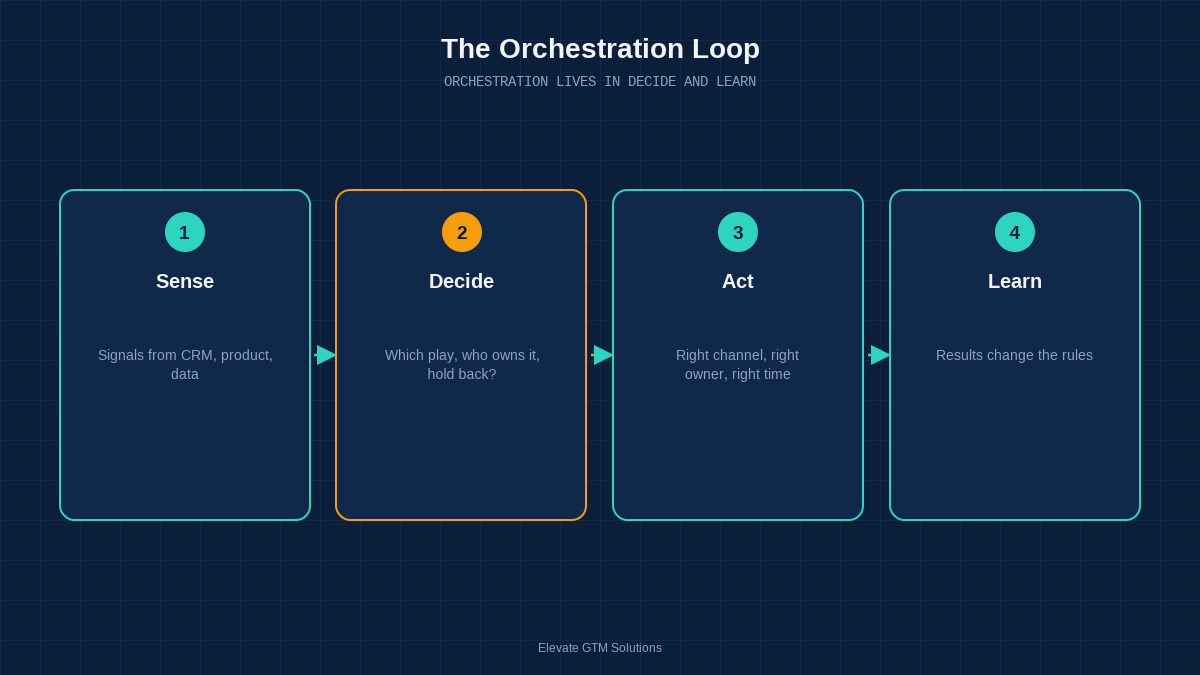
You can think of orchestration as a loop that runs continuously: sense, decide, act, learn.
Sense. Collect signals from the CRM, the product, marketing tools, third-party data and human input.
Decide. Apply rules and judgment: is this signal worth acting on, which play applies, who should respond and is there a reason to hold back?
Act. Trigger the action through the right tool or hand a task to the right person.
Learn. Record the result and use it to change the rules.
A weak implementation does the first and third steps and skips the second and fourth: signal in, action out, no thought about conflicts and no feedback. That is automation. Orchestration lives in the "decide" and "learn" steps.
The kinds of orchestration products you will meet
The market uses the term for several different product types. This is based on general vendor positioning, so confirm any product's actual scope on the vendor's own site.
| Angle | What it emphasizes | Strength | Gap to check |
|---|---|---|---|
| Process and routing | Lead and account routing, assignment, handoff rules | Reliable ownership and speed to response | May not cover the strategy that decides who matters |
| Account-based coordination | Aligning ads, email and sales outreach to target accounts | Consistent experience for named accounts | Often starts from the account list, not the market |
| AI agent and workflow | Agents that research, draft and run plays | Speed and breadth of activity | Needs guardrails and clear rules to avoid noise |
| Data and enrichment workflows | Pulling signals and data into the CRM and triggering actions | Strong data foundation for plays | Technical to set up and maintain |
| Planning and strategy platforms | Plans, segments and plays tied to execution | Connects decisions to actions | Check how deeply actions are executed vs handed off |
These are tendencies, not a classification. Many products span more than one. The useful question is not "which label" but "which of the eight things above does it actually handle, and which are left to us?"
Examples, invented for illustration
Example one: a signal arrives. A target account's operations director visits the pricing page twice in a day and downloads a comparison guide. Without orchestration, the marketing tool sends a nurture email, the sales engagement tool enrolls the contact in a cold sequence and an ad platform starts showing retargeting ads, because each tool saw the same signal and reacted. With orchestration, a rule checks the account: there is no open opportunity, the account is in the priority tier, no one has contacted the person in thirty days. The play assigns the contact to the named sales development rep with a task and a suggested message, pauses automated nurture for that contact and adds the account to the ad audience. One response, one owner.
Example two: an exception. The same pattern, but the account is a current customer with an open escalation. The orchestration rule suppresses outbound outreach, notifies the customer success manager and creates no sales task. The signal is recorded for later. Nothing is sent. Avoiding the wrong message is orchestration working.
Example three: a handoff. A deal closes. The orchestration creates the onboarding task for customer success, passes the notes that matter, such as the buyer's goals and the commitments sales made, starts a welcome sequence and suppresses further sales outreach for a set period. The customer sees one team, not two.
Do you need orchestration?
Ask these questions plainly.
Signs you probably do:
- Customers or prospects have complained about getting conflicting or duplicate outreach.
- Several teams act on the same accounts with no shared view.
- Signals are plentiful, but response is slow or inconsistent.
- Handoffs between teams drop work silently.
- You run many tools and spend significant effort keeping them in step by hand.
- Leaders cannot say which plays are running right now or for whom.
Signs you probably do not need it yet:
- One small team handles marketing, outreach and customer relationships, and everyone talks daily.
- You have few signals and a short account list that people know by name.
- Your motion is not yet repeatable, so there is nothing stable to coordinate.
- Definitions are still being argued about. Orchestration would encode the dispute.
- Data is unreliable. Orchestration on bad data creates errors faster.
If you are in the second group, a weekly meeting, a shared account list and a few written rules do the same job at lower cost. See GTM operations for the role that usually carries this early.
What must exist first
Orchestration depends on things that are often missing.
Agreed definitions. What is a target account, a qualified lead, an open opportunity, a customer? If teams answer differently, rules will conflict.
Reasonably clean data. Duplicate accounts and wrong owners produce wrong routing. Perfect data is not required, but you need to know where it is bad.
Named owners. Every play and every account needs an owner who is accountable for the result.
A short list of plays that work. Start with three to five plays you believe in, not fifty.
A view of the account. Some shared place where a person can see what has happened with an account across teams. See GTM intelligence.
A decision about strategy. Which segments and accounts matter most? See account tiering framework and ICP scoring framework.
If these are missing, fix them first. They are the substance of orchestration, and software cannot supply them.
Design principles that keep it humane
One account, one conversation. Buyers do not experience your org chart. Design so that, from their side, there is a single coherent sequence of contact.
Suppression before activation. For every play, write the conditions under which it must not run. This prevents most embarrassing mistakes.
Priority rules, written down. When two plays apply, which wins? Decide in advance, not by whichever tool fires first.
Humans for high-stakes moments. Large accounts, sensitive situations and anything involving a senior relationship should involve a person who can use judgment.
Fail safe. If data is missing or a rule cannot decide, the default should be to do nothing or ask a person, not to send.
Rate limits. Cap how many touches a contact or account can receive in a period across all teams.
Explain every action. Someone should be able to see why a given message or task was triggered. That helps debugging and builds trust.
Respect consent and law. Contact rules vary by region and channel, and the rules for tracking and outreach are subject to change. This is not legal advice. Involve your legal and privacy advisers when you design outreach rules.
Where orchestration goes wrong
Over-automation. A team discovers it can trigger hundreds of actions and does, then wonders why replies fall and complaints rise. Volume is not coordination.
Conflicting plays. Two well-meaning teams each launch a play on the same accounts. Without priority and suppression rules, buyers get both.
Signals nobody validated. A signal sounds meaningful, such as a visit to a certain page, but has never been tested against outcomes. Orchestrating around a meaningless signal is activity theater.
No owner for the whole. Each team owns its own tool, and nobody owns the interactions between them. Orchestration needs an owner, usually in RevOps or GTM operations.
Black-box decisions. If nobody can explain why a message went out, nobody can fix it, and trust erodes.
Treating it as a one-time project. Signals, tools and plays change. Orchestration needs maintenance and regular review.
Ignoring the human cost. Sellers who get flooded with low-quality tasks learn to ignore the system. Quality of triggers matters more than quantity.
Mistaking coordination for strategy. Smooth delivery of the wrong message to the wrong audience is still wrong.
Humans and AI in orchestration
Many current products use AI agents to carry out plays: researching an account, drafting messages, choosing timing and logging results. This can speed things up considerably. It also raises the stakes of the rules you give the system.
Think of three levels of autonomy:
| Level | What happens | Fits when |
|---|---|---|
| Suggest | The system recommends an action and a person decides | New plays, high-value accounts, sensitive contexts |
| Act with review | The system prepares the action and a person approves it quickly | Plays that have shown good results but need a check |
| Act automatically | The system acts within defined limits | Low-risk, well-tested actions with clear suppression and rate limits |
Start at the first level, move up only as evidence supports it and keep the ability to step back. See AI agents in revenue organizations for broader context on how teams are using agents.
Build, buy or assemble
Companies pursue orchestration in three ways.
Build it from existing tools. Use the workflow features in your CRM and automation tools, plus a data warehouse or integration platform. Strengths: control and lower license cost. Weaknesses: engineering time, fragile connections and dependence on a few people. See what is a GTM engineer.
Buy an orchestration product. Strengths: faster to start and purpose-built features. Weaknesses: cost, another system to administer and the risk that the product's model does not match your process.
Use a platform that includes it. Some GTM platforms include planning, plays and execution handoff together. Strengths: connected strategy and action. Weaknesses: check depth, because breadth sometimes means shallow features.
The right choice depends on your engineering capacity, the complexity of your stack and how much you value having strategy and orchestration connected. For many companies, a hybrid is realistic: workflow tools for specific automations, and a shared plan that says which plays exist and why.
Questions to ask a vendor
- What exactly do you orchestrate: routing, plays, channels, handoffs, suppression, all of these?
- Show me a case where two plays apply to one account. How does the system decide?
- How do I define suppression rules, and can you show one in action?
- Where can I see why a particular action was triggered?
- What data do you need, and what happens when it is missing or wrong?
- Which actions can run automatically, and which can require approval?
- How do results feed back to change the rules?
- Which of our tools do you connect to, in which direction and how often?
- What does the first month look like with our data?
- Who in our company needs to own this, and what skills do they need?
- What does the product not do?
- How is pricing structured, and what changes it later? Confirm in writing.
See also questions to ask AI GTM vendors.
How to measure it
Measure coordination, not just activity.
- Conflict rate. How often does an account receive overlapping outreach from different teams? Aim to drive it down.
- Time to response. How long from a meaningful signal to a human or automated response?
- Handoff completion. How often do handoffs happen within the agreed time, with the right information?
- Suppression effectiveness. Are there messages that should not have been sent? Track them as incidents.
- Play results. Which plays produce meetings, pipeline and retained customers, compared with a baseline?
- Complaints and opt-outs. A rise is an early warning.
- Adoption. Do sellers act on the tasks the system creates?
Attribution is hard in any multi-team system. Be cautious about claiming that orchestration caused a result. Compare against a sensible baseline, and keep expectations modest.
A starter plan: the first 60 days
Days 1 to 10: see the mess. Map every tool that can contact an account and every team that uses it. List the signals each acts on. Note where actions can collide.
Days 11 to 20: write the rules. Define target accounts, ownership, handoffs, suppression conditions, priorities and rate limits. Keep it to a few pages.
Days 21 to 35: pick three plays. Choose plays with a clear trigger and goal. For each, write the owner, the steps, the suppression conditions and the metric.
Days 36 to 50: implement in the simplest way that works. That might be CRM workflows and a shared list, not a new product. Start in suggest mode.
Days 51 to 60: review. Look at conflicts, response times and results. Fix rules before adding plays.
Decide at the end whether the problem was coordination all along, in which case tools may help, or something upstream such as strategy or data.
Common mistakes
Buying a tool before writing the rules. The software will ask you to define priorities and suppression during setup, under pressure.
Starting with fifty plays. Begin with three to five and learn.
Orchestrating around vanity signals. Validate that a signal predicts an outcome before building around it.
Forgetting existing customers. Many conflicts involve customers receiving prospecting messages. Include customers in the rules.
No kill switch. You need a fast way to pause a play or all outreach when something goes wrong.
Ignoring sellers' judgment. Let sellers override and report bad triggers, and learn from it.
Letting it become a spam engine. If outreach volume rises while replies and meetings fall, stop and tighten the rules.
Skipping documentation. Plays and rules need an owner and a written purpose, or nobody will know which to retire.
Orchestration across the customer lifecycle
Most discussions focus on new-business outreach, but the stages after the sale are where uncoordinated activity does the most damage, because customers expect you to know them.
| Stage | Typical orchestration need | What to watch |
|---|---|---|
| Before first contact | Decide which accounts get which treatment, so ads, email and outreach match the tier | Over-contacting low-fit accounts |
| Early conversation | One owner, one thread, relevant content, no parallel cold sequences | Marketing nurture running on top of a live sales conversation |
| Evaluation | Coordinated proof: references, trials, security answers, proposals | Different teams sending different versions of pricing or claims |
| Closing | Clear approvals, no surprise outreach, tidy handoff preparation | Promotions or renewal notices reaching a buyer mid-negotiation |
| Onboarding | Handoff to customer success with commitments and goals attached | Sales continuing to contact the buyer as if the deal were open |
| Adoption and support | Usage and support signals visible to account teams | Sales or marketing messages that ignore an open issue |
| Renewal and expansion | Timing across success, sales and finance; clear ownership of the conversation | Duplicate outreach from customer success and an account executive |
| Advocacy | Selective, respectful requests for references and reviews | Asking unhappy customers to promote you |
A useful exercise is to take one real customer and trace every message they received in the last ninety days. If a stranger could not tell it came from one company with one plan, you have found your orchestration problem.
A sample rulebook, invented for illustration
Rules written in plain language are easier to agree on than rules buried in tool settings. Here are samples to show the style. Adapt them to your own business.
- Ownership. Every named account has exactly one owner. If a signal arrives for an account, the owner is notified first. Nobody else contacts a named account about new business without the owner's agreement.
- Customers. Current customers are excluded from prospecting sequences and cold advertising audiences unless customer success approves.
- Escalations. Any account with an open high-priority support issue is suppressed from promotional email and outbound sequences until the issue is resolved.
- Rate limit. No contact receives more than a set number of touches per week across all teams and tools. The number is chosen by the team and reviewed monthly.
- Priority. When two plays apply, the one tied to an open opportunity wins, then renewals, then expansion, then new-business prospecting, then general nurture.
- Speed. High-priority signals get a response within one business day. If the owner does not act, the task escalates to the manager.
- Fail safe. If account ownership or tier data is missing, no automated outreach goes out and a data task is created.
- Visibility. Every automated action records which play triggered it and why, in a place the owner can see.
- Pause. Any manager can pause a play, and the operations owner can pause all outreach, with a record of why.
- Review. Every play is reviewed each quarter and is retired if it has not met its goal.
Ten short rules like these prevent most of the problems that make teams distrust orchestration. They also expose disagreements early, which is useful.
Who does the work
Orchestration needs a few roles, even if one person holds several.
The owner of the whole. Usually in GTM operations or RevOps. This person holds the rulebook, resolves conflicts and reports on results.
Play owners. Leaders in marketing, sales development, sales and customer success who own the plays in their area and agree to the shared rules.
The builder. A GTM engineer, marketing operations specialist or CRM administrator who implements the rules in tools.
The data steward. Someone responsible for the accuracy of the fields that rules depend on, such as account owner, tier and customer status.
An executive sponsor. When two teams disagree about priority, someone senior has to decide. Without that, rules get negotiated one conflict at a time.
In small companies, one operations person may be the owner, builder and steward, which works until volume grows. See how to structure a GTM team.
Glossary
GTM orchestration. Coordination of go-to-market actions across teams, tools and channels based on signals and rules, with feedback.
Signal. An event or data point that may indicate an account's situation or intent.
Play. A defined set of actions triggered by a situation, with an owner and a goal.
Routing. Assigning a lead, account or task to an owner.
Suppression. A rule that prevents an action under certain conditions.
Handoff. The transfer of an account or task from one team to another, with defined information and timing.
Human in the loop. A design where a person reviews or approves an automated action.
Rate limit. A cap on how many contacts or touches a person or account can receive in a period.
Orchestration layer. The system or set of rules that coordinates actions across tools. See what is a GTM context layer for a related concept.
Where Elevate GTM Solutions fits
Elevate GTM Solutions is an AI GTM platform for creating, executing and adapting go-to-market strategy. Its homepage describes modules including "Unified GTM Strategy," "ICP & Segmentation," "Account-Based Marketing," "Distribution Channel Strategy," "Marketing Alignment," "Launch & Execute," "Measure & Optimize" and "Sales Enablement," plus use cases such as "Align cross-functional teams," and a shared model across Marketing, Sales, Product and RevOps. The homepage says "15 connected GTM modules" and names sixteen, so count what you see.
In orchestration terms, the part such a platform is designed to cover is the upstream layer: deciding which segments and accounts matter, what the plays and messages are and how teams plan together, then carrying that into execution and measurement. That is the "decide" and "learn" side of the loop. Whether it also performs routing, suppression and cross-tool actions at the depth you need is something to test with your own stack, using the vendor questions above, and to confirm on the vendor's own integrations information. A platform does not replace your CRM or your sales engagement tool, and it does not substitute for clear ownership and clean data. For related reading, see what Elevate GTM Solutions is and GTM execution.
What to do this week
- List every tool that can send a message to a customer or prospect, and the team that owns each.
- Pick five accounts and review everything each received in the last thirty days. Count the collisions.
- Write three suppression rules you wish existed today.
- Name an owner for cross-team coordination, even if informally.
- Choose one play and write its trigger, owner, steps, suppression conditions and metric.
- Decide which actions should be suggested to a person and which could be automatic.
- If you evaluate tools, ask the twelve questions, with a real two-play conflict from your own business.
- Set a review date thirty days out, and look at conflicts and complaints first.
Key takeaways
- GTM orchestration coordinates go-to-market actions across teams, tools and channels so the right thing happens at the right time, without contradicting other actions.
- It differs from automation, which runs one process, and from integration, which moves data. Orchestration decides, sequences and learns.
- What gets orchestrated: signals, routing, plays, channels and timing, handoffs, suppression and priority, human review and feedback.
- Vendors use the word for different things: routing, account coordination, AI agents, data workflows and planning. Ask which of the eight elements a product handles.
- You need it when coordination is the bottleneck. You do not need it when one small team runs everything or when the motion does not yet work.
- Definitions, clean enough data, named owners, a few plays and a decision about strategy come first.
- Design for one conversation per account, suppression before activation, written priorities, human review for high stakes and a kill switch.
- Start in suggest mode, measure conflicts and handoffs, and expand only when evidence supports it.
Sources
- Elevate GTM Solutions: descriptions of modules, audience and use cases, as stated on the company's homepage.
- Related Elevate guides linked in the text, including what is signal-based selling, what is a GTM engineer and the sales and marketing SLA framework.
- Several software vendors publish their own definitions of GTM orchestration, and they emphasize different things, which is why this page defines the term by function. We drew no facts or figures from those pages. Their descriptions of themselves should be confirmed on their own sites.
- The loop, the design principles, the autonomy levels and the starter plan reflect our judgment and common practice. Legal points are not legal advice. The examples are invented for illustration.
Frequently Asked Questions
What is GTM orchestration in simple terms?
It is coordinating what your marketing, sales and customer teams do, and through which tools, so a buyer gets the right action at the right time and teams do not collide. It decides what should happen when a signal appears, who handles it, in what order and when to hold back.
How is GTM orchestration different from marketing automation?
Marketing automation runs a defined process, such as sending a sequence after a form fill. Orchestration coordinates many such processes across teams and tools, using priorities and exceptions, so that they do not conflict.
How is it different from RevOps?
RevOps is a function that owns revenue process, data and systems. Orchestration is a capability that RevOps or GTM operations may own. Not all RevOps work is orchestration, and not all orchestration needs a RevOps team.
Do I need a GTM orchestration tool?
Not necessarily. If one small team runs everything, a few written rules and a weekly review may be enough. Tools help when many teams, tools and signals create conflicts that manual coordination cannot handle.
What do I need in place before starting?
Agreed definitions, reasonably clean data, named owners, a short list of plays that work and a decision about which segments and accounts matter. Without these, orchestration just coordinates confusion.
What is a play in GTM orchestration?
A play is a defined set of actions for a situation, with a trigger, an audience, steps, an owner and a goal. For example, a play might define what happens when a target account shows research intent and has no open opportunity.
What is suppression and why does it matter?
Suppression is a rule that stops an action under certain conditions, such as during an open support escalation or active negotiation. It prevents many embarrassing mistakes and is often the most valuable part of orchestration.
Can AI agents handle orchestration?
They can carry out many steps, including research, drafting and timing. They need clear rules, limits and human review for important situations. Begin in suggest mode and increase autonomy only as evidence supports it.
What are common mistakes?
Buying a tool before writing the rules, starting with too many plays, orchestrating around unvalidated signals, forgetting existing customers, having no owner for the whole and having no way to pause everything quickly.
How do I measure whether orchestration is working?
Track conflicting outreach, time to respond to signals, handoff completion, suppression incidents, play results against a baseline, complaints and opt-outs and seller adoption. Be careful about attributing results to orchestration alone.
Is orchestration the same as GTM engineering?
No. GTM engineers build automations and data workflows. Orchestration is the design of how those pieces should behave together. The two roles often work closely, and sometimes the same person does both.
Does legal or privacy compliance affect orchestration?
Yes. Rules about contacting people and tracking vary by region and channel and change over time. This is not legal advice, so involve legal and privacy advisers when designing outreach rules and consent handling.