By the Elevate GTM Solutions Team · Updated November 13, 2026 · 25 min read
What Is the Best GTM Tool for a Small Sales Team With No RevOps Person? How to Choose, What to Skip and a Lean Stack That Works
If your sales team is five people and nobody's job title includes "operations," you already know the problem. The CRM is half filled in. Lead routing is whoever shouts first. The forecast lives in a spreadsheet one person understands. Somebody suggests a new tool, someone else says "who will run it?" and the meeting ends.
The question "what is the best GTM tool?" has a built-in trap for a team like yours. Most tools are designed for companies that have operations people to configure, maintain and govern them. A powerful platform with no owner becomes an expensive shelf. So the best tool for you is less about features and more about how much care it needs to keep working.
This guide helps you choose with that in mind. It explains what to buy first, what to delay, which jobs matter at your size, how to run a lean stack without an operations person, and how to tell when it is time to hire one. It names categories and a few vendors as examples, with descriptions drawn from their general positioning, and asks you to confirm current details. We make a GTM strategy platform and say where it fits and where it does not. We use no benchmark numbers, and examples are invented.
What is the best GTM tool for a small sales team with no RevOps person?
Start with a CRM your team will actually keep up to date, because every other tool depends on it. Add only what removes a specific, painful job: a source of contact data if finding prospects is the bottleneck, a way to send and track outreach if follow-up is inconsistent, and a simple way to record calls or notes if deals get lost in memory. Choose tools that set up in hours, not weeks, that work well with defaults and that someone on the team can own for an hour or two a week. Leave advanced platforms, such as full account-based suites and revenue intelligence systems, until you have the volume and the person to run them. A GTM strategy tool can help earlier than most of those if your gap is deciding whom to target and what to say, but it does not replace a CRM.
What should we buy first? The CRM, then one tool for your biggest bottleneck.
Do we need a RevOps hire? Not at the start. You need one owner for tools and data, even part-time.
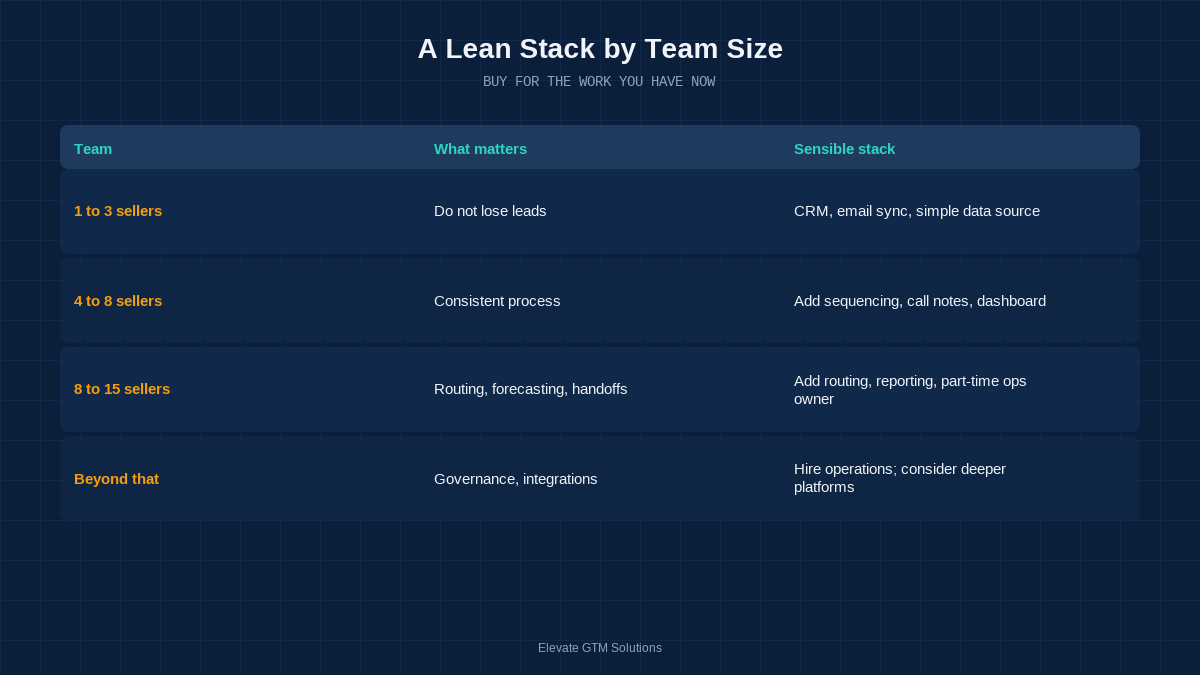
The short version
| Team stage | What matters | A sensible stack |
|---|---|---|
| One to three sellers | Do not lose leads; write down what works | CRM, shared inbox or email tracking, a simple contact data source |
| Four to eight sellers | Consistent process, basic reporting | The above plus sequencing, call notes, a simple dashboard |
| Eight to fifteen sellers | Routing, forecasting, handoffs, data quality | Add routing rules, better reporting and a part-time or full-time operations owner |
| More than that | Governance, integrations, planning | Hire the operations person; consider platforms with more depth |
These stages are rough and vary with deal size and complexity. The pattern holds: buy for the work you have now, plus a little room.
Why "no RevOps" changes the question
A revenue operations person does a bundle of jobs: they keep the CRM clean, set up and maintain tools, build reports, design routing and territories, manage the data flowing between systems and make sure the process is followed. See what is revenue operations.
When nobody does those jobs, three things happen.
Tools decay. Fields go stale, integrations break quietly and automation rules stop matching how the team works.
Data splits. Each seller keeps their own version of the truth in a spreadsheet, a notes app or their head.
Reporting becomes a monthly scramble. Someone pulls numbers by hand, nobody trusts them and arguments follow.
A small team cannot afford tools that make this worse. Pick tools that need little maintenance, produce useful output with defaults and make it easy to see what is going on without building reports.
The seven jobs a small sales team needs done
You do not need a tool for every job. Rank the jobs by pain, and cover the top one or two first.
| Job | The question it answers | The simple answer | The lean tool category |
|---|---|---|---|
| Keep track of leads and deals | Who are we talking to and where do they stand? | A shared system everyone updates | CRM |
| Find the right people | Who should we contact? | A list of target accounts and contacts | Contact and company data, ICP definition |
| Reach out consistently | Are we following up? | Templates and reminders | Email sequencing or a CRM's built-in sequences |
| Remember what was said | What did the buyer tell us? | Short notes after every call | Call recording and notes, or a notes template in the CRM |
| Know who to prioritize | Which accounts first? | A simple scoring rule | CRM fields, a short scoring sheet, or a strategy tool |
| Say the right thing | What do we tell this buyer? | Short, tested messaging by segment | Positioning and messaging work, with a shared doc or a strategy tool |
| See how we are doing | Are we on track? | A weekly pipeline view | CRM dashboard, a single shared sheet |
Notice that three of seven are not software problems. Knowing whom to prioritize and what to say are strategy questions. A tool cannot fix them if nobody has decided.
How to choose: criteria for a team with no operations help
Use these before looking at any feature list.
Time to value. Can someone have it useful within a day or two? If setup needs a consultant, it probably does not fit.
Works with defaults. If it is only good after heavy customization, it needs an owner you do not have.
Low maintenance. Ask what has to be updated regularly and by whom. Tools that sync automatically with your email and calendar need less care.
Easy for sellers. Sellers will skip anything that takes more than a minute per entry. Logging a call should feel quick.
Clear pricing. Small teams get hurt by surprise add-ons and minimum contract lengths. Ask for the full price, including setup, extra users, usage limits and renewal terms. Our AI GTM platform pricing guide lists cost items that hide outside quotes.
Exit. Can you export your data in a usable form, and cancel without penalty? A small team changes its mind often.
Support you can reach. Without an operations person, you will rely on the vendor's help. Test it during the trial. See how to evaluate GTM platform customer support.
Grows with you, within reason. You do not need enterprise features, but you should not need to rebuild everything at fifteen sellers.
Category by category: what to buy and when
The CRM
Everything else attaches to it. The best CRM for a small team without operations help is the one the sellers will update. Choose on ease and fit, not on feature count.
Examples include HubSpot, which offers free and paid tiers and covers CRM plus marketing and sales tools, and Salesforce, which is deeper and typically needs more setup and care. Several smaller CRMs aim at simplicity. Compare current plans on each vendor's site.
What to check: how easily contacts and emails sync, how quickly a seller can log a call, whether the pipeline view is clear, what the reporting looks like out of the box and what extra users cost.
Rule of thumb for this size: pick the simplest CRM that can handle your sales process, and keep the fields few. Ten well-used fields beat fifty ignored ones. For a view on when a CRM is enough, see GTM platform vs CRM.
Contact and company data
If finding prospects is a bottleneck, a data source helps. Tools such as Apollo, which describes itself as an AI sales platform with a free plan after a trial, and ZoomInfo, a larger and typically pricier option, are widely used. See Elevate vs Apollo and Elevate vs ZoomInfo.
What to check: accuracy for your market, tested on a list of people you can verify; how credits and exports are counted; whether usage limits fit; what the contract requires; and how the tool handles opt-outs and consent. Rules on contacting people differ by country and channel, and this guide is not legal advice. Have counsel review your outreach practices.
Rule of thumb: start small. Test with a short list and check how many contacts are correct before paying for volume.
Outreach and follow-up
Consistent follow-up is where small teams lose the most deals. A sequencing feature, either in your CRM or in a separate tool, can send timed follow-ups and remind sellers.
What to check: whether it works from the seller's own inbox, how it logs activity in the CRM, whether it stops when a buyer replies and how easy it is to edit templates.
Rule of thumb: keep sequences short and personal. Automation that makes every email feel the same hurts replies and can harm your sending reputation. If you are tempted to automate heavily, read our guide on what is GTM automation and best GTM automation tools.
Call notes and recording
Memory fades quickly. A tool that records or transcribes calls and drops a summary into the CRM can save hours. Examples include conversation intelligence tools such as Gong, which targets larger teams, and a growing number of lighter note-takers. See Elevate vs Gong.
What to check: whether participants are told about recording, since consent rules vary by place; where the data is stored; how long it is kept; and whether summaries are accurate enough that sellers trust them.
Rule of thumb: a simple, consistent notes template in your CRM does most of the work for free. Add recording when you have enough calls to learn from.
Prioritization and targeting
Small teams cannot chase everyone. Deciding which accounts first is one of the highest-value jobs, and it is mostly thinking. Our guides on ICP, ICP scoring and account tiering show how to do it with a short sheet and a rule.
A GTM strategy tool can help here too, especially if nobody on the team has a marketing or strategy background. See the section below on where Elevate GTM Solutions fits.
Messaging and positioning
If sellers each pitch differently, win rates vary and nobody learns. A short, tested message for each segment, kept in one place, helps more than another tool. Our guide on positioning covers the basics.
Reporting
A small team needs one weekly view: pipeline by stage, new opportunities, deals at risk, deals closed. Most CRMs provide this with a basic dashboard. Do not build a wall of reports.
What to delay
| Tool | Why delay | When it starts to make sense |
|---|---|---|
| Full account-based marketing platforms | Need a target list, data hygiene and an owner | A large named account list and marketing support |
| Revenue intelligence and forecasting suites | Need volume to learn from | Many deals per quarter and a manager who coaches from the data |
| Complex routing and territory tools | Few sellers means simple rules work | Many sellers, regions or segments |
| Data warehouses and custom pipelines | Need engineering skills | A GTM engineer or analyst joins; see what is a GTM engineer |
| Big sales enablement platforms | Content library is small | Many sellers, many assets and a person to manage them |
Buying these early produces the situation you are trying to avoid: tools with no owner.
A lean stack, by team size
The examples are invented, and the shape is what matters.
Three sellers, early stage
- A CRM with a short list of fields and a simple pipeline.
- Email and calendar synced to the CRM.
- A small prospect list built by hand or with a data tool on a trial.
- A one-page ICP and a one-page message document.
- A weekly pipeline review of thirty minutes.
Total cost stays low, and the main discipline is entering data every day.
Seven sellers, repeating process
- The CRM, with a defined sales process and required fields at each stage.
- A sequencing feature for follow-up.
- A contact data subscription, sized to your volume.
- A call notes template, and recording if the team will review it.
- A scoring sheet for accounts, updated monthly.
- A dashboard with five or six numbers.
- One person, part-time, as the tools owner.
Twelve sellers, growing
- Everything above, plus routing rules and territories.
- A clearer handoff process between marketing and sales; see the sales and marketing SLA framework.
- Better reporting and forecasting.
- A decision on hiring an operations person or a contractor.
At this stage the lack of a dedicated person starts to cost real time and money.
Who owns the tools when nobody is "ops"
The most important decision is not which tool. It is who owns them. Without an owner, tools decay.
Name one owner. It can be a sales manager, a senior seller or a founder. Give them one or two hours a week and say so out loud.
Give the owner a short list of duties. Keep fields tidy, add and remove users, check integrations still work, review a weekly data check and handle vendor contact.
Limit who can change things. Everyone can add records. One or two people can change fields, stages and automation.
Keep a one-page tools map. What each tool does, who owns it, what it costs, when it renews and what connects to what.
Do a monthly health check. Look for records with missing owners, duplicates, stale deals and broken syncs. Fix the worst ten.
Write the rules down. What counts as a qualified lead, what each stage means and what has to be true to move a deal forward. Two pages are enough.
If your owner cannot do these things, you may need a contractor for a short engagement, or a part-time hire.
Budgeting
Small teams get surprised by costs outside the license.
| Cost | What to ask |
|---|---|
| Per-user fees | What does each extra user cost? Are there minimum seat counts? |
| Tiers and limits | Which features are in which plan? What happens at the limit? |
| Data credits | How are contacts or exports counted? Do credits expire? |
| Setup and training | Is there a fee? How long does it take? |
| Integrations | Are connectors included or extra? |
| Renewal terms | Does the price change at renewal? Is there automatic renewal? |
| Cancellation | Can you leave mid-term? What happens to your data? |
| People time | Who sets it up and keeps it running, and what is that hour worth? |
Compare the total for a year, not the monthly sticker. A free or cheap tool that eats a day a week of a seller's time is not cheap.
When it is time to hire a RevOps person
Signs include: reports nobody trusts, tools that keep breaking, sellers spending visible time on admin, handoff disputes between marketing and sales, a CRM that has been "about to be cleaned up" for months, or a forecast built by hand each quarter. Another sign is that you are about to buy a larger platform and nobody can run it.
Options before a full-time hire: a part-time contractor, a fractional operations lead, or a senior seller who takes a defined share of time. See how to structure a GTM team. If you are thinking about a more technical automation hire, see what is a GTM engineer, which also covers when that makes sense.
The strategy gap: the tool that is not a sales tool
Small teams often assume that more tools will fix inconsistent results. Sometimes the real gap is earlier. Three questions test it.
- Can every seller name, in one sentence, the kind of company we sell to best?
- Does every seller describe our value in roughly the same way?
- Do we agree on which accounts to pursue first?
If the answer to any is no, no sales tool will fix it. The fix is a short piece of strategy work: define the ICP, choose segments, write the positioning and agree on a priority list. A strategy platform, a consultant or a focused afternoon with a whiteboard can do this. See GTM strategy without a consultant and GTM strategy for startups.
Mistakes small teams make
Buying the enterprise tool "to grow into." Growth is uncertain, and the tool needs care today.
Stacking tools with overlapping features. Three tools doing sequencing, none well configured.
No owner. The tool is bought, nobody maintains it.
Too many fields. Sellers skip them, and the data is useless.
Automating before the process is clear. You scale confusion.
Testing on demo data. Always trial with your own accounts and your own sellers.
Ignoring contact and consent rules. Outreach practices can create legal and reputational risk.
Measuring too much. Five numbers watched weekly beat thirty watched never.
Skipping the strategy basics. More tools do not fix a vague target.
Assuming a free plan is free. Count time, limits and the cost of switching later.
A simple weekly rhythm that replaces a lot of software
Many small teams reach for a tool when what they lack is a habit. A short weekly routine does a surprising amount of the work an operations person would do.
Monday, fifteen minutes: the pipeline review. Open the CRM pipeline view. For each deal, ask three things: what is the next step, when is it, and who owns it? Anything without an answer gets one before the meeting ends. This single habit fixes more forecasting problems than most tools.
Wednesday, ten minutes: the data check. The tools owner looks at four lists: deals with no next step, deals untouched for a set number of days, contacts with no owner and possible duplicates. They fix or assign the worst few. Ten minutes weekly prevents a day-long cleanup each quarter.
Friday, ten minutes: the notes check. Sellers add any call notes they have not yet logged. Over time this builds a record of what buyers actually say, which feeds your messaging.
Monthly, one hour: the loss review. Look at deals lost in the past month. Write down the real reason, taken from the buyer if you can get a reply and not from the seller's guess. Look for repeats. Our win-loss analysis framework gives a simple format.
Quarterly, two hours: the tools review. For each tool, ask whether it removed the job you bought it for, whether people use it and what it costs. Cancel what is not earning its place.
None of this needs a RevOps title. It needs a calendar and a person who cares.
Questions to ask in a trial
A trial is your best protection, because you will learn more from a week of real use than from any demo. Use these questions while you test.
- How long did it take a seller to log a call or update a deal, from the moment they decided to do it?
- Did data from email and calendar flow in without anyone copying it?
- When something went wrong, how long did it take to get a useful answer from support?
- Could someone who was not involved in the setup understand how it works after a half-hour walkthrough?
- What happened when we hit a limit, such as the number of users, contacts or emails?
- Could we export everything in a usable format?
- After a week, were people still using it without being reminded?
The last question is the most revealing. A tool that needs reminding in week one will need nagging forever.
Small-team specifics people forget
Founders and managers often sell too. Their activity should be in the CRM like everyone else's. If it lives only in their inbox, you lose half your picture.
Seasonality and long cycles. If your deals take months, a pipeline dashboard will look empty for stretches. Track stage progression and conversations, not just closed revenue.
Customer data. Even a small team holds personal information. Know where it lives, who can see it and what your tools may do with it. Have counsel review your privacy notices and outreach practices.
Shared inboxes and personal accounts. Deals lost because the one person who knew a customer left, and their inbox went with them. Keep customer communication in systems the company controls.
Handover. When a seller leaves, their accounts, notes and next steps should be reassigned within a day. A CRM with owners and next steps makes that possible. A spreadsheet in a personal drive does not.
Glossary
GTM tool. Software that helps a company plan or carry out go-to-market work, such as finding prospects, tracking deals or planning strategy.
CRM (customer relationship management). A system that records contacts, companies, deals and interactions.
Revenue operations (RevOps). The function that manages process, data, systems and reporting across sales, marketing and customer success.
Sequencing. Sending a planned series of messages over time and tracking responses.
Sales intelligence. Data and tools that help sellers find and understand prospects.
Conversation intelligence. Tools that record and analyze sales conversations.
Lead routing. Rules that decide who gets which lead.
ICP (ideal customer profile). A description of the companies and people most likely to buy and succeed.
Lead scoring. Ranking leads or accounts by fit and likelihood to buy.
Total cost of ownership. The full cost of a tool, including license, setup, people time and switching.
Point solution. A tool that does one job.
Data hygiene. Keeping records accurate, complete and free of duplicates.
Where Elevate GTM Solutions fits
Elevate GTM Solutions is an AI GTM platform for creating, executing and adapting go-to-market strategy. Its homepage lists modules including "ICP & Segmentation," "Product Positioning," "Product Messaging," "Sales Enablement," "Customer Acquisition" and "Unified GTM Strategy," and says "15 connected GTM modules" while naming sixteen, so count what you see when you look. It lists B2B companies and teams in marketing, sales, product and revenue operations as its audience, and says a free personalized strategy takes about five minutes to build. That is the company's own claim.
For a small sales team without operations support, the relevant fit is the strategy gap described above: deciding whom to target, how to position and what to say. Elevate is not a CRM, a data provider, a sequencing tool or a call recorder, and you would still need a CRM. A reasonable use is to build the ICP, positioning and messaging first, then choose lean tools to carry them out.
Third-party listings on Software Advice and Capterra show Elevate with monthly plans, one-time modules and a guided program, with prices that we have read from those listings and not from the company's own pricing page. Confirm current prices and what each plan includes. The listings also list a short set of integrations, so check the company's current integrations page against the tools you use. See best GTM tools for startups for a wider view and what Elevate GTM Solutions is.
What to do this week
- List the seven jobs and mark the two that hurt most.
- Name a tools owner and give them one to two hours a week.
- Audit your CRM: cut fields down to the ones you use.
- Write the stage definitions and what qualifies a lead, on two pages.
- Check the strategy gap: can every seller name the ICP and the value in one sentence?
- Shortlist one tool for your top job, and trial it with your own accounts.
- Ask each vendor for the full first-year cost, renewal terms and export options.
Key takeaways
- For a team with no RevOps person, choose tools by how little care they need, not how many features they have.
- Buy the CRM first, then one tool for the biggest bottleneck. Delay advanced platforms.
- Name a tools owner, give them time and keep the rules on two pages.
- Three of the seven jobs are strategy problems, not software problems.
- Compare the full yearly cost, including people time, limits and renewal terms.
- Hire or contract operations help when reports lose trust, tools keep breaking or you are about to buy something nobody can run.
Sources
- Elevate GTM Solutions: descriptions of modules, audience and the free strategy build, as stated on the company's homepage. The five-minute figure is the company's own claim. Plan prices referenced come from third-party listings on Software Advice and Capterra and should be confirmed with the company.
- HubSpot, Salesforce, Apollo, ZoomInfo and Gong: named as examples of categories, with descriptions based on general positioning. Confirm current plans and features with each vendor.
- Related Elevate guides linked in the text.
- The seven jobs, the stack by team size and the ownership advice reflect common practice and our judgment. They are not drawn from a study. Examples are invented for illustration, and we cite no benchmark figures.
- This guide is not legal advice. Rules on contacting people and recording calls vary by country and channel.
Frequently Asked Questions
What is the best GTM tool for a small sales team with no RevOps person?
Start with a CRM your team will actually update, then add one tool for your biggest bottleneck, such as contact data or follow-up. Choose tools that set up in hours, work on defaults and need little maintenance. Leave advanced platforms until you have the volume and a person to run them.
What should a small sales team buy first?
A simple CRM. Everything else depends on it. After that, pick based on the job that hurts most: finding prospects, following up consistently, remembering what buyers said or knowing whom to prioritize.
Do we need a RevOps person?
Not at the start, but you need someone who owns the tools and data, even for an hour or two a week. Hire or contract operations help when reports lose trust, tools keep breaking, handoffs cause disputes or you are about to buy a platform nobody can run.
How many sales tools does a small team need?
Often three to five: a CRM, a data source, a way to follow up, a notes habit and a simple dashboard. More tools without an owner tends to make things worse. Add one at a time and check that it is used before adding the next.
Is a free CRM good enough?
Sometimes. Free plans can cover contacts, deals and basic reporting for a small team. Check the limits on users, records and features, and what changes when you outgrow it, since switching later takes time.
Can a small team use an account-based marketing platform?
It is rarely the first thing to buy. Account-based platforms work best with a named target list, clean data and someone to run them. A small team usually does better with a CRM, a data source and a clear priority list first.
What GTM tools help with strategy rather than selling?
GTM strategy platforms help with ideal customer definition, segmentation, positioning, messaging and planning. They do not replace a CRM. They fit when the gap is deciding whom to target and what to say, which is common in small teams.
How do we avoid tool sprawl?
Keep a one-page tools map listing what each tool does, who owns it, cost and renewal date. Add a tool only when it removes a named, painful job and you have an owner for it. Review the list every quarter and cut what is unused.
What should we ask vendors before buying?
Ask for the full first-year cost including extra users, limits, setup and renewal terms. Ask how long setup takes, what support looks like, how data can be exported and whether you can cancel mid-term. Trial the tool with your own accounts.
When should a small sales team hire a RevOps person?
When reports are untrusted, tools break often, sellers lose visible time to admin, marketing and sales dispute handoffs or you are about to adopt a platform nobody can run. A part-time or contract hire can bridge the gap before a full-time role.
Should a small team use AI sales tools?
They can help with drafting, research and note-taking, but they need review and rules. Test accuracy on your own work, keep outreach personal and check consent and data rules. Do not automate a process you have not yet defined clearly.
How much should a small sales team spend on tools?
It depends on team size and deal value, and we do not offer a figure. Compare the total yearly cost of each tool, including people time and renewal terms, against the specific job it removes. A tool that does not remove a named job is not worth buying yet.