By the Elevate GTM Solutions Team · Updated November 13, 2026 · 27 min read
Why Do Teams Still Run Go-to-Market on HubSpot or Salesforce When Outbound, Intent and Messaging Stay Disconnected? And How to Connect Them
Walk through the go-to-market stack of almost any B2B company and you will find a pattern. A CRM sits in the middle, usually HubSpot or Salesforce. Around it are a sales engagement tool that runs outbound sequences, a data provider and an intent tool that say which accounts are "in market," a conversation tool that records calls, a marketing automation platform, a folder of messaging documents and a set of slides nobody has updated since the last offsite. Every one of them was bought to do a real job. Together they do not share a picture of who the customer is or what the company is trying to say to them.
People who feel this pain often ask a reasonable question: if the pieces are so disconnected, why does everyone still run on the CRM? And the follow-up: does fixing the disconnect mean replacing it? This guide answers both. It explains why the CRM persists, what is actually disconnected and why, five specific gaps to look for, three ways to fix them and how to sequence the work. We make a GTM platform that sits next to the CRM, so we have an interest in this problem. We say where replacing the CRM is the wrong answer, we use no statistics and the examples are invented.
Why do teams still use HubSpot or Salesforce for GTM when outbound, intent and messaging are disconnected?
Because a CRM does a different job from the one that is disconnected. It is the system of record for contacts, accounts, deals and activity, and replacing it is expensive, risky and rarely the actual problem. The disconnect lives around it: outbound, intent and messaging tools are each bought for one job, owned by different teams, built on different definitions of an account, a persona and a segment, and none of them holds the reasoning that connects them, such as who the best customer is, why they buy and what should be said to them now. You can fix it three ways: connect the tools through integration and orchestration, add a shared strategy and context layer upstream of them, or consolidate onto fewer products. Most companies keep the CRM and do the first two. Replacing the CRM only makes sense when the CRM itself is what blocks the work.
Is the CRM the problem? Usually not. It is a record keeper being asked to do strategy and coordination work it was not built for.
What should be fixed first? Shared definitions of account, segment and persona. Without them, every integration just moves disagreement faster.
The short version
| Question | Answer |
|---|---|
| Why does everyone still use a CRM? | It is the system of record, it is deeply embedded and switching is costly. It is also good at record keeping |
| What is actually disconnected? | Outbound, intent and messaging tools, plus the strategy behind them |
| Why are they disconnected? | Different owners, different purchase dates, different data models, and no shared source of context |
| What are the five gaps? | Identity, definition, context, timing and feedback |
| How can you fix it? | Connect the tools, add a shared strategy and context layer, consolidate, or a mix |
| Should you replace the CRM? | Rarely. Only when it is the blocker, and then as a separate decision |
| What should come first? | Agree on definitions, then fix identity, then signals, then messaging, then feedback |
| How will you know it worked? | Fewer conflicting touches, faster response to signals, consistent messaging, and results you can trace to decisions |
Why the CRM is still at the center
The CRM is not at the center because nobody has noticed its limits. It is there for reasons that are mostly sound.
It is the system of record. Finance, sales leadership, customer success and often the board look at CRM data to understand pipeline and customers. Moving that is a company-level decision, not a tooling choice.
It is deeply embedded. Years of custom fields, workflows, reports, permissions, integrations and habits sit in it. Every team has at least one report they rely on.
The ecosystem is large. Many tools integrate with the major CRMs, and many consultants, administrators and agencies know them. That lowers the cost of hiring and of getting help.
Switching is risky. A CRM migration can lose data, break reports and disrupt a quarter. Few leaders want to take that risk for an uncertain gain.
It does record keeping well. Contacts, accounts, deals, activities, forecasting and reporting are what it was built for. The parts of the CRM that fall short are mostly the parts it was never meant to cover.
Vendors keep adding. The major CRM vendors have added marketing, engagement, service and AI features over time. For many companies, those features are good enough for part of the job, which reduces the pressure to look elsewhere.
Budget and procurement. A CRM is already approved, budgeted and understood. A new platform needs a business case.
None of this means the CRM is the best place to run every part of go-to-market. It means that the CRM is likely to stay, and that a plan which depends on removing it will stall. The more productive question is what has to sit around the CRM to make the whole stack work as one. See GTM platform vs CRM and alternatives to HubSpot for GTM strategy.
What the CRM was designed to do, and not designed to do
It helps to be exact, because most frustration comes from asking a tool for something outside its design.
| The CRM is built to | The CRM is not built to |
|---|---|
| Store contacts, accounts, deals and activities | Decide who your best customer is from market evidence |
| Enforce process through stages, fields and assignments | Hold the reasoning behind a positioning choice |
| Report on pipeline, forecast and activity | Tell you which market segment you have not yet explored |
| Connect to other tools through integrations | Keep your messaging consistent across teams and regions |
| Automate tasks inside its own workflows | Coordinate actions across tools it does not control |
| Hold history of what happened | Hold the plan for what should happen and why |
Some CRM vendors offer features that move into the right-hand column, such as planning, scoring and AI assistance, and those can help. The core design remains record keeping and process. A company that tries to run its entire strategy inside CRM fields usually ends up with a strategy shaped by the fields available.
Where the disconnect shows up
The word "disconnected" is vague, so here is where it appears in practice. The three workflows in the question, outbound, intent and messaging, each live in a different place.
| Workflow | Typical tool | What it knows | What it usually does not know |
|---|---|---|---|
| Outbound | Sales engagement tool, plus the CRM | Who is in a sequence, who replied, what was sent | Why this account is a priority, what the current positioning says, whether marketing is already contacting them |
| Intent and signals | Data provider, intent tool, ABM platform, product analytics | Which accounts show research or buying behavior | Whether the account is a good fit, who already owns it, what message fits the signal |
| Messaging | Documents, slides, enablement tool, content library | What the company says, in various versions | Which version is current, which segment it is for, whether anyone uses it |
| Conversations | Call recording or conversation intelligence | What buyers actually say | How that feeds back into messaging or segmentation |
| Marketing | Marketing automation and ad platforms | Campaign responses, web behavior | Sales activity, deal context |
| Customer success | Success tool, plus the CRM | Usage, health and renewals | What was promised in the sale, expansion potential |
Each tool is a competent specialist. The trouble is that nobody holds the whole picture, and the CRM, which is the obvious candidate, was not designed to hold the strategy and messaging parts of it.
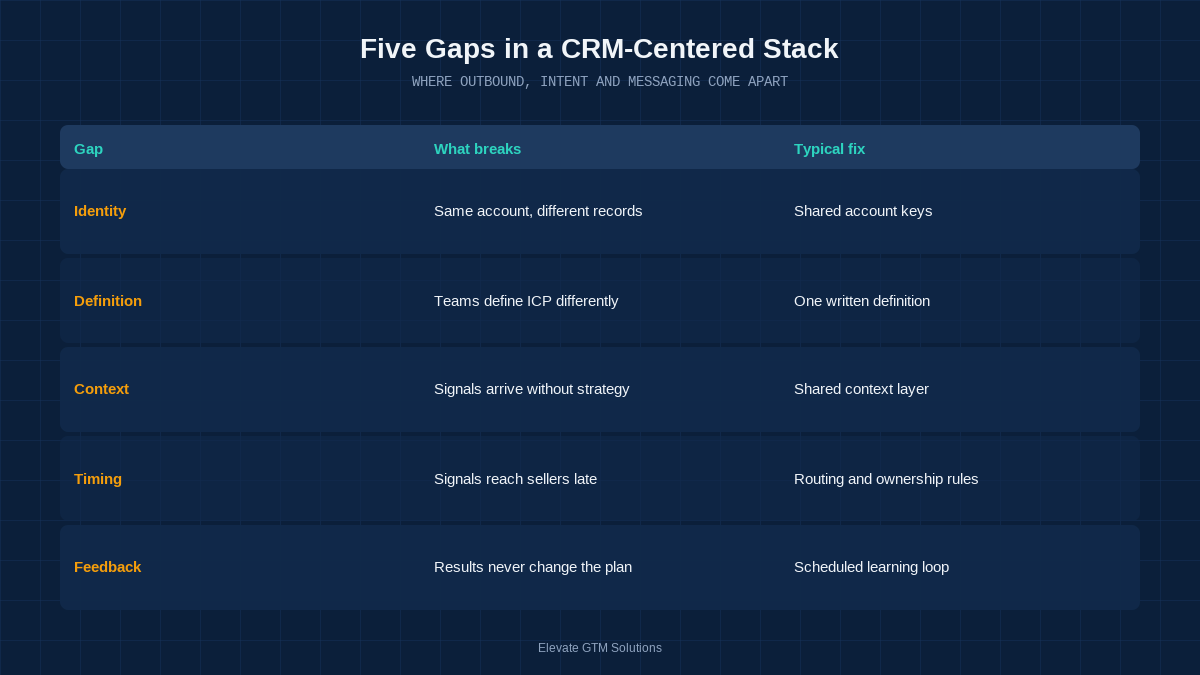
Five gaps to look for
When people say "our stack is disconnected," they usually mean one or more of five specific gaps. Naming them helps you fix the right one.
1. Identity gap
The same account or person appears differently in different tools. The CRM has one version of the company name, the data provider another and the marketing platform a third. Contacts are duplicated, owners differ, and a signal from one tool cannot be matched to a record in another.
Symptom: signals arrive for accounts nobody can find, or two people contact the same buyer. Test: pick ten accounts and trace each across every tool. Count the mismatches.
2. Definition gap
Teams use the same words to mean different things. "Qualified lead," "target account," "ideal customer," "enterprise" and "active customer" vary by team and by tool. A segment defined by employee count in one place is defined by industry in another.
Symptom: reports disagree, and arguments about numbers eat meeting time. Test: ask each team to write its definition of a target account and a qualified lead. Compare. See ICP and the sales and marketing SLA framework.
3. Context gap
Tools know what happened but not why. A sequence goes to an account because a list said so. A seller has no view of the reasoning: that this segment was chosen because it converts well, that this message was chosen because customers describe the problem this way, that this account is a priority because of a trigger.
Symptom: outreach that feels generic, sellers who improvise, and nobody able to say why a campaign exists. Test: pick a live campaign and ask its owner to write down the segment, the reason and the evidence. If they cannot, the context is missing.
4. Timing gap
Signals arrive, and nothing coordinates the response. An intent tool flags an account, a sequence enrolls the contact, marketing sends a promotion and a seller calls, each unaware of the others. Or the signal sits in a dashboard for a week.
Symptom: buyers receiving overlapping contact, and hot signals that go cold. Test: take five recent high-intent signals and trace what happened and how long it took. See what is GTM orchestration and what is signal-based selling.
5. Feedback gap
Results do not flow back to decisions. A message performs well in one segment, a sequence underperforms in another, and a competitor shows up more often in lost deals, but these facts never reach the people who decide the target, the message or the plan.
Symptom: the same assumptions survive for years because nothing challenges them. Test: find the last strategic decision that changed because of data from the field. If you cannot, feedback is broken. See continuous GTM optimization.
Why the pieces end up disconnected
Understanding the cause helps you avoid recreating it.
Tools are bought one job at a time. Each purchase solved a real problem in a particular team, with a particular owner and a particular budget. Nobody was responsible for the whole stack.
Different owners, different definitions. Marketing owns the automation platform, sales development owns the engagement tool, RevOps owns the CRM, and product marketing owns the messaging. Each defines segments and accounts the way that makes its own job work.
Integrations move data, not meaning. Connecting two tools passes records between them. It does not reconcile what the fields mean.
Strategy lives outside the systems. The reasoning behind targeting and messaging usually exists in slides, workshops and people's heads. Systems that run campaigns have no access to it.
Pace of change. New tools appear faster than companies can rationalize old ones. Each addition creates a new place for definitions to drift.
Nobody owns the seams. The gaps between tools belong to nobody. See what is GTM operations for the function that usually should.
A day in a disconnected stack, invented for illustration
Consider a company selling workflow software to mid-size manufacturers. The scene is invented to show how the gaps combine.
Monday morning, the intent tool flags a manufacturer that has been researching the company's category. A sales development rep sees it in a dashboard, finds a contact in the data provider and enrolls them in an outbound sequence. The sequence uses a message written three quarters ago, because that is the one in the sequence library.
Monday afternoon, marketing automation sends the same contact a newsletter promoting a webinar on a different topic. The contact has already seen two emails from the rep.
Tuesday, the account executive who owns the account discovers the contact has been enrolled. They had been talking to a different person at the company for a month, under a different spelling of the company name, so the CRM did not show the overlap. They stop the sequence, annoyed.
Wednesday, product marketing publishes a new positioning for the manufacturing segment. It goes into a shared folder. The sequence library is not updated, the enablement tool shows the old version and the new message reaches sellers over the next few weeks as people hear about it.
Thursday, a call with a manufacturer includes an objection that comes up in many deals. The call recording tool captures it. Nobody who sets messaging sees it.
Every tool did what it was supposed to do. The customer saw an inconsistent company, and the company learned nothing from the week. Nothing here needed a new tool. It needed shared definitions, a view of the account and a path for the learning to reach the plan.
What disconnection costs
Without inventing figures, the costs are easy to describe.
Rework. People rebuild lists, rewrite messages and reconcile reports by hand.
Mixed messages. Buyers hear different stories from different parts of the company, which weakens trust.
Slow response. Signals sit unused or reach the wrong person.
Wasted spend. Programs run without a shared view of which segment or message works.
Wasted tools. Overlapping subscriptions that do similar jobs. See GTM stack audit.
Unlearnable results. When definitions and context differ, nobody can say what worked or why.
Leadership blind spots. Executives get several versions of the truth and cannot see the plan against results in one place.
Three ways to fix it
There are three broad approaches, and most companies end up using a combination.
| Approach | What it means | Strengths | Limits |
|---|---|---|---|
| Connect | Integrate tools and add orchestration so actions are coordinated | Keeps what you have, targeted at specific gaps | Moves data, not meaning. Needs ongoing maintenance and an owner |
| Add a shared strategy and context layer | A place where segments, ICP, positioning, messaging, plays and metrics live and are handed to the tools | Fixes the definition and context gaps at the source | Needs adoption, and a clear handoff to the execution tools |
| Consolidate | Replace several tools with fewer, broader ones | Fewer seams, simpler to manage | Migration cost, possible loss of depth, vendor dependence |
Approach A: Connect
Link the tools through native integrations, an integration platform or custom workflows. Add orchestration rules for routing, priority and suppression. This fixes identity and timing gaps well, especially when tools are good individually.
Works when: the tools are sound, the definitions are already agreed and the main pain is coordination. Watch for: integration sprawl, fragile connections and the false comfort of "it's all connected" when the definitions still differ.
Approach B: Add a shared strategy and context layer
Create a place upstream of the execution tools where the decisions live: market and segment choices, ICP, positioning, messaging by persona, competitive context, plays and success measures. Push those into the CRM, engagement and marketing tools in a defined way, and bring results back. This targets the definition, context and feedback gaps. See what is a GTM context layer, GTM platform to build strategy before CRM campaigns and what is a GTM operating system.
Works when: teams disagree on who the customer is, messaging varies and the reasoning is trapped in slides. Watch for: a layer that nobody uses, or a handoff that is not designed.
Approach C: Consolidate
Retire tools that overlap and move to fewer products. This reduces seams and cost. It is a bigger project, and often done in stages.
Works when: you pay for several tools that do similar jobs and the integration burden is high. Watch for: losing depth that a team relied on, and replacing many seams with one big dependency.
Which to choose
| Your situation | Likely starting point |
|---|---|
| Tools are good, but signals and actions collide | Connect, with orchestration rules |
| Teams disagree about segments and messages | Shared strategy and context layer first |
| Many overlapping subscriptions and a heavy integration load | Consolidate in stages |
| All of the above | Fix definitions first, then connect, then consolidate where it pays |
See unified GTM platform vs point solutions for a longer comparison of the consolidation trade-off.
What stays in the CRM, and what moves upstream
A clean division of labor avoids confusion.
| Stays in the CRM | Lives upstream, in the strategy and context layer |
|---|---|
| Contacts, accounts, deals, activities | Market and segment decisions, with reasons |
| Pipeline stages and forecasting | ICP, with the evidence behind it |
| Ownership and territories | Positioning and messaging by persona |
| Reports on what happened | Plays, with triggers and goals |
| Process enforcement | Assumptions and the metrics that test them |
| Customer history | Competitive context |
The upstream layer passes decisions to the CRM as fields, lists and templates, and the CRM passes results back. The CRM remains the system of record. See GTM strategy handoff.
Should you replace the CRM?
Usually not, and the question deserves honesty. Replacing a CRM is justified when:
- It cannot support a core process you need, even with reasonable customization.
- Its cost or administration burden is out of proportion to its value.
- Data quality is so poor that cleaning is nearly as expensive as migrating.
- The company has outgrown it, or changed so much that its structure no longer fits.
- A merger or acquisition forces consolidation. See how to combine GTM teams after an acquisition.
It is not justified when the real problems are definitions, ownership, messaging and feedback. A new CRM with the same unresolved definitions will reproduce the same disconnect in a new place. Treat any CRM replacement as its own project with its own business case, and do not use it as a way to avoid the strategy work. See why GTM operating systems will replace CRM-centric GTM for one view on where the market may be heading, and weigh it against your own situation.
The order in which to fix things
Sequence matters. Fixing the wrong thing first wastes effort.
1. Definitions. Agree what a target account, a qualified lead, a segment and a persona are. Write them down. This costs nothing but attention and makes everything else easier.
2. Identity. Decide how an account and a contact are identified across tools. Clean up the biggest duplicates and the owner fields.
3. Context. Write down, for your top segment, why it is the target, what the positioning is and what evidence supports it. Put it where sellers and marketers can see it.
4. Signals and timing. Choose the few signals that matter and write routing, priority and suppression rules.
5. Messaging flow. Decide how new messaging reaches sequences, enablement tools and content libraries, and who is responsible for each.
6. Feedback. Create a path for win-loss findings, conversation themes and campaign results to reach the people who set strategy.
7. Consolidation. Only after the above, look at which tools you no longer need.
Doing step seven first, by buying a new tool to "fix the stack," is the most common and most expensive mistake.
A sixty-day plan
Days 1 to 10: map the stack and the gaps. List every tool, its owner, its purpose and what data it holds. Run the five gap tests above on a small sample of accounts and campaigns.
Days 11 to 25: agree definitions and identity rules. Write definitions of account, segment, persona and qualified lead. Choose the identifiers that match records across tools. Name an owner for the seams.
Days 26 to 40: build the context for one segment. Write the ICP, the positioning, the messaging by persona, the plays and the metrics for your priority segment. Review with sales, marketing and customer success.
Days 41 to 55: connect it. Push the segment definition into the CRM, load the messaging into sequences and enablement, and write the routing and suppression rules. Start in a simple way, and add automation once the manual version works.
Days 56 to 60: review. Check conflicting contacts, response time to signals, consistency of messaging and whether results are visible against the plan. Decide what to extend to the next segment and what to retire.
Questions to ask about your own stack
- If a high-intent signal arrives today, who sees it, in how many minutes and what do they do?
- If product marketing changes the messaging, how long until every seller and sequence uses it?
- Can you say which segment each active campaign serves and why?
- Can you say how many tools overlap in purpose?
- If a deal is lost to a competitor, where does the finding go?
- Do your teams use the same definitions of account and qualified lead?
- Who owns the connections between tools?
- What would break if you changed your ICP tomorrow?
- If the CRM disappeared tomorrow, which strategy information would you lose, and which would be safe elsewhere?
- What do your customers experience when several of your tools contact them?
How to measure whether it is better
Choose a few measures and take a baseline before you change anything.
- Conflicting touches. How often does one account receive overlapping outreach from different teams?
- Time from signal to action. From a meaningful signal to a first relevant response.
- Messaging currency. How long until a messaging change appears in sequences and enablement materials.
- Definition agreement. Do teams produce the same definitions when asked?
- Record match rate. The share of accounts that match cleanly across tools.
- Traceability. The share of active campaigns whose segment, reason and measure are written down.
- Learning loops. Number of decisions changed by field evidence in the last quarter.
- Tool overlap. Count of subscriptions that serve overlapping purposes.
Do not claim the fix caused any improvement in revenue without a fair comparison. Look at leading indicators first. See GTM metrics and KPIs.
Common mistakes
Replacing the CRM to solve a definition problem. The disconnect will follow you to the new system.
Buying another tool first. Each new tool adds a seam. Fix definitions and ownership before adding.
Assuming integration equals alignment. Moving data between tools does not make them agree on what it means.
Leaving the seams unowned. Someone must be responsible for connections between tools.
Letting messaging live in slides. If it is not where sellers work, it will not be used.
Ignoring the feedback path. Without it, the strategy never improves.
Over-automating early. Automation of a muddled process speeds up the mess.
Forgetting existing customers. Many collisions involve customers receiving prospecting messages.
Trying to fix everything at once. Pick one segment, prove it and extend.
What each team feels, and what each team can do
The disconnect looks different from each seat, and each seat has something it can fix without waiting for the others.
| Role | What they feel | What they can do now |
|---|---|---|
| Head of marketing | Campaigns run without knowing what sales is doing, and messaging changes do not reach the field | Publish messaging in the place sellers work, with a version date and an owner |
| Sales development leader | Sequences use old messages, signals arrive without context | Ask for the segment reason and current positioning for every sequence, and retire sequences nobody can justify |
| Account executive | Surprise outreach to their accounts, no view of what marketing has sent | Flag collisions with dates, and ask for a named-account suppression rule |
| Product marketing | Positioning work disappears into folders | Hand each message to the tools with a named owner, and ask for feedback from calls |
| RevOps | Blamed for every gap, owns tools but not decisions | Write the definitions, propose the identity rules and show the mismatch counts |
| Customer success | Sales promises that differ from reality, expansion signals nobody sees | Share churn and expansion patterns with segment owners every quarter |
| Executive | Several versions of the truth | Name one owner for the seams, and ask for a plan against results view |
No single role can fix the whole stack, which is why it stays broken. Each can reduce its own pain, and each fix makes the next one cheaper.
Small companies and large ones
The shape of the problem changes with size.
Small company, a few tools. The disconnect is mostly in people's heads, and the fix is mostly written definitions and a weekly meeting. A new platform is rarely the first step. A shared document of segments, messages and rules, kept current by one person, often does most of the work. See best GTM tools for a small sales team without RevOps.
Mid-size company, a dozen tools. The seams multiply. Several owners disagree, duplicate subscriptions appear and integrations break quietly. This is where a shared strategy and context layer, plus an owner for the seams, tends to repay the effort.
Large company, several business units. The problem includes governance: who decides segments and messaging globally, and what regions and units may change. Technology choices matter less than decision rights. See best GTM platform for an enterprise with several products and regions and global vs local GTM strategy.
In all three, the same first step applies: write down what the words mean.
A short test of whether you are ready to add or change tools
Before spending on any new product, answer these honestly.
- Have we written the definitions of target account, qualified lead and segment?
- Do we know which of our current tools overlap?
- Is there a named owner for the connections between tools?
- Can we describe the problem the new tool solves in one sentence, and who will own it?
- Do we know what we would stop doing or stop paying for once it works?
- Do we have a baseline, such as conflicting touches or time to act, so we can tell if it helped?
If you answer no to most of these, the next purchase is more likely to add a seam than close one.
Glossary
CRM. Customer relationship management system, the record of contacts, accounts, deals and activity.
System of record. The authoritative source for a type of data.
Sales engagement tool. Software that runs outbound sequences and tracks sales activity.
Intent data. Signals suggesting an account may be researching or ready to buy.
Context layer. A shared place holding the reasoning, definitions and plans that guide execution. See what is a GTM context layer.
Orchestration. Coordinating actions across teams and tools based on signals and rules.
Seam. The connection point between two tools or teams, where data and meaning can be lost.
Suppression. A rule that prevents an action under certain conditions.
ICP. Ideal customer profile.
Where Elevate GTM Solutions fits
Elevate GTM Solutions is an AI GTM platform for creating, executing and adapting go-to-market strategy. Its homepage describes modules including "Unified GTM Strategy," "ICP & Segmentation," "Competitive Intelligence," "Product Positioning," "Product Messaging," "Account-Based Marketing," "Marketing Alignment," "Launch & Execute," "Measure & Optimize" and "Sales Enablement," and a shared model across Marketing, Sales, Product and RevOps. The homepage says "15 connected GTM modules" and names sixteen, so count what you see.
In the terms of this guide, that is an attempt at the second approach: a shared strategy and context layer that sits alongside the CRM and the execution tools, aimed at the definition, context and feedback gaps. It does not replace the CRM, the sales engagement tool or your data provider. The depth of the handoff into those tools is the part to test, so ask for specifics about which systems it connects to and in which direction, and confirm on the vendor's own information, because directory listings show only a short integrations list. See Elevate vs HubSpot, Elevate vs Salesforce and what Elevate GTM Solutions is.
What to do this week
- List every tool that touches customers or prospects, with its owner and purpose.
- Ask each team to write its definition of a target account and a qualified lead. Compare them.
- Trace ten accounts across your tools and count the mismatches.
- Pick one live campaign and have its owner write the segment, the reason and the evidence.
- Trace five recent high-intent signals and note how long each took to reach action.
- Find the last messaging change and how long it took to reach every seller.
- Name an owner for the connections between tools.
- Decide whether the biggest gap is identity, definition, context, timing or feedback, and start there.
Key takeaways
- Teams keep the CRM at the center because it is the system of record, deeply embedded and costly to change, and it does record keeping well.
- What is disconnected is the work around it: outbound, intent, messaging and the strategy that should connect them.
- Five gaps explain most of the pain: identity, definition, context, timing and feedback.
- The pieces end up disconnected because tools were bought one job at a time, owners differ, integrations move data and not meaning and strategy lives in slides.
- Three fixes exist: connect, add a shared strategy and context layer, or consolidate. Most companies combine them.
- Replacing the CRM is rarely the answer. Treat it as a separate decision with its own case.
- Fix in order: definitions, identity, context, signals, messaging flow, feedback, then consolidation.
- Measure conflicting touches, time to act, messaging currency and learning loops, and avoid claiming credit for revenue without a fair comparison.
Sources
- Elevate GTM Solutions: descriptions of modules, audience and shared-model design, as stated on the company's homepage.
- Related Elevate guides linked in the text, including GTM platform vs CRM, what is a GTM context layer and the GTM stack audit.
- Descriptions of tool categories are general, and individual vendors' products vary. Confirm any vendor's capabilities on its own site.
- The five gaps, the three approaches, the sequencing and the plan reflect our judgment and common practice. We cite no statistics. The day-in-the-stack scene is invented for illustration.
Frequently Asked Questions
Why do companies still use HubSpot or Salesforce for GTM?
Because a CRM is the system of record for contacts, accounts and deals, it is deeply embedded in reports and process, the ecosystem is large and switching is costly and risky. It also does record keeping well. The disconnect is mostly in the tools and strategy around it.
Why are outbound, intent and messaging tools disconnected?
They were bought one job at a time, have different owners, use different definitions of accounts and segments and exchange data without exchanging meaning. The strategy that should connect them usually lives in slides, not in any system.
Does fixing the disconnect mean replacing the CRM?
Usually not. Most companies keep the CRM and either connect the tools around it, add a shared strategy and context layer upstream, consolidate overlapping tools or combine these. Replace the CRM only when it is itself the blocker.
What is the first thing to fix?
Shared definitions of target account, qualified lead, segment and persona. Without them, integrations move disagreement faster and any new tool inherits the confusion.
What is a strategy and context layer?
A shared place where decisions and reasoning live: segments, ICP, positioning, messaging by persona, competitive context, plays and metrics. It hands these to the CRM and execution tools and receives results back.
How is integration different from alignment?
Integration moves data between systems. Alignment means teams and tools agree on what the data means. You can have the first without the second.
Who should own the connections between tools?
Usually GTM operations or RevOps, with clear authority across marketing, sales and customer success. If nobody owns the seams, they decay.
How long does it take to improve this?
A focused effort on one segment can show progress in about two months: agree definitions, build context for the priority segment, connect it and review. Wider change takes longer.
Can AI fix a disconnected stack?
AI can help draft the strategy, summarize conversations and suggest actions. It cannot reconcile definitions or ownership for you. If the inputs conflict, AI will produce polished versions of the conflict.
Is consolidating tools always better?
No. It reduces seams and cost, but it can lose depth a team relies on and create a larger dependency. Consolidate where tools truly overlap and the integration burden is high.
What should stay in the CRM?
Contacts, accounts, deals, activities, pipeline stages, forecasting, ownership and customer history. The CRM remains the system of record even when a strategy layer sits upstream.
How do I know whether my stack problem is serious?
Run the five gap tests: trace accounts across tools, compare definitions, ask campaign owners for their reasons, trace recent signals and look for decisions changed by field evidence. Several failures mean the disconnect is costing you.
Contents